avatarThuwarakesh Murallie

Free AI web copilot to create summaries, insights and extended knowledge, download it at here

7331

Abstract

ljs-string">Commit</span> <span class="hljs-string">changes</span> <span class="hljs-attr">uses:</span> <span class="hljs-string">EndBug/add-and-commit@v4</span> <span class="hljs-attr">with:</span> <span class="hljs-attr">author_name:</span> <span class="hljs-string">{{</span> <span class="hljs-string">github.actor</span> <span class="hljs-string">}}</span> <span class="hljs-attr">author_email:</span> <span class="hljs-string">{{</span> <span class="hljs-string">github.actor</span> <span class="hljs-string">}}@users.noreply.github.com</span> <span class="hljs-attr">message:</span> <span class="hljs-string">"Format code with black"</span> <span class="hljs-attr">add:</span> <span class="hljs-string">"."</span> <span class="hljs-attr">branch:</span> <span class="hljs-string">${{</span> <span class="hljs-string">github.ref</span> <span class="hljs-string">}}</span></pre></div><p id="98f3">This workflow will run whenever you push changes to the <code>master</code> branch of your repository.</p><p id="2134">It installs <code>black</code>, and then runs the <code>black</code> command on the entire project (the <code>.</code> at the end of the <code>black</code> command specifies the current directory). Finally, it commits the new changes to the same branch.</p><p id="0b5c">Once you have defined your workflow, you can commit the changes to your repository and push them to GitHub. When you do this, the workflow will run automatically, formatting your code with <code>black</code>.</p><div id="2638" class="link-block"> <a href="https://towardsdatascience.com/python-project-structure-best-practices-d9d0b174ad5d"> <div> <div> <h2>7 Ways to Make Your Python Project Structure More Elegant</h2> <div><h3>Here are the best practices for a manageable, scalable, and easily understandable python project structure.</h3></div> <div><p>towardsdatascience.com</p></div> </div> <div> <div style="background-image: url(https://miro.readmedium.com/v2/resize:fit:320/0*pN0b6t4LR3OVBDyy.jpg)"></div> </div> </div> </a> </div><h1 id="eb6c">Excluding and including files and folders for formatting</h1><p id="d8e3">There's an issue with the above configuration. It goes through all the files and folders in our repository and tries to format them. Sometimes, we want to avoid that happening for specific files.</p><p id="362f">Black has options to configure its formatting behavior.</p><p id="5ae0">In the following example, we've configured black to ignore any files inside the ref folder.</p><div id="7105"><pre><span class="hljs-bullet">-</span> <span class="hljs-attr">name:</span> <span class="hljs-string">Format</span> <span class="hljs-string">code</span> <span class="hljs-string">with</span> <span class="hljs-string">black</span> <span class="hljs-attr">run:</span> <span class="hljs-string">| pip install black black . --exclude="env/"</span></pre></div><p id="bccc">This will run the <code>black</code> command on all files in the current directory, except for those in the <code>env</code> folder.</p><p id="8683">By default, Black will format all <code>.py</code>, <code>.pyi</code>, and <code>.ipynb</code> files. Alternatively, you can specify the list of files to include directly using the <code>--include</code> flag, like this:</p><div id="b235"><pre><span class="hljs-bullet">-</span> <span class="hljs-attr">name:</span> <span class="hljs-string">Format</span> <span class="hljs-string">code</span> <span class="hljs-string">with</span> <span class="hljs-string">black</span> <span class="hljs-attr">run:</span> <span class="hljs-string">| pip install black black --include=".py" .</span></pre></div><p id="4ca5">This will run the <code>black</code> command only on files with a <code>.py</code> extension in the current directory.</p><p id="abf7">Yes, you can use both the <code>--include</code> and <code>--exclude</code> flags together to specify a more complex pattern of files to include or exclude.</p><div id="1e9b"><pre><span class="hljs-bullet">-</span> <span class="hljs-attr">name:</span> <span class="hljs-string">Format</span> <span class="hljs-string">code</span> <span class="hljs-string">with</span> <span class="hljs-string">black</span> <span class="hljs-attr">run:</span> <span class="hljs-string">| pip install black black --include=".py" --exclude="env/" .</span></pre></div><p id="e2ce">This will run the <code>black</code> command on all files with a <code>.py</code> extension in the current directory, except for those in the <code>env</code> folder.</p><blockquote id="25bf"><p>Note that the <code>--include</code> flag takes precedence over the <code>--exclude</code> flag, so if a file matches both patterns, it will be included. Thus be extra careful when you include patterns. Blindely including patterns, like in the above example, would cause black to format files in your env folder too.</p></blockquote><p id="a7ff">You can specify multiple patterns for both <code>--include</code> and <code>--exclude</code> by separating them with a comma, like this:</p><div id="e504"><pre><span class="hljs-bullet">-</span> <span class="hljs-attr">name:</span> <span class="hljs-string">Format</span> <span class="hljs-string">code</span> <span class="hljs-string">with</span> <span class="hljs-string">black</span> <span class="hljs-attr">run:</span> <span class="hljs-string">| pip install black black --include=".py,.pyi" --exclude="env/,tests/" .</span></pre></div><p id="25f8">This will run the <code>black</code> command on all files with a <code>.py</code> or <code>.pyi</code> extension in the current directory, except for those in the <code>env</code> or <code>tests</code> folders.</p><p id="a899">Another helpful way to manage files to exclude is your .gitignore file. You may have one in your project already. If a file matches any patterns in .gitignore, those files will be ignored for formatting.</p><p id="66d2">If you need to use both .gitignore and exclude behaviors, according to the official docs, you need to use <code>--extend-exclude</code> instead of <code>--exclude</code>.</p><div id="05f1" class="link-block"> <a href="https://towardsdatascience.com/github-automated-testing-python-fdfe5aec9446"> <div> <div> <h2>How to Run Python Tests on Every Commit Using GitHub Actions?</h2> <div><h3>Automate the boring stuff and ensure your code quality with a CI pipeline.</h3></div> <div><p>towardsdatascience.com</p></div> </div> <div> <div style="background-image: url(https://miro.readmedium.com/v2/resize:fit:320/1*YwZKIK_vKWZ7JUw-Ooh5NA.jpeg)"></div> </div> </div> </a> </div><h1 id="da50">Extending the workflow with more clean code tools</h1><p id="4bd5">Black is one of the essential tools for formatting Python code. It takes care of a lot of things. But we do have other important stuff too.</p><p id="1959">One aspect of clean coding is logically sorting imports. But once again, you don't have

Options

to worry about this. You can use the package isort with your GitHub workflow to handle this automatically.</p><p id="6cea">Removing redundant or unused variables is another quality of a good codebase. Many IDEs nowadays automatically highlight such new variables. But autoflake8 could automatically remove them as well.</p><p id="7b58">Here's the finished GitHub Actions configuration:</p><div id="1022"><pre><span class="hljs-attr">name:</span> <span class="hljs-string">Format</span> <span class="hljs-string">code</span>

<span class="hljs-attr">on:</span> <span class="hljs-attr">push:</span> <span class="hljs-attr">branches:</span> [ <span class="hljs-string">master</span> ]

<span class="hljs-attr">jobs:</span> <span class="hljs-attr">format:</span> <span class="hljs-attr">runs-on:</span> <span class="hljs-string">ubuntu-latest</span> <span class="hljs-attr">steps:</span> <span class="hljs-bullet">-</span> <span class="hljs-attr">uses:</span> <span class="hljs-string">actions/checkout@v2</span> <span class="hljs-bullet">-</span> <span class="hljs-attr">name:</span> <span class="hljs-string">Format</span> <span class="hljs-string">code</span> <span class="hljs-string">with</span> <span class="hljs-string">black</span> <span class="hljs-attr">run:</span> <span class="hljs-string">| pip install black black . </span> <span class="hljs-bullet">-</span> <span class="hljs-attr">name:</span> <span class="hljs-string">Sort</span> <span class="hljs-string">imports</span> <span class="hljs-string">with</span> <span class="hljs-string">isort</span> <span class="hljs-attr">run:</span> <span class="hljs-string">| pip install isort isort . </span> <span class="hljs-bullet">-</span> <span class="hljs-attr">name:</span> <span class="hljs-string">Remove</span> <span class="hljs-string">unused</span> <span class="hljs-string">imports</span> <span class="hljs-string">with</span> <span class="hljs-string">autoflake</span> <span class="hljs-attr">run:</span> <span class="hljs-string">| pip install autoflake autoflake --in-place --remove-all-unused-imports --remove-unused-variables --recursive . </span> <span class="hljs-bullet">-</span> <span class="hljs-attr">name:</span> <span class="hljs-string">Commit</span> <span class="hljs-string">changes</span> <span class="hljs-attr">uses:</span> <span class="hljs-string">EndBug/add-and-commit@v4</span> <span class="hljs-attr">with:</span> <span class="hljs-attr">author_name:</span> <span class="hljs-string">{{</span> <span class="hljs-string">github.actor</span> <span class="hljs-string">}}</span> <span class="hljs-attr">author_email:</span> <span class="hljs-string">{{</span> <span class="hljs-string">github.actor</span> <span class="hljs-string">}}@users.noreply.github.com</span> <span class="hljs-attr">message:</span> <span class="hljs-string">"Format code with black"</span> <span class="hljs-attr">add:</span> <span class="hljs-string">"."</span> <span class="hljs-attr">branch:</span> <span class="hljs-string">{{</span> <span class="hljs-string">github.ref</span> <span class="hljs-string">}}</span></pre></div><h1 id="cb54">When things don't go the way we want</h1><p id="7c0e">Regardless of all our effort, there may be instances where these automated code refactoring can fail.</p><p id="9ec3">In a good development environment, this should be avoided. Most developers test their code locally before pushing it to Git because it allows them to identify any bugs or issues with the code before deployment.</p><p id="a3f5">Testing locally also allows developers to make necessary changes and ensure that the code functions correctly before it is pushed live, saving time and resources in the long run.</p><p id="f1ae">Because of this, issues such as typos and other minor things, usually why code refactoring fails, won't be an issue. But when they happen, we need to be prepared.</p><p id="3177">The below config will send an email notification whenever our code refactoring fails.</p><div id="f39b"><pre><span class="hljs-bullet">-</span> <span class="hljs-attr">name:</span> <span class="hljs-string">Notify</span> <span class="hljs-string">errors</span> <span class="hljs-attr">if:</span> <span class="hljs-string">failure()</span> <span class="hljs-attr">uses:</span> <span class="hljs-string">dawidd6/action-send-mail@v2</span> <span class="hljs-attr">with:</span> <span class="hljs-attr">server_address:</span> <span class="hljs-string">smtp.gmail.com</span> <span class="hljs-attr">server_port:</span> <span class="hljs-number">465</span> <span class="hljs-attr">username:</span> <span class="hljs-string">{{</span> <span class="hljs-string">secrets.EMAIL_USERNAME</span> <span class="hljs-string">}}</span> <span class="hljs-attr">password:</span> <span class="hljs-string">{{</span> <span class="hljs-string">secrets.EMAIL_PASSWORD</span> <span class="hljs-string">}}</span> <span class="hljs-attr">subject:</span> <span class="hljs-string">"Format code with black"</span> <span class="hljs-attr">body:</span> <span class="hljs-string">"Format code with black failed"</span> <span class="hljs-attr">to:</span> <span class="hljs-string">{{</span> <span class="hljs-string">secrets.EMAIL_TO</span> <span class="hljs-string">}}</span> <span class="hljs-attr">from:</span> <span class="hljs-string">${{</span> <span class="hljs-string">secrets.EMAIL_FROM</span> <span class="hljs-string">}}</span> <span class="hljs-attr">content_type:</span> <span class="hljs-string">text/plain</span></pre></div><p id="f809">The above extension to the configuration uses the <a href="https://github.com/dawidd6/action-send-mail">custom GitHub action</a> created by <a href="https://github.com/dawidd6">Dawid Dziurla</a>.</p><h1 id="525e">Conclusion</h1><p id="c2ea">Nobody wants messy code, but a few have the patience to clean it up.</p><p id="2788">Every programming community has a style guide to ensure the code is readable. But that's the first hurdle in solving the problem. We need to make code formatting effortless for every developer to use often. Packages like Black does that.</p><p id="0111">But making it effortless doesn't mean everyone uses it. Pre-commit hooks automate the process but still rely on the developer. This post has presented a way to do the formatting centrally automatically.</p><p id="2490">Black with GitHub Actions can ensure the code is always formatted. You can centrally dictate the style guide. It can be PEP 8 or your custom one. And when they fail for any reason, you can also get notified.</p><p id="654c">I hope this helps.</p><blockquote id="3dc9"><p>Thanks for reading, friend! Say Hi to me on <a href="https://www.linkedin.com/in/thuwarakesh/"><b>LinkedIn</b></a>, <a href="https://twitter.com/Thuwarakesh"><b>Twitter</b></a>, and <a href="https://thuwarakesh.medium.com/"><b>Medium</b></a>.</p></blockquote><blockquote id="7471"><p>Not a Medium member yet? Please use this link to <a href="https://thuwarakesh.medium.com/membership"><b>become a member</b></a> because, at no extra cost for you, I earn a small commission for referring you.</p></blockquote></article></body>

Maintain Clean Python Code With Black and GitHub Actions

Nobody wants a messy codebase; few have the patience to clean it

Like this cleaning robot, we can build an automatic system to clean our Python codebase with Black and GitHub Actions. — Photo by Onur Binay on Unsplash

Writing code is hard enough, but ensuring it's well-formatted and easy to read can be even more challenging.

My coding skills have improved a lot in a decade. But the majority of them are not some fancy API usage or anything. It's how I format the code.

In my earliest years, I've coded for the outcome. Of course, that's every programmer's ultimate goal. But as I progressed, I understood that good coding is much more than simply getting things done.

It wasn't easy to share my code with others and not get a truckload of questions to explain them. Other programmers found digesting my code very challenging, even with supporting documents and inline comments.

A programmer's job is not over with a working code.

Beyond documentation, there's something that makes good code great. And the programming community hasn't failed to find what it is.

It's how we format our code.

Python, my favorite programming language, has the easiest syntax. But that doesn't warrant everyone who reads your Python code will understand it.

For this reason, we have a style guide known as PEP 8. This standard brings every programmer to code in the same style. If done correctly, a new programmer can spend less time figuring out which line is what.

Here's a sample code. The first is how I'd have coded it early in my career. It gets the job done. It reads a file and trains a model.
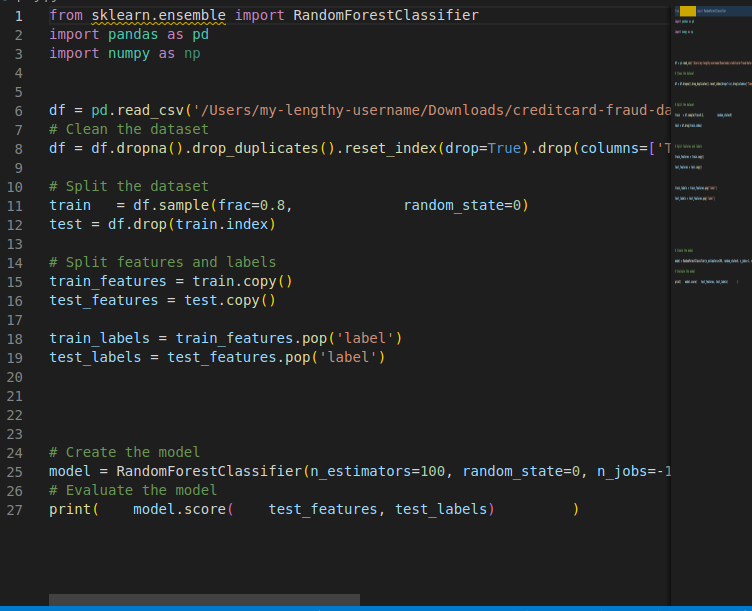
Unformatted Python code — Image by the author.

In the above image, you can see only half of my code fits into the screen. I’d have to scroll to the right and left to read and understand the code. There are unwanted blank lines and whitespace everywhere, while there’s no blank line where there needs to be one.

And this is how it would look like after implementing the style guide. This one is easier to understand, isn’t it?
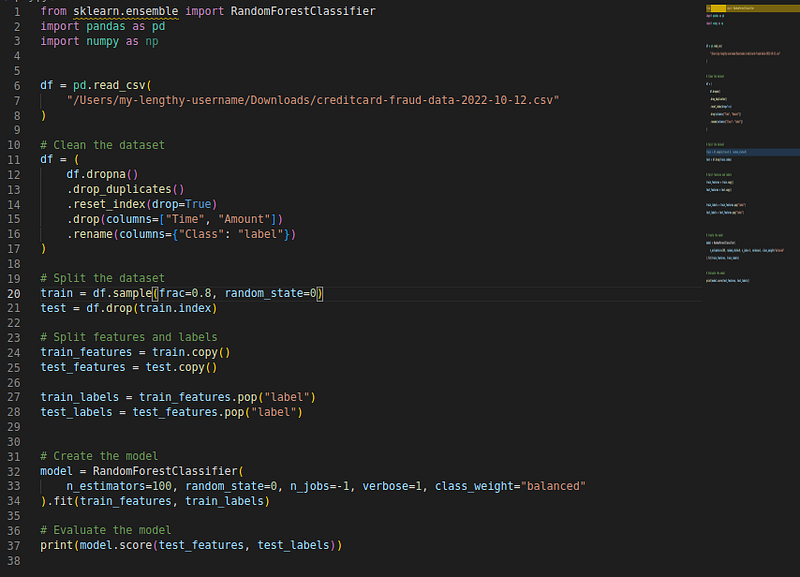
Formatted Python code — Image by the author.

But there's an issue. Remembering the style guide and forcing myself to code it this way takes a lot of work. I still wanted to spend more time getting the job done.

It would be helpful if someone else took care of the code formatting. That's where Black comes in. Black is a Python package to format your code to a predefined style guide in a single command. This guide can be PEP 8, or you can tweak it to your organizational version.

Modern code editors usually come with support for document formatting. For instance, in VSCode, you can right-click on the editor and click on code formatting. If Black is installed, it'll format your code at once.

All these improvements haven't stopped there. You can automate code formatting with pre-commit hooks and not worry about it at the time of coding. When you're committing a change, it will format all your python files. I've discussed that in a previous post.

The last missing piece of the puzzle is this. Even pre-commit hooks run on the developers' computers. When working as a team, you still rely on them for formatting.

What if you can do it centrally regardless of who the developer is and how they did it?

That's the focus of this post. We leverage GitHub Actions to do this.

When developers commit to the central repository, their code will automatically align with the organizational standards. GitHub actions will trigger a workflow whenever we push changes to the repository. We can configure it to run a Black formatting command.

Set up Black on GitHub Actions to Automatically Format Python Code

To use black to format your Python code when committing changes using GitHub Actions, you can follow these steps:

First, ensure that black is installed in your project. You can do this by adding black to the requirements.txt file in your project or by running pip install black in your project's virtual environment.

Next, create a new file in your project's .github/workflows directory called format.yml. This file will contain the configuration for your GitHub Actions workflow.

In the format.yml file, you can define a workflow that runs black on your code whenever you commit changes to your repository. Here's an example workflow that does this:

name: Format code

on:
  push:
    branches: [ master ]

jobs:
  format:
    runs-on: ubuntu-latest
    steps:
      - uses: actions/checkout@v2
      - name: Format code with black
        run: |
          pip install black
          black .
      - name: Commit changes
        uses: EndBug/add-and-commit@v4
        with:
          author_name: ${{ github.actor }}
          author_email: ${{ github.actor }}@users.noreply.github.com
          message: "Format code with black"
          add: "."
          branch: ${{ github.ref }}

This workflow will run whenever you push changes to the master branch of your repository.

It installs black, and then runs the black command on the entire project (the . at the end of the black command specifies the current directory). Finally, it commits the new changes to the same branch.

Once you have defined your workflow, you can commit the changes to your repository and push them to GitHub. When you do this, the workflow will run automatically, formatting your code with black.

Excluding and including files and folders for formatting

There's an issue with the above configuration. It goes through all the files and folders in our repository and tries to format them. Sometimes, we want to avoid that happening for specific files.

Black has options to configure its formatting behavior.

In the following example, we've configured black to ignore any files inside the ref folder.

- name: Format code with black
  run: |
    pip install black
    black . --exclude="env/*"

This will run the black command on all files in the current directory, except for those in the env folder.

By default, Black will format all .py, .pyi, and .ipynb files. Alternatively, you can specify the list of files to include directly using the --include flag, like this:

- name: Format code with black
  run: |
    pip install black
    black --include="\.py" .

This will run the black command only on files with a .py extension in the current directory.

Yes, you can use both the --include and --exclude flags together to specify a more complex pattern of files to include or exclude.

- name: Format code with black
  run: |
    pip install black
    black --include="\.py" --exclude="env/*" .

This will run the black command on all files with a .py extension in the current directory, except for those in the env folder.

Note that the --include flag takes precedence over the --exclude flag, so if a file matches both patterns, it will be included. Thus be extra careful when you include patterns. Blindely including patterns, like in the above example, would cause black to format files in your env folder too.

You can specify multiple patterns for both --include and --exclude by separating them with a comma, like this:

- name: Format code with black
  run: |
    pip install black
    black --include="\.py,\.pyi" --exclude="env/*,tests/*" .

This will run the black command on all files with a .py or .pyi extension in the current directory, except for those in the env or tests folders.

Another helpful way to manage files to exclude is your .gitignore file. You may have one in your project already. If a file matches any patterns in .gitignore, those files will be ignored for formatting.

If you need to use both .gitignore and exclude behaviors, according to the official docs, you need to use --extend-exclude instead of --exclude.

Extending the workflow with more clean code tools

Black is one of the essential tools for formatting Python code. It takes care of a lot of things. But we do have other important stuff too.

One aspect of clean coding is logically sorting imports. But once again, you don't have to worry about this. You can use the package isort with your GitHub workflow to handle this automatically.

Removing redundant or unused variables is another quality of a good codebase. Many IDEs nowadays automatically highlight such new variables. But autoflake8 could automatically remove them as well.

Here's the finished GitHub Actions configuration:

name: Format code

on:
  push:
    branches: [ master ]

jobs:
  format:
    runs-on: ubuntu-latest
    steps:
      - uses: actions/checkout@v2
      - name: Format code with black
        run: |
          pip install black
          black .
      - name: Sort imports with isort
        run: |
          pip install isort
          isort .
      - name: Remove unused imports with autoflake
        run: |
          pip install autoflake
          autoflake --in-place --remove-all-unused-imports --remove-unused-variables --recursive .
      - name: Commit changes
        uses: EndBug/add-and-commit@v4
        with:
          author_name: ${{ github.actor }}
          author_email: ${{ github.actor }}@users.noreply.github.com
          message: "Format code with black"
          add: "."
          branch: ${{ github.ref }}

When things don't go the way we want

Regardless of all our effort, there may be instances where these automated code refactoring can fail.

In a good development environment, this should be avoided. Most developers test their code locally before pushing it to Git because it allows them to identify any bugs or issues with the code before deployment.

Testing locally also allows developers to make necessary changes and ensure that the code functions correctly before it is pushed live, saving time and resources in the long run.

Because of this, issues such as typos and other minor things, usually why code refactoring fails, won't be an issue. But when they happen, we need to be prepared.

The below config will send an email notification whenever our code refactoring fails.

- name: Notify errors
  if: failure()
  uses: dawidd6/action-send-mail@v2
  with:
    server_address: smtp.gmail.com
    server_port: 465
    username: ${{ secrets.EMAIL_USERNAME }}
    password: ${{ secrets.EMAIL_PASSWORD }}
    subject: "Format code with black"
    body: "Format code with black failed"
    to: ${{ secrets.EMAIL_TO }}
    from: ${{ secrets.EMAIL_FROM }}
    content_type: text/plain

The above extension to the configuration uses the custom GitHub action created by Dawid Dziurla.

Conclusion

Nobody wants messy code, but a few have the patience to clean it up.

Every programming community has a style guide to ensure the code is readable. But that's the first hurdle in solving the problem. We need to make code formatting effortless for every developer to use often. Packages like Black does that.

But making it effortless doesn't mean everyone uses it. Pre-commit hooks automate the process but still rely on the developer. This post has presented a way to do the formatting centrally automatically.

Black with GitHub Actions can ensure the code is always formatted. You can centrally dictate the style guide. It can be PEP 8 or your custom one. And when they fail for any reason, you can also get notified.

I hope this helps.

Thanks for reading, friend! Say Hi to me on LinkedIn, Twitter, and Medium.

Not a Medium member yet? Please use this link to become a member because, at no extra cost for you, I earn a small commission for referring you.

Programming
Python
Data Science
Technology
Coding
Recommended from ReadMedium