avatarNikhil Adithyan

Free AI web copilot to create summaries, insights and extended knowledge, download it at here

17608

Abstract

0</span> and ao[i-<span class="hljs-number">1</span>] > <span class="hljs-number">0</span>: if signal != -<span class="hljs-number">1</span>: buy_price.<span class="hljs-built_in">append</span>(np.nan) sell_price.<span class="hljs-built_in">append</span>(price[i]) signal = -<span class="hljs-number">1</span> ao_signal.<span class="hljs-built_in">append</span>(signal) else: buy_price.<span class="hljs-built_in">append</span>(np.nan) sell_price.<span class="hljs-built_in">append</span>(np.nan) ao_signal.<span class="hljs-built_in">append</span>(<span class="hljs-number">0</span>) else: buy_price.<span class="hljs-built_in">append</span>(np.nan) sell_price.<span class="hljs-built_in">append</span>(np.nan) ao_signal.<span class="hljs-built_in">append</span>(<span class="hljs-number">0</span>) return buy_price, sell_price, ao_signal

buy_price, sell_price, ao_signal = <span class="hljs-built_in">implement_ao_crossover</span>(btc[<span class="hljs-string">'Close'</span>], btc[<span class="hljs-string">'ao'</span>])</pre></div><p id="121d"><b>Code Explanation:</b> First, we are defining a function named ‘implement_ao_strategy’ which takes the stock prices (‘price), and the AO values (‘ao’) as parameters.</p><p id="884e">Inside the function, we are creating three empty lists (buy_price, sell_price, and ao_signal) in which the values will be appended while creating the trading strategy.</p><p id="aa46">After that, we are implementing the trading strategy through a for-loop. Inside the for-loop, we are passing certain conditions, and if the conditions are satisfied, the respective values will be appended to the empty lists. If the condition to buy the stock gets satisfied, the buying price will be appended to the ‘buy_price’ list, and the signal value will be appended as 1 representing to buy the stock. Similarly, if the condition to sell the stock gets satisfied, the selling price will be appended to the ‘sell_price’ list, and the signal value will be appended as -1 representing to sell the stock.</p><p id="5132">Finally, we are returning the lists appended with values. Then, we are calling the created function and stored the values into their respective variables. The list doesn’t make any sense unless we plot the values. So, let’s plot the values of the created trading lists.</p><h2 id="4919">Step-6: Plotting the Trading Signals</h2><p id="0de2">In this step, we are going to plot the created trading lists to make sense out of them.</p><p id="7817"><b>Python Implementation:</b></p><div id="4c21"><pre>ax1 = plt<span class="hljs-selector-class">.subplot2grid</span>((<span class="hljs-number">10</span>,<span class="hljs-number">1</span>), (<span class="hljs-number">0</span>,<span class="hljs-number">0</span>), rowspan = <span class="hljs-number">5</span>, colspan = <span class="hljs-number">1</span>) ax2 = plt<span class="hljs-selector-class">.subplot2grid</span>((<span class="hljs-number">10</span>,<span class="hljs-number">1</span>), (<span class="hljs-number">6</span>,<span class="hljs-number">0</span>), rowspan = <span class="hljs-number">4</span>, colspan = <span class="hljs-number">1</span>) ax1<span class="hljs-selector-class">.plot</span>(btc<span class="hljs-selector-attr">[<span class="hljs-string">'Close'</span>]</span>, <span class="hljs-selector-tag">label</span> = <span class="hljs-string">'BTC'</span>, <span class="hljs-attribute">color</span> = <span class="hljs-string">'skyblue'</span>) ax1<span class="hljs-selector-class">.plot</span>(btc<span class="hljs-selector-class">.index</span>, buy_price, marker = <span class="hljs-string">'^'</span>, markersize = <span class="hljs-number">12</span>, <span class="hljs-attribute">color</span> = <span class="hljs-string">'#26a69a'</span>, linewidth = <span class="hljs-number">0</span>, label = <span class="hljs-string">'BUY SIGNAL'</span>) ax1<span class="hljs-selector-class">.plot</span>(btc<span class="hljs-selector-class">.index</span>, sell_price, marker = <span class="hljs-string">'v'</span>, markersize = <span class="hljs-number">12</span>, <span class="hljs-attribute">color</span> = <span class="hljs-string">'#f44336'</span>, linewidth = <span class="hljs-number">0</span>, label = <span class="hljs-string">'SELL SIGNAL'</span>) ax1<span class="hljs-selector-class">.legend</span>() ax1<span class="hljs-selector-class">.set_title</span>(<span class="hljs-string">'BITCOIN CLOSING PRICE'</span>) <span class="hljs-keyword">for</span> <span class="hljs-selector-tag">i</span> <span class="hljs-keyword">in</span> <span class="hljs-built_in">range</span>(<span class="hljs-built_in">len</span>(btc)): <span class="hljs-keyword">if</span> btc<span class="hljs-selector-attr">[<span class="hljs-string">'ao'</span>]</span><span class="hljs-selector-attr">[i-1]</span> > btc<span class="hljs-selector-attr">[<span class="hljs-string">'ao'</span>]</span><span class="hljs-selector-attr">[i]</span>: ax2<span class="hljs-selector-class">.bar</span>(btc<span class="hljs-selector-class">.index</span><span class="hljs-selector-attr">[i]</span>, btc<span class="hljs-selector-attr">[<span class="hljs-string">'ao'</span>]</span><span class="hljs-selector-attr">[i]</span>, <span class="hljs-attribute">color</span> = <span class="hljs-string">'#f44336'</span>) <span class="hljs-keyword">else</span>: ax2<span class="hljs-selector-class">.bar</span>(btc<span class="hljs-selector-class">.index</span><span class="hljs-selector-attr">[i]</span>, btc<span class="hljs-selector-attr">[<span class="hljs-string">'ao'</span>]</span><span class="hljs-selector-attr">[i]</span>, <span class="hljs-attribute">color</span> = <span class="hljs-string">'#26a69a'</span>) ax2<span class="hljs-selector-class">.set_title</span>(<span class="hljs-string">'BITCOIN AWESOME OSCILLATOR 5,34'</span>) plt<span class="hljs-selector-class">.show</span>()</pre></div><p id="fa74"><b>Output:</b></p><figure id="0c7e"><img src="https://cdn-images-1.readmedium.com/v2/resize:fit:800/1*BCYjOI9GVX65KWuRGgbfGg.png"><figcaption>Image by Author</figcaption></figure><p id="be91"><b>Code Explanation:</b> We are plotting the Awesome Oscillator values along with the buy and sell signals generated by the trading strategy. We can observe that whenever the Awesome Oscillator goes from below to above the zero line, a green-colored buy signal is plotted in the chart. Similarly, whenever the Awesome Oscillator goes from above to below the zero line, a red-colored sell signal is plotted in the chart.</p><h2 id="c8ec">Step-7: Creating our Position</h2><p id="5db2">In this step, we are going to create a list that indicates 1 if we hold the stock or 0 if we don’t own or hold the stock.</p><p id="aeee"><b>Python Implementation:</b></p><div id="f7b9"><pre><span class="hljs-built_in">position</span> = [] <span class="hljs-keyword">for</span> i <span class="hljs-keyword">in</span> <span class="hljs-built_in">range</span>(len(ao_signal)): <span class="hljs-keyword">if</span> ao_signal[i] > <span class="hljs-number">1</span>: <span class="hljs-built_in">position</span>.<span class="hljs-built_in">append</span>(<span class="hljs-number">0</span>) <span class="hljs-keyword">else</span>: <span class="hljs-built_in">position</span>.<span class="hljs-built_in">append</span>(<span class="hljs-number">1</span>)

<span class="hljs-keyword">for</span> i <span class="hljs-keyword">in</span> <span class="hljs-built_in">range</span>(len(btc['Close'])): <span class="hljs-keyword">if</span> ao_signal[i] == <span class="hljs-number">1</span>: <span class="hljs-built_in">position</span>[i] = <span class="hljs-number">1</span> elif ao_signal[i] == -<span class="hljs-number">1</span>: <span class="hljs-built_in">position</span>[i] = <span class="hljs-number">0</span> <span class="hljs-keyword">else</span>: <span class="hljs-built_in">position</span>[i] = <span class="hljs-built_in">position</span>[i-<span class="hljs-number">1</span>]

ao = btc['ao'] close_price = btc['Close'] ao_signal = pd.DataFrame(ao_signal).<span class="hljs-built_in">rename</span>(<span class="hljs-built_in">columns</span> = {<span class="hljs-number">0</span>:'ao_signal'}).set_index(btc.index) <span class="hljs-built_in">position</span> = pd.DataFrame(<span class="hljs-built_in">position</span>).<span class="hljs-built_in">rename</span>(<span class="hljs-built_in">columns</span> = {<span class="hljs-number">0</span>:'ao_position'}).set_index(btc.index)

frames = [close_price, ao, ao_signal, <span class="hljs-built_in">position</span>] strategy = pd.<span class="hljs-built_in">concat</span>(frames, <span class="hljs-built_in">join</span> = 'inner', axis = <span class="hljs-number">1</span>)

strategy</pre></div><p id="eeef"><b>Output:</b></p><figure id="5168"><img src="https://cdn-images-1.readmedium.com/v2/resize:fit:800/1*KzBN_JwBt3h1eFUzj3yzaQ.png"><figcaption>Image by Author</figcaption></figure><p id="0c1c"><b>Code Explanation:</b> First, we are creating an empty list named ‘position’. We are passing two for-loops, one is to generate values for the ‘position’ list to just match the length of the ‘signal’ list. The other for-loop is the one we are using to generate actual position values. Inside the second for-loop, we are iterating over the values of the ‘signal’ list, and the values of the ‘position’ list get appended concerning which condition gets satisfied. The value of the position remains 1 if we hold the stock or remains 0 if we sold or don’t own the stock. Finally, we are doing some data manipulations to combine all the created lists into one dataframe.</p><p id="98a1">From the output being shown, we can see that in the first two rows our position in the stock has remained 1 (since there isn’t any change in the AO signal) but our position suddenly turned to 0 as we sold the stock when the AO signal represents a sell signal (-1). Our position will remain 0 until some changes in the trading signal occur. Now it’s time to do implement some backtesting process!</p><h2 id="00fe">Step-8: Backtesting</h2><p id="2c19">Before moving on, it is essential to know what backtesting is. Backtesting is the process of seeing how well our trading strategy has performed on the given stock data. In our case, we are going to implement a backtesting process for our AO trading strategy over the Bitcoin stock data.</p><p id="0b64"><b>Python Implementation:</b></p><div id="52e0"><pre>btc_ret = pd<span class="hljs-selector-class">.DataFrame</span>(np<span class="hljs-selector-class">.diff</span>(btc<span class="hljs-selector-attr">[<span class="hljs-string">'Close'</span>]</span>))<span class="hljs-selector-class">.rename</span>(<span class="hljs-attribute">columns</span> = {<span class="hljs-number">0</span>:<span class="hljs-string">'returns'</span>}) ao_strategy_ret = <span class="hljs-selector-attr">[]</span>

<span class="hljs-keyword">for</span> <span class="hljs-selector-tag">i</span> <span class="hljs-keyword">in</span> <span class="hljs-built_in">range</span>(<span class="hljs-built_in">len</span>(btc_ret)): returns = btc_ret<span class="hljs-selector-attr">[<span class="hljs-string">'returns'</span>]</span><span class="hljs-selector-attr">[i]</span>*strategy<span class="hljs-selector-attr">[<span class="hljs-string">'ao_position'</span>]</span><span class="hljs-selector-attr">[i]</span> ao_strategy_ret<span class="hljs-selector-class">.append</span>(returns)

ao_strategy_ret_df = pd<span class="hljs-selector-class">.DataFrame</span>(ao_strategy_ret)<span class="hljs-selector-class">.rename</span>(<span class="hljs-attribute">columns</span> = {<span class="hljs-number">0</span>:<span class="hljs-string">'ao_returns'</span>}) investment_value = <span class="hljs-number">200000</span> number_of_stocks = <span class="hljs-built_in">floor</span>(investment_value/btc<span class="hljs-selector-attr">[<span class="hljs-string">'Close'</span>]</span><span class="hljs-selector-attr">[-1]</span>) ao_investment_ret = <span class="hljs-selector-attr">[]</span>

<span class="hljs-keyword">for</span> <span class="hljs-selector-tag">i</span> <span class="hljs-keyword">in</span> <span class="hljs-built_in">range</span>(<span class="hljs-built_in">len</span>(ao_strategy_ret_df<span class="hljs-selector-attr">[<span class="hljs-string">'ao_returns'</span>]</span>)): returns = number_of_stocks*ao_strategy_ret_df<span class="hljs-selector-attr">[<span class="hljs-string">'ao_returns'</span>]</span><span class="hljs-selector-attr">[i]</span> ao_investment_ret<span class="hljs-selector-class">.append</span>(returns)

ao_investment_ret_df = pd<span class="hljs-selector-class">.DataFrame</span>(ao_investment_ret)<span class="hljs-selector-class">.rename</span>(<span class="hljs-attribute">columns</span> = {<span class="hljs-number">0</span>:<span class="hljs-string">'investment_returns'</span>}) total_investment_ret = <span class="hljs-built_in">round</span>(<span class="hljs-built_in">sum</span>(ao_investment_ret_df<span class="hljs-selector-attr">[<span class="hljs-string">'investment_returns'</span>]</span>), <span class="hljs-number">2</span>) profit_percentage = <span class="hljs-built_in">round</span>((total_investment_ret/investment_value)*<span class="hljs-number">100</span>, <span class="hljs-number">2</span>) <span class="hljs-function"><span class="hljs-title">print</span><span class="hljs-params">(cl(<span class="hljs-string">'Profit gained from the AO strategy by investing 200k in BTC : {}'</span>.format(total_investment_ret)</span></span>, attrs = <span class="hljs-selector-attr">[<span class="hljs-string">'bold'</span>]</span>)) <span class="hljs-function"><span class="hljs-title">print</span><span class="hljs-params">(cl(<span class="hljs-string">'Profit percentage of the AO strategy : {}%'</span>.format(profit_percentage)</span></span>, attrs = <span class="hljs-selector-attr">[<span class="hljs-string">'bold'</span>]</span>))</pre></div><p id="b263"><b>Output:</b></p><div id="ae13"><pre><span class="hljs-attribute">Profit</span> gained from the AO strategy by investing <span class="hljs-number">200</span>k in BTC : <span class="hljs-number">122545</span>.<span class="hljs-number">53</span> <span class="hljs-attribute">Profit</span> percentage of the AO strategy : <span class="hljs-number">61</span>.<span class="hljs-number">27</span>%</pre></div><p id="c356"><b>Code Explanation:</b> First, we are calculating the returns of the Facebook stock using the ‘diff’ function provided by the NumPy package and we have stored it as a dataframe into the ‘btc_ret’ variable. Next, we are passing a for-loop to iterate over the values of the ‘btc_ret’ variable to calculate the returns we gained from our AO trading strategy, and these returns values are appended to the ‘btc_strategy_ret’ list. Next, we are converting the ‘ao_strategy_ret’ list into a dataframe and stored it into the ‘ao_strategy_ret_df’ variable.</p><p id="ad76">Next comes the backtesting process. We are going to backtest our strategy by investing two hundred thousand USD into our trading strategy. So first, we are storing the amount of investment into the ‘investment_value’ variable. After that, we are calculating the number of Bitcoins we can buy using the investment amount. You can notice that I’ve used the ‘floor’ function provided by the Math package because, while dividing the investment amount by the closing price of Bitcoin, it spits out an output with decimal numbers. The number of cryptos should be an integer but not a decimal number. Using the ‘floor’ function, we can cut out the decimals. Remember that the ‘floor’ function is way more complex than the ‘round’ function. Then, we are passing a for-loop to find the investment returns followed by some data manipulations tasks.</p><p id="af5d">Finally, we are printing the total return we got by investing two hundred thousand into our trading strategy and it is revealed that we have made an approximate profit of one hundred and twenty thousand USD with a profit percentage of 61.27% in one year. That’s not bad! In fact, it’s great!</p><h1 id="5c79">Other AO Strategies</h1><p id="ee53">As I mentioned before, there are many other trading strategies based on Awesome Oscillator and now we are going to explore some AO strategies apart from what we have implemented.</p><ul><li><b>Saucer Strategy:</b> This strategy is one of my favorites and can be implemented easily. This strategy reveals a buy signal when the Awesome Oscillator is above the zero line, the AO histogram having two consecutive red bars where the second red bar is lesser than the first red one and the third bar of the histogram is green. Likewise, a sell signal is revealed by the strategy when the Awesome Oscillator is below the zero line, the AO histogram having two consecutive green bars where the second green bar is lesser than the first green one and the third bar of the histogram is red. This strategy can be represented as follows:</li></ul><div id="c03d"><pre><span class="hljs-number">1</span>. IF AO > <span class="hljs-number">0</span> <span class="hljs-keyword">AND </span>First red AO <span class="hljs-keyword">bar </span>> Second red AO <span class="hljs-keyword">bar </span><span class="hljs-keyword">AND </span>Third <span class="hljs-keyword">bar </span>= Green --> <span

Options

class="hljs-keyword">BUY </span>THE STOCK</pre></div><div id="2bf7"><pre><span class="hljs-number">2</span>. IF AO < <span class="hljs-number">0</span> <span class="hljs-keyword">AND </span>First green AO <span class="hljs-keyword">bar </span>> Second green AO <span class="hljs-keyword">bar </span><span class="hljs-keyword">AND </span>Third <span class="hljs-keyword">bar </span>= Red --> SELL THE STOCK</pre></div><ul><li><b>Twin Peak Strategy:</b> Like the Saucer Strategy, this trading strategy is a powerful one that reveals a buy signal when the Awesome Oscillator is below the zero line, two peaks in momentum are formed below the zero line where the second peak is higher than the first peak and the histogram after the second peak low is green. The strategy reveals a sell signal when the Awesome Oscillator is above the zero line, two peaks in momentum are formed above the zero line where the second peak is lower than the first peak and the histogram after the second peak high is red. The Twin Peak strategy can be represented as follows:</li></ul><div id="a0af"><pre><span class="hljs-number">1.</span> IF AO <span class="hljs-operator"><</span> <span class="hljs-number">0</span> <span class="hljs-keyword">AND</span> <span class="hljs-keyword">Second</span> momentum peak <span class="hljs-operator">></span> <span class="hljs-keyword">First</span> momentum peak <span class="hljs-keyword">AND</span> Histogram after <span class="hljs-keyword">second</span> peak low <span class="hljs-operator">=</span> Green <span class="hljs-comment">-- > BUY THE STOCK</span></pre></div><div id="ed52"><pre><span class="hljs-number">2.</span> IF AO <span class="hljs-operator">></span> <span class="hljs-number">0</span> <span class="hljs-keyword">AND</span> <span class="hljs-keyword">Second</span> momentum peak <span class="hljs-operator"><</span> <span class="hljs-keyword">First</span> momentum peak <span class="hljs-keyword">AND</span> Histogram after <span class="hljs-keyword">second</span> peak high <span class="hljs-operator">=</span> Red <span class="hljs-comment">-- > SELL THE STOCK</span></pre></div><p id="e0e5">Several other strategies also exist and can be implemented but these two and the one we implemented in python are the standard AO-based strategies. After familiarizing yourself with these, you can start creating your own custom Awesome Oscillator strategies and implement them in the real-world market.</p><h1 id="4d1c">Final Thoughts!</h1><p id="023c">In this article, we almost covered everything we could on Awesome Oscillator but possibilities for improvements are numerous. You can tune the trading strategy, pick the right cryptos with Machine Learning models, and so on but, always ensure that your level of risk doesn't cross an extent while doing algorithmic trading. While we as humans trade cryptos, we have certain cognitive skills and intuitions to identify whether our trade is too riskier or not. Whereas, trading bots we create are just programs to implement our trading strategies but do not have any sort of emotions to deal with situations involving risk factors.</p><p id="ca15">One way to deal with risks while doing algorithmic trading is to calculate the level of risk involved in each trade and neglect trades whose risk level crosses a specified boundary. We haven't implemented this step but it doesn't mean it is not of much importance. You can try adding a step to the program to calculate the amount of risk with some basic math and programming and you will be set to trade in the real-world market.</p><p id="826e">That’s it! Hope you learned something new and useful from this article. If you forgot to follow any of the coding parts, don’t worry. I’ve provided the full source code at the end of the article.</p><h2 id="66bc">Full code:</h2><div id="3945"><pre><span class="hljs-keyword">import</span> pandas <span class="hljs-keyword">as</span> pd <span class="hljs-keyword">import</span> requests <span class="hljs-keyword">import</span> numpy <span class="hljs-keyword">as</span> np <span class="hljs-keyword">import</span> matplotlib.pyplot <span class="hljs-keyword">as</span> plt <span class="hljs-keyword">from</span> math <span class="hljs-keyword">import</span> floor <span class="hljs-keyword">from</span> termcolor <span class="hljs-keyword">import</span> colored <span class="hljs-keyword">as</span> cl

plt.rcParams[<span class="hljs-string">'figure.figsize'</span>] = (<span class="hljs-number">20</span>, <span class="hljs-number">10</span>) plt.style.use(<span class="hljs-string">'fivethirtyeight'</span>)

<span class="hljs-keyword">def</span> <span class="hljs-title function_">get_crypto_price</span>(<span class="hljs-params">symbol, exchange, start_date = <span class="hljs-literal">None</span></span>): api_key = <span class="hljs-built_in">open</span>(<span class="hljs-string">r'api_key.txt'</span>) api_url = <span class="hljs-string">f'https://www.alphavantage.co/query?function=DIGITAL_CURRENCY_DAILY&amp;symbol=<span class="hljs-subst">{symbol}</span>&market=<span class="hljs-subst">{exchange}</span>&apikey=<span class="hljs-subst">{api_key}</span>'</span> raw_df = requests.get(api_url).json() df = pd.DataFrame(raw_df[<span class="hljs-string">'Time Series (Digital Currency Daily)'</span>]).T df = df.rename(columns = {<span class="hljs-string">'1a. open (USD)'</span>: <span class="hljs-string">'Open'</span>, <span class="hljs-string">'2a. high (USD)'</span>: <span class="hljs-string">'High'</span>, <span class="hljs-string">'3a. low (USD)'</span>: <span class="hljs-string">'Low'</span>, <span class="hljs-string">'4a. close (USD)'</span>: <span class="hljs-string">'Close'</span>, <span class="hljs-string">'5. volume'</span>: <span class="hljs-string">'Volume'</span>}) <span class="hljs-keyword">for</span> i <span class="hljs-keyword">in</span> df.columns: df[i] = df[i].astype(<span class="hljs-built_in">float</span>) df.index = pd.to_datetime(df.index) df = df.iloc[::-<span class="hljs-number">1</span>].drop([<span class="hljs-string">'1b. open (USD)'</span>, <span class="hljs-string">'2b. high (USD)'</span>, <span class="hljs-string">'3b. low (USD)'</span>, <span class="hljs-string">'4b. close (USD)'</span>, <span class="hljs-string">'6. market cap (USD)'</span>], axis = <span class="hljs-number">1</span>) <span class="hljs-keyword">if</span> start_date: df = df[df.index >= start_date] <span class="hljs-keyword">return</span> df

btc = get_crypto_price(symbol = <span class="hljs-string">'BTC'</span>, exchange = <span class="hljs-string">'USD'</span>, start_date = <span class="hljs-string">'2020-01-01'</span>) <span class="hljs-built_in">print</span>(btc)

<span class="hljs-keyword">def</span> <span class="hljs-title function_">sma</span>(<span class="hljs-params">price, period</span>): sma = price.rolling(period).mean() <span class="hljs-keyword">return</span> sma

<span class="hljs-keyword">def</span> <span class="hljs-title function_">ao</span>(<span class="hljs-params">price, period1, period2</span>): median = price.rolling(<span class="hljs-number">2</span>).median() short = sma(median, period1) long = sma(median, period2) ao = short - long ao_df = pd.DataFrame(ao).rename(columns = {<span class="hljs-string">'Close'</span>:<span class="hljs-string">'ao'</span>}) <span class="hljs-keyword">return</span> ao_df

btc[<span class="hljs-string">'ao'</span>] = ao(btc[<span class="hljs-string">'Close'</span>], <span class="hljs-number">5</span>, <span class="hljs-number">34</span>) btc = btc.dropna() <span class="hljs-built_in">print</span>(btc.tail())

ax1 = plt.subplot2grid((<span class="hljs-number">10</span>,<span class="hljs-number">1</span>), (<span class="hljs-number">0</span>,<span class="hljs-number">0</span>), rowspan = <span class="hljs-number">5</span>, colspan = <span class="hljs-number">1</span>) ax2 = plt.subplot2grid((<span class="hljs-number">10</span>,<span class="hljs-number">1</span>), (<span class="hljs-number">6</span>,<span class="hljs-number">0</span>), rowspan = <span class="hljs-number">4</span>, colspan = <span class="hljs-number">1</span>) ax1.plot(btc[<span class="hljs-string">'Close'</span>]) ax1.set_title(<span class="hljs-string">'BITCOIN CLOSING PRICE'</span>) <span class="hljs-keyword">for</span> i <span class="hljs-keyword">in</span> <span class="hljs-built_in">range</span>(<span class="hljs-built_in">len</span>(btc)): <span class="hljs-keyword">if</span> btc[<span class="hljs-string">'ao'</span>][i-<span class="hljs-number">1</span>] > btc[<span class="hljs-string">'ao'</span>][i]: ax2.bar(btc.index[i], btc[<span class="hljs-string">'ao'</span>][i], color = <span class="hljs-string">'#f44336'</span>) <span class="hljs-keyword">else</span>: ax2.bar(btc.index[i], btc[<span class="hljs-string">'ao'</span>][i], color = <span class="hljs-string">'#26a69a'</span>) ax2.set_title(<span class="hljs-string">'BITCOIN AWESOME OSCILLATOR 5,34'</span>) plt.show()

<span class="hljs-keyword">def</span> <span class="hljs-title function_">implement_ao_crossover</span>(<span class="hljs-params">price, ao</span>): buy_price = [] sell_price = [] ao_signal = [] signal = <span class="hljs-number">0</span>

<span class="hljs-keyword">for</span> i <span class="hljs-keyword">in</span> <span class="hljs-built_in">range</span>(<span class="hljs-built_in">len</span>(ao)):
    <span class="hljs-keyword">if</span> ao[i] &gt; <span class="hljs-number">0</span> <span class="hljs-keyword">and</span> ao[i-<span class="hljs-number">1</span>] &lt; <span class="hljs-number">0</span>:
        <span class="hljs-keyword">if</span> signal != <span class="hljs-number">1</span>:
            buy_price.append(price[i])
            sell_price.append(np.nan)
            signal = <span class="hljs-number">1</span>
            ao_signal.append(signal)
        <span class="hljs-keyword">else</span>:
            buy_price.append(np.nan)
            sell_price.append(np.nan)
            ao_signal.append(<span class="hljs-number">0</span>)
    <span class="hljs-keyword">elif</span> ao[i] &lt; <span class="hljs-number">0</span> <span class="hljs-keyword">and</span> ao[i-<span class="hljs-number">1</span>] &gt; <span class="hljs-number">0</span>:
        <span class="hljs-keyword">if</span> signal != -<span class="hljs-number">1</span>:
            buy_price.append(np.nan)
            sell_price.append(price[i])
            signal = -<span class="hljs-number">1</span>
            ao_signal.append(signal)
        <span class="hljs-keyword">else</span>:
            buy_price.append(np.nan)
            sell_price.append(np.nan)
            ao_signal.append(<span class="hljs-number">0</span>)
    <span class="hljs-keyword">else</span>:
        buy_price.append(np.nan)
        sell_price.append(np.nan)
        ao_signal.append(<span class="hljs-number">0</span>)
<span class="hljs-keyword">return</span> buy_price, sell_price, ao_signal

buy_price, sell_price, ao_signal = implement_ao_crossover(btc[<span class="hljs-string">'Close'</span>], btc[<span class="hljs-string">'ao'</span>])

ax1 = plt.subplot2grid((<span class="hljs-number">10</span>,<span class="hljs-number">1</span>), (<span class="hljs-number">0</span>,<span class="hljs-number">0</span>), rowspan = <span class="hljs-number">5</span>, colspan = <span class="hljs-number">1</span>) ax2 = plt.subplot2grid((<span class="hljs-number">10</span>,<span class="hljs-number">1</span>), (<span class="hljs-number">6</span>,<span class="hljs-number">0</span>), rowspan = <span class="hljs-number">4</span>, colspan = <span class="hljs-number">1</span>) ax1.plot(btc[<span class="hljs-string">'Close'</span>], label = <span class="hljs-string">'BTC'</span>, color = <span class="hljs-string">'skyblue'</span>) ax1.plot(btc.index, buy_price, marker = <span class="hljs-string">'^'</span>, markersize = <span class="hljs-number">12</span>, color = <span class="hljs-string">'#26a69a'</span>, linewidth = <span class="hljs-number">0</span>, label = <span class="hljs-string">'BUY SIGNAL'</span>) ax1.plot(btc.index, sell_price, marker = <span class="hljs-string">'v'</span>, markersize = <span class="hljs-number">12</span>, color = <span class="hljs-string">'#f44336'</span>, linewidth = <span class="hljs-number">0</span>, label = <span class="hljs-string">'SELL SIGNAL'</span>) ax1.legend() ax1.set_title(<span class="hljs-string">'BITCOIN CLOSING PRICE'</span>) <span class="hljs-keyword">for</span> i <span class="hljs-keyword">in</span> <span class="hljs-built_in">range</span>(<span class="hljs-built_in">len</span>(btc)): <span class="hljs-keyword">if</span> btc[<span class="hljs-string">'ao'</span>][i-<span class="hljs-number">1</span>] > btc[<span class="hljs-string">'ao'</span>][i]: ax2.bar(btc.index[i], btc[<span class="hljs-string">'ao'</span>][i], color = <span class="hljs-string">'#f44336'</span>) <span class="hljs-keyword">else</span>: ax2.bar(btc.index[i], btc[<span class="hljs-string">'ao'</span>][i], color = <span class="hljs-string">'#26a69a'</span>) ax2.set_title(<span class="hljs-string">'BITCOIN AWESOME OSCILLATOR 5,34'</span>) plt.show()

position = [] <span class="hljs-keyword">for</span> i <span class="hljs-keyword">in</span> <span class="hljs-built_in">range</span>(<span class="hljs-built_in">len</span>(ao_signal)): <span class="hljs-keyword">if</span> ao_signal[i] > <span class="hljs-number">1</span>: position.append(<span class="hljs-number">0</span>) <span class="hljs-keyword">else</span>: position.append(<span class="hljs-number">1</span>)

<span class="hljs-keyword">for</span> i <span class="hljs-keyword">in</span> <span class="hljs-built_in">range</span>(<span class="hljs-built_in">len</span>(btc[<span class="hljs-string">'Close'</span>])): <span class="hljs-keyword">if</span> ao_signal[i] == <span class="hljs-number">1</span>: position[i] = <span class="hljs-number">1</span> <span class="hljs-keyword">elif</span> ao_signal[i] == -<span class="hljs-number">1</span>: position[i] = <span class="hljs-number">0</span> <span class="hljs-keyword">else</span>: position[i] = position[i-<span class="hljs-number">1</span>]

ao = btc[<span class="hljs-string">'ao'</span>] close_price = btc[<span class="hljs-string">'Close'</span>] ao_signal = pd.DataFrame(ao_signal).rename(columns = {<span class="hljs-number">0</span>:<span class="hljs-string">'ao_signal'</span>}).set_index(btc.index) position = pd.DataFrame(position).rename(columns = {<span class="hljs-number">0</span>:<span class="hljs-string">'ao_position'</span>}).set_index(btc.index)

frames = [close_price, ao, ao_signal, position] strategy = pd.concat(frames, join = <span class="hljs-string">'inner'</span>, axis = <span class="hljs-number">1</span>)

<span class="hljs-built_in">print</span>(strategy) <span class="hljs-built_in">print</span>(strategy[<span class="hljs-number">20</span>:<span class="hljs-number">25</span>])

btc_ret = pd.DataFrame(np.diff(btc[<span class="hljs-string">'Close'</span>])).rename(columns = {<span class="hljs-number">0</span>:<span class="hljs-string">'returns'</span>}) ao_strategy_ret = []

<span class="hljs-keyword">for</span> i <span class="hljs-keyword">in</span> <span class="hljs-built_in">range</span>(<span class="hljs-built_in">len</span>(btc_ret)): returns = btc_ret[<span class="hljs-string">'returns'</span>][i]*strategy[<span class="hljs-string">'ao_position'</span>][i] ao_strategy_ret.append(returns)

ao_strategy_ret_df = pd.DataFrame(ao_strategy_ret).rename(columns = {<span class="hljs-number">0</span>:<span class="hljs-string">'ao_returns'</span>}) investment_value = <span class="hljs-number">200000</span> number_of_stocks = floor(investment_value/btc[<span class="hljs-string">'Close'</span>][-<span class="hljs-number">1</span>]) ao_investment_ret = []

<span class="hljs-keyword">for</span> i <span class="hljs-keyword">in</span> <span class="hljs-built_in">range</span>(<span class="hljs-built_in">len</span>(ao_strategy_ret_df[<span class="hljs-string">'ao_returns'</span>])): returns = number_of_stocks*ao_strategy_ret_df[<span class="hljs-string">'ao_returns'</span>][i] ao_investment_ret.append(returns)

ao_investment_ret_df = pd.DataFrame(ao_investment_ret).rename(columns = {<span class="hljs-number">0</span>:<span class="hljs-string">'investment_returns'</span>}) total_investment_ret = <span class="hljs-built_in">round</span>(<span class="hljs-built_in">sum</span>(ao_investment_ret_df[<span class="hljs-string">'investment_returns'</span>]), <span class="hljs-number">2</span>) profit_percentage = <span class="hljs-built_in">round</span>((total_investment_ret/investment_value)*<span class="hljs-number">100</span>, <span class="hljs-number">2</span>) <span class="hljs-built_in">print</span>(cl(<span class="hljs-string">'Profit gained from the AO strategy by investing $200k in BTC : {}'</span>.<span class="hljs-built_in">format</span>(total_investment_ret), attrs = [<span class="hljs-string">'bold'</span>])) <span class="hljs-built_in">print</span>(cl(<span class="hljs-string">'Profit percentage of the AO strategy : {}%'</span>.<span class="hljs-built_in">format</span>(profit_percentage), attrs = [<span class="hljs-string">'bold'</span>]))</pre></div></article></body>

Bitcoin Trade Automation with Awesome Oscillator in Python

Implementing and backtesting an AO-based powerful trading strategy to make bitcoin trades in Python

Image by Sylvia Boomer Yang

In recent days, the hype surrounding Bitcoin or cryptocurrency has only increased and has never seen a decline in momentum. While Bitcoin is reaching record-breaking heights, many speculators believe that it is just another bubble and can burst at any time. Also, while analyzing the reason behind the sudden price hikes in Bitcoin, it seems that human mentality and greed play a vital role. After considering these facts, we could say that the Bitcoin market is one of the most volatile and riskier markets to trade-in. Fortunately, with the help of Algorithmic Trading, we could handle this volatile market safely by automating the trades. In this article, we are going to use a powerful technical indicator named Awesome Oscillator (AO) and create a trading strategy based on it to make automated Bitcoin trades with python.

Before moving on, if you want to backtest your trading strategies without any coding, there is a solution for it. It is BacktestZone. It is a platform to backtest any number of trading strategies on different types of tradeable assets for free without coding. You can use the tool right away using the link here: https://www.backtestzone.com/

Awesome Oscillator (AO)

Awesome Oscillator (AO) is a leading technical indicator used to identify a market’s trend or to measure a market’s momentum. The Awesome Oscillator is plotted in the form of a histogram which reveals a green bar when the current bar is higher than the previous bar, similarly, a red bar is revealed when the current bar is lower than the previous bar. Being an oscillator, the values of the Awesome Oscillator fluctuates above and below the zero line.

To know how AO is calculated, it is essential to have some knowledge of the Simple Moving Average (SMA). SMA is nothing but the average price of a specified period of time. Awesome Oscillator is calculated by subtracting the 34 periods Simple Moving Average from the 5 periods Simple Moving Average. The SMAs are not calculated from the close prices of the stocks but instead, from the median price. The way to calculate Awesome Oscillator can be represented as follows:

AO = SMA 5 OF MEDIAN PRICE - SMA 34 OF MEDIAN PRICE

Now that we have an understanding of what Awesome Oscillator is. Let’s build some intuitions on our trading strategy.

About our trading strategy: There are many types of AO-based trading strategies which can be implemented but in this article, we are going to explore one the basic strategy called Zero Line Cross. When AO crosses from below to above the zero line, a buy signal is generated by our trading strategy. A sell signal is revealed when AO crosses from above the below the zero line. Ou trading strategy can be represented as follows:

IF PREVIOUS AO < 0 AND CURRENT AO > 0 => BUY SIGNAL
IF PREVIOUS AO > 0 AND CURRENT AO < 0 => SELL SIGNAL 

Now that we have an understanding of what AO means and how can it be used to build a trading strategy. Let’s use Python to implement our own AO-based trading strategy and backtest it to see how well it performs in the real-world market.

Before moving on, a note on disclaimer: This article’s sole purpose is to educate people and must be considered as an information piece but not as investment advice or so.

Python Implementation

The coding part is classified into various steps as follows:

1. Importing Packages
2. Extracting Data from Alpha Vantage
3. Awesome Oscillator Calculation
4. AO Plot
5. Creating the Trading Strategy
6. Plotting the Trading Signals
7. Creating our Position
8. Backtesting

We will be following the order mentioned in the above list and buckle up your seat belts to follow every upcoming coding part.

Step-1: Importing Packages

Importing the required packages into the python environment is a non-skippable step. The primary packages are going to be Pandas to work with data, NumPy to work with arrays and for complex functions, Matplotlib for plotting purposes, and Requests to make API calls. The secondary packages are going to be Math for mathematical functions and Termcolor for font customization (optional).

Python Implementation:

import pandas as pd
import requests
import numpy as np
import matplotlib.pyplot as plt
from math import floor
from termcolor import colored as cl

plt.rcParams['figure.figsize'] = (20, 10)
plt.style.use('fivethirtyeight')

With the required packages imported into Python, we can proceed to fetch historical data for Bitcoin using EODHD’s OHLC split-adjusted data API endpoint.

Step-2: Extracting Data from EODHD

In this phase, we’re set to retrieve the historical stock data for Bitcoin using the OHLC split-adjusted API endpoint provided by EODHD. It’s important to note that EOD Historical Data (EODHD) is a reliable provider of financial APIs, encompassing an extensive array of market data, including historical data and economic news. Be sure to possess an EODHD account and access your secret API key, a crucial element for data extraction via the API.

Python Implementation:

# EXTRACTING STOCK DATA

def get_historical_data(symbol, start_date):
    api_key = 'YOUR API KEY'
    api_url = f'https://eodhistoricaldata.com/api/technical/{symbol}?order=a&fmt=json&from={start_date}&function=splitadjusted&api_token={api_key}'
    raw_df = requests.get(api_url).json()
    df = pd.DataFrame(raw_df)
    df.date = pd.to_datetime(df.date)
    df = df.set_index('date')
    return df

btc = get_historical_data('BTC-USD.CC', '2020-01-01')
btc

Output:
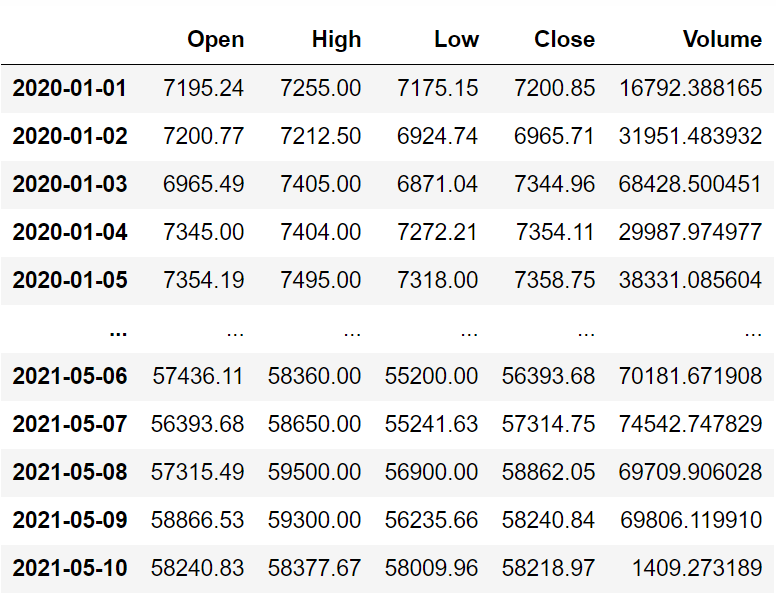
Image by Author

Code Explanation: We begin by defining a function named ‘get_historical_data,’ which takes the stock symbol (‘symbol’) and the start date for historical data (‘start_date’) as parameters. Inside the function, we define the API key and URL, then retrieve the historical data in JSON format using the ‘get’ function and store it in the ‘raw_df’ variable. After cleaning and formatting the raw JSON data, we return it as a Pandas dataframe. Finally, we call this function to fetch Bitcoin’s historical data from the start of 2020 and store it in the ‘btc’ variable.

Step-3: Awesome Oscillator Calculation

In this step, we are going to calculate the values of the Awesome Oscillator by following the formula we discussed before.

Python Implementation:

def sma(price, period):
    sma = price.rolling(period).mean()
    return sma

def ao(price, period1, period2):
    median = price.rolling(2).median()
    short = sma(median, period1)
    long = sma(median, period2)
    ao = short - long
    ao_df = pd.DataFrame(ao).rename(columns = {'Close':'ao'})
    return ao_df

btc['ao'] = ao(btc['Close'], 5, 34)
btc = btc.dropna()
btc.tail()

Output:
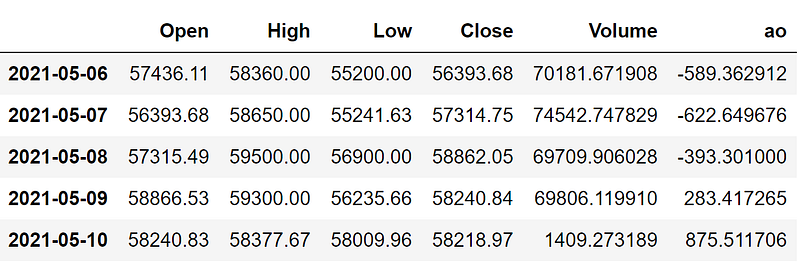
Image by Author

Code Explanation: This code can be classified into two sections: SMA calculation and AO calculation. In the first section, we are defining a function named ‘sma’ that takes the crypto prices (‘price’), and the number of periods (‘period’) as the parameters. Inside the function, we are using the ‘rolling’ function provided by the Pandas package to calculate the SMA for the given number of periods. We are storing the calculated values into the ‘sma’ variable and returned it.

In the second section, we are defining another function named ‘ao’ that takes the crypto prices (‘price’), short length SMA (‘period1’), and long length SMA (‘period2’) as parameters. Inside the function, we are first calculating the median values for the given crypto prices using the ‘rolling’ and ‘median’ function provided by the Pandas package. Next, we are defining two variables named ‘short’ and ‘long’ to store the short length and long length SMA calculated using the function we created before. To calculate the values of the Awesome Oscillator, we are subtracting the long length SMA from the short length SMA and stored it into the ‘ao’ variable. Then we are converting the ‘ao’ variable to a dataframe and returned it. Finally, we are calling the function to store the AO values of Bitcoin.

Step-4: Awesome Oscillator Plot

In this step, we are going to plot the calculated Awesome Oscillator values of Bitcoin to make more sense out of it. The main aim of this part is not on the coding section but instead to observe the plot to gain a solid understanding of Awesome Oscillator.

Python Implementation:

ax1 = plt.subplot2grid((10,1), (0,0), rowspan = 5, colspan = 1)
ax2 = plt.subplot2grid((10,1), (6,0), rowspan = 4, colspan = 1)
ax1.plot(btc['Close'])
ax1.set_title('BITCOIN CLOSING PRICE')
for i in range(len(btc)):
    if btc['ao'][i-1] > btc['ao'][i]:
        ax2.bar(btc.index[i], btc['ao'][i], color = '#f44336')
    else:
        ax2.bar(btc.index[i], btc['ao'][i], color = '#26a69a')
ax2.set_title('BITCOIN AWESOME OSCILLATOR 5,34')
plt.show()

Output:
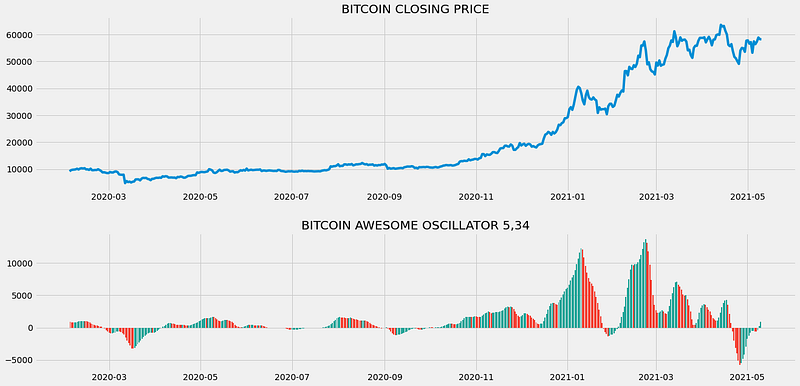
The above chart is divided into two panels: The above panel representing the close prices of Bitcoin and the below panel with the AO values plotted in the form of a histogram. As you can see, whenever the current bar is greater than the previous bar, a bar with green color is plotted on the chart, and, whenever the current bar is lesser than the previous bar, a red-colored bar is plotted on the chart.

Market momentum: The market’s momentum can easily be identified by seeing the length of the histogram bars. You could see in the above panel of the chart that the price movement of Bitcoin was not so great in the first ten months and you could also see the bars of the AO histogram is tiny revealing that the momentum of the market is poor. On the other hand, the last few months were quite great for Bitcoin and you could see the bars of the AO histogram are larger revealing a greater market momentum.

Market trend: Like how the market’s momentum can be identified easily with the histogram of AO, it also helps in knowing the trend of the marker either a down or uptrend. A market is considered to be in an uptrend when the values of the Awesome Oscillator are greater than the zero line and similarly, a downtrend in the market can be identified when the values of the Awesome Oscillator are lesser than the zero line.

Step-5: Creating the trading strategy

In this step, we are going to implement the discussed Awesome Oscillator trading strategy in python.

Python Implementation:

def implement_ao_crossover(price, ao):
    buy_price = []
    sell_price = []
    ao_signal = []
    signal = 0
    
    for i in range(len(ao)):
        if ao[i] > 0 and ao[i-1] < 0:
            if signal != 1:
                buy_price.append(price[i])
                sell_price.append(np.nan)
                signal = 1
                ao_signal.append(signal)
            else:
                buy_price.append(np.nan)
                sell_price.append(np.nan)
                ao_signal.append(0)
        elif ao[i] < 0 and ao[i-1] > 0:
            if signal != -1:
                buy_price.append(np.nan)
                sell_price.append(price[i])
                signal = -1
                ao_signal.append(signal)
            else:
                buy_price.append(np.nan)
                sell_price.append(np.nan)
                ao_signal.append(0)
        else:
            buy_price.append(np.nan)
            sell_price.append(np.nan)
            ao_signal.append(0)
    return buy_price, sell_price, ao_signal

buy_price, sell_price, ao_signal = implement_ao_crossover(btc['Close'], btc['ao'])

Code Explanation: First, we are defining a function named ‘implement_ao_strategy’ which takes the stock prices (‘price), and the AO values (‘ao’) as parameters.

Inside the function, we are creating three empty lists (buy_price, sell_price, and ao_signal) in which the values will be appended while creating the trading strategy.

After that, we are implementing the trading strategy through a for-loop. Inside the for-loop, we are passing certain conditions, and if the conditions are satisfied, the respective values will be appended to the empty lists. If the condition to buy the stock gets satisfied, the buying price will be appended to the ‘buy_price’ list, and the signal value will be appended as 1 representing to buy the stock. Similarly, if the condition to sell the stock gets satisfied, the selling price will be appended to the ‘sell_price’ list, and the signal value will be appended as -1 representing to sell the stock.

Finally, we are returning the lists appended with values. Then, we are calling the created function and stored the values into their respective variables. The list doesn’t make any sense unless we plot the values. So, let’s plot the values of the created trading lists.

Step-6: Plotting the Trading Signals

In this step, we are going to plot the created trading lists to make sense out of them.

Python Implementation:

ax1 = plt.subplot2grid((10,1), (0,0), rowspan = 5, colspan = 1)
ax2 = plt.subplot2grid((10,1), (6,0), rowspan = 4, colspan = 1)
ax1.plot(btc['Close'], label = 'BTC', color = 'skyblue')
ax1.plot(btc.index, buy_price, marker = '^', markersize = 12, color = '#26a69a', linewidth = 0, label = 'BUY SIGNAL')
ax1.plot(btc.index, sell_price, marker = 'v', markersize = 12, color = '#f44336', linewidth = 0, label = 'SELL SIGNAL')
ax1.legend()
ax1.set_title('BITCOIN CLOSING PRICE')
for i in range(len(btc)):
    if btc['ao'][i-1] > btc['ao'][i]:
        ax2.bar(btc.index[i], btc['ao'][i], color = '#f44336')
    else:
        ax2.bar(btc.index[i], btc['ao'][i], color = '#26a69a')
ax2.set_title('BITCOIN AWESOME OSCILLATOR 5,34')
plt.show()

Output:
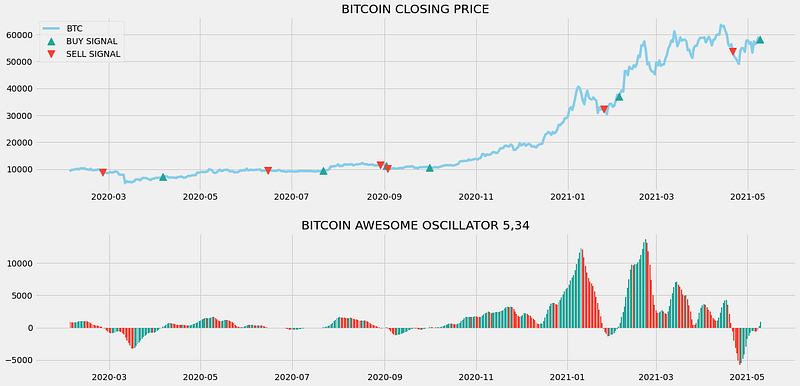
Image by Author

Code Explanation: We are plotting the Awesome Oscillator values along with the buy and sell signals generated by the trading strategy. We can observe that whenever the Awesome Oscillator goes from below to above the zero line, a green-colored buy signal is plotted in the chart. Similarly, whenever the Awesome Oscillator goes from above to below the zero line, a red-colored sell signal is plotted in the chart.

Step-7: Creating our Position

In this step, we are going to create a list that indicates 1 if we hold the stock or 0 if we don’t own or hold the stock.

Python Implementation:

position = []
for i in range(len(ao_signal)):
    if ao_signal[i] > 1:
        position.append(0)
    else:
        position.append(1)
        
for i in range(len(btc['Close'])):
    if ao_signal[i] == 1:
        position[i] = 1
    elif ao_signal[i] == -1:
        position[i] = 0
    else:
        position[i] = position[i-1]
        
ao = btc['ao']
close_price = btc['Close']
ao_signal = pd.DataFrame(ao_signal).rename(columns = {0:'ao_signal'}).set_index(btc.index)
position = pd.DataFrame(position).rename(columns = {0:'ao_position'}).set_index(btc.index)

frames = [close_price, ao, ao_signal, position]
strategy = pd.concat(frames, join = 'inner', axis = 1)

strategy

Output:
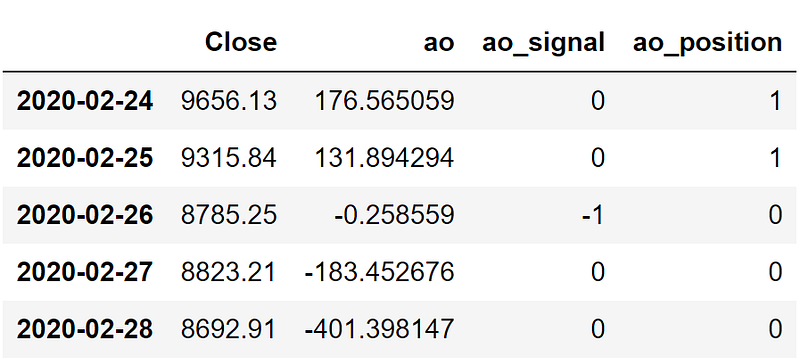
Image by Author

Code Explanation: First, we are creating an empty list named ‘position’. We are passing two for-loops, one is to generate values for the ‘position’ list to just match the length of the ‘signal’ list. The other for-loop is the one we are using to generate actual position values. Inside the second for-loop, we are iterating over the values of the ‘signal’ list, and the values of the ‘position’ list get appended concerning which condition gets satisfied. The value of the position remains 1 if we hold the stock or remains 0 if we sold or don’t own the stock. Finally, we are doing some data manipulations to combine all the created lists into one dataframe.

From the output being shown, we can see that in the first two rows our position in the stock has remained 1 (since there isn’t any change in the AO signal) but our position suddenly turned to 0 as we sold the stock when the AO signal represents a sell signal (-1). Our position will remain 0 until some changes in the trading signal occur. Now it’s time to do implement some backtesting process!

Step-8: Backtesting

Before moving on, it is essential to know what backtesting is. Backtesting is the process of seeing how well our trading strategy has performed on the given stock data. In our case, we are going to implement a backtesting process for our AO trading strategy over the Bitcoin stock data.

Python Implementation:

btc_ret = pd.DataFrame(np.diff(btc['Close'])).rename(columns = {0:'returns'})
ao_strategy_ret = []

for i in range(len(btc_ret)):
    returns = btc_ret['returns'][i]*strategy['ao_position'][i]
    ao_strategy_ret.append(returns)
    
ao_strategy_ret_df = pd.DataFrame(ao_strategy_ret).rename(columns = {0:'ao_returns'})
investment_value = 200000
number_of_stocks = floor(investment_value/btc['Close'][-1])
ao_investment_ret = []

for i in range(len(ao_strategy_ret_df['ao_returns'])):
    returns = number_of_stocks*ao_strategy_ret_df['ao_returns'][i]
    ao_investment_ret.append(returns)

ao_investment_ret_df = pd.DataFrame(ao_investment_ret).rename(columns = {0:'investment_returns'})
total_investment_ret = round(sum(ao_investment_ret_df['investment_returns']), 2)
profit_percentage = round((total_investment_ret/investment_value)*100, 2)
print(cl('Profit gained from the AO strategy by investing $200k in BTC : {}'.format(total_investment_ret), attrs = ['bold']))
print(cl('Profit percentage of the AO strategy : {}%'.format(profit_percentage), attrs = ['bold']))

Output:

Profit gained from the AO strategy by investing $200k in BTC : 122545.53
Profit percentage of the AO strategy : 61.27%

Code Explanation: First, we are calculating the returns of the Facebook stock using the ‘diff’ function provided by the NumPy package and we have stored it as a dataframe into the ‘btc_ret’ variable. Next, we are passing a for-loop to iterate over the values of the ‘btc_ret’ variable to calculate the returns we gained from our AO trading strategy, and these returns values are appended to the ‘btc_strategy_ret’ list. Next, we are converting the ‘ao_strategy_ret’ list into a dataframe and stored it into the ‘ao_strategy_ret_df’ variable.

Next comes the backtesting process. We are going to backtest our strategy by investing two hundred thousand USD into our trading strategy. So first, we are storing the amount of investment into the ‘investment_value’ variable. After that, we are calculating the number of Bitcoins we can buy using the investment amount. You can notice that I’ve used the ‘floor’ function provided by the Math package because, while dividing the investment amount by the closing price of Bitcoin, it spits out an output with decimal numbers. The number of cryptos should be an integer but not a decimal number. Using the ‘floor’ function, we can cut out the decimals. Remember that the ‘floor’ function is way more complex than the ‘round’ function. Then, we are passing a for-loop to find the investment returns followed by some data manipulations tasks.

Finally, we are printing the total return we got by investing two hundred thousand into our trading strategy and it is revealed that we have made an approximate profit of one hundred and twenty thousand USD with a profit percentage of 61.27% in one year. That’s not bad! In fact, it’s great!

Other AO Strategies

As I mentioned before, there are many other trading strategies based on Awesome Oscillator and now we are going to explore some AO strategies apart from what we have implemented.

  • Saucer Strategy: This strategy is one of my favorites and can be implemented easily. This strategy reveals a buy signal when the Awesome Oscillator is above the zero line, the AO histogram having two consecutive red bars where the second red bar is lesser than the first red one and the third bar of the histogram is green. Likewise, a sell signal is revealed by the strategy when the Awesome Oscillator is below the zero line, the AO histogram having two consecutive green bars where the second green bar is lesser than the first green one and the third bar of the histogram is red. This strategy can be represented as follows:
1. IF AO > 0 AND First red AO bar > Second red AO bar AND Third bar = Green --> BUY THE STOCK
2. IF AO < 0 AND First green AO bar > Second green AO bar AND Third bar = Red --> SELL THE STOCK
  • Twin Peak Strategy: Like the Saucer Strategy, this trading strategy is a powerful one that reveals a buy signal when the Awesome Oscillator is below the zero line, two peaks in momentum are formed below the zero line where the second peak is higher than the first peak and the histogram after the second peak low is green. The strategy reveals a sell signal when the Awesome Oscillator is above the zero line, two peaks in momentum are formed above the zero line where the second peak is lower than the first peak and the histogram after the second peak high is red. The Twin Peak strategy can be represented as follows:
1. IF AO < 0 AND Second momentum peak > First momentum peak AND Histogram after second peak low = Green -- > BUY THE STOCK
2. IF AO > 0 AND Second momentum peak < First momentum peak AND Histogram after second peak high = Red -- > SELL THE STOCK

Several other strategies also exist and can be implemented but these two and the one we implemented in python are the standard AO-based strategies. After familiarizing yourself with these, you can start creating your own custom Awesome Oscillator strategies and implement them in the real-world market.

Final Thoughts!

In this article, we almost covered everything we could on Awesome Oscillator but possibilities for improvements are numerous. You can tune the trading strategy, pick the right cryptos with Machine Learning models, and so on but, always ensure that your level of risk doesn't cross an extent while doing algorithmic trading. While we as humans trade cryptos, we have certain cognitive skills and intuitions to identify whether our trade is too riskier or not. Whereas, trading bots we create are just programs to implement our trading strategies but do not have any sort of emotions to deal with situations involving risk factors.

One way to deal with risks while doing algorithmic trading is to calculate the level of risk involved in each trade and neglect trades whose risk level crosses a specified boundary. We haven't implemented this step but it doesn't mean it is not of much importance. You can try adding a step to the program to calculate the amount of risk with some basic math and programming and you will be set to trade in the real-world market.

That’s it! Hope you learned something new and useful from this article. If you forgot to follow any of the coding parts, don’t worry. I’ve provided the full source code at the end of the article.

Full code:

import pandas as pd
import requests
import numpy as np
import matplotlib.pyplot as plt
from math import floor
from termcolor import colored as cl

plt.rcParams['figure.figsize'] = (20, 10)
plt.style.use('fivethirtyeight')

def get_crypto_price(symbol, exchange, start_date = None):
    api_key = open(r'api_key.txt')
    api_url = f'https://www.alphavantage.co/query?function=DIGITAL_CURRENCY_DAILY&symbol={symbol}&market={exchange}&apikey={api_key}'
    raw_df = requests.get(api_url).json()
    df = pd.DataFrame(raw_df['Time Series (Digital Currency Daily)']).T
    df = df.rename(columns = {'1a. open (USD)': 'Open', '2a. high (USD)': 'High', '3a. low (USD)': 'Low', '4a. close (USD)': 'Close', '5. volume': 'Volume'})
    for i in df.columns:
        df[i] = df[i].astype(float)
    df.index = pd.to_datetime(df.index)
    df = df.iloc[::-1].drop(['1b. open (USD)', '2b. high (USD)', '3b. low (USD)', '4b. close (USD)', '6. market cap (USD)'], axis = 1)
    if start_date:
        df = df[df.index >= start_date]
    return df

btc = get_crypto_price(symbol = 'BTC', exchange = 'USD', start_date = '2020-01-01')
print(btc)

def sma(price, period):
    sma = price.rolling(period).mean()
    return sma

def ao(price, period1, period2):
    median = price.rolling(2).median()
    short = sma(median, period1)
    long = sma(median, period2)
    ao = short - long
    ao_df = pd.DataFrame(ao).rename(columns = {'Close':'ao'})
    return ao_df

btc['ao'] = ao(btc['Close'], 5, 34)
btc = btc.dropna()
print(btc.tail())

ax1 = plt.subplot2grid((10,1), (0,0), rowspan = 5, colspan = 1)
ax2 = plt.subplot2grid((10,1), (6,0), rowspan = 4, colspan = 1)
ax1.plot(btc['Close'])
ax1.set_title('BITCOIN CLOSING PRICE')
for i in range(len(btc)):
    if btc['ao'][i-1] > btc['ao'][i]:
        ax2.bar(btc.index[i], btc['ao'][i], color = '#f44336')
    else:
        ax2.bar(btc.index[i], btc['ao'][i], color = '#26a69a')
ax2.set_title('BITCOIN AWESOME OSCILLATOR 5,34')
plt.show()

def implement_ao_crossover(price, ao):
    buy_price = []
    sell_price = []
    ao_signal = []
    signal = 0
    
    for i in range(len(ao)):
        if ao[i] > 0 and ao[i-1] < 0:
            if signal != 1:
                buy_price.append(price[i])
                sell_price.append(np.nan)
                signal = 1
                ao_signal.append(signal)
            else:
                buy_price.append(np.nan)
                sell_price.append(np.nan)
                ao_signal.append(0)
        elif ao[i] < 0 and ao[i-1] > 0:
            if signal != -1:
                buy_price.append(np.nan)
                sell_price.append(price[i])
                signal = -1
                ao_signal.append(signal)
            else:
                buy_price.append(np.nan)
                sell_price.append(np.nan)
                ao_signal.append(0)
        else:
            buy_price.append(np.nan)
            sell_price.append(np.nan)
            ao_signal.append(0)
    return buy_price, sell_price, ao_signal

buy_price, sell_price, ao_signal = implement_ao_crossover(btc['Close'], btc['ao'])

ax1 = plt.subplot2grid((10,1), (0,0), rowspan = 5, colspan = 1)
ax2 = plt.subplot2grid((10,1), (6,0), rowspan = 4, colspan = 1)
ax1.plot(btc['Close'], label = 'BTC', color = 'skyblue')
ax1.plot(btc.index, buy_price, marker = '^', markersize = 12, color = '#26a69a', linewidth = 0, label = 'BUY SIGNAL')
ax1.plot(btc.index, sell_price, marker = 'v', markersize = 12, color = '#f44336', linewidth = 0, label = 'SELL SIGNAL')
ax1.legend()
ax1.set_title('BITCOIN CLOSING PRICE')
for i in range(len(btc)):
    if btc['ao'][i-1] > btc['ao'][i]:
        ax2.bar(btc.index[i], btc['ao'][i], color = '#f44336')
    else:
        ax2.bar(btc.index[i], btc['ao'][i], color = '#26a69a')
ax2.set_title('BITCOIN AWESOME OSCILLATOR 5,34')
plt.show()

position = []
for i in range(len(ao_signal)):
    if ao_signal[i] > 1:
        position.append(0)
    else:
        position.append(1)
        
for i in range(len(btc['Close'])):
    if ao_signal[i] == 1:
        position[i] = 1
    elif ao_signal[i] == -1:
        position[i] = 0
    else:
        position[i] = position[i-1]
        
ao = btc['ao']
close_price = btc['Close']
ao_signal = pd.DataFrame(ao_signal).rename(columns = {0:'ao_signal'}).set_index(btc.index)
position = pd.DataFrame(position).rename(columns = {0:'ao_position'}).set_index(btc.index)

frames = [close_price, ao, ao_signal, position]
strategy = pd.concat(frames, join = 'inner', axis = 1)

print(strategy)
print(strategy[20:25])

btc_ret = pd.DataFrame(np.diff(btc['Close'])).rename(columns = {0:'returns'})
ao_strategy_ret = []

for i in range(len(btc_ret)):
    returns = btc_ret['returns'][i]*strategy['ao_position'][i]
    ao_strategy_ret.append(returns)
    
ao_strategy_ret_df = pd.DataFrame(ao_strategy_ret).rename(columns = {0:'ao_returns'})
investment_value = 200000
number_of_stocks = floor(investment_value/btc['Close'][-1])
ao_investment_ret = []

for i in range(len(ao_strategy_ret_df['ao_returns'])):
    returns = number_of_stocks*ao_strategy_ret_df['ao_returns'][i]
    ao_investment_ret.append(returns)

ao_investment_ret_df = pd.DataFrame(ao_investment_ret).rename(columns = {0:'investment_returns'})
total_investment_ret = round(sum(ao_investment_ret_df['investment_returns']), 2)
profit_percentage = round((total_investment_ret/investment_value)*100, 2)
print(cl('Profit gained from the AO strategy by investing $200k in BTC : {}'.format(total_investment_ret), attrs = ['bold']))
print(cl('Profit percentage of the AO strategy : {}%'.format(profit_percentage), attrs = ['bold']))
Finance
Investing
Programming
Bitcoin
Education
Recommended from ReadMedium
avatarAakash Chavan Ravindranath, Ph.D
🚨 Why You Need an Alternative to yfinance

3 min read