
BigQuery QUALIFY Clause: Towards Cleaner SQL Queries

I’ve been using the QUALIFY clause for a while now, and all I can say is that I love it for its simplicity and how it can prettify SQL code. It’s one of those SQL statements that I believe is a significant step toward more advanced query writing. As someone who always strives to optimize and clean my code, I’ve found that using QUALIFY not only makes your code shorter but also more readable and understandable.
Besides good commenting practices and the right structuring of your query, QUALIFY helps ensure that your code remains clear and maintainable. For me, the QUALIFY clause has firmly qualified itself into my repertoire of favorite SQL expressions:)
Note:
QUALIFYis not only available in Google’s BigQuery but also in other SQL dialects and tools like Snowflake, Databricks, DuckDB, and more. Each platform has its own version, makingQUALIFYa versatile and valuable tool for any data professional.
Understanding the QUALIFY Clause
If you are here, you are probably familiar with window, also known as analytic functions. We won’t delve deep into that topic now, but essentially, QUALIFY is used to filter your data based on the results of window functions.
In other words, it is to window functions what HAVINGis to GROUP BYand WHERE is to FROM.

These are all tools to filter your data based on specific criteria. To give you a clearer picture, here are descriptions from the BigQuery documentation for these clauses:
The WHERE clause filters the results of the FROM clause. The HAVING clause filters the results produced by GROUP BY or aggregation. The QUALIFY clause filters the results of window functions.
Thus, QUALIFY adds another layer to the filtering process.
Usage of the QUALIFY Clause
To effectively use the QUALIFY clause, it’s essential to understand its place within the overall structure of a SQL query in BigQuery. Here’s the order in which the different clauses should be used:

This syntax structure, taken directly from the BigQuery documentation, shows where the QUALIFY clause fits in the sequence. You can see that QUALIFY comes after HAVING and before the WINDOW clause, highlighting its role in filtering the results of window functions.
Here’s a simplified pseudocode example to demonstrate the general usage of the QUALIFY clause:
SELECT
  first_column,
  second_column,
  some_window_function() OVER (PARTITION BY first_column ORDER BY second_column) AS window_result
FROM
  table_name
QUALIFY
  condition_on_window_result
Practical Use Case | Example
To illustrate the concept of the QUALIFY clause, let’s use an engaging example involving our old friends, the Teenage Mutant Ninja Turtles (TMNT)🐢. Imagine we have a dataset that tracks their interactions on a pizza delivery platform, where they can view and purchase different types of pizzas 🍕.
Let’s say we want to determine the first pizza page each turtle visited on the platform. There are several ways to achieve this.
                                Source table

+--------------+--------------------------------+-------------+------------+
|    ninja     |        event_timestamp         |   action    | pizza_name |
+--------------+--------------------------------+-------------+------------+
|   Leonardo   | 2024-06-01 10:00:00.000000 UTC | item_viewed | Margherita |
| Michelangelo | 2024-06-01 10:05:00.000000 UTC | item_viewed | Pepperoni  |
|   Leonardo   | 2024-06-01 10:10:00.000000 UTC | item_viewed | Pepperoni  |
| Michelangelo | 2024-06-01 10:15:00.000000 UTC | item_viewed | Margherita |
|   Leonardo   | 2024-06-01 10:20:00.000000 UTC |  purchased  | Margherita |
| Michelangelo | 2024-06-01 10:25:00.000000 UTC |  purchased  | Margherita |
+--------------+--------------------------------+-------------+------------+

                               Expected result

        +--------------+------------+--------------------------------+
        |    ninja     | pizza_name |        first_timestamp         |
        +--------------+------------+--------------------------------+
        |   Leonardo   | Margherita | 2024-06-01 10:00:00.000000 UTC |
        | Michelangelo | Pepperoni  | 2024-06-01 10:05:00.000000 UTC |
        +--------------+------------+--------------------------------+
Solution 1: Naive Approach
- Identify the earliest timestamp for each turtle (using
GROUP BYandMIN()) - Use this minimum timestamp to find the corresponding pizza (using
JOIN)
WITH first_interaction AS (
  SELECT
    ninja,
    MIN(event_timestamp) AS first_timestamp
  FROM
    pizza_events
  WHERE
    action = 'item_viewed'
  GROUP BY
    ninja
)

SELECT
  e.ninja,
  e.pizza_name,
  f.first_timestamp
FROM
  pizza_events e
JOIN
  first_interaction f
ON
  e.ninja = f.ninja AND e.event_timestamp = f.first_timestamp
WHERE
  e.action = 'item_viewed';
Solution 2: A Better Alternative
- Assign a sequential number to each pizza view event in a CTE (using the
ROW_NUMBER()window function) - Select the first row in an other query (using
WHERE)
WITH numbered_interactions AS (
  SELECT
    ninja,
    pizza_name,
    event_timestamp,
    ROW_NUMBER() OVER(PARTITION BY ninja ORDER BY event_timestamp) AS row_num
  FROM
    pizza_events
  WHERE
    action = 'item_viewed'
)

SELECT
  ninja,
  pizza_name,
  event_timestamp
FROM
  numbered_interactions
WHERE
  row_num = 1;
Solution 3: We’re Almost There
- Assign a sequential number to each pizza view event (using the
ROW_NUMBER()window function). - Filter to retain only the first row (using
QUALIFY).
SELECT
  ninja,
  pizza_name,
  event_timestamp,
  ROW_NUMBER() OVER(PARTITION BY ninja ORDER BY event_timestamp) AS row_num
FROM
  pizza_events
WHERE
  action = 'item_viewed'
QUALIFY
  row_num = 1;
Solution 4: Here We Go
Similar to Solution 3, but the row number is used directly within the QUALIFY clause, avoiding its inclusion in the SELECT statement.
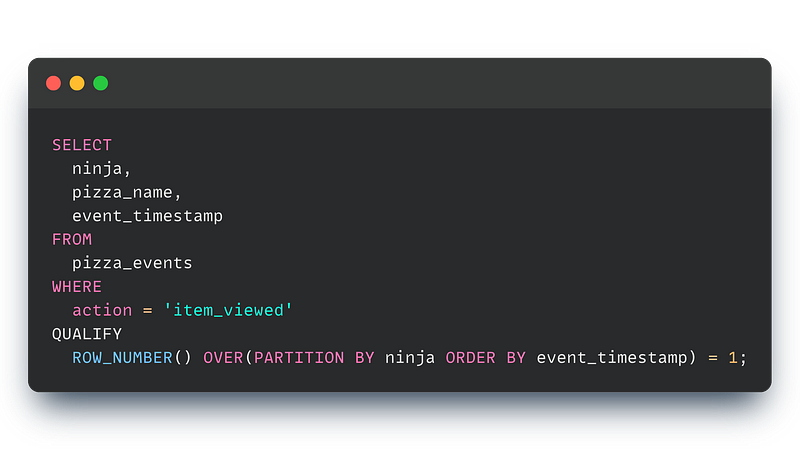
If you want to explore this toy example further, you can find the full source as a gist here.
Performance considerations
We didn’t dive into the performance details of each query, but I encourage you to check it out yourself. Generally, using window function (as in Solution 4) is better than relying on GROUP BY and JOIN (like in Solution 1) because the execution is less complex.
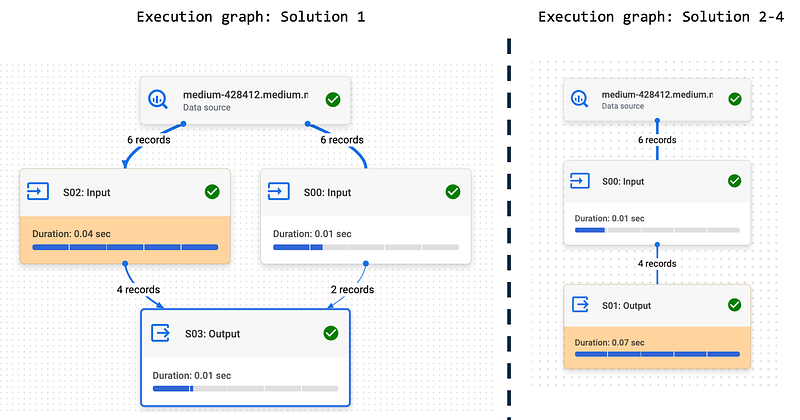
When comparing the three versions with QUALIFY (Solutions 2–4), you'll see that the execution graph is the same in BigQuery under the hood.
So, using QUALIFY is like adding some syntactic sugar to your SQL — and who doesn’t like a bit of sugar?
Summary
Using QUALIFY makes your SQL queries shorter and easier to read if you have to limit the output based on a window function result. It’s a small change that can make a big difference in your workflow. So next time you’re writing a query, give QUALIFY a try and see how it can simplify your code.
Further readings
Gist for the example showed in the article Google BigQuery documentation A good read about window functions from Axel Thevenot 🐣


