
Big Data without Hadoop/HDFS? MinIO tested on Jupyter + PySpark
The takeover of Hortonworks by Cloudera ended the free distribution of Hadoop. Therefore, a lot of people are looking for alternative solutions. Cloud solutions are impossible in some areas.
MinIO is a distributed storage implementing AWS S3 API. It can be deployed in on-premises environments. It is prepared for Kubernetes. It is an interesting alternative to HDFS-based environments and the rest of the Hadoop ecosystem. Finally, Kubernetes is becoming an increasingly interesting alternative of YARN to Apache Spark.In this story, we will take a look at the local MinIO on the docker-compose and perform several operations in the Spark.
Environment
Docker compose consists of a jupiter and 4 nodes from MinIO.
version: '3'
services:
  notebook:
    image: jupyter/all-spark-notebook
    ports:
      - 8888:8888
      - 4040:4040
    environment:
      - PYSPARK_SUBMIT_ARGS=--packages com.amazonaws:aws-java-sdk-bundle:1.11.819,org.apache.hadoop:hadoop-aws:3.2.0 pyspark-shell
    volumes:
      - ./work:/home/jovyan/work
  minio1:
    image: minio/minio:RELEASE.2020-07-02T00-15-09Z
    volumes:
      - ./minio/data1-1:/data1
      - ./minio/data1-2:/data2
    ports:
      - "9001:9000"
    environment:
      MINIO_ACCESS_KEY: minio
      MINIO_SECRET_KEY: minio123
    command: server http://minio{1...4}/data{1...2}
    healthcheck:
      test: ["CMD", "curl", "-f", "http://localhost:9000/minio/health/live"]
      interval: 30s
      timeout: 20s
      retries: 3

  minio2:
    image: minio/minio:RELEASE.2020-07-02T00-15-09Z
    volumes:
      - ./minio/data2-1:/data1
      - ./minio/data2-2:/data2
    ports:
      - "9002:9000"
    environment:
      MINIO_ACCESS_KEY: minio
      MINIO_SECRET_KEY: minio123
    command: server http://minio{1...4}/data{1...2}
    healthcheck:
      test: ["CMD", "curl", "-f", "http://localhost:9000/minio/health/live"]
      interval: 30s
      timeout: 20s
      retries: 3

  minio3:
    image: minio/minio:RELEASE.2020-07-02T00-15-09Z
    volumes:
      - ./minio/data3-1:/data1
      - ./minio/data3-2:/data2
    ports:
      - "9003:9000"
    environment:
      MINIO_ACCESS_KEY: minio
      MINIO_SECRET_KEY: minio123
    command: server http://minio{1...4}/data{1...2}
    healthcheck:
      test: ["CMD", "curl", "-f", "http://localhost:9000/minio/health/live"]
      interval: 30s
      timeout: 20s
      retries: 3

  minio4:
    image: minio/minio:RELEASE.2020-07-02T00-15-09Z
    volumes:
      - ./minio/data4-1:/data1
      - ./minio/data4-2:/data2
    ports:
      - "9004:9000"
    environment:
      MINIO_ACCESS_KEY: minio
      MINIO_SECRET_KEY: minio123
    command: server http://minio{1...4}/data{1...2}
    healthcheck:
      test: ["CMD", "curl", "-f", "http://localhost:9000/minio/health/live"]
      interval: 30s
      timeout: 20s
      retries: 3
The test data will be the MovieLens set.
wget http://files.grouplens.org/datasets/movielens/ml-latest.zip
unzip ./ml-latest.zip
To launch, just type sudo docker-compose up -d in the folder with repo
MinIO
GUI
Under localhost:9001–9004 we can access the graphic interface. It is very simple. After entering access_key and secret_key given in docker-compose.yml, we can create a test bucket and add files from MovieLens collection.
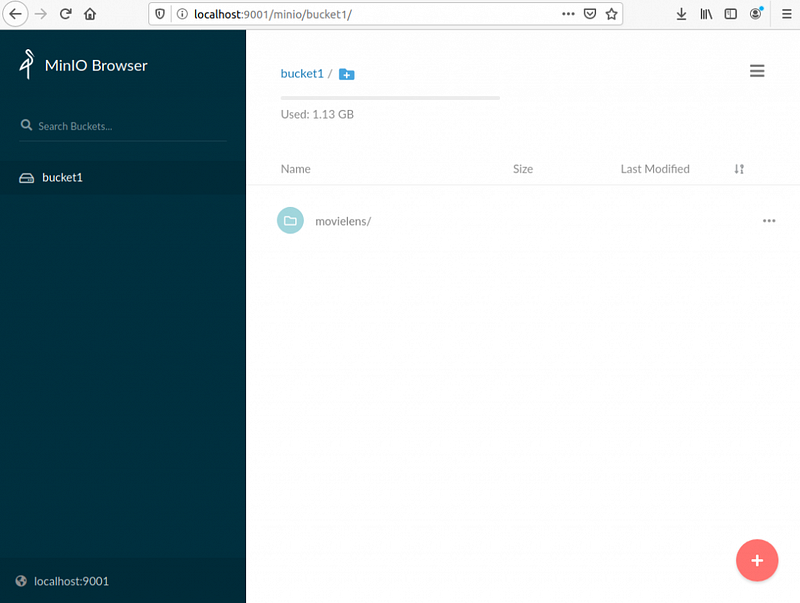
There is an option to use a dedicated CLI mc. It allows, among others, to administer the cluster.
File structure
I haven’t gotten into the documentation yet, to learn how the MinIO works. We’ve mapped the data folders, so let’s see how MovieLens files were added.
maciej@ubuntu:~/Desktop/fun2/minio$ du -h .
12K ./data1-1/bucket1/movielens/README.txt
182M    ./data1-1/bucket1/movielens/ratings.csv
320K    ./data1-1/bucket1/movielens/links.csv
9.5M    ./data1-1/bucket1/movielens/tags.csv
99M ./data1-1/bucket1/movielens/genome-scores.csv
16K ./data1-1/bucket1/movielens/genome-tags.csv
708K    ./data1-1/bucket1/movielens/movies.csv
291M    ./data1-1/bucket1/movielens
291M    ./data1-1/bucket1
12K ./data1-1/.minio.sys/buckets/.usage-cache.bin
12K ./data1-1/.minio.sys/buckets/bucket1/.usage-cache.bin
12K ./data1-1/.minio.sys/buckets/bucket1/.metadata.bin
28K ./data1-1/.minio.sys/buckets/bucket1
12K ./data1-1/.minio.sys/buckets/.bloomcycle.bin
12K ./data1-1/.minio.sys/buckets/.usage.json
76K ./data1-1/.minio.sys/buckets
12K ./data1-1/.minio.sys/backend-encrypted
4.0K    ./data1-1/.minio.sys/multipart
12K ./data1-1/.minio.sys/config/iam/format.json
16K ./data1-1/.minio.sys/config/iam
12K ./data1-1/.minio.sys/config/config.json
32K ./data1-1/.minio.sys/config
4.0K    ./data1-1/.minio.sys/tmp
136K    ./data1-1/.minio.sys
291M    ./data1-1
...
You can see the configuration files. The names of the files we uploaded are directories. The size of the added ratings.csv file was 724 MB. Here one part weighs 182 MB, so counting 2 directories * 4 nodes, it comes out as ~1456 MB. That’s 2x as much as the original. Here you will find configuration of data and parity disks. In this case MinIO has Storage Usage Ratio of 2. I wonder what will happen if we turn off one node 😎.
maciej@ubuntu:~/Desktop/fun2/minio$ md5sum data{1,2,3,4}-{1,2}/bucket1/movielens/ratings.csv/part.1
0f034325431b33725c9938632166f0e6  data1-1/bucket1/movielens/ratings.csv/part.1
559aefe5c66a7b8e1cbbaf34afec36f3  data1-2/bucket1/movielens/ratings.csv/part.1
235e2c8af8779589d7198e4031a37e3e  data2-1/bucket1/movielens/ratings.csv/part.1
4573b69e29948539e7400f99117418a3  data2-2/bucket1/movielens/ratings.csv/part.1
76b4d2684bf8f5c1d5d5e728a40d85e1  data3-1/bucket1/movielens/ratings.csv/part.1
1ec1e7a955ef5b17880468ddf9d5052a  data3-2/bucket1/movielens/ratings.csv/part.1
c475fafd05739d56ccaf25724ea60362  data4-1/bucket1/movielens/ratings.csv/part.1
6148048b77f83fcc1e2922bff0cef67b  data4-2/bucket1/movielens/ratings.csv/part.1
The hashes are different. Despite the same names, they are not identical files.
Apache Spark / PySpark
Let’s see if the Spark (or rather PySpark) in version 3.0 will get along with the MinIO. Remember to use the docker logs
Let’s go back to docker-compose.yml. For Spark to be able to talk with API S3, we have to give him some packages.
...
    environment:
      - PYSPARK_SUBMIT_ARGS=--packages com.amazonaws:aws-java-sdk-bundle:1.11.819,org.apache.hadoop:hadoop-aws:3.2.0 pyspark-shell
...
How do you know which versions? Jupyter, which I used here, uses Spark Core 3.0.0. Spark Core 3.0.0, uses “org.apache.hadoop>>hadoop-client “ in version 3.2.1, which corresponds to the same version of “org.apache.hadoop>>hadoop-aws”. This one has dependency on “com. amazonaws>>aws-java-sdk-bundle” in version 1.11.819. If my reasoning is bad, let me know 😁. Anyway, other versions were not fully compatible and result in typical Java Stack Trace.
from pyspark.sql import SparkSession
spark = SparkSession.builder.getOrCreate()

spark.sparkContext._jsc\
     .hadoopConfiguration().set("fs.s3a.access.key", "minio")
spark.sparkContext._jsc\
     .hadoopConfiguration().set("fs.s3a.secret.key", "minio123")
spark.sparkContext._jsc\
      .hadoopConfiguration().set("fs.s3a.endpoint", "http://minio1:9000")
spark.sparkContext._jsc\
      .hadoopConfiguration().set("spark.hadoop.fs.s3a.impl", "org.apache.hadoop.fs.s3a.S3AFileSystem")
spark.sparkContext._jsc\
      .hadoopConfiguration().set("spark.hadoop.fs.s3a.path.style.access", "true")
spark.sparkContext._jsc\
      .hadoopConfiguration().set("fs.s3a.multipart.size", "104857600")
The configuration contains MinIO address, needed keys and specific entries related to the PySpark. For example: fs.s3a.multipart.size is 100M by default, which cannot be interpreted by the python interpreter.
After configuration we use Apache Spark as before. The only difference is the URI.
ratings = spark.read\
            .option("header", "true")\
            .option("inferSchema", "true")\
            .csv("s3a://bucket1/movielens/ratings.csv")
ratings.registerTempTable("ratings")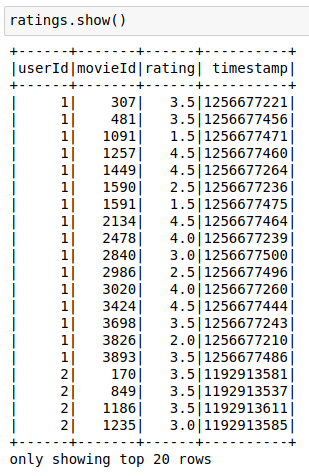
movies = spark.read\
            .option("header", "true")\
            .option("inferSchema", "true")\
            .csv("s3a://bucket1/movielens/movies.csv")
movies.registerTempTable("movies")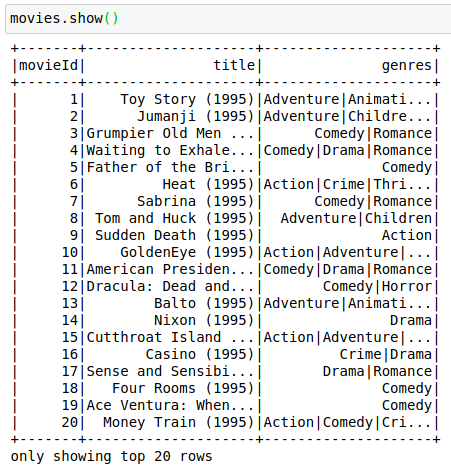
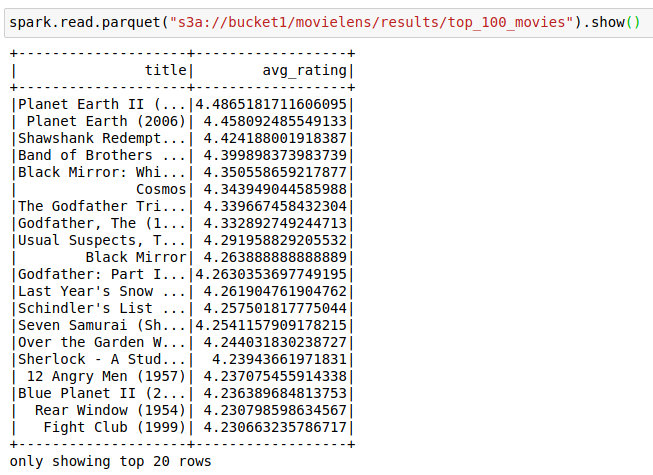
We read it in CSV, so let’s save it in Parquet.
top_100_movies = spark.sql("""
    SELECT title, AVG(rating) as avg_rating
    FROM movies m
    LEFT JOIN ratings r ON m.movieId = r.movieID
    GROUP BY title
    HAVING COUNT(*) > 100
    ORDER BY avg_rating DESC
    LIMIT 100
""")
top_100_movies.write.parquet("s3a://bucket1/movielens/results/top_100_movies")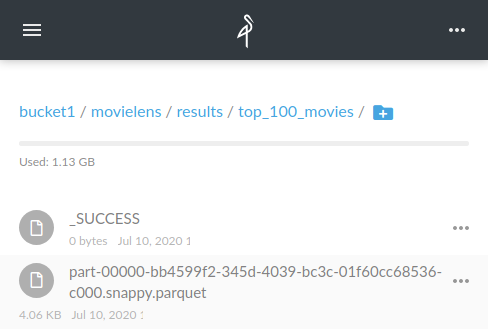
And if you turn off the container…
I turned off three containers one by one. I left the first one to not change the config.
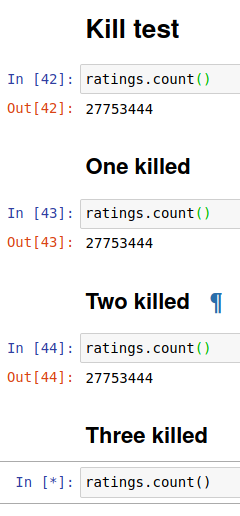
The shutdown of the third one made it impossible to operate.
And that would be consistent with what they say in reference architecture. Minio protects the integrity of objects using erasure code and checksums to prevent data degradation. In theory, the Minio should work after the loss of 50% of the disks and 50% of the cluster, and so it worked in this case. Unless we save on hard drives 🙂.
Repository
What’s next?
I plan to compare the speed of HDFS and MinIO solutions. MinIO has already done such a comparison. They used 12 nodes (storage + compute) for HDFS, when for MinIO it was 12 (storage) + 12 (compute). I understand the separation between storage and compute, but comparing 12 vs 24 doesn’t convince me 😁.


