
BIG 1Password 8 News for iOS Users
I’ve finally got my hands on the new version!
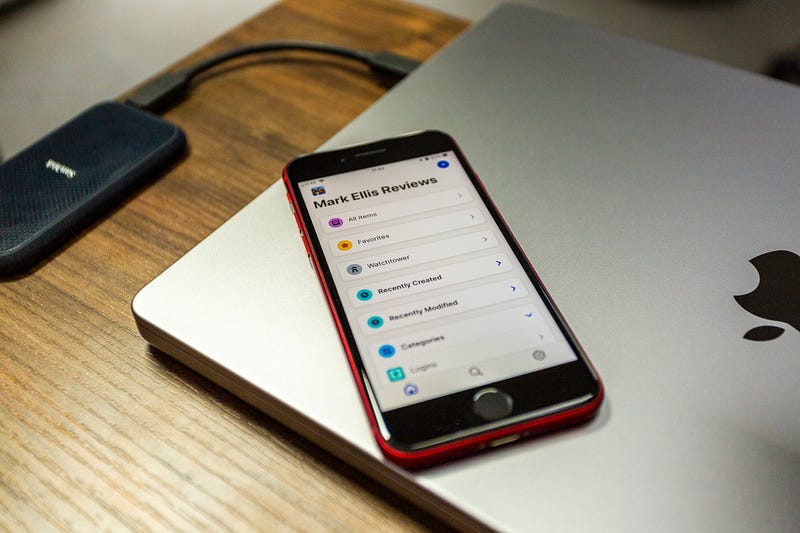
While playing around with 1Password 8 beta for macOS yesterday (which is quite simply brilliant, by the way — more on that soon), I started to wonder when we’d be able to get our hands on a new iOS version.
Michael Fey must have been listening, because later that day, he published a blog post detailing the Early Access launch of 1Password 8 for iOS.
Spooky. And pretty exciting, because there are four features in particular that have immediately impressed me on the next iteration of 1Password for Apple’s mobile devices.
Oh, and while this blog post isn’t sponsored by 1Password, I’ve worked closely with them to get you, my loyal readers, an impressive 25% discount off your first year. You can grab that deal here!
So, onto those four features…
1. A unified experience
As noted previously, one of my goals this year is to take a look at what lies beyond the Apple ecosystem. This has led me to a far more wholesome experience of Android and getting reacquainted with Windows.
It also reveals the inherent challenges that come with developing software across multiple platforms. 1Password is available on practically every platform you can think of, but the experience isn’t always that consistent.
This shouldn’t come as a surprise; every platform has its own idiosyncrasies, rules, and limitations. What’s encouraging, however, is confirmation from Fey that the team at 1Password have been “making a concerted effort to unify our design language”. That effort is clear to see the more you dig into version 8 of the app, be it on Windows, the Mac, or, iOS.
Everything is starting to look and feel very familiar across each device, and the new design for 1Password on iOS is both fresh and in keeping with the simplicity that has always made for a brilliant password manager. It looks great.
2. The personalised Home tab
In 1Password 8 for iOS, there’s a new ‘Home’ tab, which is a very welcome sight.
As much as I enjoy using 1Password 7 on iOS, it is missing a base from which to start, unless you count ‘Favourites’. In 1Password 8, the Home tab enables users to customise the first screen they see when opening the app. In practice, this removes the inevitable pause in the user journey when trying to work out what to do next.
The new Home tab extends far beyond Favourites (which is now simply an option within Home). You can quickly access your entire vault, Watchtower (more on that in a moment), and items you’ve either recently added or modified.
There are loads more, too, from tags to categories, recently deleted, and the archive. But the best news is that you can customise the 1Password 8 Home screen by removing what you don’t want on there and reordering the list to your heart’s content. It’s rather wonderful.
3. iPad-specific design
Fey describes 1Password 8 for the iPad as “next-level”, and “the iPad app I’ve always wanted us to build”.
I’ve never been a fan of iPad apps that look like an afterthought, and while that was never the case with 1Password 7, as soon as you open up 1Password 8 on any sized iPad, it looks immediately built for the screen in question.
The design is free of visual complication, and the bottom navigation bar has been banished in favour of centralised navigation within the sidebar. Hit the new item button (which is now separated from the sidebar and, consequently, far easier to spot), and you’re presented with a modernised list of options.
It feels like a proper iPad app, and, just like the iPhone version, comes complete with one of the coolest and most useful features 1Password offers: Watchtower.
4. Full Watchtower functionality
As Fey notes, “only fragments of Watchtower have been available on iOS” — until now, because 1Password 8 for iOS and iPadOS finally features the full-blown version of Watchtower.
They’ve done a cracking job with the design of Watchtower on these devices. In fact, it has already solved a very real, self-inflicted problem for me.
You see, I’m acutely aware that I need to do some work on my passwords, but I’ve always found an excuse not to do so. The way Watchtower has been designed for devices I can hold in my hand actually makes it tempting to dive in and fix any concerns. The fact I can literally do so from anywhere is both reassuring and gives me literally no excuse not to pull my finger out and finally get those niggles sorted.
What’s next?
There’s no news yet on an official public release of 1Password 8 for iOS, but the TestFlight version already feels pretty solid. There are a few missing features, but most of those reside within settings. I can see myself using this version quite happily while awaiting the full release.
Fey tells us that there are additional features on the way, including Apple Watch support, additional Home tab content, and account management.
I will, of course, report back as soon as I get my hands on that stuff.
How to access 1Password 8 beta for iOS
Fancy giving 1Password 8 beta for iOS a try? It’s super simple — just download TestFlight via this link, and then visit the same link again on your iPhone once installed. Don’t worry — you can keep 1Password 7 running happily on your device at the same time.
Happy testing! I’m really looking forward to seeing how this one develops.
Before you go
Join my behind-the-scenes mailing list
If you enjoy my writing, it’s only a snippet of what’s on Medium. I’m a paying member myself and highly recommend joining. Click here to join (a portion of your membership fee will be sent my way and therefore directly support my work!).
Originally published at https://markellisreviews.com on April 14, 2022.