Better understanding of @Output and EventEmitter in Angular
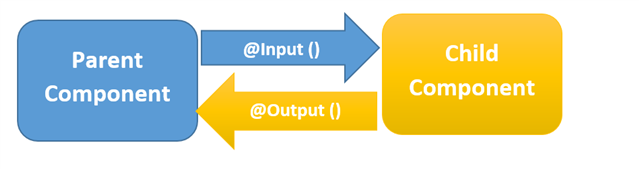
Angular is based on a one-directional data flow and does not have two-way data binding. So, here is a way to allow a component to emit an event to another component.
In Angular, a component can emit an event using @Output and EventEmitter. Both are parts of the @angular/core.
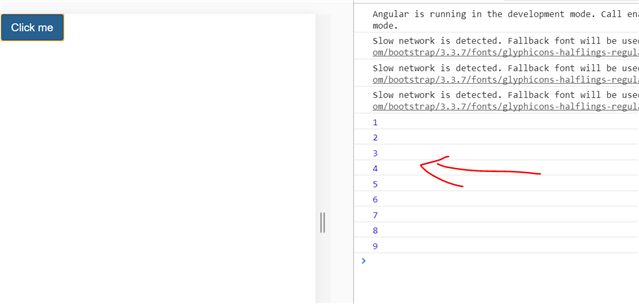
import { EventEmitter, Output } from '@angular/core';In our example, we’re going to use ChildCopmponent inside AppComponent, thereby creating a parent/child kind of relationship, in which AppComponent is the parent and ChildComponent is the child. When we run the application with a button click, you’ll see this message in the browser console.
To do this, you will have to emit the button click event from ChildComponent. Import EventEmitterand Output from @angular/core.
Here we are going to emit an event and pass a parameter to the event. Consider the code below:
appchild.component.ts
import { Component, EventEmitter, Output } from '@angular/core';
@Component({
    selector: 'app-child',
    template: `<button class='btn btn-primary' (click)="getValue()">Click here</button> `
})
export class ChildComponent {
    @Output() counterValue= new EventEmitter();
    counter = 0;
    getValue() { // You can give any function name
        this.counter = this.counter + 1;
        this.counterValue.emit(this.counter);
    }
}
Right now, we are performing the following tasks in the ChildComponent class:
- Creating a variable called counter, which will be passed as the parameter of the emitted event.
- Creating an EventEmitter,
counterValue, which will be emitted to the parent component on the click event of the button. - Creating a function named
getValue().This function is called on the click event of the button, and inside the function eventcounterValueis emitted. - While emitting the
counterValueevent, the value of the counter is passed as a parameter.
In the parent component, AppComponent, the child component, ChildComponent, can be used as shown in the code below:
import { Component, OnInit } from '@angular/core';
@Component({
    selector: 'app-root',
    template: `<app-child (counterValue)='displayCounter($event)'></app-child>`
})
export class AppComponent {

    displayCounter(count) {
        console.log(count);
    }
}
Right now, we are performing the following tasks in the AppComponent class:
- Using
in the template. - In the <app-child> element, using event binding to use the
counterValueevent. - Calling the
displayCounterfunction on thecounterValueevent. - In the
displayCounterfunction, printing the value of the counter passed from the ChildComponent.
As you can see, the function AppComponent is called on the click event of the button placed on the ChildComponent. This is can be done with @Output and EventEmitter. When you run the application and click the button, you can see the value of the counter in the browser console. Each time you click on the button, the counter value is increased by 1.
Summary:
This is how, components interact in Angular.