es-1.readmedium.com/v2/resize:fit:800/1*KliRhQtkBJG1kgqSPMmksw.png"><figcaption></figcaption></figure><h1 id="88d4">3. Thonny</h1><ul><li><b>Category: </b>IDE</li><li><b>Platform Compatibility: </b>Microsoft Windows, Linux, macOS</li><li><b>Who It’s For: </b>Beginners</li><li><b>Supporting Languages: </b>Python</li><li><b>Price: </b>Free</li><li><b>Download: <a href="http://thonny.org/"></a></b><a href="http://thonny.org/">Thonny download link</a></li></ul><p id="32c7"><b>Thonny</b> is an extremely <b>beginner-friendly Python IDE </b>for people with little or no programming experience. Thonny makes it easier for newbies to jump into Python programming as it<b> comes with Python 3.7</b>, saving you the installation.</p><p id="fa2b">Thonny’s educative programming style not only teaches you parts of the programming language, such as variables but also gives you a visual representation of the execution.<b> Key highlights of Thonny are:</b></p><p id="2222">● Simple and clean IDE</p><p id="bac7">● Comes with a simple debugger</p><p id="588d">● Provides code completion feature</p><h2 id="3bd0">Advantages —</h2><p id="96e7">● Offers tons of beginner-friendly features</p><p id="7797">● Provides an easy Python shell to install additional packages</p><p id="e30b">● Can be extended with several handy plugins</p><h2 id="174e">Disadvantages —</h2><p id="59ba">● It isn’t as advanced as some other IDEs on this list</p><p id="3a48">● Lacks support for templates</p><h2 id="06f7">Screenshot for Reference-</h2><figure id="5af3"><img src="https://cdn-images-1.readmedium.com/v2/resize:fit:800/1*rkkcA6-eNvJUpc9Y8u7A-g.png"><figcaption></figcaption></figure><h1 id="6e62">4. Eric</h1><ul><li><b>Category: </b>IDE</li><li><b>First Release Date: </b>2002</li><li><b>Platform Compatibility: </b>Linux, macOS, Microsoft Windows</li><li><b>Supporting Languages: </b>Python</li><li><b>Price:</b> Free</li><li><b>Download: <a href="https://eric-ide.python-projects.org/"></a></b><a href="https://eric-ide.python-projects.org/">Eric download link</a></li><li><b>Popular Companies using Eric Python IDE -
</b>BristoSoft, GymGlish, Climpact</li></ul><p id="5ec7">Although not as popular as other code editors and IDEs on this list, <b>Eric</b> still comes packed with loads of features to handle your everyday text editing needs. What’s special about Eric is that<b> it’s not only a code editor for Python but also an equally impressive IDE.</b></p><p id="3684">Based on the popular <b>Qt toolkit</b> and the<b> flexible Scintilla editor control</b>, Eric offers several handy features <b>for creating Python applications</b> and professionally managing software projects. Some of its <b>best features are:</b></p><p id="3438">● Source code editing capabilities</p><p id="643c">● Support for GUI designing with Qt Designer</p><p id="01fe">● Code debugging, checking, testing, and documenting</p><h2 id="f3fe">Advantages —</h2><p id="4803">● Can run multiple editors at once</p><p id="d1b3">● Comes with an efficient debugger</p><p id="4ae8">● Centered around the Python programming language</p><h2 id="dd53">Disadvantages —</h2><p id="c686">● The interface may seem complex even to the pros</p><p id="6e36">● Performance takes a hit while using multiple plugins</p><div id="36fa" class="link-block">
<a href="https://towardsdatascience.com/top-16-python-applications-in-real-world-a0404111ac23">
<div>
<div>
<h2>Top 16 Python Applications in Real-World</h2>
<div><h3>Have a look at diverse applications of Python we have in the real world</h3></div>
<div><p>towardsdatascience.com</p></div>
</div>
<div>
<div style="background-image: url(https://miro.readmedium.com/v2/resize:fit:320/1*DcZn6R-4dbkdeILC9dabag.jpeg)"></div>
</div>
</div>
</a>
</div><div id="8890" class="link-block">
<a href="https://towardsdatascience.com/10-cool-python-project-ideas-for-python-developers-7953047e203">
<div>
<div>
<h2>10 Cool Python Project Ideas for Python Developers</h2>
<div><h3>A list of interesting ideas and projects you can build using Python</h3></div>
<div><p>towardsdatascience.com</p></div>
</div>
<div>
<div style="background-image: url(https://miro.readmedium.com/v2/resize:fit:320/1*J4xsEISU9wuB237dgDfLNA.jpeg)"></div>
</div>
</div>
</a>
</div><h1 id="b81f">5. Rodeo</h1><ul><li><b>Category: </b>IDE</li><li><b>First Release Date: </b>2016</li><li><b>Platform Compatibility: </b>Windows, Linux, Mac OS etc.</li><li><b>Price: </b>Free</li></ul><p id="1aaa"><b>Rodeo</b> is a cross-platform IDE for Python that is lightweight and serves as the perfect tool for modern data scientists developing for <a href="https://towardsdatascience.com/a-tour-of-machine-learning-algorithms-466b8bf75c0a"><b>Machine Learning</b></a> and Data Science problems.</p><p id="1fb0">Rodeo can be used effectively as your personal data exploration and interpretation tool. If you find yourself stuck at some point, Rodeo’s integrated tutorials can help you find a way out. Features that make Rodeo an excellent option for Data Science are:</p><p id="7e58">● Its data plotting capabilities</p><p id="649f">● Offers features like code completion, syntax highlighting</p><p id="1331">● Comes with support for IPython</p><h2 id="3cf6">Advantages —</h2><p id="c3d3">● Offers intuitive tools like visual file navigator, package search, and point-and-click directories</p><p id="429d">● Cheatsheets make referencing Python topics easier</p><h2 id="81f6">Disadvantages —</h2><p id="01d0">● The IDE has several memory and performance issues</p><p id="9400">● Development has been stagnant for quite some time</p><h1 id="9937">Conclusion</h1><p id="4aa2">Python can be extremely developer-friendly, but things get tough when it comes to picking the right code editor and IDE for the job. Python offers code editors and IDEs for people with varying levels of experience with the programming language. In this write-up, we covered the rest of the top Python code editors and IDEs that we missed in our original write-up.</p><p id="fa56">If you’re in search of a powerful Python code editor and IDE, we hope this follow-up article points you to the right tool for you.</p><p id="4d25"><b>What are your thoughts on this mini-list? I’d love to hear about them.</b></p><h1 id="95b1">More Interesting Python Readings</h1><p id="e942">I hope you’ve found this article useful! Below are some interesting readings hope you like them too-</p><div id="d5d7" class="link-block">
<a href="https://blog.digitalogy.co/python-interview-questions-and-answers-for-freshers/">
<div>
<div>
<h2>Top Python Interview Questions and Answers for Freshers in 2020</h2>
<div><h3>Here is the list of most frequently asked python interview questions and answers for freshers that cover the core…</h3></div>
<div><p>blog.digitalogy.co</p></div>
</div>
<div>
<div style="background-image: url(https://miro.readmedium.com/v2/resize
Options
:fit:320/0*i-JXtP3a7v2pikfa)"></div>
</div>
</div>
</a>
</div><div id="0de7" class="link-block">
<a href="https://towardsdatascience.com/top-11-github-repositories-to-learn-python-e75e8676757a">
<div>
<div>
<h2>Top 11 Github Repositories to Learn Python</h2>
<div><h3>Popular GitHub repositories for learning Python</h3></div>
<div><p>towardsdatascience.com</p></div>
</div>
<div>
<div style="background-image: url(https://miro.readmedium.com/v2/resize:fit:320/1*Su_uqZVJh8_DufNEo8wVTA.jpeg)"></div>
</div>
</div>
</a>
</div><div id="0550" class="link-block">
<a href="https://towardsdatascience.com/best-python-libraries-for-every-python-developer-77daab4fa40e">
<div>
<div>
<h2>Best Python Libraries for Every Python Developer</h2>
<div><h3>Python libraries that developers should use in their projects.</h3></div>
<div><p>towardsdatascience.com</p></div>
</div>
<div>
<div style="background-image: url(https://miro.readmedium.com/v2/resize:fit:320/1*ZwQ3ZKff44MesgyrNOoA0w.jpeg)"></div>
</div>
</div>
</a>
</div><div id="5eee" class="link-block">
<a href="https://towardsdatascience.com/top-12-python-developer-skills-you-must-need-to-know-9e2b6c7fc6c">
<div>
<div>
<h2>Top 12 Python Developer Skills You Must Need to Know</h2>
<div><h3>Top skills that a Python developer must-have</h3></div>
<div><p>towardsdatascience.com</p></div>
</div>
<div>
<div style="background-image: url(https://miro.readmedium.com/v2/resize:fit:320/1*CaKo1S2p0wLLMrxJ4gEumg.jpeg)"></div>
</div>
</div>
</a>
</div><div id="8e86" class="link-block">
<a href="https://towardsdatascience.com/top-10-trending-python-projects-on-github-fb852cd58262">
<div>
<div>
<h2>Top 10 Trending Python Projects On GitHub</h2>
<div><h3>GitHub projects like these are the perfect showcase of people’s creativity and talent</h3></div>
<div><p>towardsdatascience.com</p></div>
</div>
<div>
<div style="background-image: url(https://miro.readmedium.com/v2/resize:fit:320/0*bO6mT8h-OlZZGlts.jpeg)"></div>
</div>
</div>
</a>
</div><div id="9fce" class="link-block">
<a href="https://towardsdatascience.com/python-books-you-must-read-in-2020-a0fc33798bb">
<div>
<div>
<h2>Python Books You Must Read in 2020</h2>
<div><h3>Have a look, why you should read them?</h3></div>
<div><p>towardsdatascience.com</p></div>
</div>
<div>
<div style="background-image: url(https://miro.readmedium.com/v2/resize:fit:320/1*qjzRVOyNL_AP_ZfRT0OfOw.jpeg)"></div>
</div>
</div>
</a>
</div><div id="47a6" class="link-block">
<a href="https://towardsdatascience.com/top-10-python-gui-frameworks-for-developers-adca32fbe6fc">
<div>
<div>
<h2>Top 10 Python GUI Frameworks for Developers</h2>
<div><h3>Best Python GUI frameworks for building interactive GUIs</h3></div>
<div><p>towardsdatascience.com</p></div>
</div>
<div>
<div style="background-image: url(https://miro.readmedium.com/v2/resize:fit:320/1*2yekvip0YxnrkVrr3b0eGQ.jpeg)"></div>
</div>
</div>
</a>
</div><div id="5679" class="link-block">
<a href="https://towardsdatascience.com/best-python-libraries-for-machine-learning-and-deep-learning-b0bd40c7e8c">
<div>
<div>
<h2>Best Python Libraries for Machine Learning and Deep Learning</h2>
<div><h3>Python libraries for modern machine learning models & projects</h3></div>
<div><p>towardsdatascience.com</p></div>
</div>
<div>
<div style="background-image: url(https://miro.readmedium.com/v2/resize:fit:320/1*RIrPOCyMFwFC-XULbja3rw.png)"></div>
</div>
</div>
</a>
</div><div id="8e2e" class="link-block">
<a href="https://towardsdatascience.com/python-libraries-for-natural-language-processing-be0e5a35dd64">
<div>
<div>
<h2>Python Libraries for Natural Language Processing</h2>
<div><h3>An Overview Of popular python libraries for Natural Language Processing</h3></div>
<div><p>towardsdatascience.com</p></div>
</div>
<div>
<div style="background-image: url(https://miro.readmedium.com/v2/resize:fit:320/1*PIpjPTlcrDyXLl2fDv34bA.png)"></div>
</div>
</div>
</a>
</div><div id="457d" class="link-block">
<a href="https://towardsdatascience.com/10-world-class-companies-using-python-26cde24919a8">
<div>
<div>
<h2>10 World-Class Companies Using Python</h2>
<div><h3>Python is actively being used by some of the giants in the IT world</h3></div>
<div><p>towardsdatascience.com</p></div>
</div>
<div>
<div style="background-image: url(https://miro.readmedium.com/v2/resize:fit:320/0*MoD_EFBxViZ2bfaQ.jpeg)"></div>
</div>
</div>
</a>
</div><div id="8b76" class="link-block">
<a href="https://blog.digitalogy.co/best-python-frameworks-for-web-development-2020/">
<div>
<div>
<h2>10 Best Python Frameworks for Web Development In 2020</h2>
<div><h3>Last updated on by Claire D. Over the years, Python has become the preferred choice of programming language for…</h3></div>
<div><p>blog.digitalogy.co</p></div>
</div>
<div>
<div style="background-image: url(https://miro.readmedium.com/v2/resize:fit:320/0*l-x_q74VtBnX7kY2)"></div>
</div>
</div>
</a>
</div><blockquote id="a75f"><p><b><i>About Author</i></b></p></blockquote><blockquote id="6780"><p><b><i>Claire D</i></b><i>. is a Content Crafter and Marketer at <a href="https://digitalogy.co/"><b>Digitalogy </b></a><b>— </b>a tech sourcing and custom matchmaking marketplace that connects people with pre-screened & top-notch developers and designers based on their specific needs across the globe. Connect with me on <a href="https://medium.com/@harish_6956"><b>Medium</b></a><b>,</b> <a href="https://www.linkedin.com/in/claire-d-costa-a0379419b/"><b>Linkedin</b></a><b>, & <a href="https://twitter.com/ClaireDCosta2">Twitter</a>.</b></i></p></blockquote></article></body>
Best Python IDEs and Code Editors You Should Know — Part 2
More Python IDEs and Code Editors with noteworthy features

The joy of coding Python should be in seeing short, concise, readable classes that express a lot of action in a small amount of clear code — not in reams of trivial code that bores the reader to death.
- Guido van Rossum
Python’s rise to the top as the most popular programming language today is truly spectacular. And, thanks to its versatility, a majority of developers are now using the programming language for a variety of projects. But one tool that any developer, be it Python or any other programming language cannot live without are code editors and IDEs.
Looking at the ever-increasing popularity of Python, a few months ago, I did a write-up covering the best Python code editors and IDE available.
Since then, the article has garnered a hefty amount of praise alongside some valuable suggestions from our readersto add a few more popular code editors and IDEs that we may have overlooked. This follow-up article aims to fulfill that very purpose by adding a couple more powerful and widely used Python Code Editors and IDEs among the developer community to the list.
Although Python has loads of code editors and IDEs, picking the right one can be quite challenging. In the original article, we highlighted some of the best ones available out there, and in this one, we’ll share some more equally famous ones.
Popular Companies using Emacs Python Code Editor—
Stack, Accenture, Bukalapak, Chime.
Emacs has been a long-running text editor from the early days of modern computers. The editor became popular from a notorious Editor War with another reputed text editor called Vi (now known as Vim). Over the years, Emacs has evolved into a highly customizable and extensible code editor that is available free of cost.
At its core, the editor is an interpreter for Emacs Lisp but can also be used pretty easily as a code editor for most programming languages. Notable features of Emacs are:
● Offers plenty of key bindings
● Comes with a debugger, project planner, and more
● Built-in packaging system for installing extensions
Advantages —
● Fast
● Minimal usage of system resources
● Offers a large collection of extensions or packages
Disadvantages —
● High learning curve
● Extensive customization options may seem distracting
Reasons to Learn Emacs in 2021 —
2. Vim
Category: Code Editor
First Release Date: 1991
Platform Compatibility: Windows, Linux, Mac OS, IOS, Android, UNIX, AmigaOS, and MorphOS
Popular Companies using Vim Code Editor-
Lyft, Alibaba Travels, CircleCI, Ruangguru.
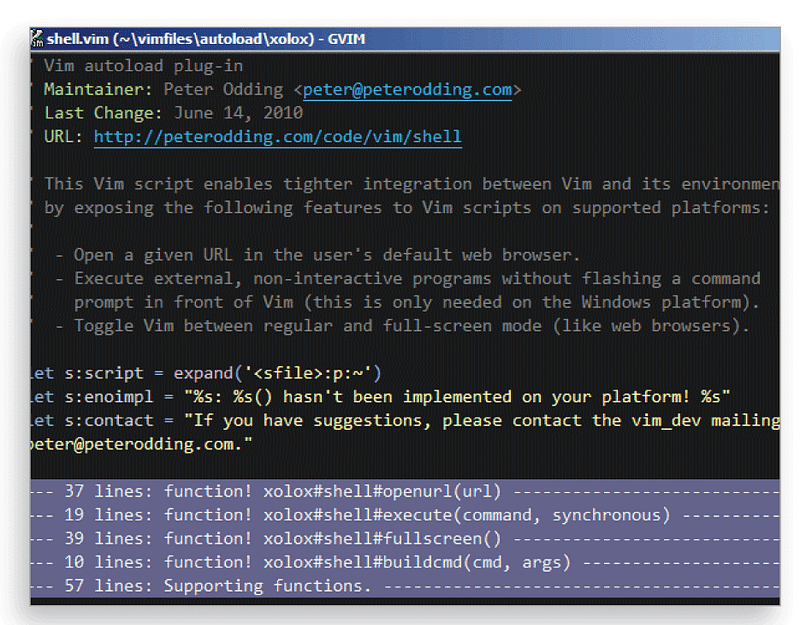
Remember the Editor War that involved Emacs? On the other side of the ring was Vi, another popular text editor that came baked-in with Unix-based operating systems, offering equally impressive features. Vim (short for Vi IMproved) is a modernized flavor of Vi that offers tons of convenient features putting it in line with the text editors of today for developers.
The Vim editor not only allows you to efficiently create full-scale Python programs, but it also allows you to work with text files with ease. The editor is also being actively updated with a slew of features that come standard with modern code editors. We have listed some of those features below:
● Offers more than 10 interface modes
● Comes with a built-in scripting language called Vimscript
● Offers extensive support for plugins
● Supports several programming languages
Advantages —
● Lightweight
● Vimtutor, a built-in tutorial can counter its high learning curve
● Is highly configurable and portable
Disadvantages —
● Can seem complicated at first
● Customizing Vim can become a never-ending process
Screenshot for Reference-
3. Thonny
Category: IDE
Platform Compatibility: Microsoft Windows, Linux, macOS
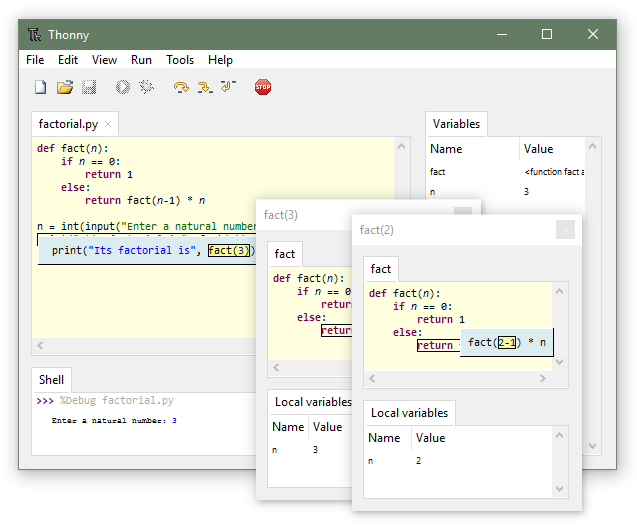
Thonny is an extremely beginner-friendly Python IDE for people with little or no programming experience. Thonny makes it easier for newbies to jump into Python programming as it comes with Python 3.7, saving you the installation.
Thonny’s educative programming style not only teaches you parts of the programming language, such as variables but also gives you a visual representation of the execution. Key highlights of Thonny are:
● Simple and clean IDE
● Comes with a simple debugger
● Provides code completion feature
Advantages —
● Offers tons of beginner-friendly features
● Provides an easy Python shell to install additional packages
● Can be extended with several handy plugins
Disadvantages —
● It isn’t as advanced as some other IDEs on this list
● Lacks support for templates
Screenshot for Reference-
4. Eric
Category: IDE
First Release Date: 2002
Platform Compatibility: Linux, macOS, Microsoft Windows
Popular Companies using Eric Python IDE -
BristoSoft, GymGlish, Climpact
Although not as popular as other code editors and IDEs on this list, Eric still comes packed with loads of features to handle your everyday text editing needs. What’s special about Eric is that it’s not only a code editor for Python but also an equally impressive IDE.
Based on the popular Qt toolkit and the flexible Scintilla editor control, Eric offers several handy features for creating Python applications and professionally managing software projects. Some of its best features are:
● Source code editing capabilities
● Support for GUI designing with Qt Designer
● Code debugging, checking, testing, and documenting
Advantages —
● Can run multiple editors at once
● Comes with an efficient debugger
● Centered around the Python programming language
Disadvantages —
● The interface may seem complex even to the pros
● Performance takes a hit while using multiple plugins
Platform Compatibility: Windows, Linux, Mac OS etc.
Price: Free
Rodeo is a cross-platform IDE for Python that is lightweight and serves as the perfect tool for modern data scientists developing for Machine Learning and Data Science problems.
Rodeo can be used effectively as your personal data exploration and interpretation tool. If you find yourself stuck at some point, Rodeo’s integrated tutorials can help you find a way out. Features that make Rodeo an excellent option for Data Science are:
● Its data plotting capabilities
● Offers features like code completion, syntax highlighting
● Comes with support for IPython
Advantages —
● Offers intuitive tools like visual file navigator, package search, and point-and-click directories
● Cheatsheets make referencing Python topics easier
Disadvantages —
● The IDE has several memory and performance issues
● Development has been stagnant for quite some time
Conclusion
Python can be extremely developer-friendly, but things get tough when it comes to picking the right code editor and IDE for the job. Python offers code editors and IDEs for people with varying levels of experience with the programming language. In this write-up, we covered the rest of the top Python code editors and IDEs that we missed in our original write-up.
If you’re in search of a powerful Python code editor and IDE, we hope this follow-up article points you to the right tool for you.
What are your thoughts on this mini-list? I’d love to hear about them.
More Interesting Python Readings
I hope you’ve found this article useful! Below are some interesting readings hope you like them too-
Claire D. is a Content Crafter and Marketer at Digitalogy — a tech sourcing and custom matchmaking marketplace that connects people with pre-screened & top-notch developers and designers based on their specific needs across the globe. Connect with me on Medium,Linkedin, & Twitter.