
Best Practices for Securing MongoDB

Introduction
MongoDB is a popular open-source NoSQL database that is used to store the data. It is famous because of its flexible and scheme-free format, in which data is stored in BSON(binary json) format documents. These databases are dynamic in nature and contain a variable number of fields.
Since this is a database that stores sensitive information, it is the organization’s top priority to ensure that it remains secure and accessible at all times. The risks associated with it and other security concerns can be reduced with the use of strong security parameters. Let’s talk about the various ways that it could be used.
What are the different ways to secure MongoDB?
In order to prevent data breaches, illegal access, and other serious security issues, MongoDB must be properly secured. In this section, we’ll talk more about that.
Role based access control in Mongodb
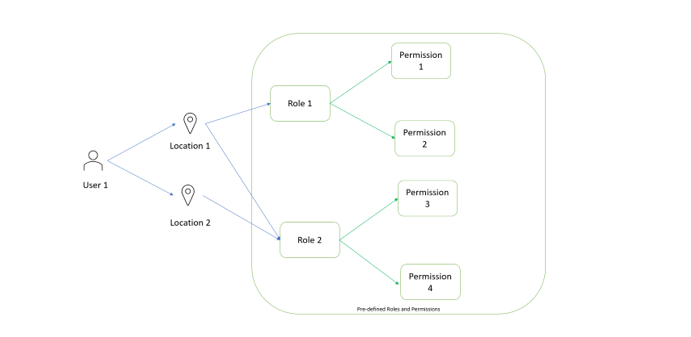
A user can have one or more roles assigned to them, each with its own set of permissions. If a user has several roles, it is clear that he has access to all of the privileges listed. There are predefined roles in MongoDB, and administrators can also build new roles as needed. Read/write, dbAdmin, userAdmin, and clusterAdmin are all examples of predefined roles. The administrator can provide a custom role the ability to search, add, edit, or delete data. That’s why a user with that privilege needs to exercise extra caution.
After a role has been defined, the administrator can provide it to a user, and a user can have as many roles as he needs (depending on the requirements of the business). We’re aware that role users have complete access to the system, thus it’s up to the administrator to ensure that the user has the bare minimum of permissions necessary to execute his job. It decreases the possibility of accidental and intentional misuse.
db.createUser({
user: “NormalUser”,
pwd: “NormalPassword”,
roles: [“clusterAdmin”]
})
Implement roles based on access control users and their privileges. In the above example we can see NormalUser has rights only to access the clusterAdmin role.
Encryption in MongoDB
Encryption is essential for protecting data at rest and in transit and improving database security as a whole. The information sent from the application to the mongoDB server can be encrypted using transport layer security protocols like TLS and SSL. The following settings can be made in the mongod.conf file to achieve this:
net:
port: 11111
bindIp: 127.0.0.1/localip
ssl:
mode: requireSSL
PEMKeyFile: /path/to/mongodb.pem
Therefore, PEMKeyFile specifies the location of the certificate and private key, and the requireSSL option ensures that SSL is enforced.
The entire MongoDB data directory can be encrypted with file system-level security. That means it will encrypt everything, not just some files. Encryption ensures privacy, keeps data intact, and transfers information safely. On top of that, it’s always a good idea to update your encryption keys and review your configuration settings on a regular basis.
Network security best practices while dealing with mongoDB
Protecting a mongoDB server from being accessed by an unauthorized server or having its data intercepted begins with this crucial step of applying network best practice. Making the mongodb accessible only from a specific IP address. The mongod.conf file requires editing by the administrator.
net:
bindIp: 127.0.0.1
While the example code above uses a local IP address, the binding IP address is entirely up to the individual business.
Additional virtual firewall deployment or HTTP interface deactivation can further limit the attack surface. Limit network access to the MongoDB server by using a firewall. Restrict access to the mongoDB port to authorized hosts only.
iptables -A INPUT -p tcp — dport 27017 -s trusted_ip_address -j ACCEPT
iptables -A INPUT -p tcp — dport 27017 -j DROP
On Linux, we may do this with the use of an ip-table.
To ensure that only authorized users are able to access the mongodb server, we must enable authentication features in mongod.conf. Here are the edits to the mongod.conf file that will accomplish this.
security:
authorization: enabled
Backup strategies in mongoDB
Data availability, data security, and data recovery from a variety of threats and disasters all depend critically on having a solid backup plan in place. Several backup utilities, including mongodump, are available in MongoDb. A command-line tool for making logical copies, with BSON data export. Further mongorestore, that is used to restore the dump data. So, it takes in data in BSON format and stores it in a MongoDB repository.
These are helpful, but in order to get the most out of backup, some fundamental best practices, such frequent backups, backup retention, backup automation via cron jobs, and encrypted backups, need to be put in place. Organizations must make these choices for safeguarding backup and making good use of it. These data best practices guarantee the data’s continued accessibility and accuracy. Volume, recovery target, retention, criticality, etc. are just a few examples of specific criteria that might vary greatly from one business to the next.
Conclusion
Now we realize the importance of MongoDB and its existence. While there are likely many different approaches that would provide adequate security, I’ve focused on the ones that are most commonly used by businesses and that cover the most serious risks in this blog post. Security best practices must be used in order to protect the company from harm.
Using the aforementioned methods, organizations should establish monitoring and regularly review audit logs to gain insight into the nature of threats to their databases and the steps that should be taken to mitigate them. If a permissions feature isn’t needed by our business, we should probably disable it in the configuration file to lessen the number of potential entry points for attackers.


