
Benefits of E2E Test Automation & Continuous Testing (Part 3: to Business Analysts)
More productive, more creative, and happier
Non-Medium-Members: you can view this article free on Vocal Media.
Updated (2023–09–28): My Innovative Solution to Continuous Testing: Let Business Analysts Self-help Create Data in a BuildWise CT Server
Continuous Testing (enables software teams to release to production daily, not fake CI/CD talks. Check out “Continuous Integration at Facebook” and AgileWay Continuous Testing Grading) is the centre of the software development process. It benefits all stakeholders of a software project.
- Executives
- Managers
- Business Analysts (BAs)
- Developers
- Testers (automated & manual)
- Customers
Many people do not realize that business analysts (BA) can also benefit significantly from CT. Surprised? It is actually very logical: BAs use the application (via UI) a lot (maybe only behind manual testers). As a matter of fact, after contracting/consulting for over 10+ years, I have come to notice that BAs are often among the first ones to realize the great benefits of E2E test automation and CT.
The benefits for BAs are:
- Test Data Creation
- Quick navigation to the application
- Self-help test data generation or an individual automation script run
- Performing a sequence of business steps
1. Test data creation
Typically, a BA frequently wants to get a particular data scenario in the application. To achieve that, they spend a lot of time using the application. It is not efficient: slow and error-prone.
I once worked on an insurance claim application. Lodging a proper claim (with many different categories) could easily take 4 minutes even if every step was done correctly. After seeing that, I created a suite of automated scripts (in Selenium Ruby) to get newly lodged claim numbers for a few sets of scenarios, of which each took 40 seconds on average.
Please note, the saving is not just 83% of the time (40 seconds instead of 240 seconds), it is actually more like 99%. Why? Because the BA can perform other activities during the test execution.
One BA found out what I did, and loved it. Soon I received requests from all the BAs for data, such as “a claim on contents only”, “home and content policy with over 1 million”, …, etc. I extended the scripts and sent the claim numbers (from execution) back to them on Slack.
2. Quick application navigation
BAs often need to navigate the application to a certain point for various purposes, such as showcase, investigation, discussion, manual verification…, etc. For example, Bob (a BA) wants to discuss the UI design for “manager reviewing an insurance claim”. It means that he needs to first go through the lodgement process which is time-consuming and tedious.
With test automation, Bob could find the automation script and run it in the Testing IDE, like below:
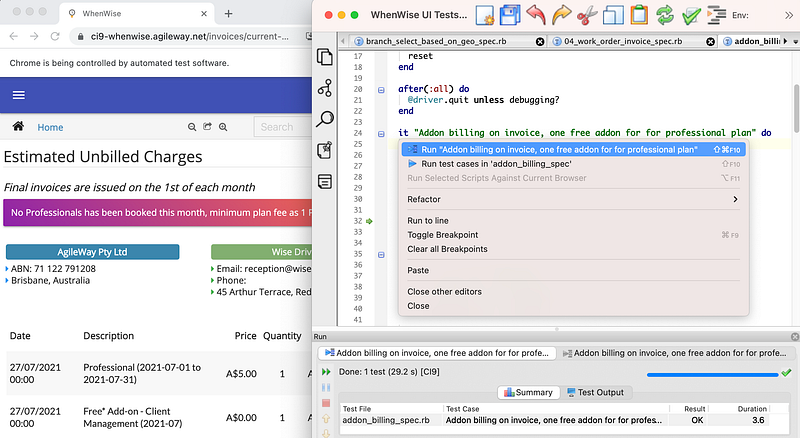
Please note: the browser will remain open after the test execution finishes, which is a feature of TestWise. In other words, Bob can continue to drive the application in the browser freely. A big time-saving!
3. Self-help test data generation
As this has become a regular thing, I worked out a better way to let business analysts do it themselves. I created a special build project in BuildWise for BA, named “Data Generation for Bob”.

A business analyst can click the “Build Now” button to trigger a build, he may move on to other tasks such as having a coffee, then get the desired data from BuildWise.

Furthermore, team members may run an individual script to get a specific type of data quickly.

Some might say that there is not much difference from Benefit 1 (business analysts request automation engineers to generate test data). Well, Yes or no. The result might be the same; however, the actors in this perspective are Business Analysts themselves. A logical outcome is that they would use it more frequently, instead of asking an automation engineer for help. This is often a starting point of the team’s awareness of what real Agile/DevOps is (whole team involved).
4. Performing a sequence of steps
There are many other uses of test automation and CT that Business Analysts will find helpful, such as Traceability Matrix (I will cover this in a separate article). Here I will just show one example: reconciliation in a financial organisation. To put it simply, this release needed to satisfy a government regulation, i.e., providing the reconciliation records.
This was actually quite challenging because we only had limited chances to do practice runs with production data. There were many database-intensive checks in each of the 7 steps. Some of the steps were dependent on manual processes.
My solution was to create 7 build projects in the BuildWise server, like the below:
- Export existing data
- After Batch Job 1, compare the Criteria A
- …
Each build project (in BuildWise) would run one or more automation scripts, which might generate some data. These data would be listed as “Build Artifacts” in BuildWise and could be used for the next business step and auditing.

On the production day (very early in the morning), The BA triggered the build project one by one on the BuildWise server (that we set up in the production zone the day before). It went smoothly. The business analyst was very happy because the BuildWise CT server greatly simplified this complex process.
From my experience, the business analysts who fall in love with test automation (just using them) are better BAs. They are more productive, more creative, and happier with the help of CT.
Related Readings:


