
Benchmarking the Raspberry Pi Zero 2 W
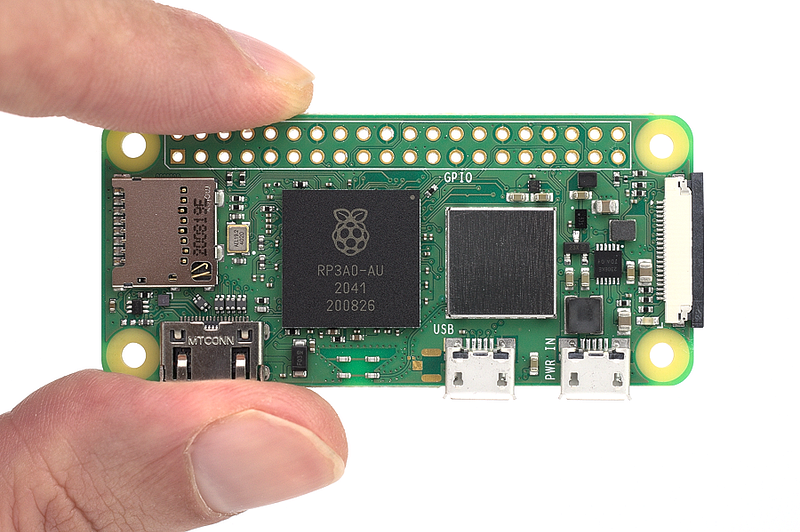
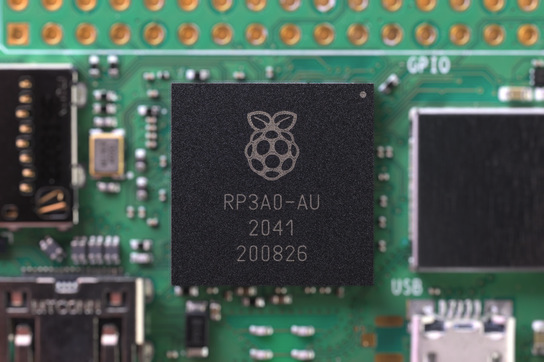
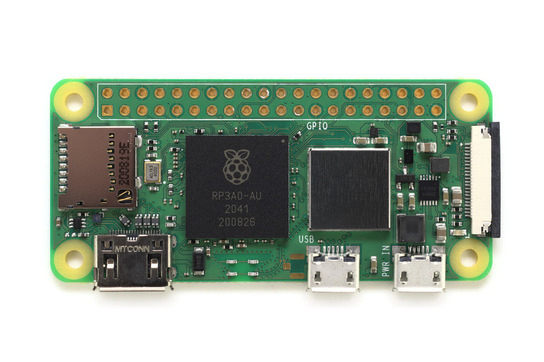
The first major upgrade in the compact, low-cost Raspberry Pi Zero family of single-board computers is here — and it’s a doozy. Blending the form factor of the original Raspberry Pi Zero with the processing power of the Raspberry Pi 3, the new Zero 2 W is an upgrade on almost all fronts — and launches today at just $15.
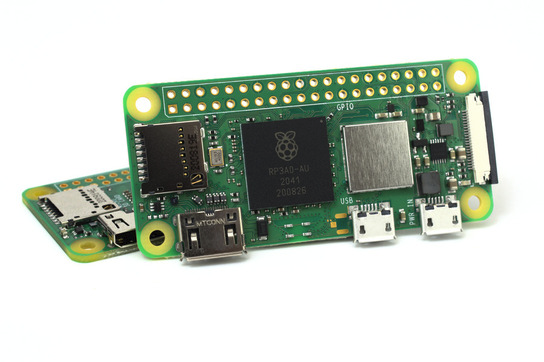
The board is designed to be near-identical to its predecessors, sharing compatibility with cases and accessories — with a couple of caveats relating to the removal of the RUN and TV headers and the shifting around of some test pads on the rear of the PCB.
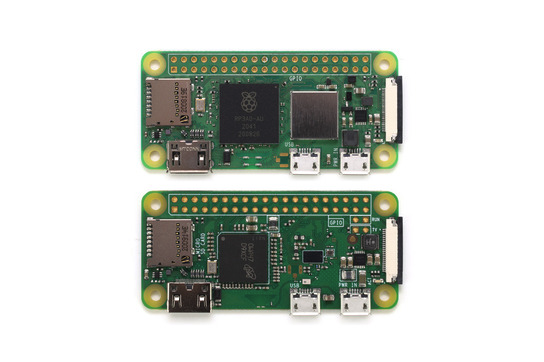
The specifications in full:
- Price: $15
- CPU: Broadcom BCM2710A1 (BCM2837) (4× 1GHz Cortex-A53)
- GPU: Broadcom VideoCore IV
- RAM: 512MB LPDDR2
- Storage: MicroSD (not included)
- Networking: Synaptics BCM43436/8 2.4GHz 802.11b/g/n Wi-Fi, Bluetooth 4.2
- Ports: Mini-HDMI, Micro-USB 2.0 OTG, Camera Serial Interface (CSI), 40-pin GPIO header
- Dimensions: 65×30mm (around 2.56×1.18in)
From this, it’s clear to see that the Raspberry Pi Zero 2 W is a big upgrade over its single-core predecessors — but only testing can reveal what difference those specs will make in the real world.
On to the benchmarking.
Power Draw
For this benchmark all devices on test were set up in the same way: the latest version of the Raspberry Pi OS software, booted to desktop, connected to a 1920×1080 HDMI monitor, a 2.4GHz Wi-Fi access point, and with a USB receiver for a wireless keyboard and mouse. The idle reading was taken as an average while sat at the desktop with no additional software loaded; the load reading was taken as a peak while running a stress-test workload which exercises both the CPU and GPU.
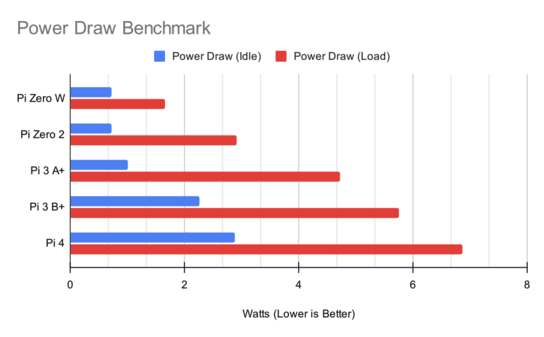
Surprisingly, the Raspberry Pi Zero 2 W manages to idle at roughly the same wattage as its predecessor — identical to two significant figures. Naturally, once you start loading those four processor cores things change: the Raspberry Pi Zero two draws almost twice as much power as the Raspberry Pi Zero W for the same worst-case-scenario workload.
Thermals
Extra power means extra heat, but it looks like the engineers’ decision to drop the clock speed of the CPU cores to 1GHz has done the trick. At no point during a ten-minute CPU and GPU stress test did the Raspberry Pi Zero 2 W hit its 80°C (176°F) throttle point, maintaining full performance throughout the test and dropping in temperature quickly during the five-minute cooling off period at the end of the benchmark.
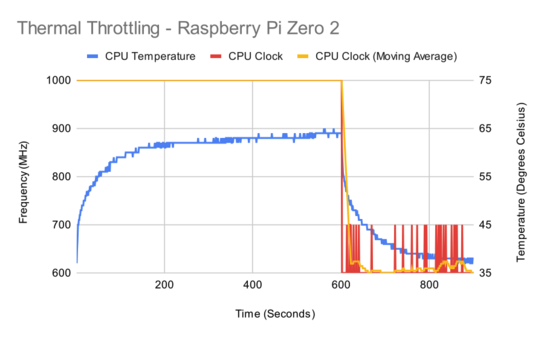
This test, however, takes place in the open air. Anyone planning on using a case, or embedding the Raspberry Pi Zero 2 W in an enclosed environment, will find that throttling is much more likely than with the cool-running Raspberry Pi Zero W — potentially to the point of requiring some form of active cooling if the device will be under sustained load.
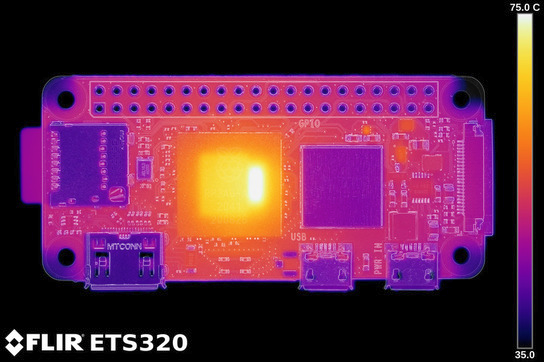
Treating the board for thermal emissivity and putting it under a FLIR ETS320 thermal inspection camera shows no real surprises. The hottest part of the board is the right-hand side of the custom system-on-chip, where the four CPU cores are located, reaching just above 72°C (around 162°F) during the stress-test benchmark. Other hotspots can be seen to the upper right, where the power circuitry is found, but are unlikely to get hot enough to require any cooling even when cased.
The heat is distributed relatively evenly throughout the board, though doesn’t easily make its way into the metal ports and the radio module shield. With far less PCB in which to sink heat than the larger Raspberry Pi 3 Model A+ or larger-still Raspberry Pi 3 Model B+, heatsinks may be required for some installations.
Memory Bandwidth
The processor cores aren’t the only things that are faster on the Raspberry Pi Zero 2 W: the memory bandwidth has been considerably boosted, as a simple synthetic benchmark reading and writing in 1MB blocks shows.
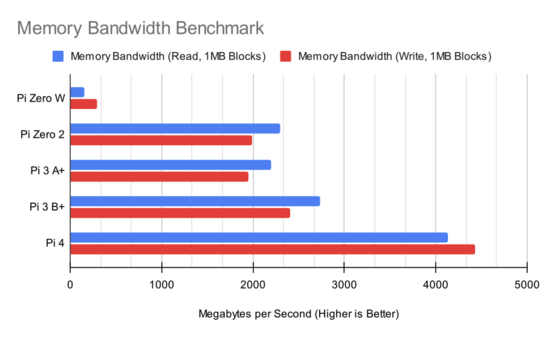
The Raspberry Pi Zero 2 W manages to sit roughly neck-and-neck with the Raspberry Pi 3 Model A+, though is somewhat slower than the Model B+. All models are, as you would expect, outclassed by the newer Raspberry Pi 4 — which remains the go-to model for performance-sensitive projects.
Storage Throughput
Memory performance is one thing, but at some point you’re going to have to read or write from storage. Here, the news isn’t so great: while the Raspberry Pi 4 brought a doubled SD Card clock, boosting performance, there’s been no such change in the Raspberry Pi Zero 2 W.
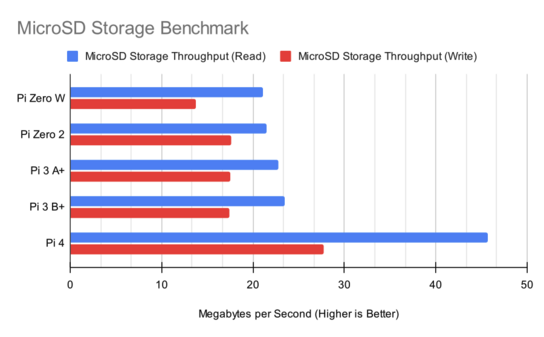
Read performance is on a par with the Raspberry Pi Zero W, though the Zero 2 W manages to pull ahead on write. It’s not until you move to the Raspberry Pi 4, though, that you’ll see any real performance boosts — no matter how good a microSD Card you pick up.
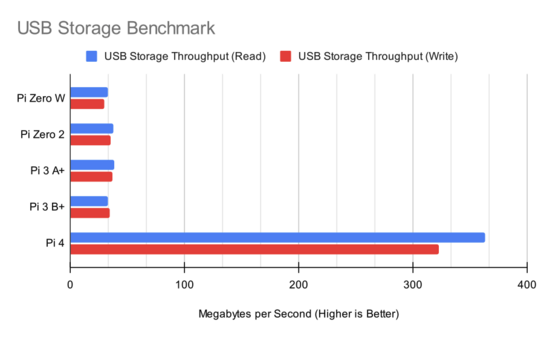
The same is true for USB-connected storage — and, by extension, any USB-connected devices, including Ethernet dongles and machine learning accelerators. The Raspberry Pi Zero 2 W manages a small boost over its predecessor, but only just — and, once again, you have to move to the Raspberry Pi 4 to see any real improvement, where the USB 3.0 ports offer a dramatic increase in performance.
Linpack
The Linpack benchmark is a classic, though entirely synthetic. This version, a pre-compiled copy ported to the Raspberry Pi by Roy Longbottom, is used for historical reasons, and its results should not be taken as an absolute representation of the peak performance available from each model. It does, however, provide an easy at-a-glance comparison between the models on test — and older models, as demonstrated in earlier benchmark articles.
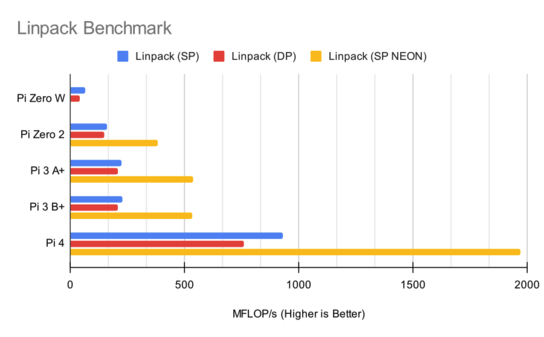
There are no surprises here: the Raspberry Pi Zero 2 W is considerably faster than its predecessor, even before you take advantage of the NEON instructions available on the newer Arm cores. It does, however, lag behind the Raspberry Pi 3 family, thanks to that slower default clock speed.
GPIO Zero
A popular Python library for handling the Raspberry Pi’s general-purpose input/output (GPIO) port, GPIO Zero can act as a simple benchmark for worst-case GPIO performance. Here, a simple Python program runs in a loop with only one job: to see how quickly it can toggle a GPIO pin on and off, with an external frequency counter measuring the result.
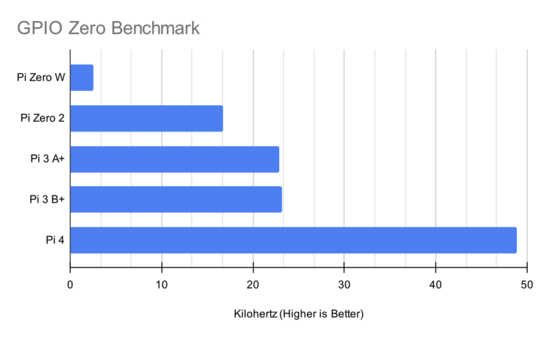
Being entirely CPU-bound, it’s no surprise to see similar results here to the synthetic Linpack benchmark above: the Raspberry Pi Zero 2 W offers a dramatic performance increase over the Zero W, but its slower clock speed hampers performance compared to the Raspberry Pi 3 range. One thing is clear, though: Python users have plenty to gain by moving to the newer Zero 2 W.
File Compression
The first real-world test of the Raspberry Pi Zero 2 W’s performance, this benchmark compresses a randomly-generated file — the same file between runs of the test, to ensure things are fair — using bzip2 and times how long it takes. For models with multi-core processors, the benchmark is repeated using the multithreaded lbzip2.
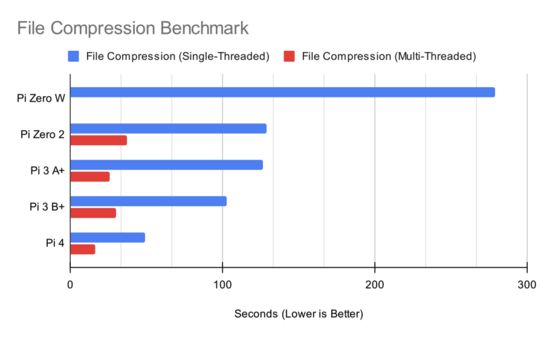
The gains here are dramatic. The Raspberry Pi Zero W is the only model on test which doesn’t benefit from multithreading, having only a single CPU core; the Raspberry Pi Zero 2 W goes from completing the benchmark in under half the time as its predecessor using the same single-threaded compression application to finishing it seven and a half times more quickly after switching to a multithreaded version.
Image Editing
For this benchmark, a high-resolution image is loaded into The GIMP, run through a filter, and saved as a Portable Network Graphic (PNG) — mimicking a common image editing workload, though in an automated fashion which removes the human element from the equation.
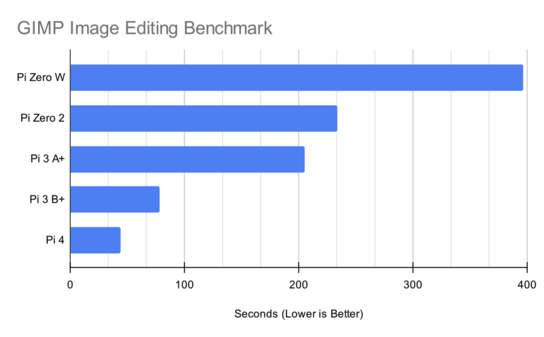
This workload is memory-hungry, and it’s clear the Raspberry Pi Zero 2 W is at a disadvantage with just 512MB of RAM. While it handily beats the Raspberry Pi Zero W, the margin isn’t as big as in previous benchmarks — and a look at the Raspberry Pi 3 Model B+’s result shows what it could be capable of, if only it had 1GB of RAM instead.
Gaming
The Raspberry Pi Zero W has long been a popular gadget for retro gamers, thanks to its small size and power draw making it easy to cram into hand-held housings or as a replacement for a long-deceased motherboard. Its performance, though, limited it to the simpler end of the gaming and emulation spectrum.
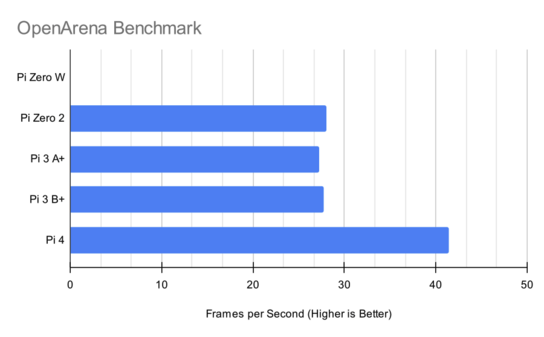
There’s no such limit with the Raspberry Pi Zero 2 W. Running the popular OpenArena first-person shooter at 720p, the Zero 2 W managed an entirely-playable 28 frames per second — with over 30 achievable by dropping the resolution or quality settings — while the Raspberry Pi Zero W couldn’t manage anything that would even round up to a whole number.
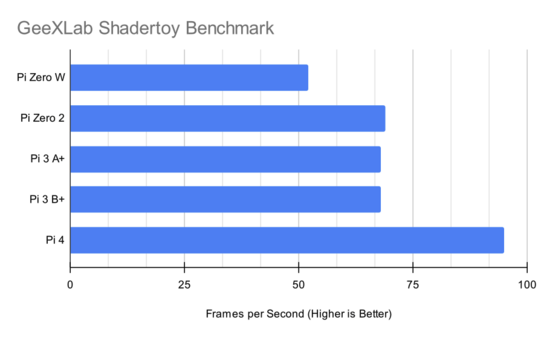
Switching to a pure-GPU workload, a shadertoy included in the GeeXLab benchmark suite, reveals where those gains come from: the CPU. GPU performance on the Raspberry Pi Zero 2 W is only marginally higher than that of the Raspberry Pi Zero W, and in-line with the Raspberry Pi 3 family. All models, naturally, fall behind the Raspberry Pi 4, which is the only device on test to use a Broadcom VideoCore VI GPU instead of the ageing VideoCore IV.
Optical Character Recognition
This real-world workload takes ten high-resolution magazine scans and passes them through the Tesseract optical character recognition (OCR) package. Tesseract includes support for taking advantage of multi-core processors, though can also run on a single-core device like the Raspberry Pi Zero W.
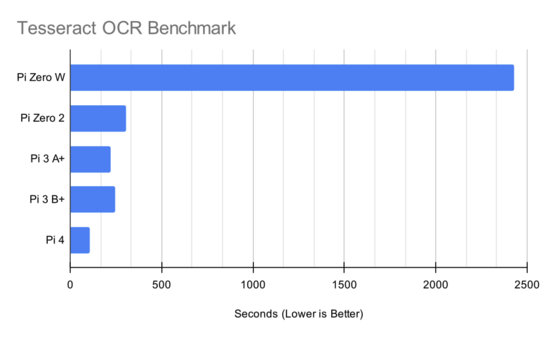
This is one of the most dramatic results in the testing. The combination of four more powerful processor cores and a massive increase in memory bandwidth push the Raspberry Pi Zero 2 W to complete the benchmark eight times more quickly than the Raspberry Pi Zero W, and only slightly behind the faster Raspberry Pi 3 Model A+ and Model B+.
Cryptography
For this benchmark, the OpenSSL cryptographic toolkit is used to test two key algorithms: 256-bit AES encryption in cipher block chaining (CBC) mode and 512-bit SHA-2 hashing.
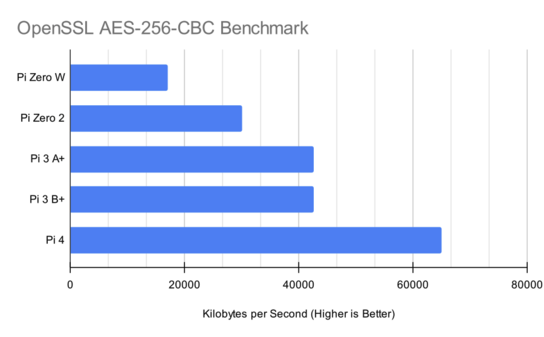
The encryption results show no surprises: the Raspberry Pi Zero W sits at the bottom of the pile, while the Raspberry Pi Zero 2 W is roughly twice as fast — the benchmark not benefiting from the additional processor cores and instead relying on raw single-core performance.
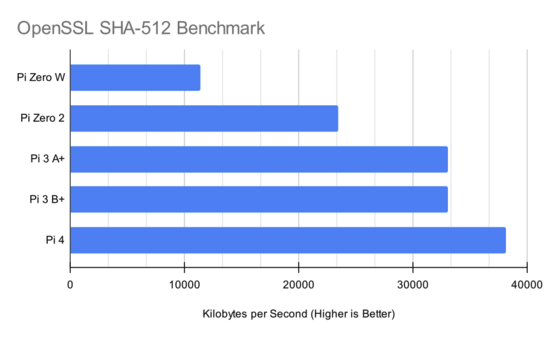
Hashing performance shows the same story, though with one surprise: the Raspberry Pi 3 Model A+ and Model B+ narrow the gap to the Raspberry Pi 4 in this particular workload, an interesting result the investigation of which is outwith the scope of this particular article.
Video Encoding
The low cost, small size, and tiny power draw of the Raspberry Pi Zero W made it a popular choice for remote video streaming projects — but as soon as you needed to transcode video, it became wholly unsuitable. For this benchmark, each device is given the job of transcoding a 1080p video into H.264 format, using the hardware-accelerated omx and v4l2 libraries.
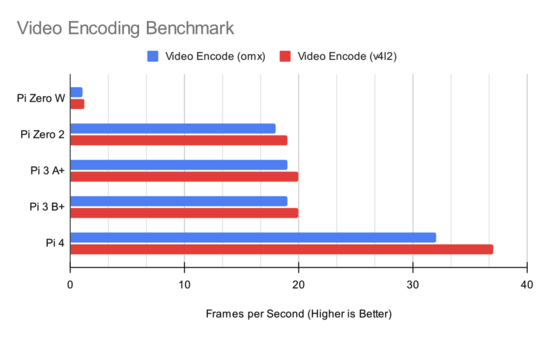
Like the Tesseract OCR benchmark, these results are staggering. For both libraries, the Raspberry Pi Zero 2 W shows a roughly sixteenfold performance gain — going from a slideshow-like 1.2 frames per second to a far smoother 19 frames per second. To get over 30 frames per second, however, you’ll need a Raspberry Pi 4 — or to drop the resolution down to 720p.
Web Browsing
The Raspberry Pi Zero W was usable as a general desktop computer, but only if you were patient. In this benchmark, the stock Chromium browser — full-screen, and with default settings — is used to run the Speedometer 2.0 benchmark, which tests its performance for simple web applications.
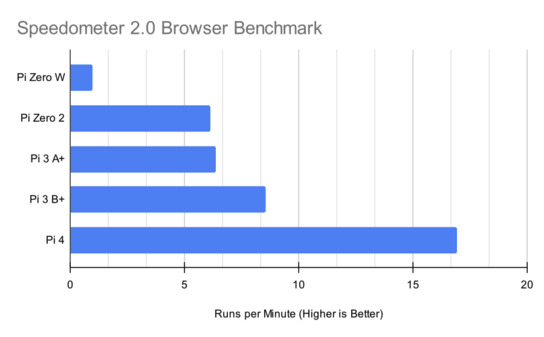
Another benchmark, and another clear win for the Raspberry Pi Zero 2 W at over six times the performance of the Raspberry Pi Zero W. There’s a catch, however: that 512MB of RAM again. Running a simple web app is one thing, but if you’re looking to do some web browsing and open more than a couple of browser tabs you’ll find the process terminated with an out-of-memory error pretty quickly.
Machine Learning
Running machine learning workloads on low-power devices, known as embedded artificial intelligence (AI) or tiny machine learning (tinyML) depending on the network and the device, is increasingly popular. Here, the SSDLite-MobileNet-V2 object detection network is run across a pre-recorded video, and the performance measured in frames per second.
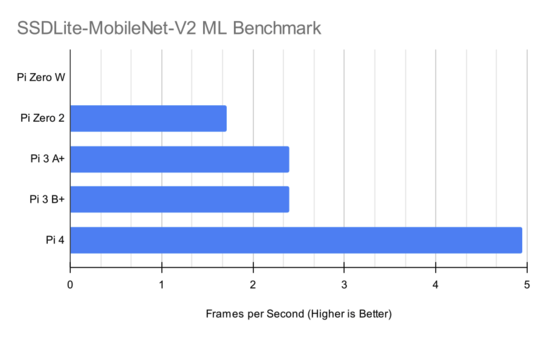
The Raspberry Pi Zero W, sadly, refused to participate in this particular test. If it had, the graph would probably look very similar: despite its far more powerful processor and boosted memory bandwidth, the Raspberry Pi Zero 2 W only managed 1.7 frames per second — far below real-time but enough to accurately detect and track slower-moving objects, and to do so with an admittedly obvious lag in faster footage.
It’s not alone: despite being a “lighter” version of the SSD-MobileNet network, even the range-topping Raspberry Pi 4 failed to get above five frames per second during this demanding benchmark.
Networking
There’s no Ethernet port on the Raspberry Pi Zero range — though you could add one using the USB On-The-Go port, if you desperately needed wired networking —meaning Wi-Fi is your only option. Here, the Raspberry Pi Zero disappoints: the Synaptics BCM43436/8 only supports 2.4GHz networks, leaving it unable to connect to the 5GHz networks available to the Raspberry Pi 3 and 4.
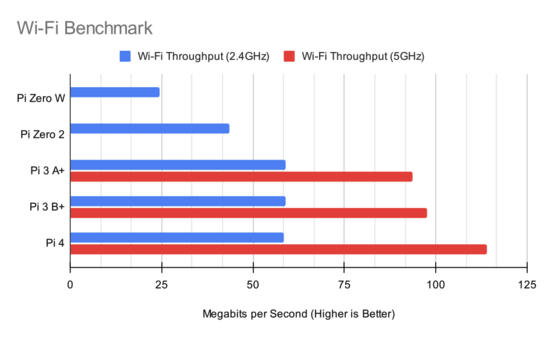
That decision — likely taken to reduce the bill of materials for what is, admittedly, a bargain-basement launch price — has a direct impact on throughput. Without the ability to use 5GHz networks, Wi-Fi throughput on the Raspberry Pi Zero 2 W is roughly half that possible on a Raspberry Pi 3 — and even the 2.4GHz performance lags behind.
The one positive: while it can’t hold a candle to the Raspberry Pi 3, the Raspberry Pi Zero 2 W’s radio is considerably better than that included in the Raspberry Pi Zero W — offering a roughly 80 per cent throughput gain in ideal conditions.
One last thing to note: although Raspberry Pi has officially launched the board as the “Raspberry Pi Zero 2 W,” there is no sign of a non-W version which drops the radio to reduce the bill of materials — at least, for now.
Footprint and Weight
The Raspberry Pi Zero 2 W is designed to mimic the layout of both the Raspberry Pi Zero and Raspberry Pi Zero W. Cases and accessories designed for the older models should be compatible with the new — with a couple of exceptions: anything relying on the placement of test pads on the rear will need redesigning, as will accessories which make use of the removed RUN and TV headers.
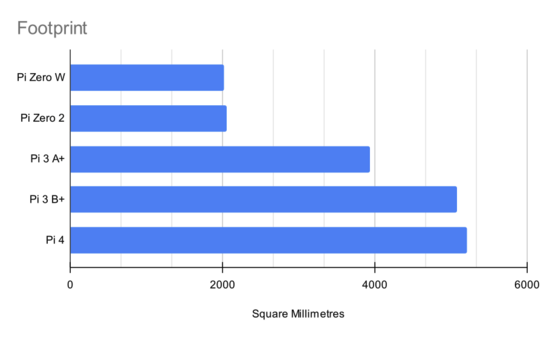
Measured at its widest points, rather than from the edges of the PCB, the Raspberry Pi Zero 2 W is slightly larger than the Raspberry Pi Zero W thanks to a marginally bigger HDMI socket — but there’s not much in it. Both are still far and away the smallest Raspberry Pi models on test.
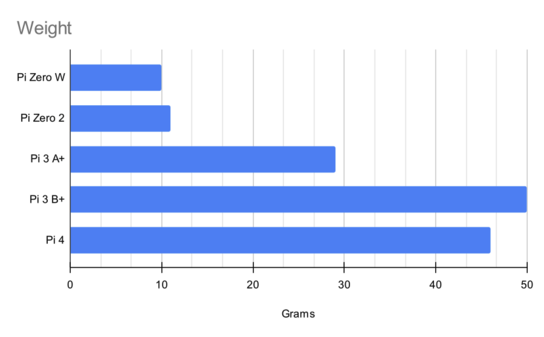
There is, though, a difference in weight: the Raspberry Pi Zero 2 W is 1g heavier than its predecessor, at 11g to the Raspberry Pi Zero W’s 10g. It’s a small difference, and likely almost entirely attributable to the metal cover over the radio module — but it’s there, and it could matter to those using a Zero as a payload for airborne projects.
Conclusion
Despite a couple of disappointments — the radio being by far the biggest — the Raspberry Pi Zero 2 W impresses, and that’s before you even consider the pricing. While $15 is three times the launch price of the original Raspberry Pi Zero and half again as much as the Raspberry Pi Zero W, you’re getting a heck of a lot for your money.
There are, effectively, no workloads which are not uplifted by the Raspberry Pi Zero 2 W. The only exception: RAM-constrained workloads, which still benefit from the faster processor and boosted memory bandwidth but hit a brick wall once that not-so-generous 512MB of RAM has been filled. It’s not a new story: the same workloads hit the same wall on the Raspberry Pi 3 Model A+, and enjoy a big performance boost when run on the Model B+ with its 1GB of RAM.
The new processor brings with it access to new use-cases, too. Computer vision, web browsing, 3D gaming — all things which were either entirely inaccessible or far too low performance on the Raspberry Pi Zero W and which are now within reach on the Raspberry Pi Zero 2 W, if you temper your expectations a little.
The engineers at Raspberry Pi have hit a home-run with this launch, but there’s one final fly in the ointment: availability. With component supply shortages and shipment delays still a problem throughout the industry, and given just how impressive the Raspberry Pi Zero 2 W is for the money, expect demand to be higher than supply for some time post-launch.
The Raspberry Pi Zero 2 W is available at all good resellers today, with a list available on the Raspberry Pi website.


