Be Careful of Passing an Async Function as a Parameter in JavaScript
An async function can have more than one await expression in its scope which can pause the execution inside its function scope. Once the passed Promisehas been resolved, it will resume the async function's execution. The async/await works like a combination of controllable promise chain and generator function.
Let’s have a look of the following examples.
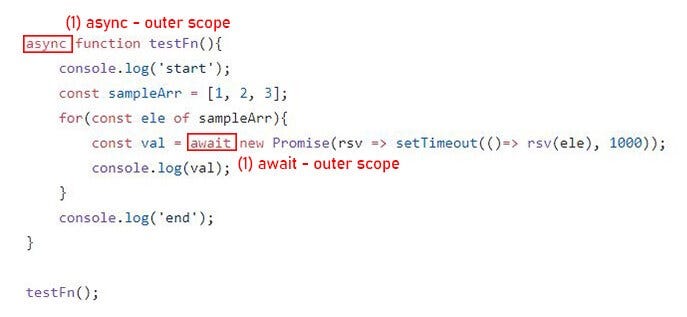
Q: Will example 1 & 2 have the same output to the console?
The answer is no. The output of the 1st example is:
"start"
1
2
3
"end"
The output of example 2 is:
"start"
"end"
1
2
3
It is not a problem if you simply call your async function as a function expression, but when you pass your async function as a parameter into a function especially a 3rd-party function, you’re passing it into a black box, and you’ll lose control of your async function’s execution.
In this post, we will be discussing why we should be careful of passing an async function as a parameter in terms of async/await mechanism.
1. async/await explanation
First, we need to clarify the working mechanism of async/await:
(1) async keyword and await expression work together
(2) await can only be used to pause the execution in the scope of its corresponding async function, which means the await in inner scope won’t be able to pause the execution in the outer scope.
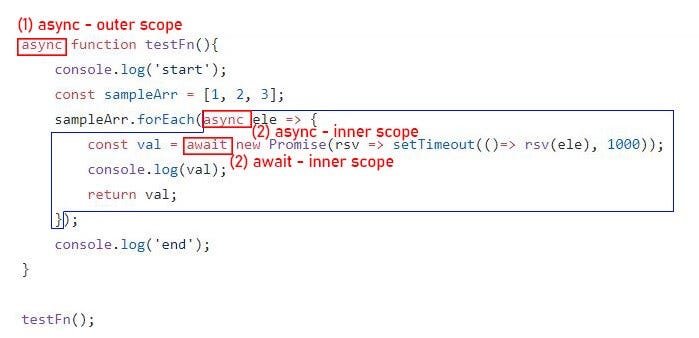
For example, in the first example, the await expression directly works with async keyword of the function scope so it can pause the execution of in the scope.
2. Pause outer scope’s execution with inner scope await
Now you might be wondering how we can pause the execution in the outer scope from the inner scope await expression. Actually it all depends on how the function handler deal with your async function. There are two general situations:
(1) handler function is synchronous or
(2) handler function is asynchronous
Let’s see the code.
2.1 synchronous handler function
Take the code shown above as an example, if your async function is passed into an synchronous function, then you need to link your inner scope’s await promise to outer scope’s await by returning a promise from handlerFn to outer scope, and the returned promise’s resolution should depend on the inner scope’s await. To make it simple, I directly return the promise generated by await in inner scope to outer scope, and await its resolution in outer scope. Here below is the code:
2.2 asynchronous handler function
Actually the concept for handling asynchronous handlerFn is the same that you need to link your inner scope’s await to outer scope’s await in the asynchronous handlerFn. To be specific, create a promise(whose resolution depends on inner scope) in the handler function, and return it to outer scope. The only thing different is the we can use await to create a pending promise.
In real-world project, when we use a 3rd-party library, passing an function to a 3rd-party handler function is very common, so you’d better make sure what type the handler function is (async or not) and how your function will be executed (if there is a promise returned from handlerFn) before passing an async function as a param into that handlerFn, otherwise it might not work as your expectation.
Wrapping Up
Now you should have a deeper understanding of async/await mechanism. However, the interactions between inner scope and outer scope is not the only trap of async/await functions. We will be discussing the async function’s error handling which is another minefiled of async functions.
If you’ve learnt anything from this post, please don’t hesitate to give me a clap. Your support is always important for me.
Cheers and thanks for reading!
Other Posts:


