

Converting Texts to Numeric Form with TfidfVectorizer: A Step-by-Step Guide
How to calculate Tfidf values manually and using sklearn
TFIDF is a method to convert texts to numeric form for machine learning or AI models. In other words, TFIDF is a method to extract features from texts. This is a more sophisticated method than the CountVectorizer() method I discussed in my last article.
The TFIDF method provides a score for each word that represents the usefulness of that word or the relevance of the word. It measures the usage of the word compared to the other words present in the document.
This article will calculate the TFIDF scores manually so that you understand the concept of TFIDF clearly. Toward the end, we will see how to use the TFIDF vectorizer from the sklearn library as well.
There are two parts to it: TF and IDF. Let’s see how each part works.
TF
TF is elaborated as ‘Term Frequency’. TF can be calculated as:
TF = # of occurrence of a word in a Document
OR
TF = (# of occurrence in a document) / (# of words in a document)
Let’s work on an example. We will find the TF for each word for this document:
My name is Lilly
Let’s see an example for each of the formulas.
TF = # of occurrence of a word in a Document
If we take the first formula here which is simply the number of occurrences of a word in a document, TF for the word ‘MY’ is 1 as it appeared only once.
In the same way, the TF for the word
‘name’ = 1, ‘is’ = 1, ‘Lilly’ = 1
Now, let’s use the second formula.
TF = (# of occurrence in a document) / (# of words in a document)
If we take the second formula, the first part of the formula (# of occurrences in a document) is 1, and the second part (# of words in a document) is 4.
So, the TF for the word ‘MY’ is 1/4 or 0.25.
In the same way, the TF for the words
name = ¼ = 0.25, is = ¼ = 0.25, Lilly = ¼ = 0.25.
IDF
The elaboration of IDF is Inverse Document Frequency.
Here is the formula,
idf = 1 + LN[n/df(t)]
or
idf = LN[n/df(t)]
Where, n = Number of documents available, and
df = Number of documents where the term appears
As per sklearn library’s documentation
idf = LN[(1+n) / (1+df(t))] + 1 (default setting)
or
idf = LN[n / df(t)] + 1 (when smooth_idf = True)
We won’t work on all four formulas here. Let’s just work on the 2 formulas. You will get the idea.
To demonstrate the IDF, only one document is not enough. I will these three documents:
My name is Lilly
Lilly is my mom’s favorite flower
My mom loves flowers
Let’s use this formula to practice this time:
IDF = LN[n/df(t)]
If we take the word ‘My’ first, n is 3 because we have 3 documents here, and df(t) is also 3 because ‘My’ appeared in all three documents.
IDF(MY) = LN(3/3) = 0 (As ln(1) is 0)
We will work on one more word to understand it clearly. Take the word ‘name’.
For the word ‘name’ again the n will be the same as before because the number of documents is 3 but the df(t) will be 1. Because the word ‘name’ is present in only one document.
IDF(name) = ln(3/1) = 1.1 (I used Excel’s LN function for this)
How does the sklearn library calculate TFIDF?
the sklearn library uses these two formulas for TF and IDF:
TF = # of occurrence of a word in a Document
idf = LN[(1+n) / (1+df(t))] + 1
If I use the same three documents, for the word ‘MY’:
TF(My) = 1
IDF(My) =LN((1+3)/(1+3)) + 1 = 1
The formula for TFIDF is :
TFIDF = TF*IDF
So, the TFIDF for ‘My’ is :
TFIDF(My) = 1* 1 = 1
For the word ‘name’:
TF(name) = 1
IDF(name) = =LN((1+3)/(1+1)) +1 = 1.69
TFIDF(name) = 1* 1.69 = 1.69
In the same way, the TFIDF for all the words are :
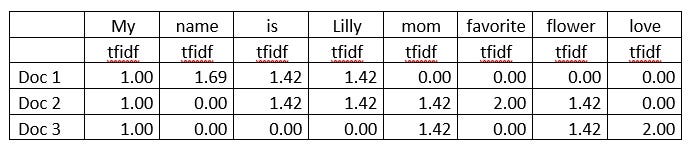
The sklearn’s tfidf vectorizer normalizes the values to bring them in a 0 to 1 scale. For that, we need to have SS(Sum of Squared) for the tfidfs of each document:
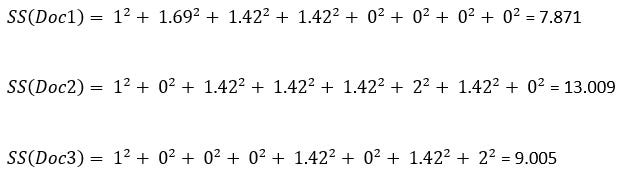
The normalized tfidf is:
The tfidf value for the word/ the SS of the document
If we take the word My. normalized tfidf for ‘My’ in the document-1 is:
tfidf_normalized(My) = 1.00 / 7.871 = 0.356
tfidf for the word ‘mom’ in document-3 is:
tfidf_normalized(name) = 1.42 / 9.005 = 0.472
Again, tfidf for the word ‘mom’ in document-2 is:
tfidf_normalized(name) = 1.42 / 13.009 = 0.392
Looks like the word ‘mom’ has a bit more relevance in the document 2 than in the document 3
The normalized tfidf for all the words are here:
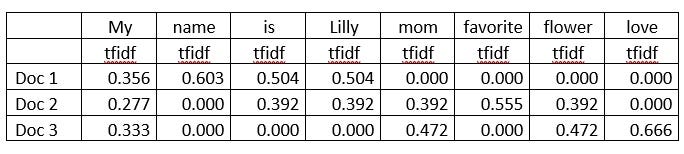
Now, we should check how the tfidf vectorizer in the sklearn library work.
First, import the Tfidf vectorizer from sklearn library and define the text to be used for feature extraction:
from sklearn.feature_extraction.text import TfidfVectorizer
text = ["My name is Lilly",
       "Lilly is my mom’s favorite flower",
       "My mom loves flowers"]
In the next code block,
the first line calls the TfidfVectorizer method and saves it in a variable named vectorizer.
the second line fit_transform the text into the vectorizer
the third line converts that to an array to display
vectorizer = TfidfVectorizer()
X = vectorizer.fit_transform(text)
X.toarray()
Output:
array([[0.        , 0.        , 0.        , 0.4804584 , 0.4804584 ,
        0.        , 0.        , 0.37311881, 0.63174505],
       [0.49482971, 0.49482971, 0.        , 0.37633075, 0.37633075,
        0.        , 0.37633075, 0.2922544 , 0.        ],
       [0.        , 0.        , 0.5844829 , 0.        , 0.        ,
        0.5844829 , 0.44451431, 0.34520502, 0.        ]])
It will be helpful to convert this array into a DataFrame and use the words as the column names.
import pandas as pd
pd.DataFrame(X.toarray(), columns = vectorizer.get_feature_names())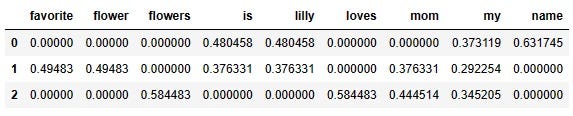
You can use the same parameters as I explained in my tutorial on CountVectorizer to refine or limit the number of features. Please feel free to check that.
Conclusion
This tutorial explained in detail how Tfidf Vectorizer works. Though it is very simple to use the Tfidf Vectorizer from sklearn library, it is important to understand the concept behind it. When you know how a vectorizer works, it becomes easier to make the decision on what kind of vectorizer is suitable.
Feel free to follow me on Twitter and like my Facebook page.
The video version of this tutorial:


