
Basics of JavaScript: Variable
Hello everyone! Welcome to my first blog post on basics to JavaScript!
Today, I want to talk briefly about variables, declaring variables, and assigning variables with values in JavaScript.
What is JavaScript?
So for those of you new to JavaScript, let’s briefly go over what JavaScript is. JavaScript is one of the most popular interpretive programming languages in the world and it’s one of the three main technologies used on the world wide web along with HTML (Hypertext Markdown Language) and CSS (Cascading Style Sheet). Moreover, JavaScript is a very dynamic language and fairly easy to code with so beginner friendly for the most part. However don’t get JavaScript confused with Java there are two different languages.
So now let’s get into JavaScript variable. The first thing I want to talk about is what a variable is in JavaScript. One thing to note is that variable is used in other programming languages not just in JavaScript.
What is a variable?
A variable is an entity that can hold value also known as data and each variable can only hold one value at a time so you you could think of a variable as a small storage.
How do you declare a variable in JavaScript?
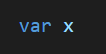
Variable declaration in programming is the process of creating a variable. The way we create a variable is by using a reserved keyword called “var” followed by the name of the variable that you want to create.
How do you assign a variable a value?
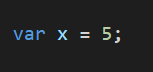
Variable assignment is the way you can assign a value to a variable. This is quite simple. Simply declare a variable like we did in the step above followed by an equal sign and then a value that we want to assign this variable.
You can also get more information on this topic in this video from this link here.
In the next post, I will talk about the different data types that we have in JavaScript including some examples one how they look like.
Feel free to leave any questions, comments, or feedback in the comment section below.
For new contents:
Subscribe on YouTube here!
Follow on Twitter here!