Basic Linux Commands to Check Hardware and System Information
Once the Linux kernel initializes, it enumerates all hardware components. There are plenty of commands to check information about the hardware of a Linux system. Some commands report only specific hardware components like CPU or memory while the rest cover multiple hardware units.

1. Printing Machine Hardware Name (uname –m uname –a)
Using the -m switch with the uname command prints the hardware name of our machine. If we want the uname command to print all the information mentioned above, we can use the command with all the switches.
$ uname –m
$ uname -a

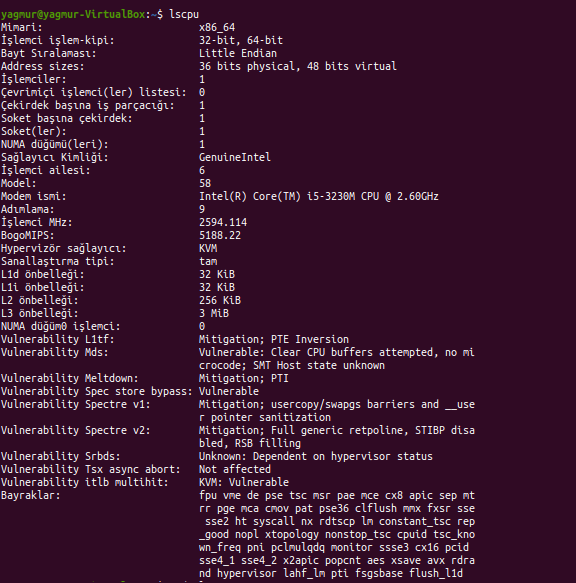
2. lscpu
The lscpu command reports information about the cpu and processing units. It does not have any further options or functionality.
$ lscpu
lshw –List Hardware
A general purpose utility, that reports detailed and brief information about multiple different hardware units such as cpu, memory, disk, usb controllers, network adapters etc. Lshw extracts the information from different /proc files. Lshw is capable of reporting memory configuration, firmware version, mainboard configuration, CPU version and speed, cache configuration, bus speed etc. The lshw command needs to run with super privileges to be able to detect and report the maximum amount of information. So run as root, or use sudo. Lshw assorts hardware components into groups called “class”. Processor, memory, display, network, storage are all different classes.
$ sudo lshw $ sudo lshw –short
Generate report in html/xml format
We can also export lshw reports in html, xml and json formats.
$ sudo lshw –html > lshw-output.html
$ sudo lshw –xml >lshw-output.xml
2. hwinfo- Hardware Information
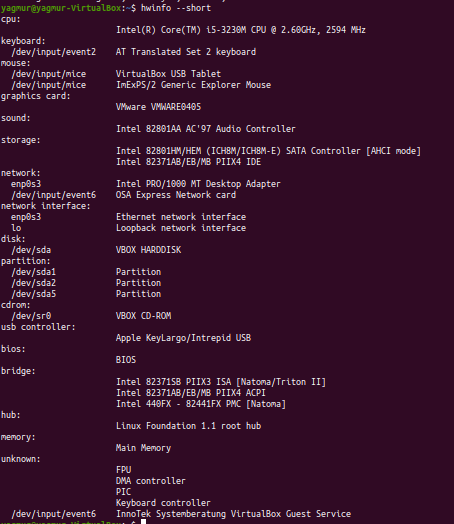
Hwinfo is another general purpose hardware probing utility that can report detailed and brief information about multiple different hardware components, and more than what lshw can report.
$ hwinfo
$ hwinfo –short
3. lspci- List PCI
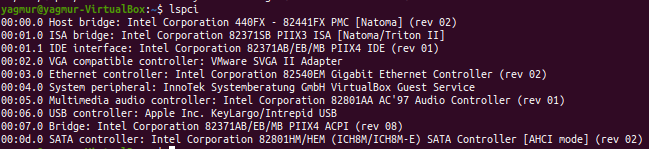
The lspci command lists out all the pci buses and details about the devices connected to them. The vga adapter, graphics card, network adapter, usb ports, sata controllers, etc all fall under this category. By using previous lspci command with the -v parameter more detailed information about the PCI devices can get.
$ lspci
4. lsscsi-List sci devices
Lists outs the scsi/sata devices like hard drives and optical drives. SCSI is another popular BUS used to connect different type of devices to the Linux systems. SCSI interface devices are pricier than PCI because they are generally used in enterprise server hardware. SCSI information similar to the PCI can be listed with the following command.
$ lsscsi

5. lsusb- List usb buses and device details
This command shows the USB controllers and details about devices connected to them. By default brief information is printed. We can use the verbose option “-v” to print detailed information about each usb port. The lsusb command fetches and prints detailed USB controllers information along with the connected hardware.
$ lsusb
6. lsblk- List block devices
The lsblk command fetches detailed block device information such as your hard drives, flash drives, and their partitions.
$ lsblk
7. df-disk space of file systems
Reports various partitions, their mount points and the used and available space on each.
$ df -H
8. fdisk
Fdisk is a utility to modify partitions on hard drives, and can be used to list out the partition information as well. File system information can be gathered by using fdisk command. Although fdisk can be used for creating partitions, file systems and other disk-related media also provides file system information with the -l parameter.
$ sudo fdisk –l
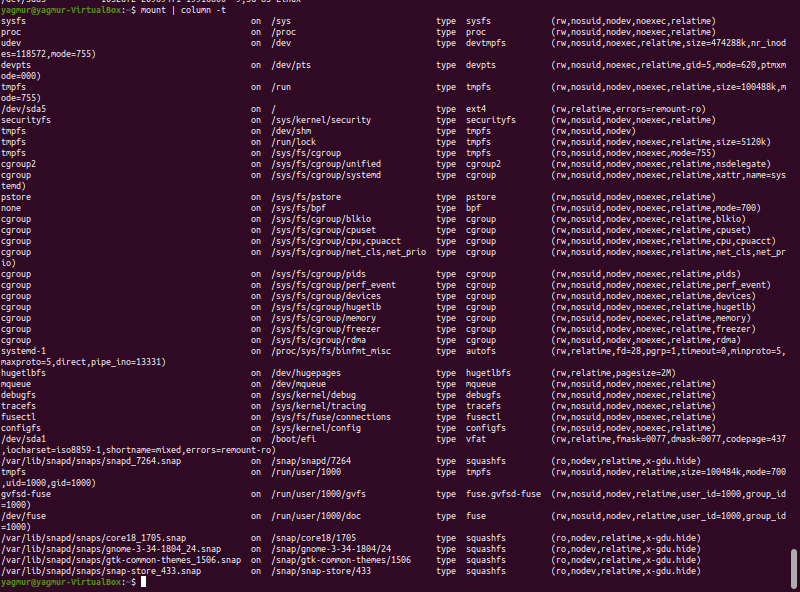
9. mount
The mount is used to mount/unmount and view mounted file systems. Again, we can use grep to filter out only those file systems that we want to see.
$ mount | column -t
10. Dmidecode
The dmidecode command is different from all other commands. It extracts hardware information by reading data from the SMBOIS data structures (also called DMI tables). # display information about the processor/cpu
$ sudo dmidecode -t processor # memory/ram information
$ sudo dmidecode -t memory # bios details
$ sudo dmidecode -t bios
11. /proc files
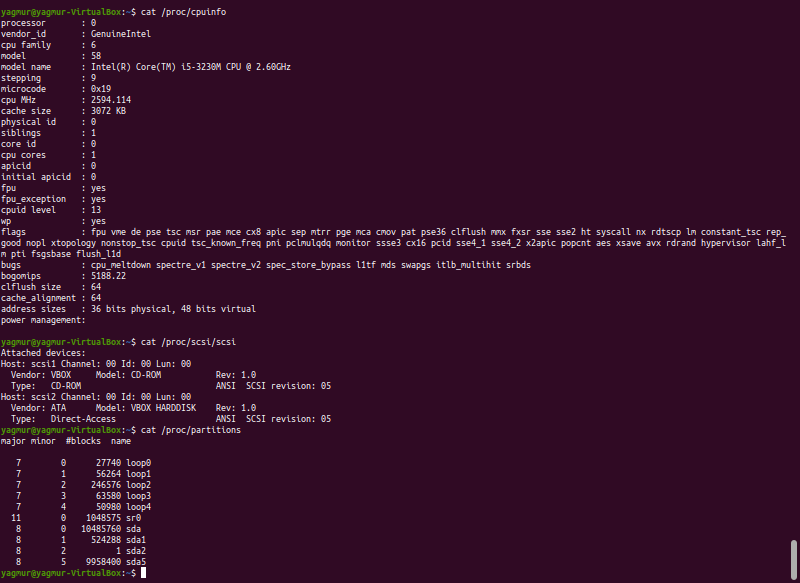
Many of the virtual files in the /proc directory contain information about hardware and configurations. Here are some of them:
CPU/Memory information
$ cat /proc/cpuinfo
Version
$ cat /proc/version
SCSI/Sata devices
$ cat /proc/scsi/scsi
Partitions
$ cat /proc/partitions
12. hdparm
The hdparm command gets information about sata devices like hard disks. Each of the command has a slightly different method of extracting information.
We may need to try more than one of them, while looking for specific hardware details. They are available across most linux distros, and can be easily installed from the default repositories. On the desktop there are gui tools, for those who do not want to memorise and type commands. Hardinfo, I-nex are some of the popular ones that provide detailed information about multiple different hardware components.
$ hdparm
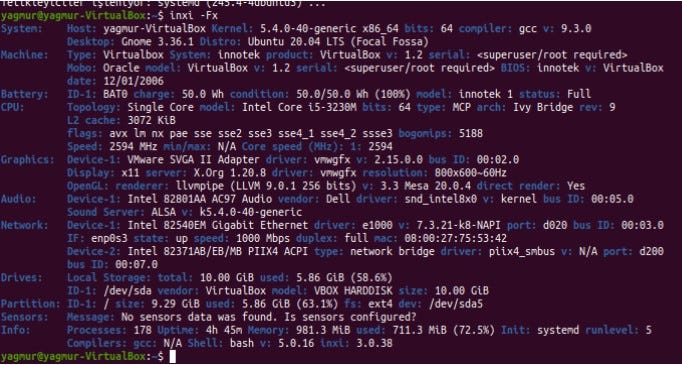
13. Inxi
Inxi is a 10K line mega bash script that fetches hardware details from multiple different sources and commands on the system and generates a good looking report that non-technical users can read easily.
$ inxi –Fx