
Backtest your Trading Systems with Python — Stop Loss/Take Profit

This story is part of the backtrader series. You can find the other stories here: Improve your Trading with Python. Also, there is a GitHub repo associated with this series, you can find it here if you want to follow the code in a clearer way: Backtrader Series.
Stop Loss and Take Profit are essential for serious traders. They allow you to cut your losses or your wins, and so limit your risks. They are usually referred to as stop orders and limit orders, and Backtrader can handle these types of orders.
What are Limit/Stop Orders
A limit order is an order allowing you to buy or sell at a specified price or better. For example, if you want to buy a stock but you don’t like the actual price, you can set a limit order at a lower price so that your order will be executed if the price fall.
A stop order is an order allowing you to buy or sell in the direction of the market. If the market is moving lower, a stop order allows you to sell. If it is moving higher, it allows you to buy.
When trading, you will usually combine these two types of orders to set an OCO order (One Cancels the Other). It’s an order composed of a Take Profit (a limit order) and a Stop Loss (a stop order), and when one of them is executed, the other is canceled. It allows you to either cut your losses if the price went in the wrong direction or cut your wins if all happened as expected.
Order Types in Backtrader
Backtrader gives you an easy way to submit orders, by self.buy() , self.sell() and self.cancel() as we’ve already seen. But you can pass parameters to these methods, to customize the execution of the orders you’re submitting.
By default, when calling self.buy() , you’re asking Backtrader to submit a market order. It’s an order that will be executed at the best possible price as soon as you’re submitting it. Look at the example below to see how you can customize this:
order1 = self.buy(exectype=bt.Order.Limit, price=self.data.close[0] * 1.01)
order2 = self.buy(exectype=Order.Stop, price=self.data.close[0] * 0.99)
Here we created a limit order which can be considered as a take profit, and a stop order which can be considered as a stop loss.
Implement a Stop Loss/Take Profit Strtaegy in Backtrader
We’ll implement a strategy that can work with stop loss orders and take profit orders.
So first, let’s create a new strategy. This strategy will be the same as the one we’ve seen in the second story of the series, but it will implement oco orders.
Let’s begin by adding parameters to set a stop loss, a take profit, or even a risk reward ratio. Then, we have to write the __init__ method. This method will just initialize an EMA and a list to store orders. We can also add a log method.
Note: now we’ll work with multiple orders, that’s why we must initialize a list to store references to orders.
Now, we can implement a notify_order method. It will be the same as we’ve seen before, but we’ll just add two lines of code to clear orders when they don’t need to exist anymore.
To check if an order still needs to exist, we use order.alive() .
Now, we can write the next method. What changes is that we need to calculate stop loss and take profit prices to then create 3 orders instead of just create a buy or a sell order.
The calculation for the prices is done in another method. Let’s check it now:
The calculation is not the same depending on the side of the trade (long or short), so we split the method using a condition.
Then, we calculate stop loss and take profit prices depending on the value of the associated parameter. If it’s 0, we don’t calculate the prices and instead we set them to the actual close price.
Stop loss and take profit prices are calculated using a percentage. For example, a 1% stop loss will be set to 99% of the actual price.
Once we have these prices, we can create the orders. Again, we do this in another method, and we split it in two cases depending on the side of the trade.
Depending on the stop loss and take profit prices, we create 1, 2, or 3 orders. If stop price is equal to the actual price, it means the stop loss parameters is equal to zero, so we don’t use a stop loss. Same thing for the take profit. That’s why there are several cases.
buy_bracket and sell_bracket are methods used as a shortcut to create an OCO order. Instead of creating one buy market order, one sell stop order, and one sell limit order, we just call buy_bracket , we give it our prices, and it create the orders.
If either the stop loss price or the take profit price is missing, we just create two orders.
Finally, we return the list of orders.
The last method we have to write is the log_orders method. Again, it depends on the side of the trade.
There’s nothing to say, we just log the orders depending on the stop loss and take profit prices.
After the orders are logged, we store their references using:
self.orders_ref = [order.ref for order in orders if order]Run the Strategy
Now we can run our strategy using the Backtester we’ve created in the previous stories:
It should work, and you should get an output like this:
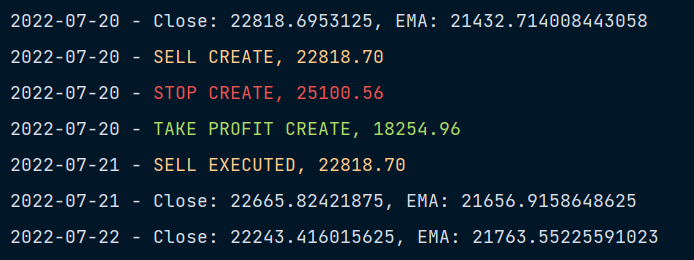
We can also try to run the strategy without using just a stop loss, or using just a take profit:
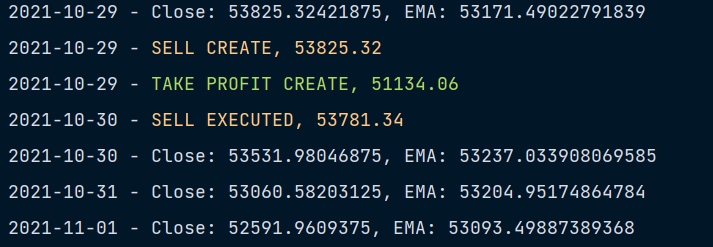
It also works, there’s no stop loss created!
Final Note
Now you know how to create strategies that truly reflect reality, with complex order types!
Next, we will see how to create custom analyzers.
To find the other stories of this series and more about mixing trading and Python, check this: Improve your Trading with Python
To explore more of my Python stories, click here! You can also access all my content by checking this page.
If you liked the story, don’t forget to clap, comment, and maybe follow me if you want to explore more of my content :)
You can also subscribe to me via email to be notified every time I publish a new story, just click here!
If you’re not subscribed to Medium yet and wish to support me or get access to all my stories, you can use my link:
A Message from InsiderFinance

Thanks for being a part of our community! Before you go:
- 👏 Clap for the story and follow the author 👉
- 📰 View more content in the InsiderFinance Wire
- 📚 Take our FREE Masterclass
- 📈 Discover Powerful Trading Tools


