
Backtest your Trading Systems with Python — Introduction
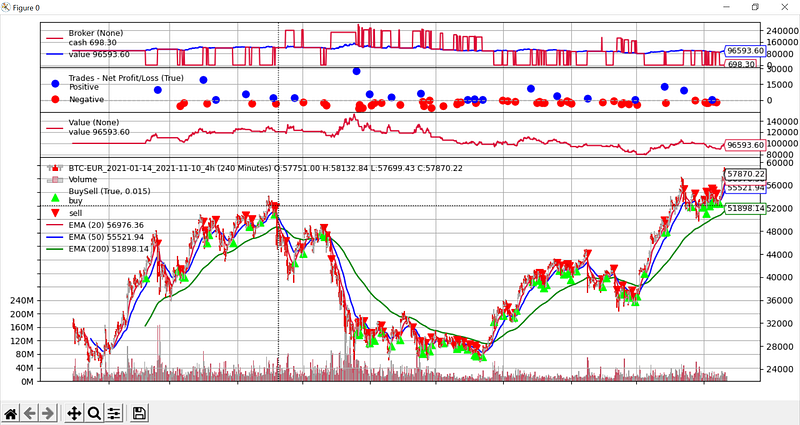
If you’re doing things the right way, you must backtest your trading systems before trying them live. Python is a great way to do this because it’s a powerful language for everything related to data manipulation.
Backtrader
Backtrader is an open-source Python library you can use to backtest your strategies or develop trading bots (I will cover this point in another article).
There are a lot of other libraries, but I prefer backtrader. I will give you some of its key features :
- Backtesting (obviously)
- Optimizing: find the best parameters for your strategies
- Plotting: you can plot your strategies through a fully personalizable chart
- Extensibility: you can develop your indicators, analyzers, observers… you can extend any of the backtrader’s features
- Open source: you benefit from all the advantages of using a free and open source solution
- Live trading: you can connect backtrader to some brokers to trade your strategies automatically in live
- A great community: there’s a great community behind backtrader which can help you if you have a problem with this library
How does it work?
Backtrader allows iteration through historical data to simulate the execution of trades, whose signals are given by the trading system you have developed.
To optimize computing speed, Backtrader includes the ability to use multiple cores of your processor.
It also works with matplotlib to display beautiful charts.
Get started
Installation
Backtrader is a PyPI package. You can install it easily with pip.
pip install backtrader
pip install matplotlib
Data extraction
In backtrader, there is an object called “Datafeed” which you can use to store data. There are different types of Datafeed. We will start with a CSV Datafeed, which allows you to load data from a CSV file.
import backtrader.feeds as btfeeds

datafeed = btfeeds.GenericCSVData(dataname="dataset_ohlcv.csv")
Your CSV file must contain “Date”, “Open”, “High”, “Low”, and “Close” columns.
There are some parameters you can provide to the GenericCSVData constructor :
- from date: datetime indicating the start date of the data extraction.
- todate: datetime indicating the end date of the extraction.
- headers: boolean indicating if the CSV file contains a row of headers.
- separator: character separating the columns in the CSV file.
- datetime: column containing time information (default: 0).
- open: column containing information on the opening price (default 1).
- high: ……… (default 2).
- low: …….. (default 3).
- close: ………. (default 4).
- volume: ………… (default 5).
- openinterest: ……… (default 6). If not present, the value -1 is assigned.
- dtformat: format of the datetime field (default: %Y-%m-%d %H:%M:%S).
You can also use data from APIs, for example, Yahoo Finance, to build a Datafeed. In this case, you have to use a PandasData instead of a GenericCSVData .
import yfinance as yf

btc_eur = yf.Ticker("BTC-EUR")
data = btc_eur.history()
pandas_data = btfeeds.PandasData(dataname=data)
Strategy development
There are 2 basic concepts to understand in backtrader. First, let’s discover “Lines”:
Data Feeds, Indicators and Strategies have lines.
A line is a succession of points that when joined together form this line. When talking about the markets, a Data Feed has usually the following set of points per day: Open, High, Low, Close, Volume, OpenInterest
The series of “Open”s along time is a Line. And therefore a Data Feed has usually 6 lines.
If we also consider “DateTime” (which is the actual reference for a single point), we could count 7 lines.
From backtrader’s documentation (https://www.backtrader.com/docu/quickstart/quickstart/)
Then, there is the “Index 0 approach”:
When accessing the values in a line, the current value is accessed with index: 0
And the “last” output value is accessed with -1. This in line with Python conventions for iterables (and a line can be iterated and is therefore an iterable) where index -1 is used to access the “last” item of the iterable/array.
In our case is the last output value what’s getting accessed.
As such and being index 0 right after -1, it is used to access the current moment in line.
From backtrader’s documentation (https://www.backtrader.com/docu/quickstart/quickstart/)
I guess it’s understandable, I don’t need to add more.
Now we can create our first strategy:
import backtrader as btclass MyFirstStrat(bt.Strategy):
def next(self):
print(self.datas[0].close[0])To create a strategy, we create a new class inheriting from bt.Strategy and we override some methods.
The first method to override is next . This method is executed at each iteration. In our test strategy, we’re accessing the actual close price. To do it, we access self.datas[0].close[0] . Data are referenced with an index because you can run strategies with multiple Datafeeds.
To try our strategy, we have to instantiate a Cerebro . It’s the brain of our program.
import backtrader as bt

cerebro = bt.Cerebro()
Then, we can add our data to the cerebro:
btc_eur = yf.Ticker("BTC-EUR")
data = btc_eur.history()
pandas_data = btfeeds.PandasData(dataname=data)

cerebro.adddata(pandas_data)
Finally, we add our strategy:
cerebro.addstrategy(MyFirstStrat)Now we can run our backtesting session:
cerebro.run()
# 43354.8046875
# 42933.625
# 44849.703125
# 44886.01171875
...
As you can see, our strategy is executed correctly because the close price is logged at each iteration.
Final note
I don’t want this post to be too long, and I want to talk about backtrader as a series of articles, so we will stop here for now.
Be sure to follow me so that you don’t miss the other articles in this series!
Edit: find the next story here: https://readmedium.com/backtest-your-trading-systems-with-python-strategies-development-48a510804d3b
You can also explore the other stories mixing Python and trading here: Improve your Trading with Python
To explore more of my Python stories, click here!
If you liked the story, don’t forget to clap and maybe follow me if you want to explore more of my content :)
You can also subscribe to me via email to be notified every time I publish a new story, just click here!
If you’re not subscribed to medium yet and wish to support me or get access to all my stories, you can use my link:
A Message from InsiderFinance

Thanks for being a part of our community! Before you go:
- 👏 Clap for the story and follow the author 👉
- 📰 View more content in the InsiderFinance Wire
- 📚 Take our FREE Masterclass
- 📈 Discover Powerful Trading Tools


