
Backtest your Trading Systems with Python — Custom Indicators

This story is the fifth of the backtrader series. You can find the other stories here: Improve your Trading with Python. Also, there is a GitHub repo associated with this series, you can find it here if you want to follow the code in a clearer way: Backtrader Series.
If you’ve followed the series, you know how to develop your own trading systems using custom conditions and using standard indicators. What if you want to develop your own indicators?
Why Should I Develop Indicators
There are many reasons for this:
- Turn your manual trading system into a trading system that can be backtested. For example, perhaps you draw trend lines when analyzing the markets. But you can’t backtest a trading system using it as there are no indicators representing trend lines. So, to ensure your trading system is profitable, developing an indicator representing trend lines can be a good idea because you will be able to backtest it.
- Compute mathematical operations over standard indicators to tweak them.
- Turn your trading systems conditions into reusable objects. Eventually, when doing backtests, you will end up with trading systems having a lot of conditions. And perhaps, several trading systems you use have the same conditions. Putting these conditions in indicators is a good idea because you can then just reuse your indicators. You can also parameterize them if you want.
How an Indicator Works in Backtrader
In Backtrader, an indicator works in much the same way as a strategy. It means an indicator can be initialized using parameters, then it includes a next method to decide what to do for each iteration.
An indicator also includes some objects called lines . These objects allow the indicators to send values to the trading system.
For example, the MACD indicator is composed of a signal line and a MACD line. So, in our indicator, we would define our lines this way:
lines = ('macd', 'signal')Then, we can access them from our strategy:
def __init__(self):
    self.macd = MACD()
def next(self):
macd_now = self.macd.macd[0]
signal_previous = self.macd.signal[-1]Indicators follow the same principles as the other Backtrader objects, with their reverse indexing.
Developing an Indicator
I said indicators include a next method to define what to do for each iteration. So, all we need to do is just to update our indicators lines in the next method, depending on what our indicator should represent.
Let’s create an indicator to detect Dojis for example. If you don’t know what is a Doji, it’s this:
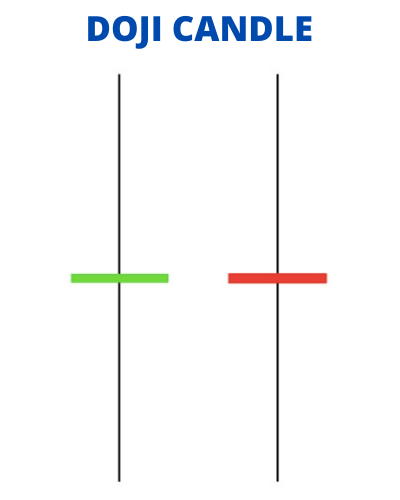
It’s a candle with a little body.
But how can we detect Dojis algorithmically?
We’ll just calculate the range of the body, and compare it to the range of the candle. If the range of the body is less than a certain percent of the range of the body, it’s a Doji.
Let’s build our indicator. It will have only one line called is_doji and one parameter called threshold_percent :
import backtrader as bt


class Doji(bt.Indicator):
    lines = ('is_doji',)
    params = (
        ('threshold_percent', 5),
    )
Above is how you declare an indicator and define its lines and parameters. It’s very similar to strategies.
Now, we may ask, do we need a special constructor? No, we don’t because we don’t have to initialize any specific values.
Now, the next method. This is what implements the logic of our indicator. The logic for the Doji is pretty easy. Here is the code, so that you can see the syntax:
def next(self):
    open = self.data.open[0]
    close = self.data.close[0]
    high = self.data.high[0]
    low = self.data.low[0]
    threshold = (high - low) * self.p.threshold_percent / 100
    self.lines.is_doji[0] = abs(open - close) < threshold and high - low > threshold
I’ll explain some lines:
threshold = (high - low) * self.p.threshold_percent / 100We just retrieve our parameter using self.p.threshold_percent . self.parameters.threshold_percent also works as p is just an alias of parameters .
self.lines.is_doji[0] = abs(open - close) < threshold and high - low > thresholdWe store True or False into our line, depending on whether the actual candle is a Doji or not.
Here is the final code:
import backtrader as bt


class Doji(bt.Indicator):
    lines = ('is_doji',)
    params = (
        ('threshold_percent', 5),
    )

    def next(self):
        open = self.data.open[0]
        close = self.data.close[0]
        high = self.data.high[0]
        low = self.data.low[0]
        threshold = (high - low) * self.p.threshold_percent / 100
        self.lines.is_doji[0] = abs(open - close) < threshold and high - low > threshold
Using an Indicator
Now, we can just use our Doji indicator in a strategy:
params = (
    ('doji_threshold', 5),
)

def __init__(self):
    self.doji = Doji(threshold_percent=self.p.doji_threshold)
def next(self):
self.log('Close: {}, IsDoji: {}'.format(self.datas[0].close[0], self.doji.is_doji[0]))Output:
2021-09-21 - Close: 34712.96875, IsDoji: 0.0
2021-09-22 - Close: 37283.484375, IsDoji: 0.0
...
2022-09-15 - Close: 19725.560546875, IsDoji: 0.0
2022-09-16 - Close: 19740.73046875, IsDoji: 1.0As you can see, there was a Doji on 2022–09–16. Please note our booleans were converted to floats by Backtrader because our is_dojivalues are now 0.0 or 1.0 .
And below, is an example of a complete strategy that can trigger orders using our Doji indicator (everything is in the GitHub repo for more clarity):
class CustomIndicatorStrat(bt.Strategy):
params = (
('doji_threshold', 5),
)
def __init__(self):
self.doji = Doji(threshold_percent=self.p.doji_threshold)
self.candle_open = 0
def log(self, msg, dt=None):
print("{} - {}".format(dt or self.datas[0].datetime.date(0), msg))
def next(self):
    self.log('Close: {}, IsDoji: {}'.format(self.datas[0].close[0], self.doji.is_doji[0]))
if not self.position:
if self.doji.is_doji[0]:
self.log('BUY CREATE, %.2f' % self.datas[0].close[0])
orders = [self.buy()]
self.orders_ref = [order.ref for order in orders if order]
self.candle_open = len(self)
if len(self) > (self.candle_open + 3):
self.close()
def notify_order(self, order):
if order.status in [order.Submitted, order.Accepted]:
# Buy/Sell order submitted/accepted to/by broker - Nothing to do
return
# Check if an order has been completed
if order.status in [order.Completed]:
if order.isbuy():
self.log(colored('BUY EXECUTED, %.2f' % order.executed.price, 'blue'))
self.buy_price = order.executed.price
elif order.issell():
self.log(colored('SELL EXECUTED, %.2f' % order.executed.price, 'yellow'))
# Not enough cash: order rejected
elif order.status in [order.Canceled, order.Margin, order.Rejected]:
self.log('Order Canceled/Margin/Rejected')
# We remove order if it's useless
if not order.alive() and order.ref in self.orders_ref:
self.orders_ref.remove(order.ref)
def notify_trade(self, trade):
if trade.isclosed:
self.log(colored('PROFIT, %.2f' % (trade.pnl), 'green') if trade.pnl > 0
else colored('LOSS, %.2f' % (trade.pnl), 'red'))Final Note
Now, you can really have fun with Backtrader and build your own indicators. But you’re still far away from building very complex trading systems as you don’t know how to deal with limit orders, or with multi-timeframe analysis.
Don’t worry, we’ll see these things in the next stories. So, if you don’t miss these stories, be sure to follow me!
To find the other stories of this series and more about mixing trading and Python, check this: Improve your Trading with Python
To explore more of my Python stories, click here!
If you liked the story, don’t forget to clap and maybe follow me if you want to explore more of my content :)
You can also subscribe to me via email to be notified every time I publish a new story, just click here!
If you’re not subscribed to Medium yet and wish to support me or get access to all my stories, you can use my link:
A Message from InsiderFinance

Thanks for being a part of our community! Before you go:
- 👏 Clap for the story and follow the author 👉
- 📰 View more content in the InsiderFinance Wire
- 📚 Take our FREE Masterclass
- 📈 Discover Powerful Trading Tools


