
Backtest your Trading Systems with Python — Analysis of the Results

Have you tried running the code we’ve seen previously? (check this if you don’t know what I’m talking about: Backtest your Trading Systems with Python — Strategies Development)
If yes, you should have noticed nothing happens except weird things. It’s because we have to modify our code a little, and we also have to add analyzers to our Cerebro. But one thing at a time, let’s change the code a little first.
But before doing this, you can have a look at the repo I’ve made for this series. It’s on GitHub: Backtrader Series. It should be more convenient for you if you want to check the code while you’re reading this story.
Better logging
When you’re backtesting, it’s important to have good logging. As you’ve seen previously, bad logging is useless. The logging we have now is something like this:
2022-08-22 - 2022-08-22 - 21531.794921875  @ 22163.3245636679
2022-08-23 -  - 1  @ None
2022-08-23 -  - 1  @ None
2022-08-23 - 2022-08-23 - 21600.099609375  @ 22060.92002652373
2022-08-24 -  - 1  @ None
2022-08-24 -  - 1  @ None
2022-08-24 - 2022-08-24 - 21694.58984375  @ 21994.31453874669
Do you understand something? No! I did it on purpose to prove to you that it is important not to neglect this.
First, let’s add something to see when we’re creating a buy order.
self.log('BUY CREATE, %.2f' % self.datas[0].close[0])
# Add this ^
orders = [self.buy()]
self.orders_ref = [order.ref for order in orders if order]
Then, we’ll modify our notify_ordermethod to deal with orders in a better way:
def notify_order(self, order):
    if order.status in [order.Submitted, order.Accepted]:
        # Buy/Sell order submitted/accepted to/by broker - Nothing to do
        return

        # Check if an order has been completed
    if order.status in [order.Completed]:
        if order.isbuy():
            self.log('BUY EXECUTED, %.2f' % order.executed.price)
        elif order.issell():
            self.log('SELL EXECUTED, %.2f' % order.executed.price)

        # Not enough cash: order rejected
    elif order.status in [order.Canceled, order.Margin, order.Rejected]:
        self.log('Order Canceled/Margin/Rejected')

        # We remove order if it's useless
    if not order.alive() and order.ref in self.orders_ref:
        self.orders_ref.remove(order.ref)
We can also delete notify_trade because we won’t need it for now.
Finally, we can modify our self.log in the next method.
self.log('Close: {}, EMA: {}'.format(self.datas[0].close[0], self.ema[0]))More backtest parameters
Our Cerebro is missing some parameters.
- Cash: what is our initial cash?
- Sizer: how many assets should we buy?
For setting the cash, we use cerebro.broker.setcash(cash) . For example: cerebro.broker.setcash(100_000) .
Then, we have to add a sizer. There are many sizers (you can find them all here). We’ll begin with a FixedSize, meaning we will buy the same size for every order.
cerebro.addsizer(bt.sizers.FixedSize, stake=1)stake is the quantity of assets we buy.
Now let’s run our code again.
One more condition
You should notice something. Sometimes, lots of orders get canceled. It’s because we try to buy assets even if we do have not enough cash because we already bought a lot of assets. To counter this, we’ll add a rule to our strategy. We’ll disable buy operations if we already are in the market.
To know if we are in the market, we use a condition on self.position in our strategy. self.position is > 0 if we’re long and < 0 if we’re short.
So, we can modify our next method:
def next(self):
    self.log('Close: {}, EMA: {}'.format(self.datas[0].close[0], self.ema[0]))

    if not self.position:

        if self.datas[0].close[0] < self.ema[0]:
            self.log('BUY CREATE, %.2f' % self.datas[0].close[0])
            orders = [self.buy()]
            self.orders_ref = [order.ref for order in orders if order]

    if self.datas[0].close[0] > self.ema[0]:
        self.close()
Now run the code, and everything should be fine. We see BUY and SELL operations.
Still some logging improvements
We will now add again notify_trade to display the profit when a trade is closed.
def notify_trade(self, trade):
    if trade.isclosed:
        self.log('PROFIT, %.2f' % (trade.pnl))
Now, I will give you a personal small tip. It’s just a visual effect, but it’s better for backtesting. I like to color what my console displays.
We’ll use the termcolor package.
pip install termcolorThen, we can for example modify our notify_trade method to color our profit in green if it’s positive or in red if it’s negative.
from termcolor import colored...def notify_trade(self, trade):
if trade.isclosed:
self.log(colored('PROFIT, %.2f' % (trade.pnl), 'green') if trade.pnl > 0
else colored('LOSS, %.2f' % (trade.pnl), 'red'))colored just takes a string as a first parameter and a color name as a second parameter.
Analyzers
In backtrader, an Analyzer is an object like a Sizer or a Strategy. It’s just something you add to the Cerebro.
There are a lot of analyzers in backtrader. We’ll just see one but you can find the others here.
The one we will see is the TradeAnalyzer . It gives you information about trades, for example, the average profit per trade, the number of winners, the max losers streak, etc…
We first add it to our Cerebro:
cerebro.addanalyzer(bt.analyzers.TradeAnalyzer, _name='trade')We provide an optional parameter _name to give a name to our analyzer.
Then, we have to store the result of cerebro.run :
result = cerebro.run()We can now access our analyzer’s analysis:
strategy_result = result[0]
trade_analyzer = strategy_result.analyzers.trade
analysis = trade_analyzer.get_analysis()
print(analysis)- We run only one strategy, so our strategy’s result is stored in
result[0]. - We retrieve our analyzer named
trade. - We call
get_analysis()to get the analysis from our analyzer. Every analyzer has aget_analysismethod. - We print the analysis.
If you run the code, you should see that the analysis is hard to understand. We’ll only keep the metrics interesting us because right now there are too many.
pnl_net_total = analysis.pnl.net.total
pnl_gross_total = analysis.pnl.gross.total
commissions = pnl_gross_total - pnl_net_total

winners = analysis.won.total
losers = analysis.lost.total
win_rate = winners / (winners + losers) * 100

print("---ANALYSIS---")
print("PnL net total: {}".format(pnl_net_total))
print("PnL gross total: {}".format(pnl_gross_total))
print("Commissions: {}".format(commissions))
print("Win rate: {}".format(win_rate)
Adjustments
If you run the code, you will notice something. Commissions are equal to 0. So our backtest is incorrect because when you’re trading for real, there are commissions. Let’s correct this. We’ll also add some slippage.
cerebro.broker.setcommission(commission=0.001) # 0.1%
cerebro.broker.set_slippage_perc(0.001) # 0.1%
Now we can run our code:
---ANALYSIS---
PnL net total: -13241.988396214756
PnL gross total: -11074.33021484366
Commissions: 2167.6581813710964
Win rate: 68.96551724137932
We have commissions, hurra! (we’ve never been so happy to have commissions…) It means now our modelization is closer to reality.
Visual representation
We may want to have a visual aspect of our strategy. We can do it easily with backtrader. First, let’s install matplotlib.
pip install matplotlibNow we can just plot our strategy:
cerebro.plot()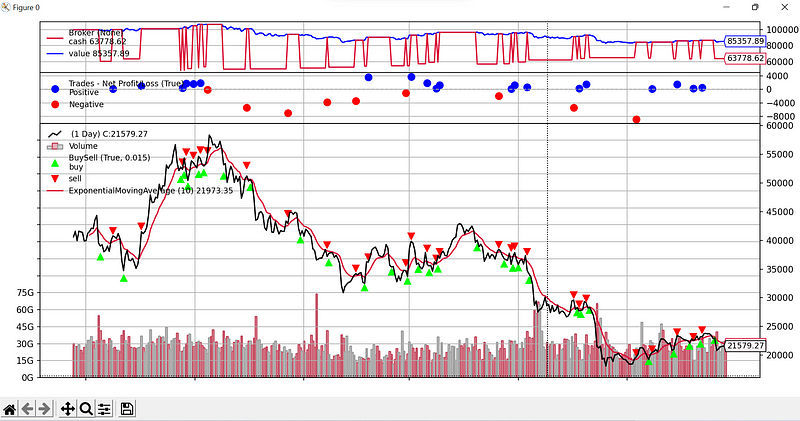
If you have an error while trying to plot, just remove warnings in the imports of locator.py in matplotlib folder. It’s a known issue happening because backtrader is not up to date with the recent versions of matplotlib.
On the chart, you see when buy and sell orders were executed. You also see the exponential moving average. You see information about trades and about broker.
Final note
Don’t forget to check Medium-backtraderSeries on my GitHub if you want the full code for each story of this series.
The next time, we’ll talk about optimization and how to find the best parameters for your strategies. Be sure to follow me so you won’t miss this story!
Edit: find the other stories of this series here: Improve your Trading with Python
To explore more of my Python stories, click here!
If you liked the story, don’t forget to clap and maybe follow me if you want to explore more of my content :)
You can also subscribe to me via email to be notified every time I publish a new story, just click here!
If you’re not subscribed to medium yet and wish to support me or get access to all my stories, you can use my link:
A Message from InsiderFinance

Thanks for being a part of our community! Before you go:
- 👏 Clap for the story and follow the author 👉
- 📰 View more content in the InsiderFinance Wire
- 📚 Take our FREE Masterclass
- 📈 Discover Powerful Trading Tools


