avatarAntonio Formato

Free AI web copilot to create summaries, insights and extended knowledge, download it at here

4206

Abstract

tion>Service Principal sign-ins log</figcaption></figure><ul><li>Click on “Apply Changes”</li><li>Check if ingestion is working running running following kusto query:</li></ul><p id="5690"><i>AADServicePrincipalSignInLogs | take 10</i></p><figure id="daa7"><img src="https://cdn-images-1.readmedium.com/v2/resize:fit:800/1*pdQy9T-nF42CsZt6cdrMyg.png"><figcaption>chacking data connector is working</figcaption></figure><p id="d020">You should see Service Principal usage.</p><h1 id="22c7">Analytic Rule setup</h1><p id="a160">Let’s assume you have an Azure AD register application running from specific IP address. You would like to be noticed if, for some reasons, Service Principal is used by different resource coming from unknown IP address.</p><p id="ae36">Set up Azure Sentinel Analytics:</p><ul><li>Go to Azure Sentinel portal on <a href="https://portal.azure.com">https://portal.azure.com</a></li><li>Click Analytics and then “<i>Create Scheduled query rule</i></li></ul><figure id="8b58"><img src="https://cdn-images-1.readmedium.com/v2/resize:fit:800/1*Rah3ZMRDo-A_ZzkDxapCRQ.png"><figcaption>Scheduled Query rule</figcaption></figure><ul><li>Fill Name, Description and other required fields.</li></ul><figure id="4d9e"><img src="https://cdn-images-1.readmedium.com/v2/resize:fit:800/1*MVfJ5Ei9bEM_gYgSEY9oTw.png"><figcaption>Analytics rule</figcaption></figure><ul><li>Add analytic rule (it’s simple, I’m just excluding my known IP from search):</li></ul><p id="46e1"><i>AADServicePrincipalSignInLogs | where ServicePrincipalName == “Test_App” | where IPAddress != “app IP”</i></p><figure id="d64c"><img src="https://cdn-images-1.readmedium.com/v2/resize:fit:800/1*Vh800a6weeWsdY0jJX2SSg.png"><figcaption>kusto query</figcaption></figure><ul><li>Fill “<i>Entity Mapping”</i></li></ul><figure id="0edd"><img src="https://cdn-images-1.readmedium.com/v2/resize:fit:800/1*w9V-G_rU01sutiDaPkc7vQ.png"><figcaption>Entity mapping</figcaption></figure><ul><li>Create Rule</li></ul><p id="52a6">If you have chance to run your app from a different IP, you should be able to get following Azure Sentinel incident:</p><figure id="602f"><img src="https://cdn-images-1.readmedium.com/v2/resize:fit:800/1*V2ttdUCIdnlEovZfiaWKMg.png"><figcaption>Azure Sentinel Incident</figcaption></figure><figure id="6d67"><img src="https://cdn-images-1.readmedium.com/v2/resize:fit:800/1*U6BD4Gmu3ILwLpQTQwv4OA.png"><figcaption>Azure Sentinel Incident — Investigate</figcaption></figure><p id="d759">Tip: advanced use case.</p><p id="8a55">If you have Azure App run within Azure, you could monitor if Service Principals are not used by Azure public IP addresses.</p><p id="da4e">Happy cloud hunting!</p><p id="2932">:)</p><p id="f84b"><i>References:</i></p><div id="2fd9" class="link-block"> <a href="https://docs.microsoft.com/en-us/azure/active-directory/develop/app-objects-and-service-principals"> <div> <div> <h2>Apps & service principals in Azure AD - Microsoft identity platform</h2> <div><h3>This article describes application registration, application objects, and service principals in Azure Active Directory…</h3></div> <div><p>docs.microsoft.com</p></div> </div> <div> <div style="background-image: url(https://miro.readmedium.com/v2/resize:fit:320/0*oC8PFTZT3YCx2ckX)"></div> </div> </div> </a> </div><div id="f245" class="link-block"> <a href="https://it.wikipedia.org/wiki/OAuth"> <div> <div> <h2>OAuth - Wikipedia</h2> <div><h3>OAuth è un protocollo di rete aperto e standard, progettato specificamente per lavorare con l' Hypertext Transfer…</h3></div> <div><p>it.wikipedia.org</p></div> </div> <div> <div style="background-image: url(https://miro.readmedium.com/v2/resize:fit:320/0*sdAlHa7WnWSnuBW6)"></div> </div> </div> </a> </div><div id="82dc" class="link-block"> <a href="https://docs.microsoft.com/en-us/azure/active-directory/fundamentals/a

Options

ctive-directory-whatis"> <div> <div> <h2>What is Azure Active Directory? - Azure Active Directory</h2> <div><h3>Azure Active Directory (Azure AD) is Microsoft's cloud-based identity and access management service, which helps your…</h3></div> <div><p>docs.microsoft.com</p></div> </div> <div> <div style="background-image: url(https://miro.readmedium.com/v2/resize:fit:320/0*M2y_5iV6aPF-Y5ha)"></div> </div> </div> </a> </div><div id="b47c" class="link-block"> <a href="https://docs.microsoft.com/en-us/azure/active-directory/fundamentals/auth-oauth2"> <div> <div> <h2>OAUTH 2.0 authentication with Azure Active Directory</h2> <div><h3>The OAuth 2.0 is the industry protocol for authorization. It allows a user to grant limited access to its protected…</h3></div> <div><p>docs.microsoft.com</p></div> </div> <div> <div style="background-image: url(https://miro.readmedium.com/v2/resize:fit:320/0*emAJxuPfSFZMmtwn)"></div> </div> </div> </a> </div><div id="aded" class="link-block"> <a href="https://docs.microsoft.com/en-us/azure/sentinel/overview"> <div> <div> <h2>What is Azure Sentinel?</h2> <div><h3>Microsoft Azure Sentinel is a scalable, cloud-native, security information event management (SIEM) and security…</h3></div> <div><p>docs.microsoft.com</p></div> </div> <div> <div style="background-image: url(https://miro.readmedium.com/v2/resize:fit:320/0*3HMJFul_3FmB-p_w)"></div> </div> </div> </a> </div><div id="3867" class="link-block"> <a href="https://docs.microsoft.com/en-us/azure/data-explorer/kusto/concepts/"> <div> <div> <h2>Getting started with Kusto</h2> <div><h3>Azure Data Explorer is a service for storing and running interactive analytics on big data. It's based on relational…</h3></div> <div><p>docs.microsoft.com</p></div> </div> <div> <div style="background-image: url(https://miro.readmedium.com/v2/resize:fit:320/0*DNIdcVUpNvuH82BE)"></div> </div> </div> </a> </div><div id="0cb5" class="link-block"> <a href="https://docs.microsoft.com/en-us/azure/active-directory/develop/app-objects-and-service-principals"> <div> <div> <h2>Apps & service principals in Azure AD - Microsoft identity platform</h2> <div><h3>This article describes application registration, application objects, and service principals in Azure Active Directory…</h3></div> <div><p>docs.microsoft.com</p></div> </div> <div> <div style="background-image: url(https://miro.readmedium.com/v2/resize:fit:320/0*oC8PFTZT3YCx2ckX)"></div> </div> </div> </a> </div><div id="cad5" class="link-block"> <a href="https://docs.microsoft.com/en-us/azure/active-directory/develop/howto-create-service-principal-portal"> <div> <div> <h2>Create an Azure AD app & service principal in the portal - Microsoft identity platform</h2> <div><h3>This article shows you how to create a new Azure Active Directory (Azure AD) application and service principal that can…</h3></div> <div><p>docs.microsoft.com</p></div> </div> <div> <div style="background-image: url(https://miro.readmedium.com/v2/resize:fit:320/0*q4a2xp_di9Y6tgXC)"></div> </div> </div> </a> </div><p id="97e4">Disclaimer: <i>Opinions expressed are solely my own and do not express the views or opinions of my employer.</i></p></article></body>

Azure Sentinel — Monitoring Azure AD Service Principal

What is a service principal?

Any application registered with an Azure Active Directory tenant has:

  • application object: globally unique istance of the app
  • app or client ID: globally unique ID for your app
  • service principal: identity object for a service

There are three types of SP:

  • application
  • managed identity
  • legacy

From Microsoft docs:

The application object is the global representation of your application for use across all tenants, and the service principal is the local representation for use in a specific tenant.

A service principal must be created in each tenant where the application is used, enabling it to establish an identity for sign-in and/or access to resources being secured by the tenant. A single-tenant application has only one service principal (in its home tenant), created and consented for use during application registration. A multi-tenant application also has a service principal created in each tenant where a user from that tenant has consented to its use.

Ref: Apps & service principals in Azure AD — Microsoft identity platform | Microsoft Docs

How to get Service Principal info

Azure Active Directory provides Sign-ins log to allow monitoring and understanding how resources are used by users. In addition, Azure AD has been started to provide three additional sign-ins logs (now in preview):

  • Non-interactive user sign-ins
  • Service principal sign-ins
  • Managed identities for Azure resource sign-ins
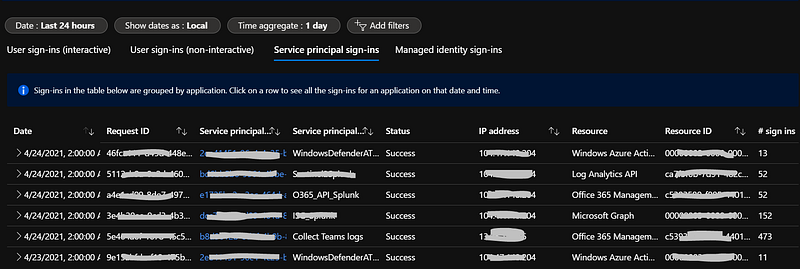
Azure AD Service Principal sign-ins

Why monitor Service Principals

When an Azure AD application needs to authenticate with Azure Active Directory you need to create and use Service Principal. It is an identity object used to authentication. Authentication with a Service Principal happens through the OAuth 2.0 protocol.

In order to reduce risks of misusing applications registered in you Azure Active Directory tenant, I think it’s a good practice to monitor Service Principals usage.

The basic idea is thinking how to be sure SPs are being used only by authorized sources and in a right way.

View the service principal

  1. Click Azure Active Directory and then click Enterprise applications.
  2. Under Application Type, choose All Applications and then click Apply.
  3. In the search filter box, type the name of the Azure resource that has managed identity enabled (Test_App in my case)
  4. Properties. Object ID is the unique ID of the Service Principal associated with this application
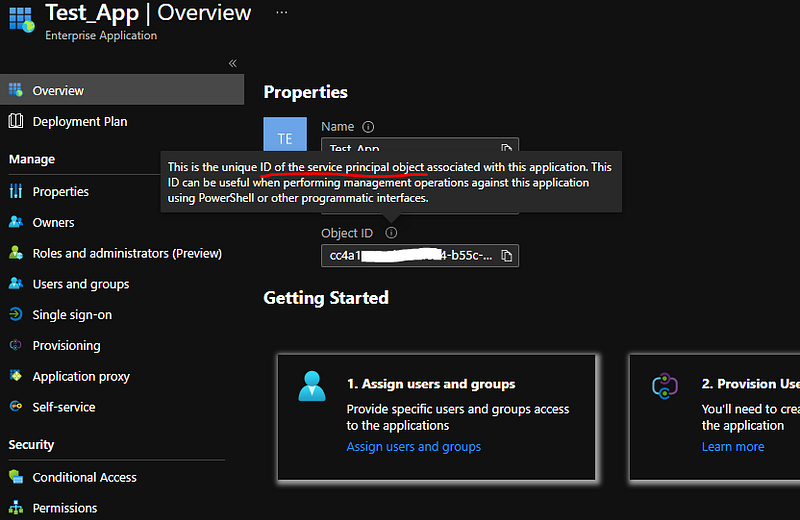
Get Service Principals

Monitoring Azure AD Service Principal leveraging Azure Sentinel

Service Principals related info ingestion

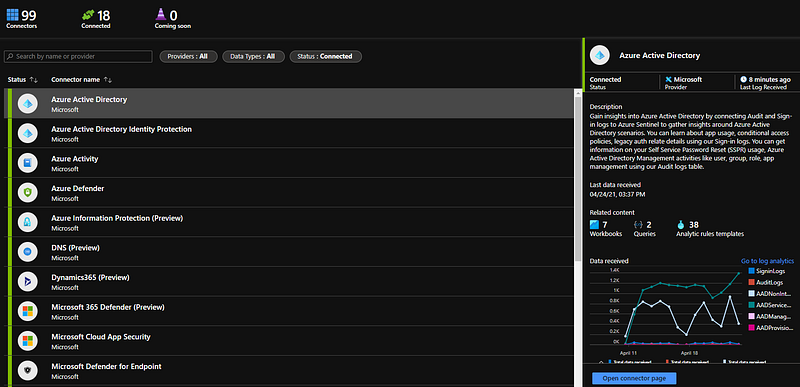
Azure Sentinel — Data Connectors
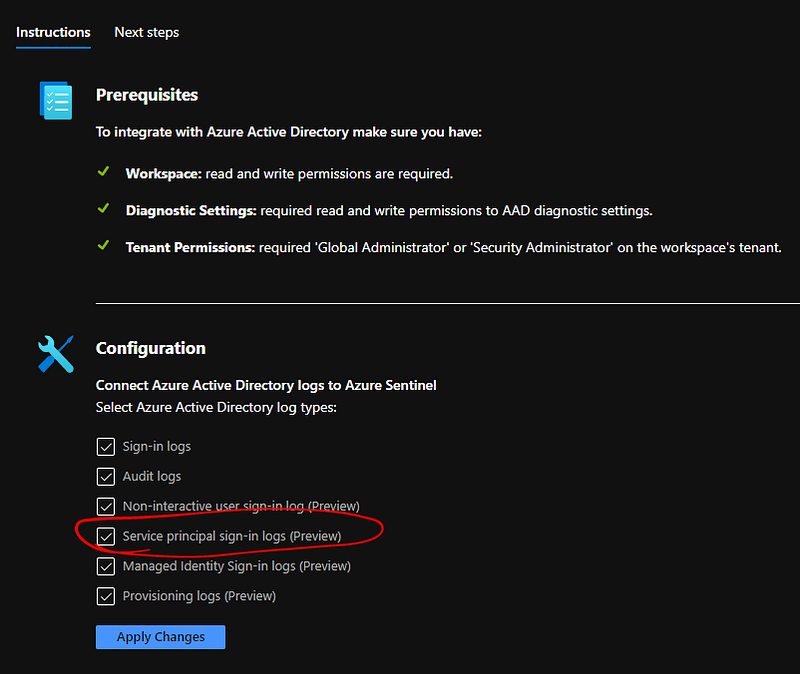
  • Click on “Open Connector page” and select “Service principal sing-in logs (Preview)
Service Principal sign-ins log
  • Click on “Apply Changes”
  • Check if ingestion is working running running following kusto query:

AADServicePrincipalSignInLogs | take 10
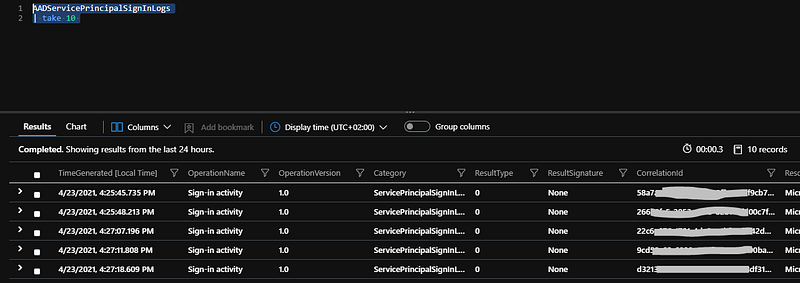
chacking data connector is working

You should see Service Principal usage.

Analytic Rule setup

Let’s assume you have an Azure AD register application running from specific IP address. You would like to be noticed if, for some reasons, Service Principal is used by different resource coming from unknown IP address.

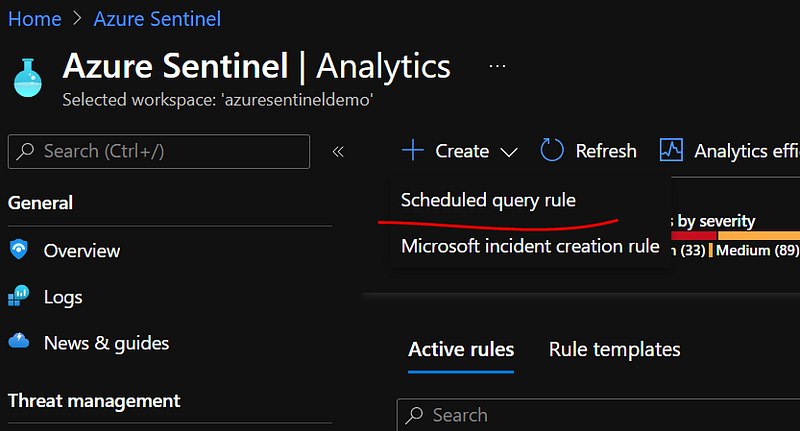
Set up Azure Sentinel Analytics:

Scheduled Query rule
  • Fill Name, Description and other required fields.
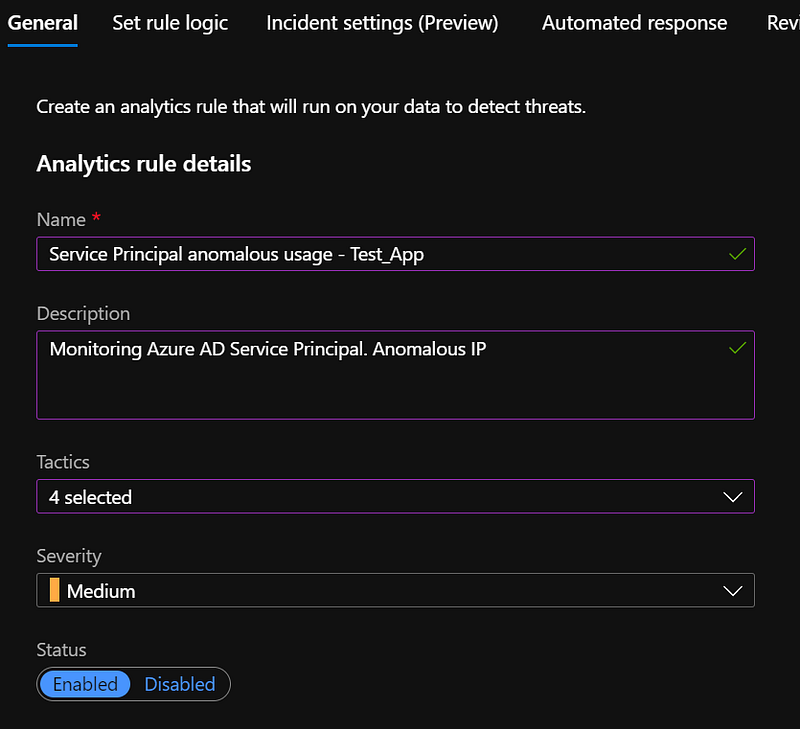
Analytics rule
  • Add analytic rule (it’s simple, I’m just excluding my known IP from search):

AADServicePrincipalSignInLogs | where ServicePrincipalName == “Test_App” | where IPAddress != “app IP”
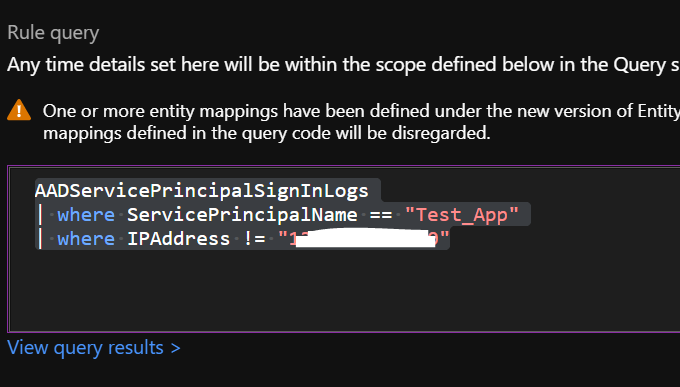
kusto query
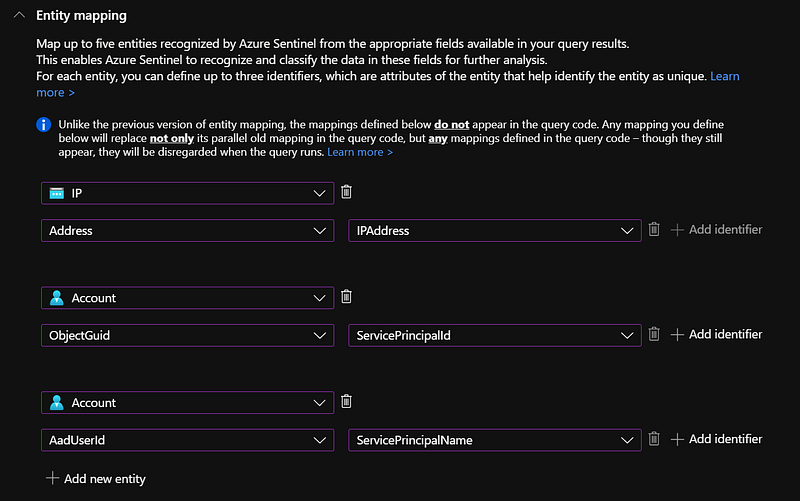
  • Fill “Entity Mapping”
Entity mapping
  • Create Rule

If you have chance to run your app from a different IP, you should be able to get following Azure Sentinel incident:
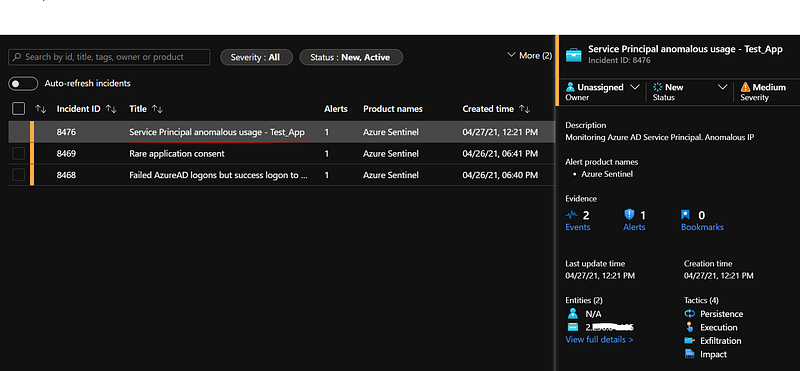
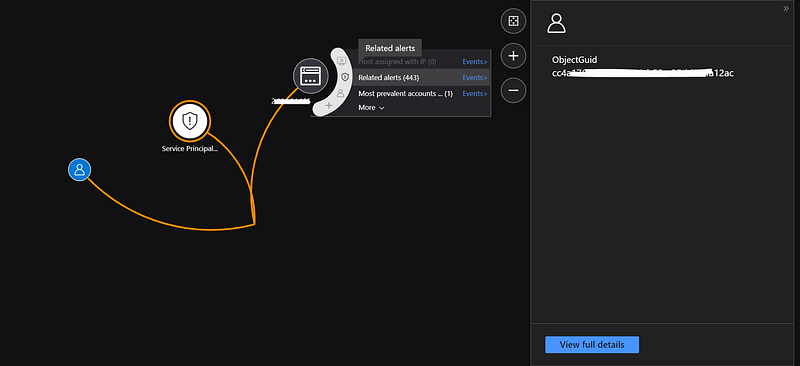
Azure Sentinel Incident
Azure Sentinel Incident — Investigate

Tip: advanced use case.

If you have Azure App run within Azure, you could monitor if Service Principals are not used by Azure public IP addresses.

Happy cloud hunting!

:)

References:

Disclaimer: Opinions expressed are solely my own and do not express the views or opinions of my employer.

Azure Sentinel
Azure Active Directory
Azure Security
Siem
Cybersecurity
Recommended from ReadMedium