avatarAntonio Formato

Free AI web copilot to create summaries, insights and extended knowledge, download it at here

5469

Abstract

cation Permission and select “<b>ThreatIndicators.ReadWrite.OwnedBy</b></li></ul><figure id="5940"><img src="https://cdn-images-1.readmedium.com/v2/resize:fit:800/1*xjkZpEc3scy187j3ip7Tew.png"><figcaption>API Permission</figcaption></figure><figure id="6518"><img src="https://cdn-images-1.readmedium.com/v2/resize:fit:800/1*VBNvJxML8Gt5HGhp619clA.png"><figcaption>Microsoft Graph API — Threat Indicators permissions</figcaption></figure><ul><li>Click on “<b>Grant Consent</b>”. It’s required to grant consent for the requested permissions</li></ul><figure id="f056"><img src="https://cdn-images-1.readmedium.com/v2/resize:fit:800/1*91zuZKjMApt31zIkCeMzIA.png"><figcaption>Grant consent on behalf of app user</figcaption></figure><ul><li>Create a new client secret in “Certificate” & Secrets”</li></ul><figure id="dbaa"><img src="https://cdn-images-1.readmedium.com/v2/resize:fit:800/1*WmuHk0XMLscx19ZEALhmnQ.png"><figcaption>Secret generation</figcaption></figure><p id="e120"><b>2.<i> Install MineMeld — ISG (Intelligence Security Graph)extension</i></b></p><ul><li>On MineMeld, “System” → “Extensions” enter <b>GitHub <a href="https://github.com/PaloAltoNetworks/minemeld-msgraph-secapi.git">repository</a> </b>(<a href="https://github.com/PaloAltoNetworks/minemeld-msgraph-secapi.git">https://github.com/PaloAltoNetworks/minemeld-msgraph-secapi.git</a>), click “Retrieve”, select “Master” and click “Install”.</li></ul><figure id="b120"><img src="https://cdn-images-1.readmedium.com/v2/resize:fit:800/1*f54xwrkZJTEnGBlZcLiJBQ.png"><figcaption>Install extention from GIT</figcaption></figure><ul><li>Enable the extention and restart MineMeld services</li></ul><p id="e85f"><b><i>3. Configure Miners to aggregate Threat Indicators (Italian CertPA in my example)</i></b></p><ul><li>In MineMeld “Config” → Add a node and search “itcert”</li></ul><figure id="3c21"><img src="https://cdn-images-1.readmedium.com/v2/resize:fit:800/1*dsdnzOSwIejwvdBg3Y49FQ.png"><figcaption></figcaption></figure><ul><li>Notice CERT_PA miner nodes</li></ul><figure id="43ea"><img src="https://cdn-images-1.readmedium.com/v2/resize:fit:800/1*W5MkMgdw2qdNlYZY2DGieA.png"><figcaption>MineMeld nodes</figcaption></figure><p id="cf2e"><b>4. Configure Azure Sentinel extension</b></p><ul><li>In MineMeld “Config” → “Prototypes” → “Browse prototypes” and search “<b>Microsoft_isg.Output</b>”, click “Clone”</li></ul><figure id="c725"><img src="https://cdn-images-1.readmedium.com/v2/resize:fit:800/1*VZ3qH_JZz1PlgLel1NI1_Q.png"><figcaption>Node for Microsoft ASG API</figcaption></figure><ul><li>Define node’s name.</li></ul><figure id="673e"><img src="https://cdn-images-1.readmedium.com/v2/resize:fit:800/1*oC0xWNAkl_PbDlXmA3tvaw.png"><figcaption>Add Azure Sentinel output node</figcaption></figure><ul><li>On Minemeld → CONFIG → select Azure Sentinel output node, click on “Input” and select your aggregator nodes</li></ul><figure id="ba7b"><img src="https://cdn-images-1.readmedium.com/v2/resize:fit:800/1*86wASMW8PoMk5pUoqTjpeg.png"><figcaption>Configuring Azure Sentinel input nodes</figcaption></figure><ul><li>Click “Commit” and wait for services restart</li><li>Edit Azure Sentinel node properties in “Nodes” → “Settings” providing: CLIENT ID (<i>Azure AD Application ID</i>), CLIENT SECRET: (<i>Client Secret</i>), TENANT ID (<i>Azure AD Identifier</i>). Select Azure Sentinel in Target Product.</li></ul><figure id="45ec"><img src="https://cdn-images-1.readmedium.com/v2/resize:fit:800/1*kV3jaYN17kA36fCU5tgx5g.png"><figcaption>Node configuration</figcaption></figure><p id="753d">Now it’s time to enable Threat Intelligence connector in Azure Sentinel. The prerequisite is using Global administrator or Security Administrator Azure AD Role User.</p><ul><li>In Azure Sentinel → Data Connector click on “Threat Intelligence”</li></ul><figure id="3c7e"><img src="https://cdn-images-1.readmedium.com/v2/resize:fit:800/1*aBXDLv6uE3qVAZX844hApA.png"><figcaption>Data Connector- Threat Intelligence</figcaption></figure><ul><li>Click on “Connect” to grant permission to your Threat Intelligence Provider. This connection enables you to incorporate indicators containing various types of observables such as IP address, domain, URL and file hash to search and create custom alerts rules in Azure Sentinel.</li></ul><figure id="ae5c"><img src="https://cdn-images-1.readmedium.com/v2/resize:fit:800/1*Z6VNLjP3YbwRx-CEjsfk8Q.png"><figcaption>Grant Permission to your threat intelligence provider</figcaption></figure><p id="e647"><b>Now MineMeld will start to stream Indicators to Azure Sentinel</b>. You can inputi TI indicators for use in Dashboards, hunting and alert rules</p><p id="a746">Using <b>Kusto </b>query language you can now run some queries to verify everything is working as expected. Indicators can be found on “<b>ThreatIntelligenceIndicator</b>” table under “<b>SecurityInsight</b>”.</p><p id="2698">Run simple queries to get latest pushed indicators:</p><p id="0def"><b>Get latest 50 IoCs</b></p><blockquote id="8a40"><p>ThreatIntelligenceIndicator</p></blockquote><blockquote id="843d"><p>| limit 50</p></blockquote><figure id="d2a2"><img src="https://cdn-images-1.readmedium.com/v2/resize:fit:800/1*ULCmwM6LYxpBXTf-31EB6A.png"><figcaption>Simple Query #1</figcaption></figure><figure id="8224"><img src="https://cdn-images-1.readmedium.com/v2/resize:fit:800/1*Boi0QSOPr6UVB825pj9v-Q.png"><figcaption>Simple query #1 — indicator detail</figcaption></figure><p id="7e5d">

Options

<b>IoCs types distibution</b></p><blockquote id="f105"><p><i>ThreatIntelligenceIndicator</i></p></blockquote><blockquote id="805f"><p><i>| summarize count() by Description</i></p></blockquote><blockquote id="fbe3"><p><i>| sort by Description asc | render piechart</i></p></blockquote><figure id="9765"><img src="https://cdn-images-1.readmedium.com/v2/resize:fit:800/1*mG4gOMxOW1snz44xhw_apQ.png"><figcaption>Indicators by Description — pie chart</figcaption></figure><p id="5d67"><b>IoCs types over time</b></p><blockquote id="7eb8"><p><i>ThreatIntelligenceIndicator</i></p></blockquote><blockquote id="d3e1"><p><i>| summarize count() by TimeGenerated, Description</i></p></blockquote><blockquote id="6895"><p><i>| sort by Description asc | render timechart</i></p></blockquote><figure id="e007"><img src="https://cdn-images-1.readmedium.com/v2/resize:fit:800/1*cnggXdt-dI8HJSWi0w9qnw.png"><figcaption>Indicators by Description over time</figcaption></figure><p id="411f">Now you will be able to correlate TI provided by external parties with internal information collected by Azure Sentinel. From a defender point of view, you will have a better vision of attacks in their context and you can proactively defend your organization against emerging threats.</p><p id="afa0">In next articles I’ll write something about <b>Threat Intelligence use cases in Azure Sentinel</b> and <b>security automation processes</b>. Stay tuned :)</p><p id="d46f"><i>References:</i></p><div id="e366" class="link-block"> <a href="https://docs.microsoft.com/en-us/azure/sentinel/"> <div> <div> <h2>Azure Sentinel Preview Documentation - Tutorials, Quickstarts</h2> <div><h3>Azure Sentinel Preview is a cloud-native SIEM that provides intelligent security analytics for your entire enterprise…</h3></div> <div><p>docs.microsoft.com</p></div> </div> <div> <div style="background-image: url(https://miro.readmedium.com/v2/resize:fit:320/)"></div> </div> </div> </a> </div><div id="a5c3" class="link-block"> <a href="https://docs.microsoft.com/en-us/azure/sentinel/connect-data-sources"> <div> <div> <h2>Connect data sources to Azure Sentinel Preview?</h2> <div><h3>Learn how to connect data sources to Azure Sentinel.</h3></div> <div><p>docs.microsoft.com</p></div> </div> <div> <div style="background-image: url(https://miro.readmedium.com/v2/resize:fit:320/0*eC5QiKmdFp2T3hnD)"></div> </div> </div> </a> </div><div id="c40c" class="link-block"> <a href="https://live.paloaltonetworks.com/t5/MineMeld/ct-p/MineMeld"> <div> <div> <h2>MineMeld</h2> <div><h3>MineMeld, by Palo Alto Networks, is an extensible Threat Intelligence processing framework and the 'multi-tool' of…</h3></div> <div><p>live.paloaltonetworks.com</p></div> </div> <div> <div style="background-image: url(https://miro.readmedium.com/v2/resize:fit:320/0*GDXFsMeBbgK12aBB)"></div> </div> </div> </a> </div><div id="9562" class="link-block"> <a href="https://github.com/PaloAltoNetworks/minemeld-msgraph-secapi"> <div> <div> <h2>PaloAltoNetworks/minemeld-msgraph-secapi</h2> <div><h3>MineMeld nodes for Microsoft Graph Security API. Contribute to PaloAltoNetworks/minemeld-msgraph-secapi development by…</h3></div> <div><p>github.com</p></div> </div> <div> <div style="background-image: url(https://miro.readmedium.com/v2/resize:fit:320/)"></div> </div> </div> </a> </div><div id="0191" class="link-block"> <a href="https://docs.microsoft.com/en-us/graph/api/resources/security-api-overview?view=graph-rest-beta#threat-indicators-preview"> <div> <div> <h2>Use the Microsoft Graph Security API - Microsoft Graph v1.0</h2> <div><h3>The Microsoft Graph Security API provides a unified interface and schema to integrate with security solutions from…</h3></div> <div><p>docs.microsoft.com</p></div> </div> <div> <div style="background-image: url(https://miro.readmedium.com/v2/resize:fit:320/0*De5_Zh1JE2NKicGj)"></div> </div> </div> </a> </div><div id="8520" class="link-block"> <a href="https://docs.microsoft.com/en-us/azure/kusto/query/"> <div> <div> <h2>Overview - Azure Data Explorer</h2> <div><h3>This article describes Overview in Azure Data Explorer.</h3></div> <div><p>docs.microsoft.com</p></div> </div> <div> <div style="background-image: url(https://miro.readmedium.com/v2/resize:fit:320/0*mTGOtqi4TCpp7Xr5)"></div> </div> </div> </a> </div><p id="1e53">Disclaimer: <i>Opinions expressed are solely my own and do not express the views or opinions of my employer.</i></p></article></body>

Azure Sentinel — MineMeld. Bring Your Own Threat Intelligence feeds

How to correlate Threat Intelligence provided by external parties with internal information collected by a SIEM — Azure Sentinel

This article is the 3rd in my Microsoft security integrations serie. It started with a post about Microsoft Intelligence Security Graph and Security API, then I posted an article about Microsoft Defender ATP and MineMeld integration.

Now I’d like to share how to bring your threat intelligence feeds into Azure Sentinel.

The most important use case is about enriching your streamed data into Azure Sentinel with the threat intelligence feeds that you use across your organization. This lets you check and prioritize your alerts, correlating them with threat intelligence information that you own, manage and trust.

For example, if you get an alert from a specific IP address, domain, url or file, your threat intelligence provider will be able to let you know if that IP address, domain or url was found to be malicious and/or linked to a known threat campain.

Azure Sentinel is Microsoft’s cloud-native SIEM Security Information Event Management — and SOAR Security Orchestration Automated Response — that provides intelligent security analytics. It can easily collects data from all cloud and/or on-premises assets: Office 365, Azure resources, and other clouds. The core capabilities are:

  1. Collect data at cloud scale across all users, devices, applications, and infrastructure, both on-premises and in multiple clouds.
  2. Detect previously undetected threats, and minimize false positives using Microsoft’s analytics and threat intelligence.
  3. Investigate threats with artificial intelligence, and hunt for suspicious activities at scale.
  4. Respond to incidents rapidly with built-in orchestration and automation of common tasks.

Azure Sentinel comes with a number of connectors for Microsoft solutions. In addition, there are built-in connectors to the broader security ecosystem for not-Microsoft solutions. You can also use common event format, Syslog or REST-API to connect your data sources with Azure Sentinel as well.

If you are interested in understanding built-in connector availability and configuration, the updated list and documentation is here.

I’d like to focus on Threat Intelligence data connector, with particular reference to Palo Alto Networks MineMeld integration.
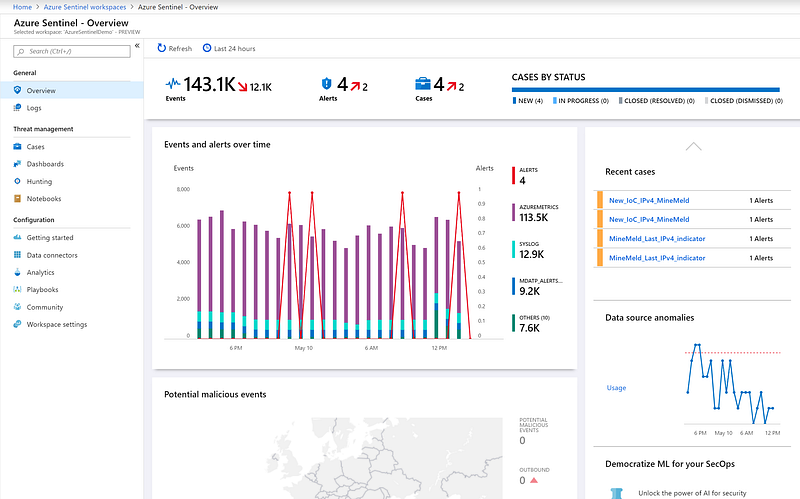
Azure Sentinel main dashboard

MineMeld, by Palo Alto Networks, is an open source Threat Intelligence processing framework. MineMeld can be used to collect, aggregate and filter indicators from a variety of sources and make them available for consumption to peers or to the Palo Alto Networks security platforms.

MineMeld can be used to aggregate multiple threat intelligence feeds and push them to Microsoft Intelligence Security Graph. I will focus on leveraging TI integration, with particular reference to Azure Sentinel. Injecting TI information into a SIEM is particularry useful as it opens up several possibilities in terms of new use cases implementation. By using Threat Intelligence integrated into SIEM tool, organizations can gain better visibility into their threat landscape, providing the needed context for monitoring and determining the actions of bad actors.

In order to connect MineMeld to Azure Sentinel, the main steps are:

  1. Create custom Azure Active Directory application
  2. Install MineMeld — ISG (Intelligence Security Graph)extension
  3. Configure Miners to aggregate Threat Indicators (optional)
  4. Configure Azure Sentinel extension

The main configuration tasks are:

  1. Create custom Azure Active Directory application:
  • On portal.azure.com → Azure AD → AppRegistration, click on “New registration” and fill all fieds (notice redirect url is required to proceed with registration, but it is not used in this scenario)
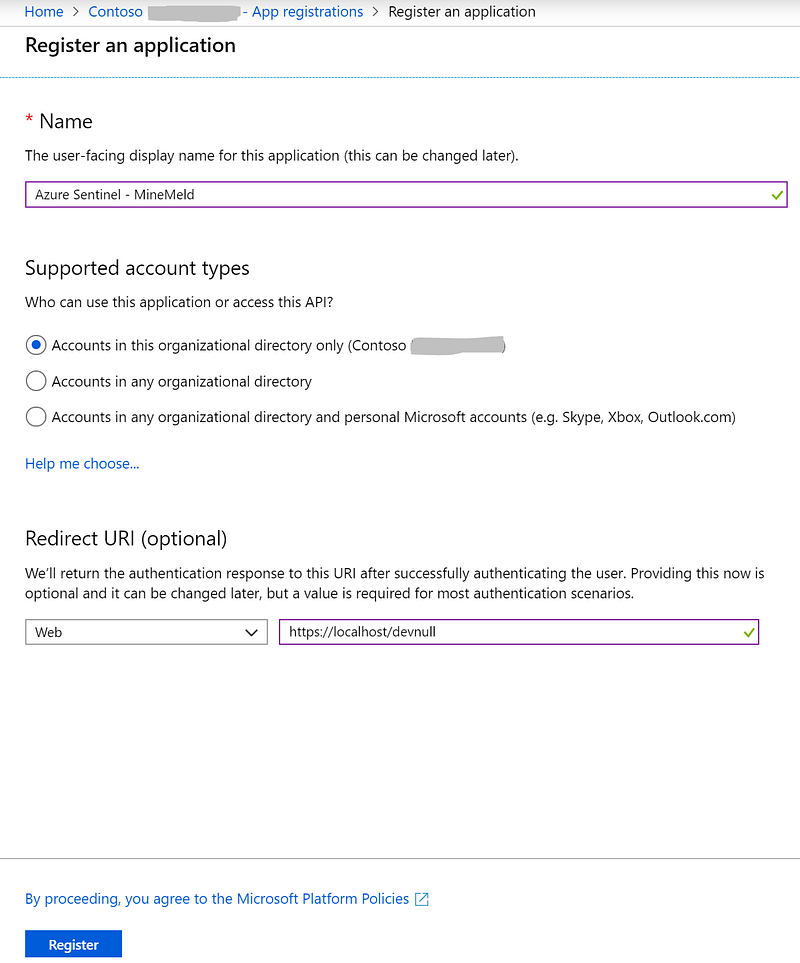
Azure AD — registrer a new app
  • Once Azure AD “Azure Sentinel — MineMeld” app has been created, take note of Application ID and Tenant ID.
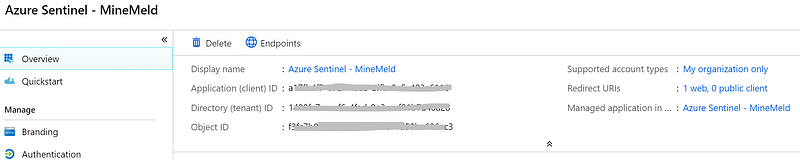
App Details
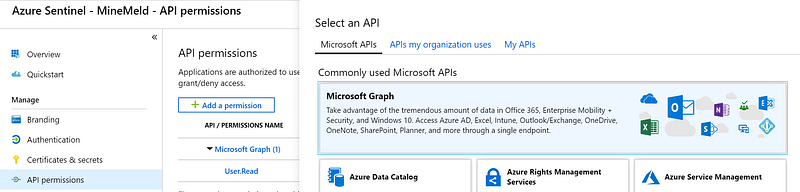
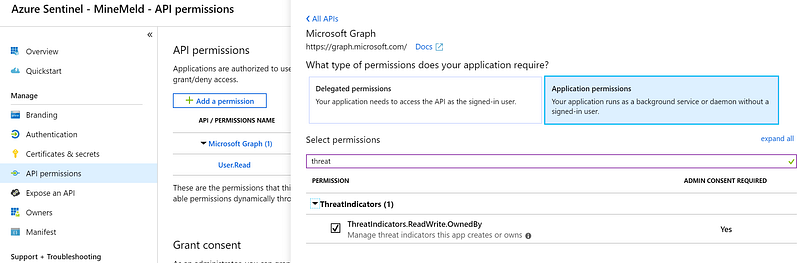
  • Inside Azure AD app just created → API Permission → Select “Microsoft Graph” and in Application Permission and select “ThreatIndicators.ReadWrite.OwnedBy
API Permission
Microsoft Graph API — Threat Indicators permissions
  • Click on “Grant Consent”. It’s required to grant consent for the requested permissions
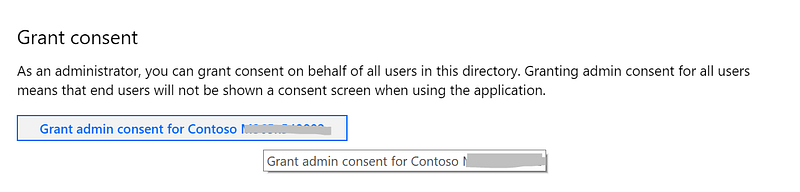
Grant consent on behalf of app user
  • Create a new client secret in “Certificate” & Secrets”
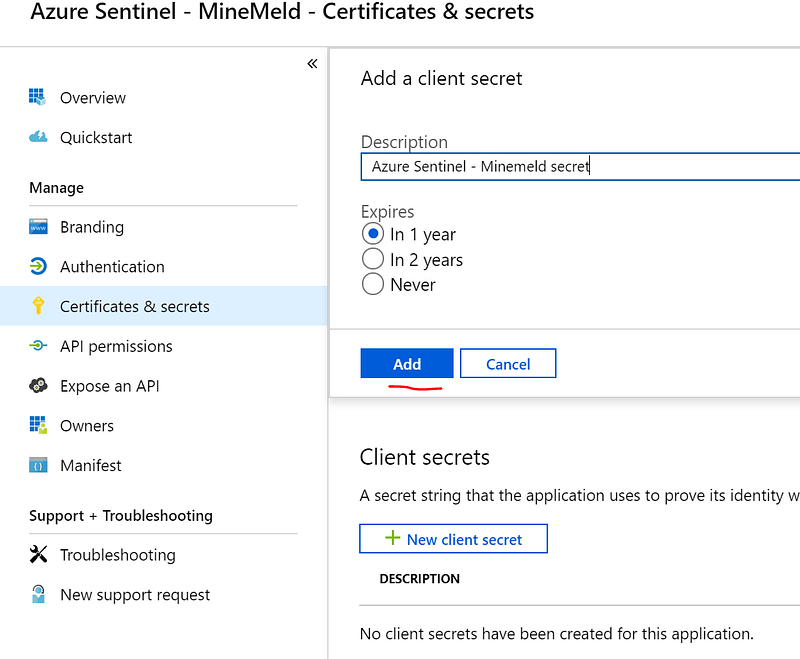
Secret generation

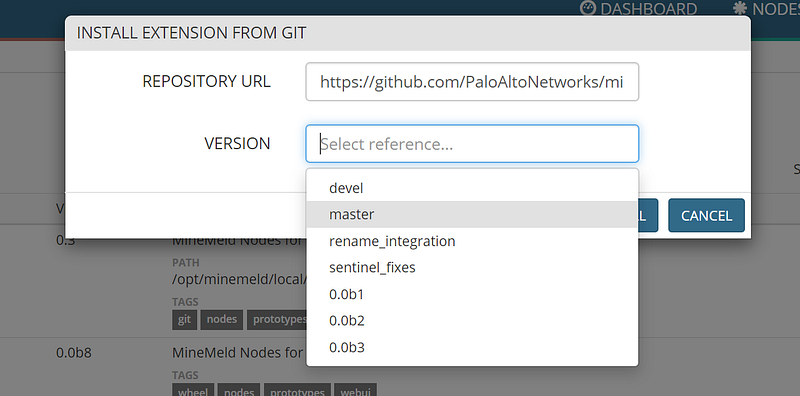
2. Install MineMeld — ISG (Intelligence Security Graph)extension

Install extention from GIT
  • Enable the extention and restart MineMeld services

3. Configure Miners to aggregate Threat Indicators (Italian CertPA in my example)

  • In MineMeld “Config” → Add a node and search “itcert”
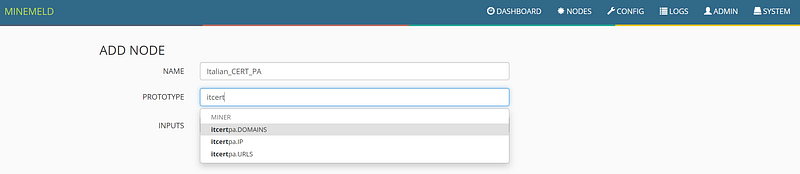
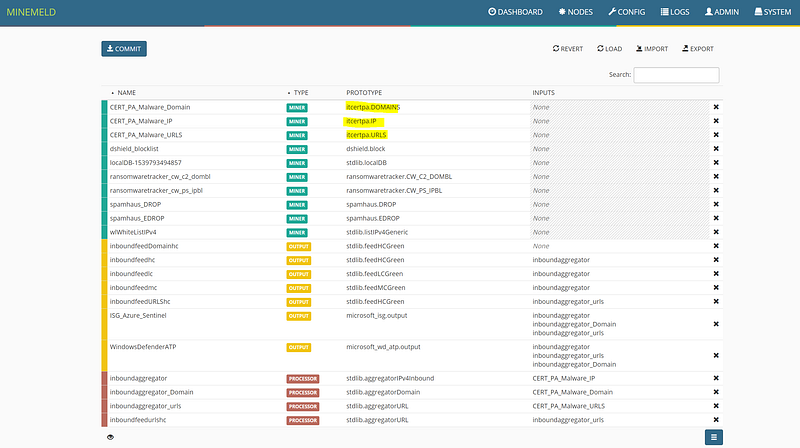
  • Notice CERT_PA miner nodes
MineMeld nodes

4. Configure Azure Sentinel extension

  • In MineMeld “Config” → “Prototypes” → “Browse prototypes” and search “Microsoft_isg.Output”, click “Clone”
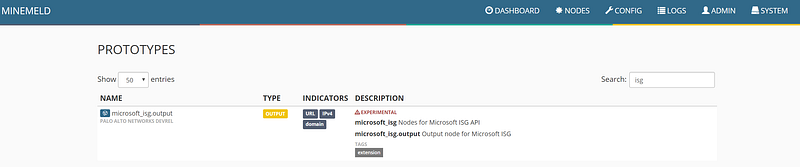
Node for Microsoft ASG API
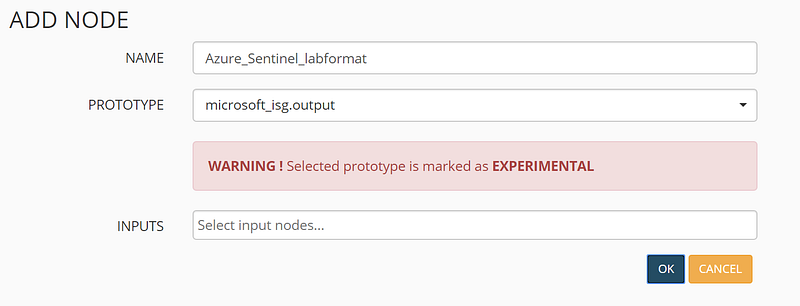
  • Define node’s name.
Add Azure Sentinel output node
  • On Minemeld → CONFIG → select Azure Sentinel output node, click on “Input” and select your aggregator nodes
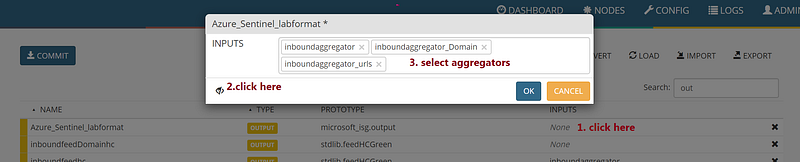
Configuring Azure Sentinel input nodes
  • Click “Commit” and wait for services restart
  • Edit Azure Sentinel node properties in “Nodes” → “Settings” providing: CLIENT ID (Azure AD Application ID), CLIENT SECRET: (Client Secret), TENANT ID (Azure AD Identifier). Select Azure Sentinel in Target Product.
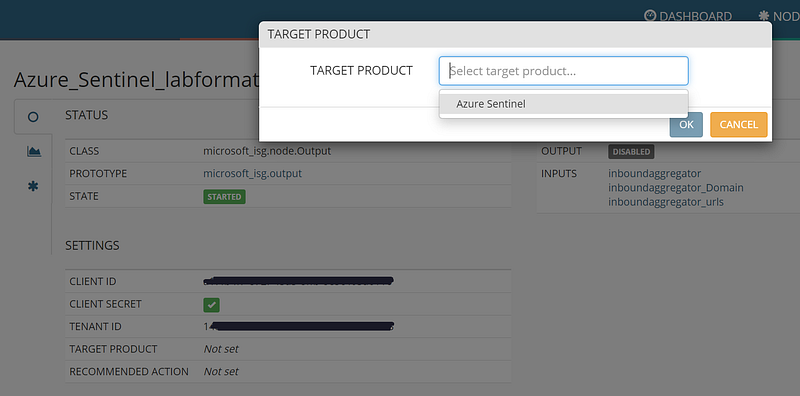
Node configuration

Now it’s time to enable Threat Intelligence connector in Azure Sentinel. The prerequisite is using Global administrator or Security Administrator Azure AD Role User.

  • In Azure Sentinel → Data Connector click on “Threat Intelligence”
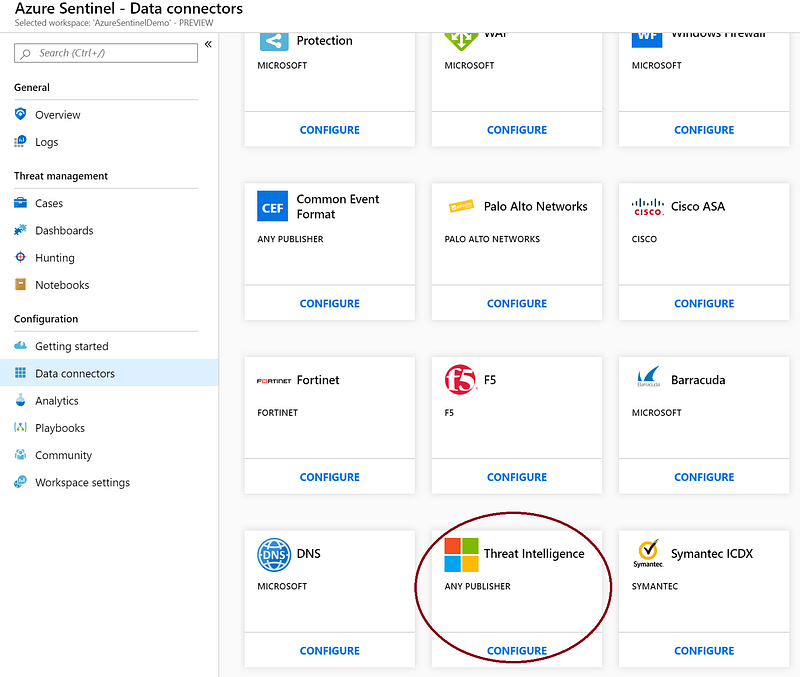
Data Connector- Threat Intelligence
  • Click on “Connect” to grant permission to your Threat Intelligence Provider. This connection enables you to incorporate indicators containing various types of observables such as IP address, domain, URL and file hash to search and create custom alerts rules in Azure Sentinel.
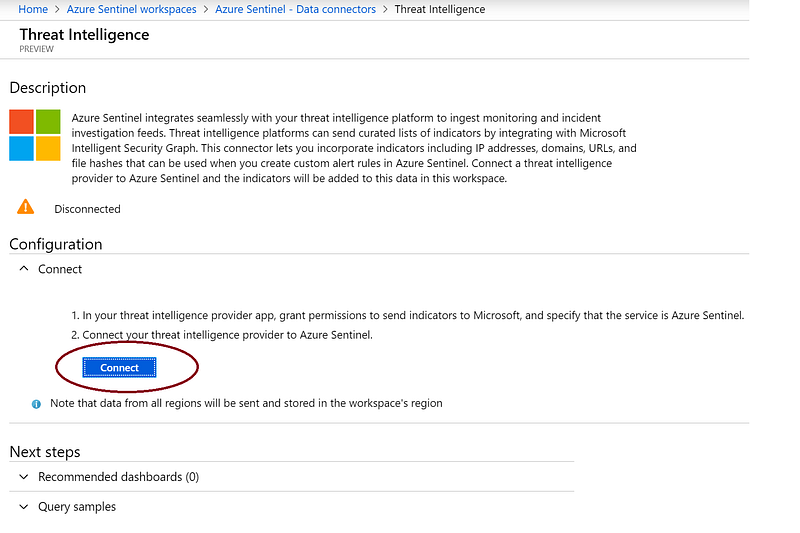
Grant Permission to your threat intelligence provider

Now MineMeld will start to stream Indicators to Azure Sentinel. You can inputi TI indicators for use in Dashboards, hunting and alert rules

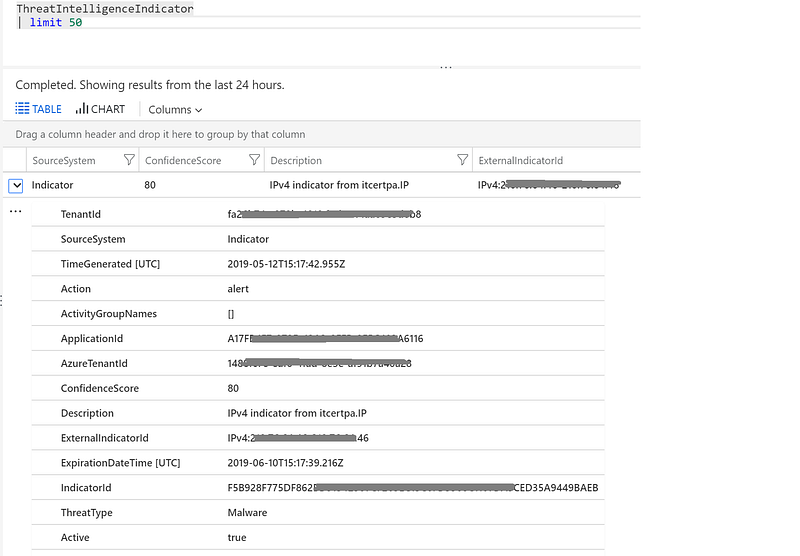
Using Kusto query language you can now run some queries to verify everything is working as expected. Indicators can be found on “ThreatIntelligenceIndicator” table under “SecurityInsight”.

Run simple queries to get latest pushed indicators:

Get latest 50 IoCs

ThreatIntelligenceIndicator

| limit 50
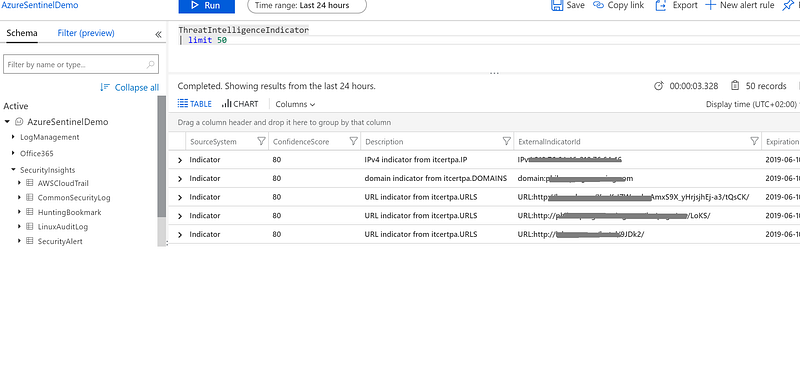
Simple Query #1
Simple query #1 — indicator detail

IoCs types distibution

ThreatIntelligenceIndicator

| summarize count() by Description

| sort by Description asc | render piechart
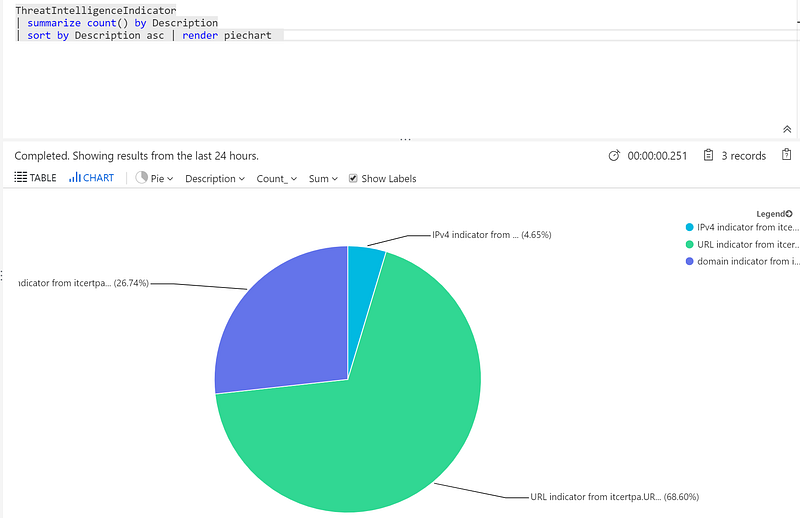
Indicators by Description — pie chart

IoCs types over time

ThreatIntelligenceIndicator

| summarize count() by TimeGenerated, Description

| sort by Description asc | render timechart
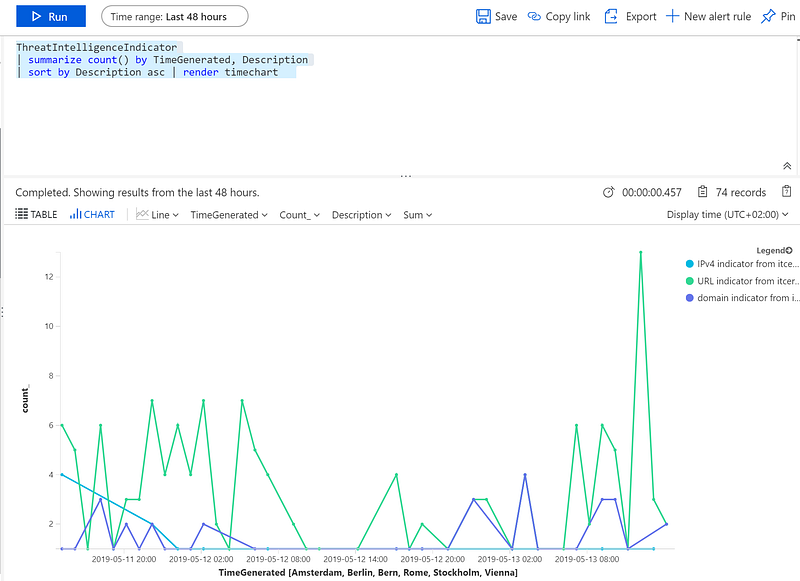
Indicators by Description over time

Now you will be able to correlate TI provided by external parties with internal information collected by Azure Sentinel. From a defender point of view, you will have a better vision of attacks in their context and you can proactively defend your organization against emerging threats.

In next articles I’ll write something about Threat Intelligence use cases in Azure Sentinel and security automation processes. Stay tuned :)

References:

Disclaimer: Opinions expressed are solely my own and do not express the views or opinions of my employer.

Azure
Azure Sentinel
Siem
Threat Intelligence
Cybersecurity
Recommended from ReadMedium