
Azure OpenAI Playground
Overview of language models and hyperparameters
OpenAI and its disruptive development of generative models are probably the most trending topic in the Tech industry today. With good reason.
The company indeed aims to promote and develop friendly AI in a way that benefits humanity as a whole. OpenAI also provides a platform for training and deploying AI models, as well as offering pre-trained models that can be fine-tuned for specific tasks.
It focuses on generative AI models, like GPT-3 (language generation) or DALL-E (image generation based on natural language input).
In this article, we are going to focus on conversational AI models and how to consume them via API directly from OpenAI. We will also dwell on how to tune hyperparameters to tailor your models to your use case and needs.
In order to proceed, we first need an OpenAI playground. For this purpose, I will use my OpenAI instance on Azure and I’ll provide a step-by-step implementation. Note that you can also use the OpenAI playground available here.
The idea is that once satisfied with the models’ results in the playgrounds, those models can be called via API and embedded within your applications to make them AI-ready.
Azure OpenAI setup
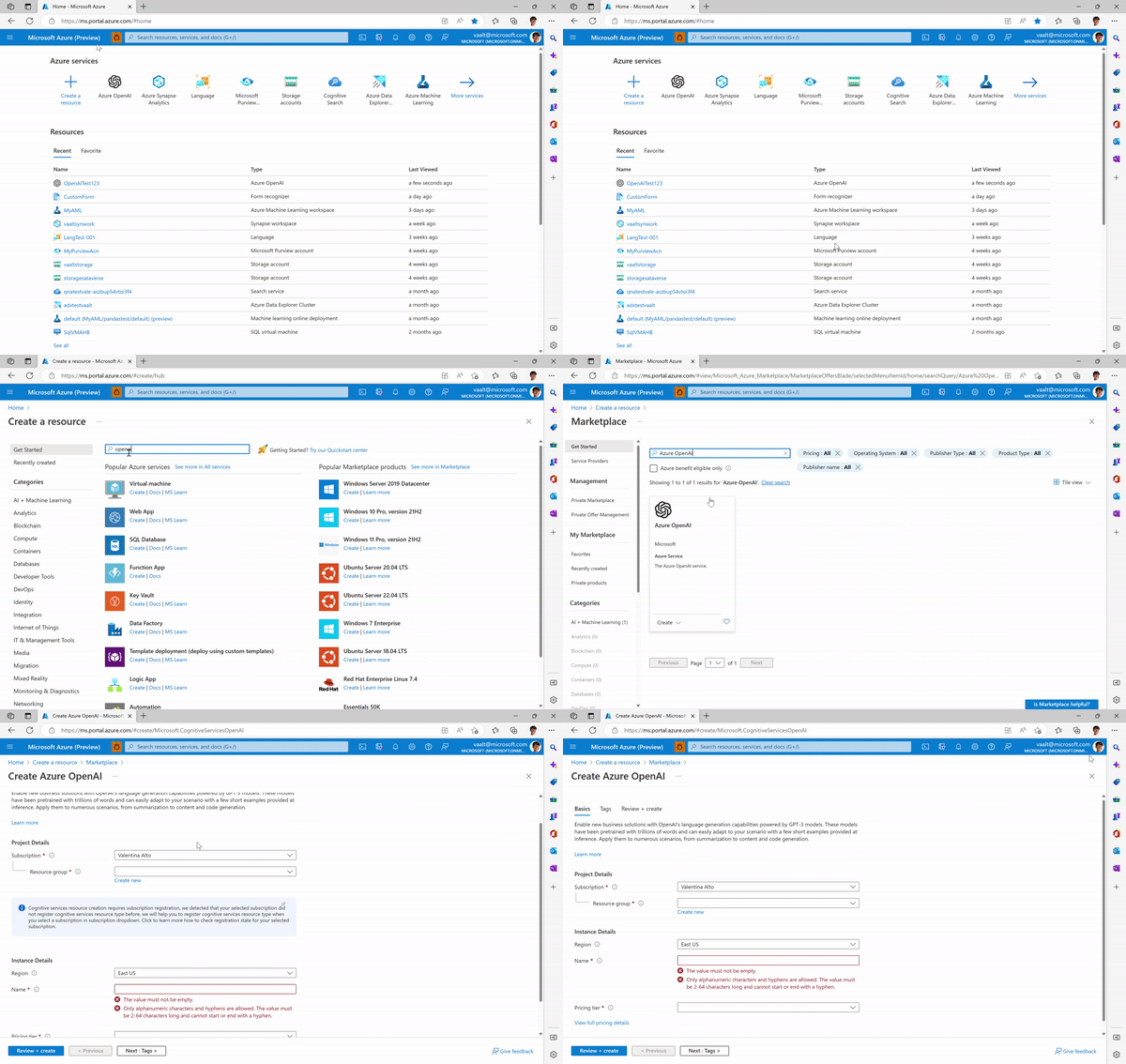
First thing first, let’s create an Azure OpenAI instance so we can access the Playground:
- An Azure subscription (you can create one for free here →https://azure.microsoft.com/it-it/free/)
- An Azure OpenAI instance →you can do so by creating a new resource in the Azure Portal:
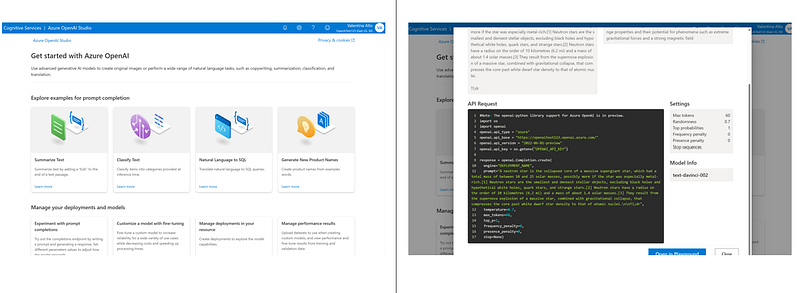
- Once the resource is created, you can jump to the Azure OpenAI Studio. Like many other cognitive services (like Language Service or Form Recognizer), Azure OpenAI studio appears as a friendly UI where you can see the list of capabilities of the models and the API request code (in Python) you can call to embed the model into your applications.
Then, directly from the examples on the home page, you can jump to the Playground where we will start experimenting with our models.
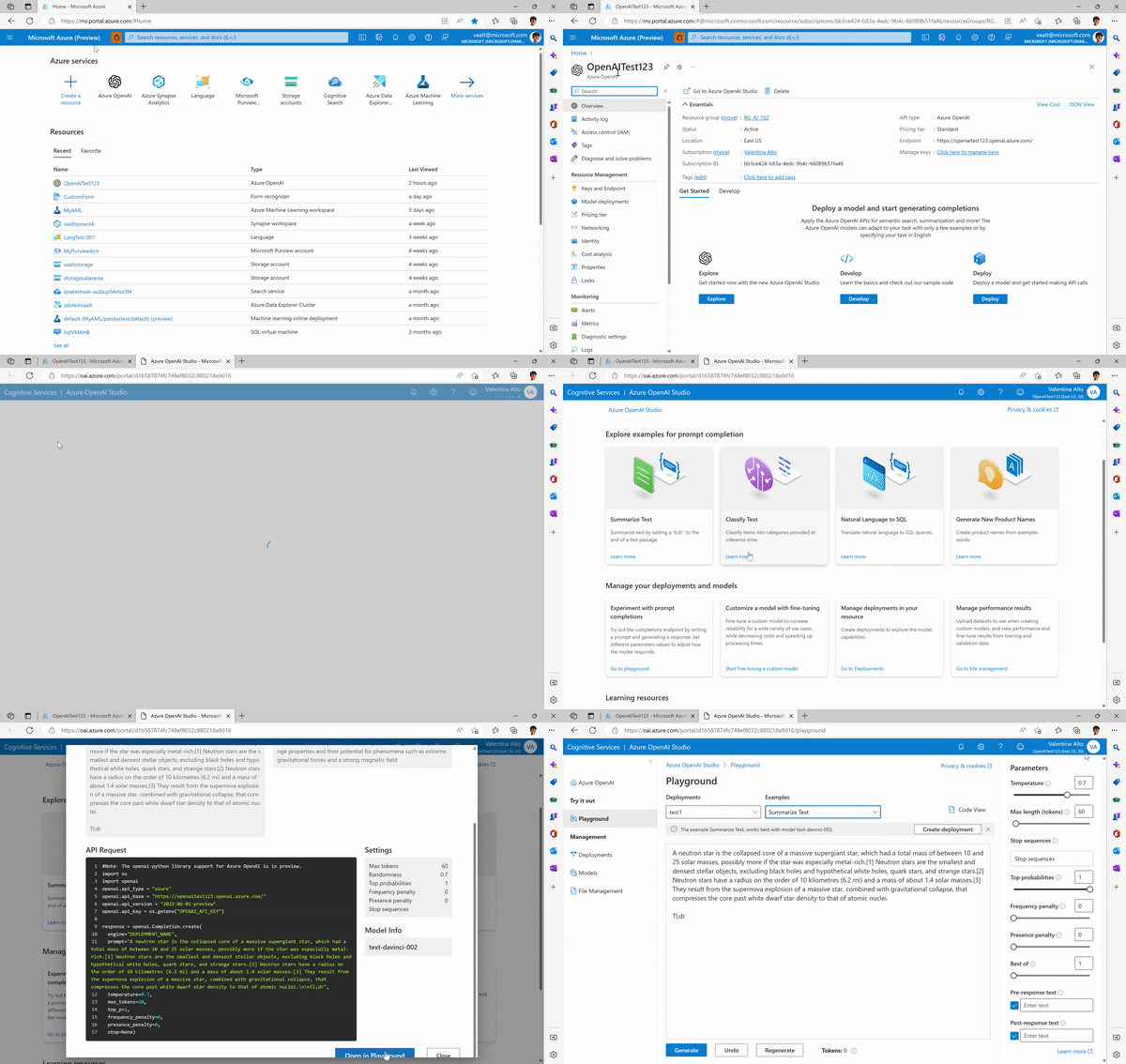
- The last step before you can start experimenting is creating a deployment that will enable you to make calls against a provided base model or fine-tuned model. Each deployment can be associated with one model. You can decide to create your model either in the Playground:
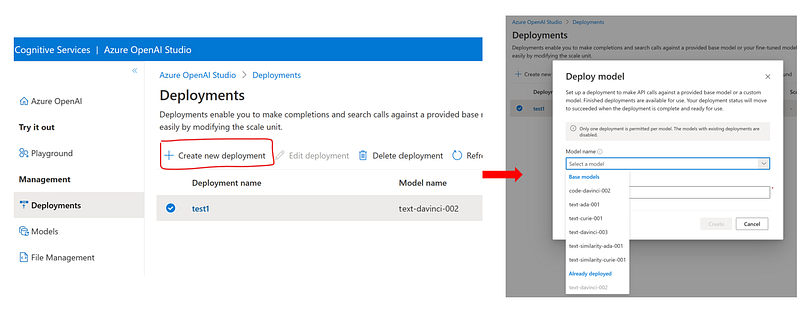
or directly in the Azure Portal, within your OpenAI resource backend:
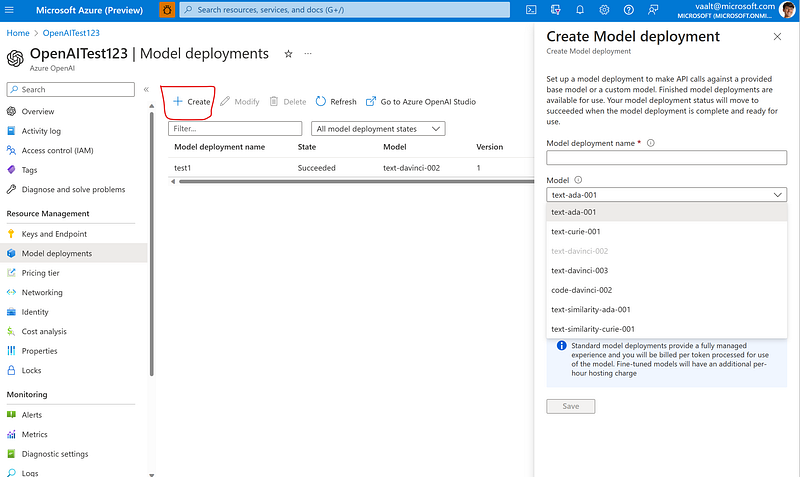
All set up! Now you can start experimenting in the Playground.
Playground Overview
In the Playground, you can start testing your deployments with different prompts. It is already available a list of examples of what you can achieve with available models.
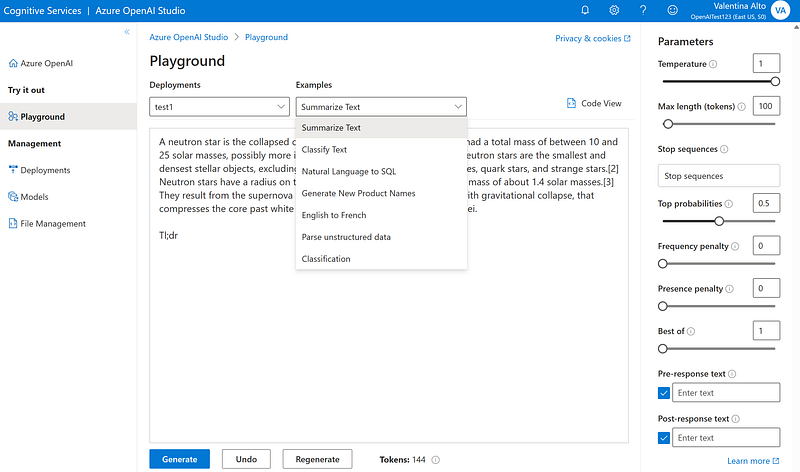
However, regardless of the task, you can interact with the Playground in natural language asking anything related to NLP.
You will also notice, at the right-hand side of the Playground, a set of (hyper)parameters to be tuned. Those are necessary in order to make the model more tailored to different use cases. Let’s examine them:
- Temperature (ranging 0–1) →it controls randomness. It means that, if the same question is asked multiple times, a model will a lower temperature will be more deterministic in its responses. A model with 0 temperature will answer the same sentence every time the same answer is generated.
- Max length (ranging 0–2048) →lengths of the model’s response
- Stop sequences (user input)→ Makes responses stop at a desired point, such as the end of a sentence or list.
- Top probabilities (ranging 0–1) → Controls which tokens the model will consider when generating a response. Setting this to 0.9 will consider the top 90% most likely of all possible tokens. Note: one could ask why not setting Top prob=1 so that all the most likely tokens are chosen. The answer is that users might still want to maintain variety when the model has low confidence even in the highest-scoring tokens.
- Frequency penalty (ranging 0–1) → Controls the repetition of the same tokens in the generated response. The higher the penalty, the lower the probability to see the same tokens more than once in the same response. Note: the penalty reduces the chance proportionally, based on how often a token has appeared in the text so far (this is the key difference with the following parameter).
- Presence penalty (ranging 0–2) → Similar to the previous one but stricter, it reduces the chance of repeating any token that has appeared in the text at all so far. As it is stricter than the frequency penalty, the presence penalty also increases the likelihood of introducing new topics in a response.
- Best of (ranging 0–20) → Generates multiple responses and displays only the one with the best total probability across all its tokens.
- Pre and post-response text (user input)→ Inserts text before and after the model’s response. This can help prepare the model for a response.
Now let’s see some examples with the available models.
Picking the right model
OpenAI offers three main categories of models, each responding to a macro-set of use cases. Within each set, there are different models which vary in terms of accuracy, speed, and cost.
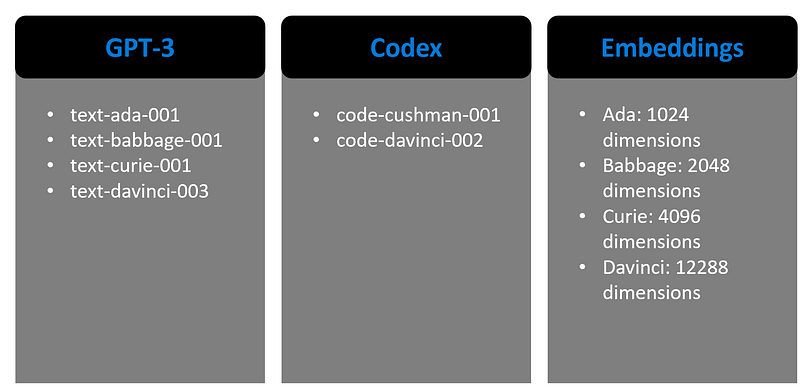
- GPT-3 →models that can understand and generate natural language. Among the GPT-3 models, Davinci is the most capable, while Ada is the fastest.
- Codex →models that can understand and generate code, translate from different programming languages, debug code, and further capabilities.
- Embeddings →models that can understand and use embeddings, which means, representing words or sentences in a multi-dimensional space where mathematical distances among instances represent their similarity in terms of meaning. As an example, imagine the words Queen, Woman, King, Man. Ideally, in our multidimensional space, where words are vectors, if the representation is correct, we want to achieve that:

Meaning that the distance between Woman and Man should be equal to the distance between Queen and King (you can learn about word and document embeddings in my former article here).
Here there are some examples of what you can achieve with the available models:
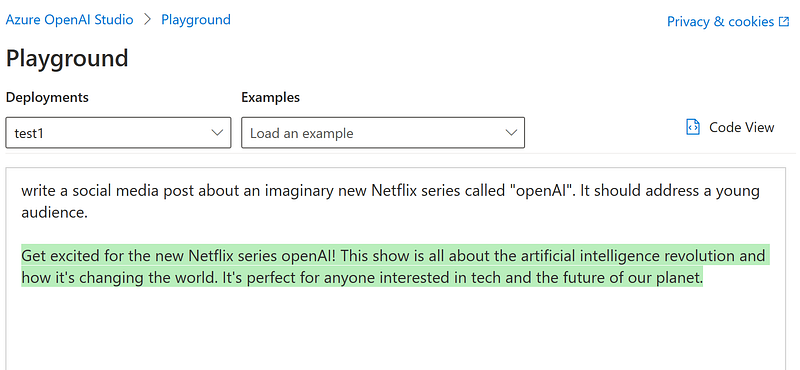
- “Write a social media post about an imaginary new Netflix series called “openAI”. It should address a young audience.”
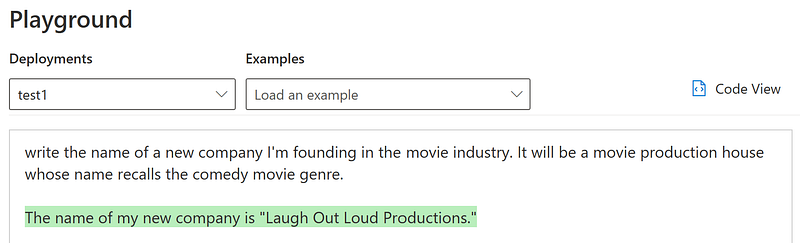
2. “Write the name of a new company I’m founding in the movie industry. It will be a movie production house whose name recalls the comedy movie genre.”
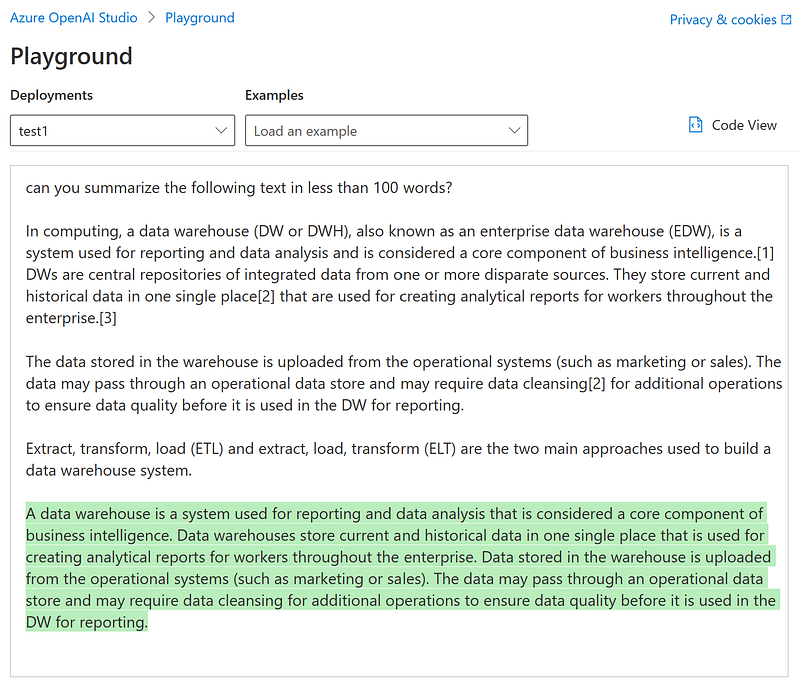
3. “Can you summarize the following text in less than 100 words?”
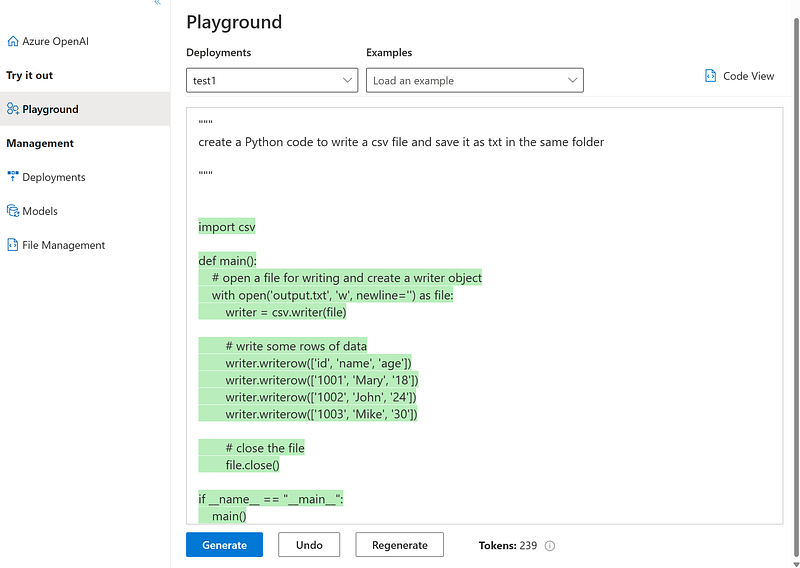
4. “create a Python code to write a csv file and save it as txt in the same folder”:
5. “translate this script in Python”
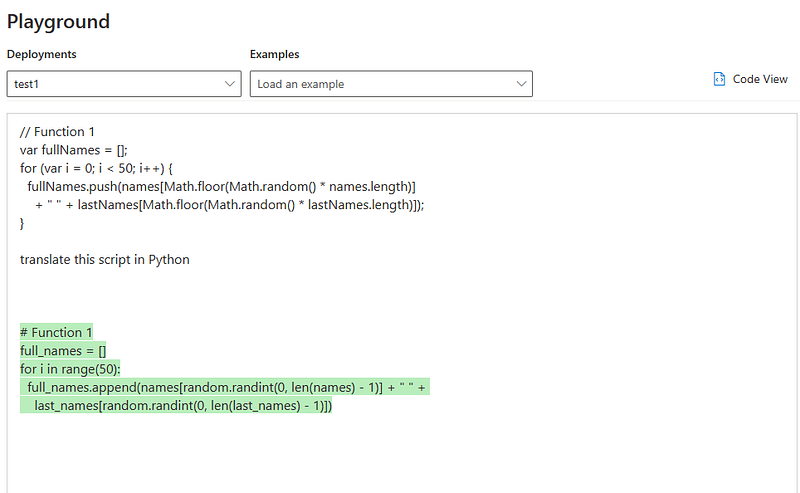
Those are just a few of the many examples you can generate within the Playground. Then, once satisfied with the model, you can embed it into your application by calling its API:
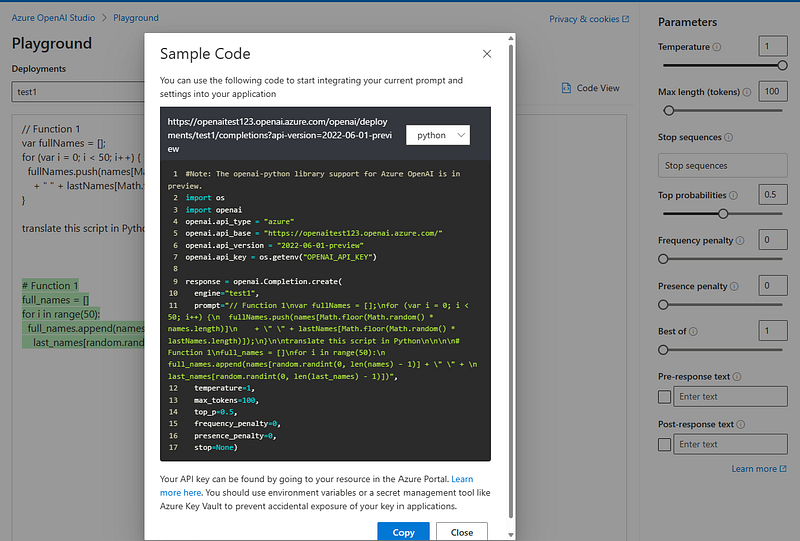
This will power and enhance your applications with conversational AI functionalities. Here there are some examples:
- Enhancing chatbot by answering long-tail questions where the bot hasn’t been trained.
- Technical and competitive analysis of SMEs’ documentation
- Enhancing intelligent search engines
- Writing assistance (social media and marketing content, RFP generator, PPT’s content)
- Customer feedback analysis
And many others.
Conclusions
On January 16th, Microsoft announced the General Availability of Azure OpenAI Service as well as its upcoming models, the most advanced AI models in the world — including GPT-3.5, Codex, and Dall-E 2.
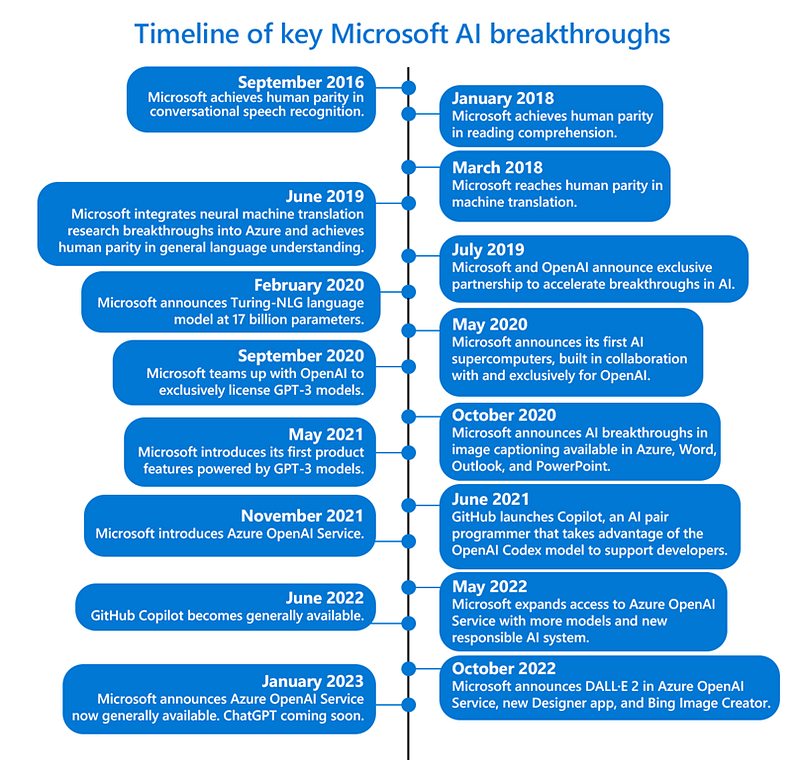
With the breaking news of ChatGPT coming soon.
I don’t know you, but I’m extremely curious and thrilled to see the next-generation models in practice and what organizations will be able to achieve.
The next months will exciting 💪
References
- https://openai.com/api/
- https://beta.openai.com/playground?__cf_chl_tk=.DD7sxfO39.FMT3a_eowMrK6wNgUtd9UeW8NOrhcsiA-1673715190-0-gaNycGzNCuU
- Azure OpenAI models — Azure OpenAI | Microsoft Learn
- General availability of Azure OpenAI Service expands access to large, advanced AI models with added enterprise benefits | Azure Blog and Updates | Microsoft Azure


