
TECH MADE SIMPLE
Identity, Authentication and Authorization for Azure Kubernetes Service — AKS
kubernetes/identity/authn/authz

Kubernetes does not offer any built in mechanism for defining and managing users. Instead it allows admins to integrate their organization identity service provider of choice in order to interact with the cluster. This way you don’t have to recreate or replicate users and manage them twice. Azure Kubernetes service offer the ability to integrate with Azure AD, an entreprise-grade ready identity management solution as the source of truth for account management and security.
In this blog we will dive deep in the notion of identity, how it is created, the different authentication and authorization options available both from a Kubernetes and Azure Kubernetes service perspective.
TL;DR
Currently, there’s four possible ways to configure Authentication and Authorization in an AKS cluster:
1- Authentication using local accounts for both user and admin access / Authorization using Kubernetes RBAC (default)

Users and admins get a X509 client certificate that is local to the cluster referred to as local accounts. The client certificate is created with a common name equal to “masterclient” and belongs to “system:masters” group and is bound to a cluster-admin cluster wide role which enable the user to have full AKS cluster admin access.
Since there’s no identity management system integrated with the cluster, to create additional users, admins will have to manually create a certificate for each user signed by the cluster’s certificate authority, then using kubernetes RBAC, users can be authorized to perform operations on cluster resources. Refer to the normal user creation in the kubernetes documentation for steps on how to create one.
Example command to create a cluster with this setup:
az aks create -g MyResourceGroup -n MyManagedCluster2- Authentication using local accounts for both user and admin access/ no authorization mechanism is enabled
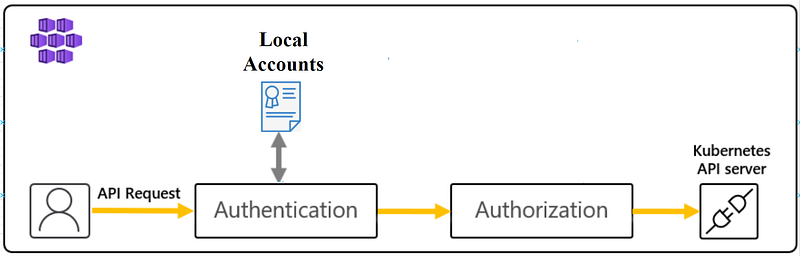
Same as above for authentication but no authorization mechanism is enabled so any authenticated user will have full admin access to the cluster.
Example command to create a cluster with this setup:
az aks create -g MyResourceGroup -n MyManagedCluster \
    --disable-rbac
3- Authentication using Azure Active directory / Authorization using Kubernetes RBAC only
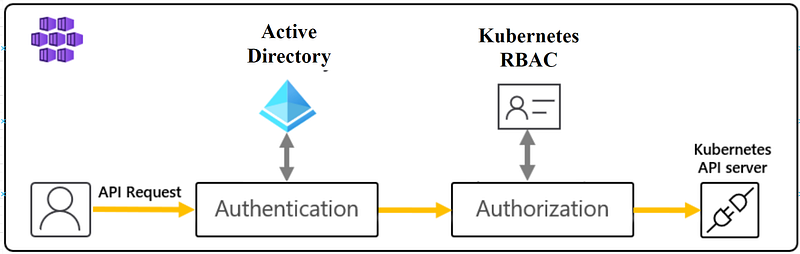
Users are redirected to Azure Active directory for authentication. Then, Kubernetes role-based access control is used as the only authorization mechanism inside the cluster. This type of cluster requires configuring an Active Directory group to act as the admin for the cluster, users belonging to the group, can then configure access control for other individual AD users or groups that need access by assigning them Kubernetes roles and cluster roles.
Example commands to create a cluster with this setup:
Create an Azure AD group that will host admin users for the cluster:
# create admin group
az ad group create --display-name myAKSAdminGroup --mail-nickname myAKSAdminGroup
# get the group object ID
admin_group_object_id=$(az ad group show --group myAKSAdminGroup --query objectId -o tsv)You can add admin users to the group using the following command:
az ad group member add \
     --group myAKSAdminGroup \
     --member-id [[put your account object id here]]
Create the cluster while specifying the admin group for the cluster
az aks create -g MyResourceGroup -n MyManagedCluster \
    --enable-aad \
    --aad-admin-group-object-ids $admin_group_object_id \
    --disable-local-accounts # optional (disable local accounts)
Note: local accounts are enabled by default. To enforce, centralized user access control and governance through Azure AD, disable local accounts. This feature is still in preview, refer to the official doc for steps to enable it.
Behind the scenes, to make the group an admin for the cluster, AKS will create a cluster role binding that assigns it a cluster role that guarantees full admin access to the cluster. Let’s verify this
First, retrieve the cluster credentials:
az aks get-credentials -g MyResourceGroup -n MyManagedClusterCheck the clusterrolebinding created by AKS and notice how it points to our admin group as the subject (you might be redirected for authentication first)
kubectl get clusterrolebinding aks-cluster-admin-binding-aad -o yamlapiVersion: rbac.authorization.k8s.io/v1
kind: ClusterRoleBinding
metadata:
name: aks-cluster-admin-binding-aad
resourceVersion: "362"
uid: f1cb3b3e-3960-4946-a168-1f2cb7ebb4b0
roleRef:
apiGroup: rbac.authorization.k8s.io
kind: ClusterRole
name: cluster-admin
subjects:
- apiGroup: rbac.authorization.k8s.io
kind: Group
name: c6f05369-71f1-4cb1-b72f-bf06071ba539 # admin group object ID4- Authentication using Azure Active directory / Authorization using both kubernetes RBAC and Azure RBAC (recommended):

Users authenticate to the cluster using Azure Active Directory. In this setup, Kubernetes API will delegate access control (authorization) to a Kubernetes Authorization webhook server deployed and managed as part of the AKS cluster. This will authorize requests based on Azure RBAC and Kubernetes RBAC if the identity exists within Azure AD and Kubernetes RBAC if the identity is local to the cluster.
Since you can use Azure RBAC to authorize Azure AD accounts to perform action against the cluster, there’s no need to configure an admin group for the cluster in this case.
Example command to create a cluster with this setup:
az aks create -g MyResourceGroup -n MyManagedCluster \
    --enable-aad \
    --enable-azure-rbac \
    --disable-local-accounts # optional (disable local accounts)
Note: local accounts are enabled by default. To enforce, centralized user access control and governance through Azure AD, disable local accounts. The feature is still in preview, refer to the official doc for steps to enable it.
Once you create the cluster, you can assign Azure AD principals, Azure RBAC roles which can be scoped to individual namespaces or across the entire AKS cluster as needed.
For example, to make yourself an admin on the entire cluster, assign yourself the “Azure Kubernetes Service RBAC Cluster Admin” role using the following commands:
# Get your AKS Resource ID
AKS_ID=$(az aks show -g MyResourceGroup -n MyManagedCluster --query id -o tsv)
# replace AAD-ENTITY-ID with your account email
az role assignment create --role "Azure Kubernetes Service RBAC Cluster Admin" --assignee <YOUR-AAD-ENTITY-ID> --scope $AKS_IDFor more information on the available roles for AKS and how to create custom roles, refer to the AKS documentation.
Some background
Every request made by a user to kubernetes is an API call that goes to the RESTful interface provided by the kube-api server. This works the same as well internally, when different kubernetes components such as the scheduler, kubelets, kube-proxy as an example want to change or retrieve cluster state from ETCD to communicate with each other, their requests must go through the API server which will then know how to handle it on their behalf.
The kube-api server performs three main consecutive tasks for each incoming request before modifying the cluster state which are: Authentication, Authorization and Admission Control as shown in the graph below. In the next part we will explain the notion of identity in k8s and how the API server tackles Authentication and Authorization both from a general perspective and from an Azure kubernetes service prespective.

Identity in Kubernetes
There are two concepts of an identity in Kubernetes:
User accounts: these accounts represent user personas and are global and unique across all namespaces. User accounts are not managed by Kubernetes and can only be referred to inside the cluster meaning that there’s no possibility to create using an API call, store or delete them and you can only grant or revoke their access to cluster resources. User accounts are typically created by an org identity management solution and can also belong to groups which in turn can be referred to inside the cluster when granting access.
Service accounts: these are special types of accounts that are meant to represent the applications running inside the pods. Service accounts are namespaced meaning each account must necessarily belong to a certain namespace and they can have the same name as long as they are created in distinct namespaces. Service accounts are actual kubernetes objects that are managed by the cluster and they can be created and used as an identity for the pods running your application if it ever needs to interact with the API server. Service account credentials are stored as Kubernetes secrets in the same namespace.
Every namespace comes with a “default” service account created automatically when you create the new namespace. After, when you deploy a pod, The credentials of the default service account of the namespace where you choose to run your pod will be mounted as a volume in the pod filesystem unless you create a new service account and explicitly indicate that you want to use it as the identity for your Pod.
To create a service account:
$ kubectl create serviceaccount mysaserviceaccount/mysa created
Notice how a secret was created for the new service account:
$ kubectl get secretsNAME TYPE DATA AGE
default-token-lqdkc kubernetes.io/service-account-token 3 16h
mysa-token-r78xj kubernetes.io/service-account-token 3 9m$ $ kubectl get secrets mysa-token-r78xj -o yamlapiVersion: v1
data:
ca.crt: LS0tLS1CRUdJTiBDRVJUSUZJQ0FURS0tLS0tCk1JSURE.....
namespace: ZGVmYXVsdA==
token: ZXlKaGJHY2lPaUpTVXpJMU5pSXNJbXRwWkNJNklpSjkuD.....
kind: SecretSince secrets are base64 encoded by default in kubernetes, if you decode the secret token field, you can use that token to assume the service account identity and authenticate to the cluster:
$ TOKEN=$(kubectl get secret mysa-token-r78xj -o jsonpath='{.data.token}'| base64 --decode)$ kubectl get pods --token $TOKENError from server (Forbidden): pods is forbidden: User "system:serviceaccount:default:mysa" cannot list resource "pods" in API group "" in the namespace "default"We get an error since we didn’t assign any permission yet to the Service account but as you can see, the request is authenticated as the service account “system:serviceaccount:default:mysa”.
Identity in AKS
AKS clusters are eventually kubernetes clusters that are managed by Azure and thus they have the same type of identities: User accounts and service accounts.
As mentioned earlier User accounts are typically created and managed outside of Kubernetes. Quoting from Kubernetes doc, even though a normal user cannot be added via an API call, any user that presents a valid certificate signed by the cluster’s certificate authority (CA) is considered authenticated. In this configuration, Kubernetes determines the username from the common name field in the ‘subject’ of the cert (e.g., “/CN=bob”). Using this approach, the kubeconfig file will contain secrets such as private keys and certificates that need to be carefully distributed to users, which can be a significant security risk.
Since kubernetes allows the integration of external identity management solution, AKS supports integration with Azure AD. This allows the same users to access OnPrem, Azure as well as AKS cluster resources and removes the need to manage and distribute certificate-based kubeconfig files that contain private keys. When you enable Azure AD integration with AKS, it is recommended to disable local accounts that use x509 certificates for authentications to enforce Azure AD as the central source for creating and managing users.
One thing to note here is Azure user accounts and Azure service principals are two types of identities that can be created within Azure AD and both can authenticate to Azure AD integrated AKS clusters. Since these accounts are external to kubernetes, they are both regarded to as user accounts when referred inside the k8s cluster.
Creating a user in this case boils down to creating a user or a service principal in Azure AD:
To create a user in Azure AD
az ad user create --display-name mydisplay --password {password} --user-principal-name myuserprincipalTo create service principal in Azure AD
az ad sp create-for-rbac --name ServicePrincipalNameAuthentication (authn)
Authentication is simply the process of verifying the identity of who or what is issuing the request.
Now that we discussed the two types of identities in k8s/AKS and we showed how users can be created, let’s understand the authentication mechanism and what options are available to authenticate in a vanilla Kubernetes cluster versus AKS.
Kubernetes Authentication
In the process of creating a Kubernetes cluster, you can choose to enable one or more Authenticator Modules from the supported methods of authentication such as static passwords or tokens file, Client Certificates, Bootstrap Tokens, OpenID Connect Tokens(OIDC), authentication webhook,. etc. Enabling an Auth module does not have to be restricted to one method versus the other. You can choose to enable many modules when you deploy the kube-api server and as a result, the API server will verify the identity of the request against each enabled authenticator until one succeeds.
After, when a user runs a kubectl command, the kubernetes CLI will formulate it into an HTTP request and will then decorate it with the client configuration that will be used by the API server to authenticate the request. Some examples of client config is listed below:
- a username and password if the cluster is configured to use HTTP basic authentication.
- a user x509 certificate if the cluster is configured to trust certificates issued from a certificate authority (CA).
- a bearer token that belongs to a user from a preconfigured file holding a set of records “tokens,users,uid,Groups” each representing a user, its token, user ID and the groups they belong to if any.
- a bearer token dynamically generated when you create a new service account.
- a JWT token generated by an OAuth2 provider. The provider can be configured as a trusted issuer for the API server level or for an external Auth webhook server used to delegate authentication to it. Azure Active Directory is an example of an OAuth2 provider.
AKS authentication
In AKS, x509 client certificates and JWT tokens generated using Azure AD are both supported methods of authentications for users.
By default AKS uses local accounts based on x509 certificates for authentication. In this case, kube-api will verify that the certificate the user is presenting is valid and signed by the trusted cluster’s certificate authority. The user ID used is the value taken from the common name in the certificate: example (CN=bob) which you can later assign k8s RBAC permissions. Disabling client certificates is impossible and will require the rotation of cluster’s certificate authority.
On the other hand, using Azure AD integrated clusters frees you from having to separately create user identities for the cluster and manage any private keys or certificates.
AKS makes this possible by delegating authentication to an auth webhook server deployed and configured as part of the AKS cluster. The Auth webhook server will validate JWT tokens, users retrieve after authenticating to Azure AD. the webhook server will also query the MS Graph API for any group memberships the user have. The authentication flow is well documented here.

Let’s look at an example of a kubeconfig file generated when you create a AKS cluster to understand better how authentication works in this case:
NOTE: Create an Azure AD enabled AKS cluster to follow along (option 3 or 4 from the TL;DR)
az aks get-credentials -g MyResourceGroup -n MyManagedClusterThe command will generate a kubeconfig containing the configuration to access your newly created cluster. Let’s give it a look:
$ kubectl config view
apiVersion: v1
clusters:
- cluster:
    certificate-authority-data: DATA+OMITTED
    server: https://mymanagedc-myresourcegroup-2d2990-38887617.hcp.eastus.azmk8s.io:443
  name: MyManagedCluster
contexts:
- context:
    cluster: MyManagedCluster
    user: clusterUser_MyResourceGroup_MyManagedCluster
  name: MyManagedCluster
current-context: MyManagedCluster
kind: Config
preferences: {}
users:
- name: clusterUser_MyResourceGroup_MyManagedCluster
  user:
    auth-provider:
      config:
        apiserver-id: 6dae42f8-4368-4678-94ff-3960e28e3630
        client-id: 80faf920-1908-4b52-b5ef-a8e7bedfc67a
        config-mode: "1"
        environment: AzurePublicCloud
        tenant-id: 72f988bf-86f1-41af-91ab-2d7cd011db47
      name: azure
The config include things like the endpoint of my AKS API server, contexts I can use to access different Kubernetes clusters added to my kube config, the current active context by default and finally a section for users with the config that allows the user to authenticate to the AKS application created in the Azure AD side.
Now if you attempt to execute a command against the cluster for the first time, kubectl will use the Azure AD client application to sign you in using an oauth2 device authorization grant flow. Let’s do this and then see what values are added to our kubeconfig afterwards.
Execute any command against the cluster and follow the steps to authenticate to your account.
$ kubectl get nodesTo sign in, use a web browser to open the page https://microsoft.com/devicelogin and enter the code AVE3KTRBC to authenticate.Once authenticated, look again at the config file, and focus on the user section side.
$ kubectl config view
apiVersion: v1
clusters:
- cluster:
    certificate-authority-data: DATA+OMITTED
    server: https://mymanagedc-myresourcegroup-2d2990-38887617.hcp.eastus.azmk8s.io:443
  name: MyManagedCluster
contexts:
- context:
    cluster: MyManagedCluster
    user: clusterUser_MyResourceGroup_MyManagedCluster
  name: MyManagedCluster
current-context: MyManagedCluster
kind: Config
preferences: {}
users:
- name: clusterUser_MyResourceGroup_MyManagedCluster
  user:
    auth-provider:
      config:
        access-token: eyJ0eXAiOiJKV1QiLCJhbGciOiJ..........
        apiserver-id: 6dae42f8-4368-4678-94ff-3960e28e3630
        client-id: 80faf920-1908-4b52-b5ef-a8e7bedfc67a
        config-mode: "1"
        environment: AzurePublicCloud
        expires-in: "3599"
        expires-on: "1632903590"
        refresh-token: 0.ARoAv4j5cvGGr0GRqy180BHbR.........
        tenant-id: 72f988bf-86f1-41af-91ab-2d7cd011db47
      name: azure
Notice the four fields that were added after the authentication: access-token, expires-in, expires-on and refresh-token.
Since the access-token is used by the auth webhook to identify the identity of the user, let’s decode that token and see what information it holds. the Access token is a JWT (JSON Web Token) token. to decode it we will use an online JWT decoder JWT.io. The decoded output is listed in the graph below:
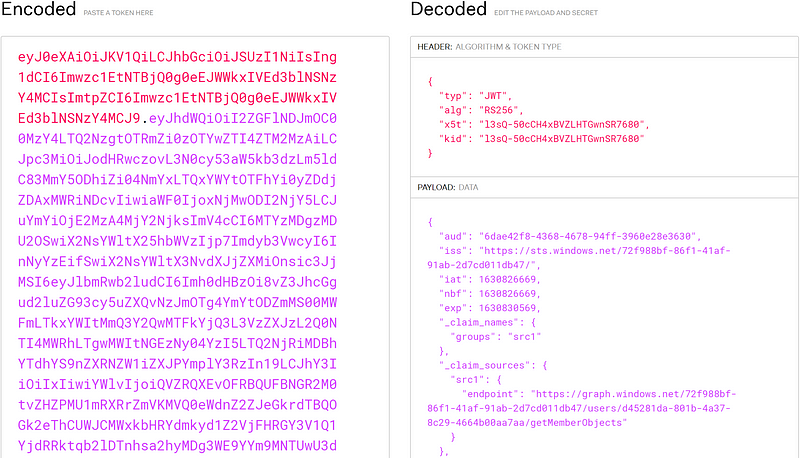
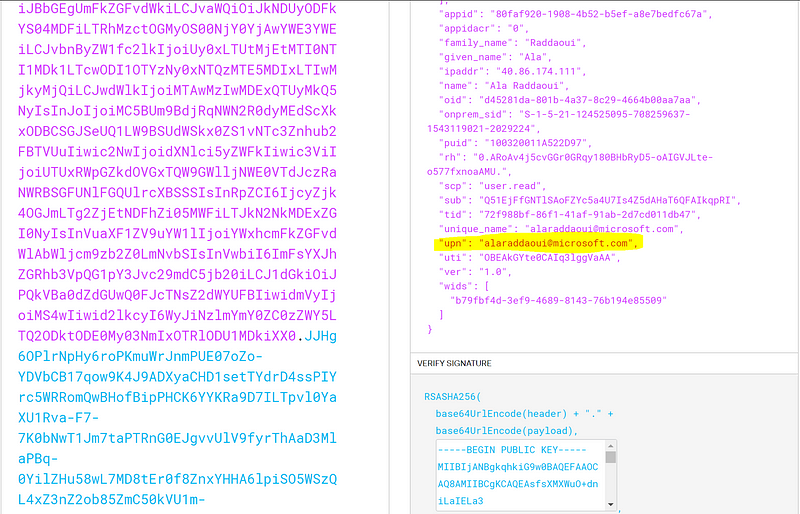
We can see that the decoded JWT token holds information about the issuer of the token (iss field), the User Principal name UPN and other information along with a signature at the end that the webhook auth module will use to verify the validity of the token to make sure the issuer of the JWT token is Azure AD and to ensure that the message wasn’t tampered with.
Authorization (authz)
Now that we verified the identity of the request, the next step performed by the kube-API is to evaluate whether the requester has the necessary permission to perform the action. This is referred to as the Authorization mechanism.
Authorization in Kubernetes
Similar to Authentication, when deploying a kubernetes cluster, the API-server can be configured to enable one or more Authorization modules. the list include:
- ABAC: policies are defined in a static file,
- RBAC: policies can be added or removed dynamically using kubernetes objects. Kubernetes RBAC is a built-in role-based access control (RBAC) mechanism that lets you create and grant roles (sets of permissions) for any object or type of object within the cluster.
- Webhook: policy decisions are delegated to an external HTTP(S) service.
- Node: special-purpose to authorize API requests made by kubelets.
You can even choose to allow all or deny all requests. If you want to learn more about how you can configure the kube-api server for both authentication and authorization. checkout the list of the flags you can pass in when you deploy the API server.
Using the webhook authorization module, Kubernetes authorization can work with existing organization-wide or cloud-provider-wide access control systems. AKS relies on this mechanism to integrate Kubernetes authorization with Azure RBAC. This will ensure a request issuer have permissions at either level to access Kubernetes cluster resources (more on this below).
Authorization in AKS
In AKS, both Kubernetes RBAC and Azure RBAC are authorization mode options. when both are enabled, authorization can be granted at either level for user accounts, service principals and groups create in Azure AD while for identities that exists only within the cluster such as regular Kubernetes users and Kubernetes service accounts, access can only be granted using Kubernetes RBAC. It is recommended to enable both as this approach allows for unified management and access control across Azure Resources, AKS, and Kubernetes resources.
Wrap up
In this blog we explained the notion of identity and the different options available for authentication and authorization both in kubernetes and AKS.
In summary, in the reference implementation for AKS, Azure recommends using Azure AD integrated AKS clusters with local accounts disabled for authentication. Both Azure RBAC and Kubernetes RBAC should be enabled to operate the cluster. Azure RBAC should be used to authorize users and groups while kubernetes RBAC should be used to authorize kubernetes service accounts. The Principle of Least Privilege should be then respected at each authorization level to make sure every user or application can only access the information and resources that are necessary for its legitimate purpose.


