
Azure Confidential VMs
Hardware boundaries for high-security workloads
~~~~~~~~~~~~~~~~~~~~~~~~~~~~~~~~~~~~~~~~~~~~~~~~~~~~~~~~~
⚙️ Check out my series on Automating Cybersecurity Metrics. The Code.
🔒 Related Stories: Azure Security | Cloud Security Architecture
💻 Free Content on Jobs in Cybersecurity | ✉️ Sign up for the Email List
~~~~~~~~~~~~~~~~~~~~~~~~~~~~~~~~~~~~~~~~~~~~~~~~~~~~~~~~~
AWS was the frontrunner for many of the innovative cloud security features we use today. However, Azure was the first cloud provider to advertise use of a trusted execution environment (TEE) and confidential computing. Perhaps AWS use or Google used something like it under the hood for some operations but it was not advertised as a feature or service when I searched for those terms when I originally wrote my own cloud security class.
I already wrote a lengthy post on TPMs, TEEs, and Enclaves in cloud environments and why you might want to use these features in the following post, and many of these concepts are applicable to any cloud environment (whether they have the feature or not):
I explained in prior posts how I was trying to create and store credentials, and how I wanted to keep them private. The prior posts show some bad ideas and solutions, how data is kept around in memory on Linux systems. Then I explain how a trusted enclave, TEE, or confidential computing environment (pick your favorite term) can help you protect your sensitive data while in use.
The challenge is that while data is in use it must be unencrypted at some point in order to be useful — otherwise your application cannot process it. While it is in use, an attacker might be able to get into system memory to get encryption keys or access the unencrypted data at that point.
Azure is now offering something they call Confidential VMs. In order to use a confidential VM, you’ll need to choose:
- A confidential VM instance type
- An operating system supported by Azure Confidential VMs
- A region where Azure Confidential VMs are currently available.
Hardware Segregation: Confidential VMs offer hardware isolation between virtual machines, host operating systems, and host management code. That presumably means that the code for each architectural component resides on a specific piece of hardware that the other components cannot access.
This sounds like the hardware isolation provided by AWS Nitro System in my above post on this topic but maybe takes it a step further. The AWS Nitro System provides hardware segregation between customer VMs. AWS has had that functionality for a while now, if it is really the same thing. Note that I am talking about the AWS Nitro System, not AWS Nitro Enclaves in comparison to Azure Confidential VMs. I am also not sure without doing more research whether the OS and hypervisor isolation exists on AWS.
If it is an apples to apples comparison, AWS has a lot more instance type options (see the section on Nitro):
AWS Nitro has supported Windows since 2021:
I’m sure Microsoft is working diligently to catch up and more will be available soon.
Other features offered by Azure Confidential VMs:
Attestation: Azure Confidential VMs offer some of the same functionality I covered for AWS Nitro VMS including attestation. This functionality will check to make sure your machine is legitimate and configured correctly, though you should explore this more in detail if you are counting on it.
Disk Encryption: Azure confidential VMs also offer cloud-based confidential disk encryption before the first boot, so presumably the entire operating system and boot disk is encrypted.
Dedicated TPM: With an Azure confidential VM it looks like you get a dedicated TPM. I guess without an Azure confidential VM your secrets in a TPM are shared with other VMs on the same host managed by the same hypervisor but it doesn’t really say in the link I provided. I explained what a TPM is in my prior post.
Secure Boot: You can also get the secure boot feature similar to what you get with trusted launch azure VMs.
Immutable Activity Logs: According to the video on confidential computing options below activity logs in a confidential computing environment are immutable and auditable.
Caveats and Considerations
VMs with Azure confidential disk encryption will cost more because the data cannot be compressed when encrypted. As I explain in class, encrypted data takes up more space.
https://azure.microsoft.com/en-us/pricing/details/managed-disks/
It will also likely take longer to create a Confidential VM, so test and make sure the timing meets your use case, or consider alternate architectures for high-availability with confidential VMs.
At the time of this writing Azure Confidential VMs do not work with the following services, but check the documentation if reading at a later date.
- Azure Batch
- Azure Backup
- Azure Site Recovery
- Azure Dedicated Host
- Microsoft Azure Virtual Machine Scale Sets with Confidential OS disk encryption enabled
- Limited Azure Compute Gallery support
- Shared disks
- Ultra disks
- Accelerated Networking
- Live migration
You can also learn more about Azure Confidential VMs in this video:
Azure also has something called App Enclaves which allows you to use a enclave accessible by a specific application instead of the entire VM via a TEE. I’m not going to go into this too much here but just mentioning it’s available.
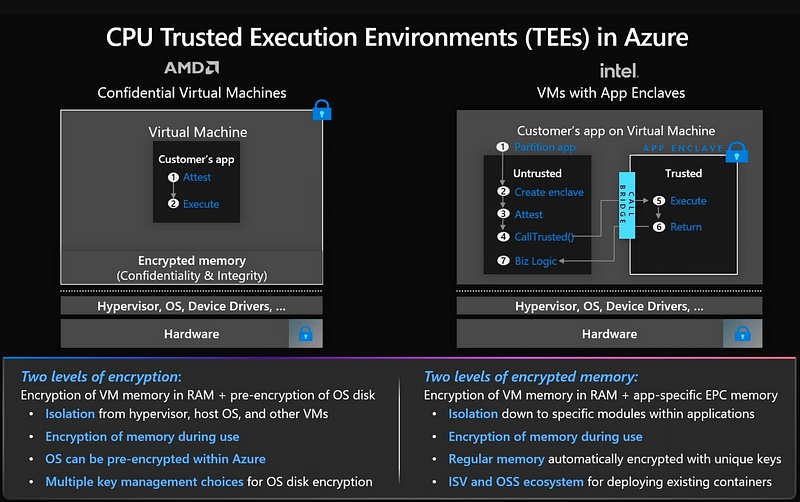
The following video covers the confidential computing options available from Azure. This includes options for serverless, containers, and SQL Server database environments. I will refer you to this video for more information and the documentation for each specific service with which you want to use confidential computing.
Should you use an Azure Confidential VM?
Does it really make your cloud environment more secure? I like the idea that the entire VM is encrypted including, presumably, the boot disk. I also like the idea of a VM having a specific public key so that any data encrypted by that key can only be decrypted by a specific VM. Immutable logs are very important when dealing with security incidents where malware may try to tamper with logs.
My initial question was why isn’t Azure performing this attestation to ensure customers are interacting with the correct host in the cloud? The answer may be that attestation seems to resolve some of the problems I mentioned in this post and one of my suggested solutions was a third-party service to validate the host similar to a TLS certificate with a third-party registrar. I need to look into this a bit more to say for sure.
I would like to see a more detailed video such as those available from AWS for the AWS Nitro System and AWS Nitro Enclaves in my last post. Those videos really dive deep into the architecture and how AWS Nitro works under the hood.
I would have similar encryption key questions as I posed in my prior post, as well, related to key management an potential man-in-the middle providing an attestation that looks valid and is — but for the wrong machine. I haven’t dug into Azure Confidential VMs to that level but suggest that customers counting on this technology dig into that and ask additional questions.
If you are using the Azure attestation and confidential VM libraries — it is up to you to ensure that you have used them in a secure manner and that no one has tampered with your code or the library itself when requesting and validating the attestation. This is one of the reasons why Azure is starting to provide managed options for confidential VMs, in part as described in the above video.
Note that the disk encryption option is private and ensure you enable if needed and test performance and failover. Due to the limited options at this time, I would also have concerns about VMs being available for failover when required. Make sure you have thought through, architected, and tested backup and failover accordingly. I wrote about some issues I was having with Azure in this area here.
Once again the video above mentions “encryption in use” but that is likely not actually the case. There are as very few limited options where data can be encrypted in use via homomorphic encryption. Rather, I suspect, confidential encryption uses cryptography to provide attestation to provide assurances through attestation and hardware components to provide segregation and protect data. If these distinctions matter to you, then you may want to ask more questions to get very specific details and definitions.
The security features included with confidential VMs certainly sound like they should provide additional security over and above a traditional VM. But as with all cloud security services, test them out and do your own due diligence.
More on cloud security to come in future posts. Follow for updates.
Follow for updates.
Teri Radichel | © 2nd Sight Lab 2022
About Teri Radichel:
~~~~~~~~~~~~~~~~~~~~
⭐️ Author: Cybersecurity Books
⭐️ Presentations: Presentations by Teri Radichel
⭐️ Recognition: SANS Award, AWS Security Hero, IANS Faculty
⭐️ Certifications: SANS ~ GSE 240
⭐️ Education: BA Business, Master of Software Engineering, Master of Infosec
⭐️ Company: Penetration Tests, Assessments, Phone Consulting ~ 2nd Sight Lab
Need Help With Cybersecurity, Cloud, or Application Security?
~~~~~~~~~~~~~~~~~~~~~~~~~~~~~~~~~~~~~~~~~~~~~~~~~~~~~~~~~~~~~
🔒 Request a penetration test or security assessment
🔒 Schedule a consulting call
🔒 Cybersecurity Speaker for PresentationFollow for more stories like this:
~~~~~~~~~~~~~~~~~~~~~~~~~~~~~~~~~~~~~~~~~~~~~~~~~~~~~~~~~~~~~
❤️ Sign Up my Medium Email List
❤️ Twitter: @teriradichel
❤️ LinkedIn: https://www.linkedin.com/in/teriradichel
❤️ Mastodon: @teriradichel@infosec.exchange
❤️ Facebook: 2nd Sight Lab
❤️ YouTube: @2ndsightlab


