avatarJohn David Luther

Free AI web copilot to create summaries, insights and extended knowledge, download it at here

8318

Abstract

l

<span class="hljs-comment"># Zoom into the volume spec section of the manifest</span> <span class="hljs-comment"># Using emptyDir volume means it only "shares the Pod's lifetime".</span> <span class="hljs-comment"># If the pod is gone the volume is gone</span> <span class="hljs-comment"># During its existence, all containers in the pod will have access to it</span> kubectl -n catalog describe statefulset catalog-mysql | grep -i -A 4 Volumes

<span class="hljs-comment"># To prove emptyDir vanishes along with the pod</span>

<span class="hljs-comment"># 1. Write a file on the emptyDir volume from within the pod</span> kubectl -n catalog <span class="hljs-built_in">exec</span> catalog-mysql-0 -- bash -c
<span class="hljs-string">"echo 'emptyDir test file: I'll vanish when this pod terminates!!' > /var/lib/mysql/test.txt"</span>

<span class="hljs-comment"># 2. Verify the test file listing and content</span> kubectl -n catalog <span class="hljs-built_in">exec</span> catalog-mysql-0 -- <span class="hljs-built_in">ls</span> -larth /var/lib/mysql/
| grep -i <span class="hljs-built_in">test</span>

kubectl -n catalog <span class="hljs-built_in">exec</span> catalog-mysql-0 -- <span class="hljs-built_in">cat</span> /var/lib/mysql/test.txt

<span class="hljs-comment"># 3. Force delete the pod of the StatefulSet workload</span> <span class="hljs-comment"># and wait for the pod to be recreated to maintain replica count</span> kubectl -n catalog delete pods -l app.kubernetes.io/component=mysql

kubectl -n catalog <span class="hljs-built_in">wait</span> --<span class="hljs-keyword">for</span>=condition=Ready pod
-l app.kubernetes.io/component=mysql --<span class="hljs-built_in">timeout</span>=30s

<span class="hljs-comment"># Confirm new pod was recreated from the Age column</span> kubectl -n catalog get pods -l app.kubernetes.io/component=mysql

<span class="hljs-comment"># 4. Reverify the test file listing and content</span> <span class="hljs-comment"># Expect no listing and no such file error since the last </span> <span class="hljs-comment">#. emptyDir file vanished along with its host pod</span> kubectl -n catalog <span class="hljs-built_in">exec</span> catalog-mysql-0 -- <span class="hljs-built_in">ls</span> -larth /var/lib/mysql/
| grep -i <span class="hljs-built_in">test</span>

kubectl -n catalog <span class="hljs-built_in">exec</span> catalog-mysql-0 -- <span class="hljs-built_in">cat</span> /var/lib/mysql/test.txt

<span class="hljs-comment"># Proven, the emptyDir volume was tied to the pod's lifecycle</span> <span class="hljs-comment"># It's content didn't persist sessions, which means it was an Ephemeral Volume.</span> <span class="hljs-comment"># Next, time to explore the Persistent Storage feature</span> </pre></div><h2 id="8844">Installing EBS Container Storage Interface (CSI) Driver</h2><figure id="22f4"><img src="https://cdn-images-1.readmedium.com/v2/resize:fit:800/1*dWLr5xRgU1kj-KE_BtFaxA.png"><figcaption><a href="https://kubernetes.io/blog/2019/01/15/container-storage-interface-ga/"><b>https://kubernetes.io/blog/2019/01/15/container-storage-interface-ga/</b></a></figcaption></figure><p id="a9e8"><b>CSI</b> (Container Storage Interface) like other Kubernetes Interfaces, <b>CNI</b> (Kubernetes Network Interface) for instance, enables the open plug-and-play architecture possible, providing the choice of selecting different kinds of storage from a wide variety of cloud providers and vendors. I found the <a href="https://kubernetes.io/blog/2019/01/15/container-storage-interface-ga/"><b><i>article</i></b></a> containing the image above a good evolutionary read to appreciate the plug-and-play architecture and what makes Kubernetes an open and powerful platform.</p><p id="85c2">As shared under the Reference section above, <a href="https://github.com/kubernetes-sigs/aws-ebs-csi-driver"><b><i>Amazon Elastic Block Store (EBS) CSI driver</i></b></a><b><i> </i></b>is easy to deploy following the few steps below.</p><div id="e8c0"><pre><span class="hljs-comment"># Ref: https://www.eksworkshop.com/docs/fundamentals/storage/ebs/ebs-csi-driver </span>

<span class="hljs-comment"># First, to use Amazon EBS as a Kubernetes Volumes as persistent volumes</span> <span class="hljs-comment"># with dynamic provisioning, EBS CSI Driver should be installed </span> <span class="hljs-comment"># as a Kubernetes add-on since it's not deployed by default out of box. </span> <span class="hljs-comment"># The CSI driver enables managing the lifecycle of Amazon EBS volumes</span>

<span class="hljs-comment"># Install the EBS CSI driver add-on </span> <span class="hljs-comment"># It takes few minutes for the EBS Volume to come up</span> aws eks create-addon --cluster-name <span class="hljs-variable">EKS_CLUSTER_NAME</span> \ --addon-name aws-ebs-csi-driver \ --service-account-role-arn <span class="hljs-variable">EBS_CSI_ADDON_ROLE</span> aws eks <span class="hljs-built_in">wait</span> addon-active --cluster-name <span class="hljs-variable">$EKS_CLUSTER_NAME</span>
--addon-name aws-ebs-csi-driver

<span class="hljs-comment"># Review what has been created in our EKS cluster by the addon</span> <span class="hljs-comment"># Expect to see </span> <span class="hljs-comment"># 1. An EBS CSI controller deployment (</span> <span class="hljs-comment"># 2. A DaemonSet (DaemonSet/ebs-csi-node)</span> kubectl -n kube-system get pods | grep ebs-csi

<span class="hljs-comment"># Check the Deployment with 2 pods</span> kubectl -n kube-system get deployment/ebs-csi-controller

<span class="hljs-comment"># Check the DaemonSet with 3 pods, one on each node in the EKS cluster</span> kubectl -n kube-system get daemonset/ebs-csi-node

<span class="hljs-comment"># Check the StorageClass object configured </span> <span class="hljs-comment"># Expect a AWS EBS gp2 storage class</span> <span class="hljs-comment"># Dynamic Provisioning means it's waiting for its first </span> kubectl get storageclass

<span class="hljs-comment"># EBS CSI is running successfully.</span> <span class="hljs-comment"># Next, let's modify the MySQL DB StatefulSet of the catalog microservice </span> <span class="hljs-comment"># to utilize a EBS block store volume as the persistent storage</span></pre></div><h2 id="9665">Provisioning EBS Persistent Volumes for StatefulSet Workload</h2><figure id="5587"><img src="https://cdn-images-1.readmedium.com/v2/resize:fit:800/1*8ww3e9cVC_OXYsXfbNayMA.png"><figcaption><b>https://www.eksworkshop.com/docs/fundamentals/storage/ebs/statefulset-with-ebs</b></figcaption></figure><p id="9694">Having successfully deployed and tested CSI drivers working as expected, we’re ready to provision Amazon EBS volumes on demand via the <a href="https://github.com/kubernetes-sigs/aws-ebs-csi-driver/tree/master/examples/kubernetes/dynamic-provisioning"><b><i>Dynamic Volume Provisioning</i></b></a> (DVP) capability in our EKS cluster. Review the <a href="https://kubernetes.io/docs/concepts/workloads/controllers/statefulset/#volume-claim-templates"><code>.spec.volumeClaimTempla</code>tes</a> in the below manifest which performs this magic by leveraging the EBS CSI.</p><p id="cdee">The rest of the commands help us learn how to handle Kubernetes StatefulSet and Kubernetes Storage building blocks and then do the persistent storage testing exactly in the same way we performed to test <code>emptyDir</code> ephemeral volume above. This time we demonstrate the persisting of data in an independent volume and accessing it across stateful pods.</p><div id="4c1a"><pre><span class="hljs-comment"># Ref: https://www.eksworkshop.com/docs/fundamentals/storage/ebs/statefulset-with-ebs</span>

<span class="hljs-comment"># Two goals here:</span> <span class="hljs-comment"># 1. Create a new StatefulSet for the MySQL database used by the catalog </span> <span class="hljs-comment"># component which uses an EBS volume</span> <span class="hljs-comment"># 2. Update the catalog component to use the new version of the database</span>

<span class="hljs-comment"># Review manifest of a new StatefulSet to be created</span> <span class="hljs-comment"># Review the volumeClaimTemplates spec in the template</span> <span class="hljs-comment"># (https://kubernetes.io/docs/concepts/workloads/controllers/statef

Options

ulset/#volume-claim-templates)</span> <span class="hljs-comment"># This instructs Kubernetes to utilize Dynamic Volume Provisioning </span> <span class="hljs-comment"># It automatically creates and we'll examine each later:</span> <span class="hljs-comment"># - A new EBS Volume</span> <span class="hljs-comment"># - A PersistentVolume (PV)</span> <span class="hljs-comment"># - A PersistentVolumeClaim (PVC) </span> <span class="hljs-built_in">cat</span> ~/environment/eks-workshop/modules/fundamentals/storage/ebs/statefulset-mysql.yaml

<span class="hljs-comment"># Reconfigure the catalog component to use the new StatefulSet</span> <span class="hljs-built_in">cat</span> ~/environment/eks-workshop/modules/fundamentals/storage/ebs/deployment.yaml

<span class="hljs-comment"># Apply the changes and wait for the new pods to be ready</span> kubectl apply -k ~/environment/eks-workshop/modules/fundamentals/storage/ebs/ kubectl -n catalog rollout status --<span class="hljs-built_in">timeout</span>=100s statefulset/catalog-mysql-ebs

<span class="hljs-comment"># Confirm the new StatefulSet is running</span> kubectl -n catalog get statefulset catalog-mysql-ebs

<span class="hljs-comment"># Inspecting the catalog-mysql-ebs StatefulSet, </span> <span class="hljs-comment"># we can see that now we have a PersistentVolumeClaim attached to it </span> <span class="hljs-comment"># with 30GiB and with storageClassName of gp2.</span>

<span class="hljs-comment"># Confirm, we have PersistentVolumeClaim attached to the StatefulSet</span> <span class="hljs-comment"># Expect to see the StorageClass create in the previous section</span> kubectl -n catalog get statefulset catalog-mysql-ebs
-o jsonpath=<span class="hljs-string">'{.spec.volumeClaimTemplates}'</span> | jq .

<span class="hljs-comment"># Checking the PVC and the PV created by Dynamic Volume Provisioning</span> kubectl -n catalog get pvc kubectl get pv kubectl describe pv

<span class="hljs-comment"># With AWS CLI command, view the Amazon EBS volume created automatically</span> <span class="hljs-comment"># (Feel free to view the EBS volume on EC2/EBS console as well)</span> <span class="hljs-comment"># Check the references for verification and connect the dots:</span> <span class="hljs-comment"># 1. VolumeID from the PV description above</span> <span class="hljs-comment"># 2. PVC from kubernetes.io/created-for/pvc/name key in the output</span> aws ec2 describe-volumes
--filters Name=tag:kubernetes.io/created-for/pvc/name,Values=data-catalog-mysql-ebs-0
--query <span class="hljs-string">"Volumes[*].{ID:VolumeId,Tag:Tags}"</span>
--no-cli-page

<span class="hljs-comment"># If you'd like to inspect the container shell and check out the </span> <span class="hljs-comment"># newly EBS volume attached to the Linux OS, </span> <span class="hljs-comment"># run this instructions to run a shell command into </span> <span class="hljs-comment"># the catalog-mysql-ebs container. </span> <span class="hljs-comment"># It'll inspect the filesystems that you have mounted:</span>

<span class="hljs-comment"># As the new owner of an EBS volume, we can go inside the container</span> <span class="hljs-comment"># and examine the volume filesystem</span> <span class="hljs-comment"># Expect to see the disk mounted to directory /var/lib/mysql</span> <span class="hljs-comment"># This is a persistent storage that we'll venture to prove next</span> kubectl -n catalog <span class="hljs-built_in">exec</span> --stdin catalog-mysql-ebs-0 -- bash -c <span class="hljs-string">"df -h"</span>

<span class="hljs-comment"># Verify the persistent storage with EBS Volume</span> <span class="hljs-comment"># Steps are the same we did during the emptyDir scenario above</span>

<span class="hljs-comment"># 1. Create a test.txt file like before</span> kubectl -n catalog <span class="hljs-built_in">exec</span> catalog-mysql-ebs-0 -- bash -c
<span class="hljs-string">"echo 'EBS persistent store test file; I will persist!!' > /var/lib/mysql/test.txt"</span>

<span class="hljs-comment"># 2. Verify that the test.txt file was created on the /var/lib/mysql directory</span> kubectl -n catalog <span class="hljs-built_in">exec</span> catalog-mysql-ebs-0 -- <span class="hljs-built_in">ls</span> -larth /var/lib/mysql/
| grep -i <span class="hljs-built_in">test</span>

kubectl -n catalog <span class="hljs-built_in">exec</span> catalog-mysql-ebs-0 -- <span class="hljs-built_in">cat</span> /var/lib/mysql/test.txt

<span class="hljs-comment"># 3. Force remove the current catalog-mysql-ebs pod</span> <span class="hljs-comment"># to trigger the StatefulSet controller to automatically re-create a new pod</span> kubectl -n catalog delete pods catalog-mysql-ebs-0

<span class="hljs-comment"># Wait for catalog-mysql-ebs Pod to be created and ready</span> kubectl -n catalog <span class="hljs-built_in">wait</span> --<span class="hljs-keyword">for</span>=condition=Ready pod
-l app.kubernetes.io/component=mysql-ebs --<span class="hljs-built_in">timeout</span>=60s

<span class="hljs-comment"># Confirm new pod by looking at AGE </span> kubectl -n catalog get pod catalog-mysql-ebs-0

<span class="hljs-comment"># 4. Exec back into the MySQL container shell and </span> <span class="hljs-comment"># and verify the file from the previous pod persists in the new pod</span>

kubectl -n catalog <span class="hljs-built_in">exec</span> catalog-mysql-ebs-0 -- <span class="hljs-built_in">ls</span> -larth /var/lib/mysql/
| grep -i <span class="hljs-built_in">test</span>

kubectl -n catalog <span class="hljs-built_in">exec</span> catalog-mysql-ebs-0 -- <span class="hljs-built_in">cat</span> /var/lib/mysql/test.txt

<span class="hljs-comment"># voilà! test.txt file exsits in the persistent storage provided by EBS.</span> <span class="hljs-comment"># Amazon EBS is storing the data and keeping data safe and </span> <span class="hljs-comment"># available within an AWS availability zone across pods!!</span></pre></div><h2 id="e4bc">Next Steps</h2><p id="ead8">In this chapter, we kicked off the <b><i>Kubernetes Storage and Volumes</i></b> demonstration in AWS Cloud’s managed Kubernetes platform, Amazon EKS, using Amazon EBS volumes as storage. It’s truly a comprehensive primer trying to teach all the building blocks necessary, not only making Kubernetes Storage function but also how to do so using one of the most prominent, widely used disk block store offerings in the Cloud — <a href="https://aws.amazon.com/ebs/"><i>EBS</i></a> by AWS.</p><p id="5344">The hands-on steps demonstrated here are simple but the commands pack so many powerful implementations under the hood. I encourage you to read the ins and outs of all building blocks, peek through the implementation details, and most importantly know the glue that connects and binds the dots.</p><p id="60c0">The next chapter is even more exciting because we will use the knowledge learned here to upend another widely used, prominent storage solution in the Cloud — <a href="https://aws.amazon.com/efs/"><i>EFS</i></a><i>.</i></p><p id="3417">See you there soon!</p><blockquote id="e9f7"><p>If you benefited from reading the post, please 👏 a few times before parting, and help others by sharing it; I highly appreciate that!</p></blockquote><div id="8ca9" class="link-block"> <a href="https://jdluther.medium.com/membership"> <div> <div> <h2>Join Medium with my referral link - John David Luther</h2> <div><h3>As a Medium member, a portion of your membership fee goes to writers you read, and you get full access to every story…</h3></div> <div><p>jdluther.medium.com</p></div> </div> <div> <div style="background-image: url(https://miro.readmedium.com/v2/resize:fit:320/0*VUlTJEesCicgGR81)"></div> </div> </div> </a> </div><p id="05ab"><b><i>Please <a href="https://jdluther.medium.com/">follow</a> to stay in touch, track, and be the first to get notified of all future writings on AWS Cloud, Containers, Kubernetes, and Machine Learning. Also, check all my stories on <a href="https://medium.com/the-aws-way/latest">The AWS Way</a> publication.</i></b></p></article></body>

AWS Workshops DIY — EKS Workshop — 6. Running Kubernetes StatefulSet in EKS w/ Amazon EBS Volumes

Chapter 6 — A hands-on how-to primer on installing Container Storage Interface (CSI) for Amazon Elastic Block Store and using EBS as Kubernetes Persistent Volumes

No storage, no computing, in Cloud, or elsewhere. So it’s essential to master everything taught in this workshop chapter — Kubernetes Storage architecture, concepts, components, as well as, the Amazon and AWS side infrastructure, implementations, and the glues that make both elephants dance in coordinated choreography.
https://www.eksworkshop.com/docs/fundamentals/storage/ebs/

Amazon Elastic Block Store (Amazon EBS) and Amazon Elastic File System (Amazon EFS) are going to be the focus of this and the next chapter respectively. Both provide a comprehensive guide on managing Kubernetes Storage as ephemeral volumes, persistent storage volumes, and shared data volumes. Head on, we’ll deal with and learn hands-on all about CSIs (Container Storage Interfaces), Volumes, Persistent Volumes, Ephemeral Volumes, Storage Classes, and Dynamic Volume Provisioning in a Kubernetes Cluster. This primer will also show how to deploy a Kubernetes StatefulSets workload commonly used in production for managing stateful applications using EBS as Kubernetes Persistent Volumes.

There’s a lot to cover, so let’s get going with some bookmark-worthy helpful pointers and reference links to understand the above concepts from both Kubernetes and AWS perspectives.

Bottom line , we’ll demonstrate in this chapter— Pods are ephemeral and so are their own storage space like emptyDir. Disk volumes like EBS store permanent data. They can be attached, detached, reattached. Data persists throughout!

Theory Note and References

No storage, no computing, in the Cloud, or elsewhere. So it’s essential to master everything taught in this workshop chapter — Kubernetes Storage architecture, concepts, and components, as well as, the Amazon and AWS side infrastructure, implementations, and the glues that make both elephants dance in coordinated choreography.

The following are my favorite bookmarks that I can’t live without and I constantly bounce around when working on EKS and Kubernetes Storage.

  1. EKS Workshop’s Storage on EKS Chapter — This single page gives away all the links you’ll ever need to understand the building blocks of Kubernetes Storage and AWS implementations of EBS, EFS, and necessary CSIs (Container Storage Interfaces) to make storage and volumes work in any Amazon EKS cluster.
  2. Kubernetes Storage — This is the source of truth Kubernetes.io page explaining all the storage primitives and how they hang together. These concepts may seem a bit complex to comprehend at first, because there’s a lot to grasp and many quirks to remember, be it in EKS or non-EKS environment. Ideally, these concepts should be clear before trying them on Amazon EKS but even if that’s not the case, the hands-on exercises in this chapter are sufficient to teach everything if practiced with patience.
  3. Amazon Elastic Block Store (EBS) CSI driver — Code deep-divers? This is your bonus link! It’s worth dedicating some time to look at the examples listed here demonstrating Static Provisioning, Dynamic Provisioning, StorageClass Parameters, Block Volume, Volume Snapshot, Volume Resizing, and Windows Volumes.

Deploying a Stateful Application with StatefulSet Workload

StatefulSets belongs to the Kubernetes Workloads family. Deployment workload comes up frequently in discussions and examples and both workloads manage Pods that are based on an identical container spec. Unlike a Deployment however, a StatefulSet maintains a sticky identity for each of its Pods and these pods are created from the same spec, but are not interchangeable because each has a persistent identifier that it maintains across any rescheduling.

StatefulSets is the solution when persistent storage across workload pods is needed and unavoidable. Individual Pods in a StatefulSet, like in the Deployment workload, are susceptible to failure but the persistent Pod identifiers match existing volumes to the newly replaced Pods when that occurs for a variety of reasons.

In this workshop, as evident by now from the previous chapters, the following few steps build everything needed to demonstrate all the capabilities we’re trying to learn.

# Ref: https://www.eksworkshop.com/docs/fundamentals/storage/ebs/statefulset

# Pre-Req: Create Amazon EKS Cluster following Chapter-2
# https://readmedium.com/aws-workshops-diy-eks-workshop-2-lets-cluster-with-eksctl-e129a4a3be9b

# Prepare the environment for the demonstration of the entire EBS chapter
# It installs the microservices of the StatefulSet based ecommerce application
# It create the IAM role needed for the EBS CSI driver addon
# AWS Ref: https://docs.aws.amazon.com/eks/latest/userguide/csi-iam-role.html
prepare-environment fundamentals/storage/ebs

# The Catalog microservice of the application has  a StatefulSet deployed 
# It utilizes a persistent storage MySQL database running on the EKS cluster
# Examine the pods of the catalog microservice. Only one pod provisioned.
kubectl get pods -n catalog -l app.kubernetes.io/component=mysql

# Peek under the hood of the StatefulSet workload running on one pod only
kubectl -n catalog get statefulset catalog-mysql -o yaml

# The stateful microservice is up and running.
# Next, examine its Volumes configuration

Demonstrating emptyDir Ephemeral Volumes

One of my earlier writings provides a pretty thorough coverage of emptyDir capabilities. It’s worth reviewing for general knowledge.

For the purpose of this workshop chapter, to contrast EV (Ephemeral Volume) with PV (Persistent Volume), the following quick demonstration does a pretty good job.

# Let's look at the Volume configuration of the StatefulSet workload
# Expect to see an emptyDir volume type
kubectl -n catalog describe statefulset catalog-mysql

# Zoom into the volume spec section of the manifest
# Using emptyDir volume means it only "shares the Pod's lifetime".
# If the pod is gone the volume is gone
# During its existence, all containers in the pod will have access to it
kubectl -n catalog describe statefulset catalog-mysql | grep -i -A 4 Volumes

# To prove emptyDir vanishes along with the pod

# 1. Write a file on the emptyDir volume from within the pod
kubectl -n catalog exec catalog-mysql-0 -- bash -c \
  "echo 'emptyDir test file: I'll vanish when this pod terminates!!' > /var/lib/mysql/test.txt"

# 2. Verify the test file listing and content
kubectl -n catalog exec catalog-mysql-0 -- ls -larth /var/lib/mysql/ \
    | grep -i test

kubectl -n catalog exec catalog-mysql-0 -- cat /var/lib/mysql/test.txt

# 3. Force delete the pod of the StatefulSet workload
#    and wait for the pod to be recreated to maintain replica count
kubectl -n catalog delete pods -l app.kubernetes.io/component=mysql

kubectl -n catalog wait --for=condition=Ready pod \
  -l app.kubernetes.io/component=mysql --timeout=30s

# Confirm new pod was recreated from the Age column
kubectl -n catalog get pods -l app.kubernetes.io/component=mysql

# 4. Reverify the test file listing and content
#    Expect no listing and no such file error since the last 
#.   emptyDir file vanished along with its host pod
kubectl -n catalog exec catalog-mysql-0 -- ls -larth /var/lib/mysql/ \
    | grep -i test

kubectl -n catalog exec catalog-mysql-0 -- cat /var/lib/mysql/test.txt

# Proven, the emptyDir volume was tied to the pod's lifecycle
# It's content didn't persist sessions, which means it was an Ephemeral Volume.
# Next, time to explore the Persistent Storage feature

Installing EBS Container Storage Interface (CSI) Driver

https://kubernetes.io/blog/2019/01/15/container-storage-interface-ga/

CSI (Container Storage Interface) like other Kubernetes Interfaces, CNI (Kubernetes Network Interface) for instance, enables the open plug-and-play architecture possible, providing the choice of selecting different kinds of storage from a wide variety of cloud providers and vendors. I found the article containing the image above a good evolutionary read to appreciate the plug-and-play architecture and what makes Kubernetes an open and powerful platform.

As shared under the Reference section above, Amazon Elastic Block Store (EBS) CSI driver is easy to deploy following the few steps below.

# Ref: https://www.eksworkshop.com/docs/fundamentals/storage/ebs/ebs-csi-driver 

# First, to use Amazon EBS as a Kubernetes Volumes as persistent volumes
# with dynamic provisioning, EBS CSI Driver should be installed 
# as a Kubernetes add-on since it's not deployed by default out of box. 
# The CSI driver enables managing the lifecycle of Amazon EBS volumes

# Install the EBS CSI driver add-on 
# It takes few minutes for the EBS Volume to come up
aws eks create-addon --cluster-name $EKS_CLUSTER_NAME \
  --addon-name aws-ebs-csi-driver \
  --service-account-role-arn $EBS_CSI_ADDON_ROLE
aws eks wait addon-active --cluster-name $EKS_CLUSTER_NAME \
  --addon-name aws-ebs-csi-driver

# Review what has been created in our EKS cluster by the addon
# Expect to see 
# 1. An EBS CSI controller deployment (
# 2. A DaemonSet (DaemonSet/ebs-csi-node)
kubectl -n kube-system get pods | grep ebs-csi

# Check the Deployment with 2 pods
kubectl -n kube-system get deployment/ebs-csi-controller

# Check the DaemonSet with 3 pods, one on each node in the EKS cluster
kubectl -n kube-system get daemonset/ebs-csi-node

# Check the StorageClass object configured 
# Expect a AWS EBS gp2 storage class
# Dynamic Provisioning means it's waiting for its first 
kubectl get storageclass

# EBS CSI is running successfully.
# Next, let's modify the MySQL DB StatefulSet of the catalog microservice 
#       to utilize a EBS block store volume as the persistent storage

Provisioning EBS Persistent Volumes for StatefulSet Workload
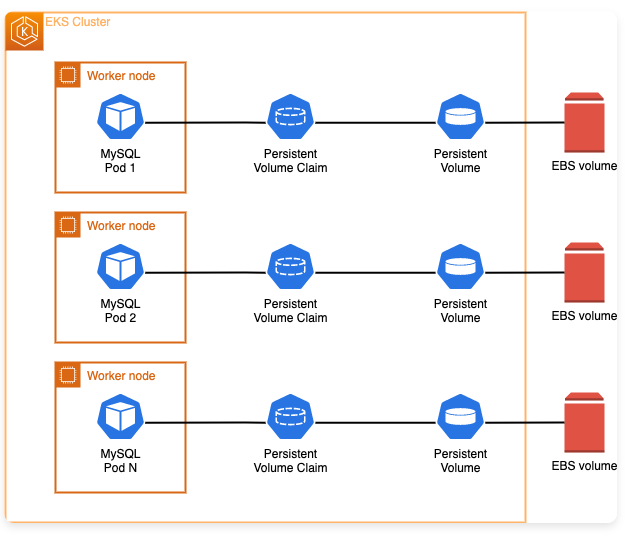
https://www.eksworkshop.com/docs/fundamentals/storage/ebs/statefulset-with-ebs

Having successfully deployed and tested CSI drivers working as expected, we’re ready to provision Amazon EBS volumes on demand via the Dynamic Volume Provisioning (DVP) capability in our EKS cluster. Review the .spec.volumeClaimTemplates in the below manifest which performs this magic by leveraging the EBS CSI.

The rest of the commands help us learn how to handle Kubernetes StatefulSet and Kubernetes Storage building blocks and then do the persistent storage testing exactly in the same way we performed to test emptyDir ephemeral volume above. This time we demonstrate the persisting of data in an independent volume and accessing it across stateful pods.

# Ref: https://www.eksworkshop.com/docs/fundamentals/storage/ebs/statefulset-with-ebs

# Two goals here:
# 1. Create a new StatefulSet for the MySQL database used by the catalog 
#    component which uses an EBS volume
# 2. Update the catalog component to use the new version of the database

# Review manifest of a new StatefulSet to be created
# Review the volumeClaimTemplates spec in the template
# (https://kubernetes.io/docs/concepts/workloads/controllers/statefulset/#volume-claim-templates)
# This instructs Kubernetes to utilize Dynamic Volume Provisioning 
# It automatically creates and we'll examine each later:
# - A new EBS Volume
# - A PersistentVolume (PV)
# - A PersistentVolumeClaim (PVC) 
cat ~/environment/eks-workshop/modules/fundamentals/storage/ebs/statefulset-mysql.yaml

# Reconfigure the catalog component to use the new StatefulSet
cat ~/environment/eks-workshop/modules/fundamentals/storage/ebs/deployment.yaml

# Apply the changes and wait for the new pods to be ready
kubectl apply -k ~/environment/eks-workshop/modules/fundamentals/storage/ebs/
kubectl -n catalog rollout status --timeout=100s statefulset/catalog-mysql-ebs

# Confirm the new StatefulSet is running
kubectl -n catalog get statefulset catalog-mysql-ebs

# Inspecting the catalog-mysql-ebs StatefulSet, 
# we can see that now we have a PersistentVolumeClaim attached to it 
# with 30GiB and with storageClassName of gp2.

# Confirm, we have PersistentVolumeClaim attached to the StatefulSet
# Expect to see the StorageClass create in the previous section
kubectl -n catalog get statefulset catalog-mysql-ebs \
  -o jsonpath='{.spec.volumeClaimTemplates}' | jq .

# Checking the PVC and the PV created by Dynamic Volume Provisioning
kubectl -n catalog get pvc
kubectl get pv
kubectl describe pv

# With AWS CLI command, view the Amazon EBS volume created automatically
# (Feel free to view the EBS volume on EC2/EBS console as well)
# Check the references for verification and connect the dots:
# 1. VolumeID from the PV description above
# 2. PVC from kubernetes.io/created-for/pvc/name key in the output
aws ec2 describe-volumes \
    --filters Name=tag:kubernetes.io/created-for/pvc/name,Values=data-catalog-mysql-ebs-0 \
    --query "Volumes[*].{ID:VolumeId,Tag:Tags}" \
    --no-cli-page

# If you'd like to inspect the container shell and check out the 
# newly EBS volume attached to the Linux OS, 
# run this instructions to run a shell command into 
# the catalog-mysql-ebs container. 
# It'll inspect the filesystems that you have mounted:

# As the new owner of an EBS volume, we can go inside the container
# and examine the volume filesystem
# Expect to see the disk mounted to directory /var/lib/mysql
# This is a persistent storage that we'll venture to prove next
kubectl -n catalog exec --stdin catalog-mysql-ebs-0 -- bash -c "df -h"

# Verify the persistent storage with EBS Volume
# Steps are the same we did during the emptyDir scenario above

# 1. Create a test.txt file like before
kubectl -n catalog exec catalog-mysql-ebs-0 -- bash -c \
  "echo 'EBS persistent store test file; I will persist!!' > /var/lib/mysql/test.txt"

# 2. Verify that the test.txt file was created on the /var/lib/mysql directory
kubectl -n catalog exec catalog-mysql-ebs-0 -- ls -larth /var/lib/mysql/ \
    | grep -i test

kubectl -n catalog exec catalog-mysql-ebs-0 -- cat /var/lib/mysql/test.txt

# 3. Force remove the current catalog-mysql-ebs pod
#    to trigger the StatefulSet controller to automatically re-create a new pod
kubectl -n catalog delete pods catalog-mysql-ebs-0

# Wait for catalog-mysql-ebs Pod to be created and ready
kubectl -n catalog wait --for=condition=Ready pod \
  -l app.kubernetes.io/component=mysql-ebs --timeout=60s

# Confirm new pod by looking at AGE 
kubectl -n catalog get pod catalog-mysql-ebs-0 

# 4. Exec back into the MySQL container shell and 
#    and verify the file from the previous pod persists in the new pod

kubectl -n catalog exec catalog-mysql-ebs-0 -- ls -larth /var/lib/mysql/ \
    | grep -i test

kubectl -n catalog exec catalog-mysql-ebs-0 -- cat /var/lib/mysql/test.txt

# voilà! test.txt file exsits in the persistent storage provided by EBS.
# Amazon EBS is storing the data and keeping data safe and 
# available within an AWS availability zone across pods!!

Next Steps

In this chapter, we kicked off the Kubernetes Storage and Volumes demonstration in AWS Cloud’s managed Kubernetes platform, Amazon EKS, using Amazon EBS volumes as storage. It’s truly a comprehensive primer trying to teach all the building blocks necessary, not only making Kubernetes Storage function but also how to do so using one of the most prominent, widely used disk block store offerings in the Cloud — EBS by AWS.

The hands-on steps demonstrated here are simple but the commands pack so many powerful implementations under the hood. I encourage you to read the ins and outs of all building blocks, peek through the implementation details, and most importantly know the glue that connects and binds the dots.

The next chapter is even more exciting because we will use the knowledge learned here to upend another widely used, prominent storage solution in the Cloud — EFS.

See you there soon!

If you benefited from reading the post, please 👏 a few times before parting, and help others by sharing it; I highly appreciate that!

Please follow to stay in touch, track, and be the first to get notified of all future writings on AWS Cloud, Containers, Kubernetes, and Machine Learning. Also, check all my stories on The AWS Way publication.

AWS
Kubernetes
DevOps
Automation
Cloud Computing
Recommended from ReadMedium