avatarTeri Radichel

Free AI web copilot to create summaries, insights and extended knowledge, download it at here

2693

Abstract

 <div>
            <h2>Enabling vi syntax colors and highlighting</h2>
            <div><h3>The following guide will show you how to enable syntax colors for VI/VIM. Connecting via SSH to your server Connecting…</h3></div>
            <div><p>mediatemple.net</p></div>
          </div>
          <div>
            <div style="background-image: url(https://miro.readmedium.com/v2/resize:fit:320/0*SFjNShZAHZwUkvPB)"></div>
          </div>
        </div>
      </a>
    </div><p id="c812">Create a new function called enable_all_features() and use the AWS CLI command below.</p><div id="7f78" class="link-block">
      <a href="https://docs.aws.amazon.com/cli/latest/reference/organizations/enable-all-features.html">
        <div>
          <div>
            <h2>enable-all-features - AWS CLI 1.27.110 Command Reference</h2>
            <div><h3>Note: You are viewing the documentation for an older major version of the AWS CLI (version 1). AWS CLI version 2, the…</h3></div>
            <div><p>docs.aws.amazon.com</p></div>
          </div>
          <div>
            <div style="background-image: url(https://miro.readmedium.com/v2/resize:fit:320/)"></div>
          </div>
        </div>
      </a>
    </div><figure id="376e"><img src="https://cdn-images-1.readmedium.com/v2/resize:fit:800/1*yuZmOVNeIdh0-cQAiS4rIQ.png"><figcaption></figcaption></figure><p id="fd1d">Now here’s where things get a little odd for me. I get an error stating that all features are already enabled when I run this command. However, I never explicitly did that.</p><p id="4c9c">Let’s see what the organization looks like by running:</p><div id="41b7"><pre><span class="hljs-attribute">aws organizations describe-organization</span></pre></div><p id="d75d">Here’s what I see (some info redacted):</p><figure id="85d0"><img src="https://cdn-images-1.readmedium.com/v2/resize:fit:800/1*dqzO_FLok8c2eFSHR2DbCA.png"><figcaption></figcaption></figure><p id="0255">I am guessing that “FeatureSet”: “ALL” above indicates that all features are enabled. Let’s add a check for that so we only run the command if features are not already enabled.</p><figure id="7c81"><img src="https://cdn-images-1.readmedium.com/v2/resize:fit:800/1*veBXooNFY3U28rZE2dDFFg.png"><figcaption></figcaption></figure><p id="8162">Sorry for the weird spacing above. I copied the above out of AWS CloudShell which seems to have a lot of issues with copy and paste from a Mac.</p><p id="2bb2">Now it appears that “enable all features” doesn’t really enable all features in AWS Organizations. What it does is allow you to use additional features beyon

Options

d consolidated billing. However, you still need to enable specific things such as Service Control Policies. So I altered my deployment script to call enable all features first, then enable SCPs.</p><figure id="3155"><img src="https://cdn-images-1.readmedium.com/v2/resize:fit:800/1*3s6CSnRwKLAcHo4XJy3IXw.png"><figcaption></figcaption></figure><p id="c5cf">That works.</p><figure id="612f"><img src="https://cdn-images-1.readmedium.com/v2/resize:fit:800/1*QpHnhcM_f_5PynE2u6n1nQ.png"><figcaption></figcaption></figure><p id="8972">I added the enable all features function to my organization creation script because I noticed it is required for SCPs as well. I’m not sure how it got enabled exactly, but just in case it causes and issue for anyone I added the command in my script. However, if you have been following along and enabled SCPs already, you can query your organization to see if all features are enabled as described above.</p><p id="ae50">So really, there was nothing to do here but oh well. We have a new function now that validates all features are enabled.</p><p id="1e2b">Follow for updates.</p><p id="4a3a">Teri Radichel | <i>© <a href="https://2ndsightlab.com/?source=post_page---------------------------">2nd Sight Lab</a> 2023</i></p><div id="8b5f"><pre><span class="hljs-section">About Teri Radichel:

⭐️ Author: Cybersecurity Books
⭐️ Presentations: Presentations by Teri Radichel
⭐️ Recognition: SANS Award, AWS Security Hero, IANS Faculty
⭐️ Certifications: SANS ~ GSE 240
⭐️ Education: BA Business, Master of Software Engineering, Master of Infosec
⭐️ Company: Penetration Tests, Assessments, Phone Consulting ~ 2nd Sight Lab</pre></div><div id="caae"><pre><span class="hljs-section">Need Help With Cybersecurity, Cloud, or Application Security?
~~~~~~~~~~~~~~~~~~~~~~~~~~~~~~~~~~~~~~~~~~~~~~~~~~~~~~~~~~~~~</span>
🔒 Request a penetration test or security assessment
🔒 Schedule a consulting call
🔒 Cybersecurity Speaker for Presentation</pre></div><div id="5a42"><pre>Follow <span class="hljs-keyword">for</span> more stories like <span class="hljs-keyword">this</span>:

❤️ Sign Up my Medium Email List ❤️ Twitter: <span class="hljs-meta">@teriradichel</span> ❤️ LinkedIn: https:<span class="hljs-comment">//www.linkedin.com/in/teriradichel</span> ❤️ Mastodon: <span class="hljs-meta">@teriradichel</span><span class="hljs-meta">@infosec</span>.exchange ❤️ Facebook: 2nd Sight Lab ❤️ YouTube: @2ndsightlab</pre></div><figure id="faf5"><img src="https://cdn-images-1.readmedium.com/v2/resize:fit:800/0*H9Ew1KCl-29nZiPR.jpeg"><figcaption></figcaption></figure></article></body>

AWS Organizations: Enable All Features

ACM.188 Step one to set up AWS Organizations CloudTrail.

Part of my series on Automating Cybersecurity Metrics. The Code.

Free Content on Jobs in Cybersecurity | Sign up for the Email List

In the last post I wrote about the steps to set up an Organization CloudTrail.

The first step is to enable all features for our AWS Organization. I provided the caveats and prerequisites in the last post.

TLDR; Use the following to see if all features are already enabled for your organization as I explain below.

aws organizations describe-organization

In a prior post I created a function to enable SCPs. I started to replace that function thinking that enabling all features would enable SCPs. Spoiler alert: it doesn’t.
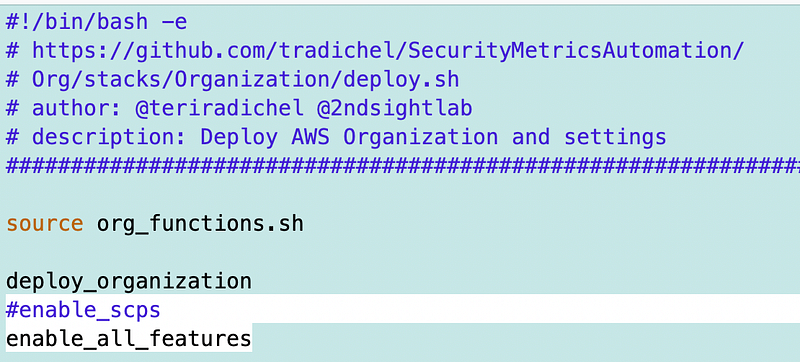
Recall that our SCP function in the org_function.sh file included via the source command above looks like this:
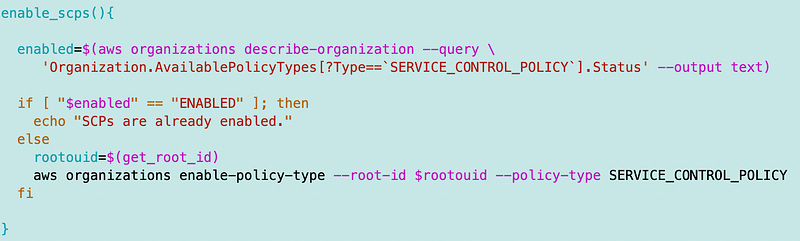
Tangent: If anyone has a hard time reading that you can find in the source code. I was tweaking color schemes in VIM and don’t have more time to mess around with it.

Create a new function called enable_all_features() and use the AWS CLI command below.

Now here’s where things get a little odd for me. I get an error stating that all features are already enabled when I run this command. However, I never explicitly did that.

Let’s see what the organization looks like by running:

aws organizations describe-organization

Here’s what I see (some info redacted):
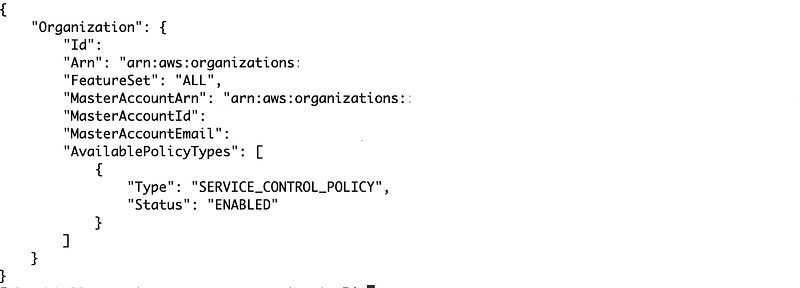
I am guessing that “FeatureSet”: “ALL” above indicates that all features are enabled. Let’s add a check for that so we only run the command if features are not already enabled.
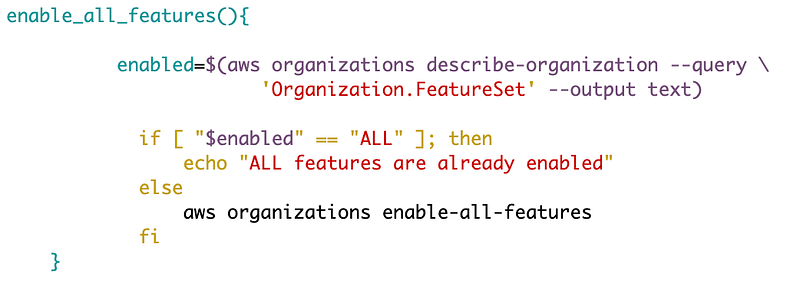
Sorry for the weird spacing above. I copied the above out of AWS CloudShell which seems to have a lot of issues with copy and paste from a Mac.

Now it appears that “enable all features” doesn’t really enable all features in AWS Organizations. What it does is allow you to use additional features beyond consolidated billing. However, you still need to enable specific things such as Service Control Policies. So I altered my deployment script to call enable all features first, then enable SCPs.
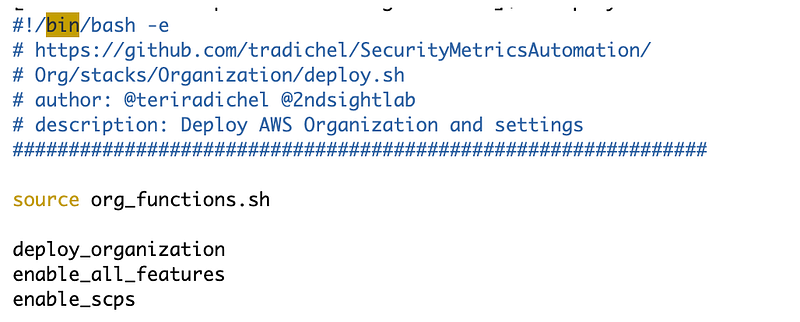
That works.

I added the enable all features function to my organization creation script because I noticed it is required for SCPs as well. I’m not sure how it got enabled exactly, but just in case it causes and issue for anyone I added the command in my script. However, if you have been following along and enabled SCPs already, you can query your organization to see if all features are enabled as described above.

So really, there was nothing to do here but oh well. We have a new function now that validates all features are enabled.

Follow for updates.

Teri Radichel | © 2nd Sight Lab 2023

About Teri Radichel:
~~~~~~~~~~~~~~~~~~~~
⭐️ Author: Cybersecurity Books
⭐️ Presentations: Presentations by Teri Radichel
⭐️ Recognition: SANS Award, AWS Security Hero, IANS Faculty
⭐️ Certifications: SANS ~ GSE 240
⭐️ Education: BA Business, Master of Software Engineering, Master of Infosec
⭐️ Company: Penetration Tests, Assessments, Phone Consulting ~ 2nd Sight Lab
Need Help With Cybersecurity, Cloud, or Application Security?
~~~~~~~~~~~~~~~~~~~~~~~~~~~~~~~~~~~~~~~~~~~~~~~~~~~~~~~~~~~~~
🔒 Request a penetration test or security assessment
🔒 Schedule a consulting call
🔒 Cybersecurity Speaker for Presentation
Follow for more stories like this:
~~~~~~~~~~~~~~~~~~~~~~~~~~~~~~~~~~~~~~~~~~~~~~~~~~~~~~~~~~~~~ 
❤️ Sign Up my Medium Email List
❤️ Twitter: @teriradichel
❤️ LinkedIn: https://www.linkedin.com/in/teriradichel
❤️ Mastodon: @teriradichel@infosec.exchange
❤️ Facebook: 2nd Sight Lab
❤️ YouTube: @2ndsightlab

Enable All Features
AWS
Organizations
Cloud
Security
Recommended from ReadMedium