avatarTeri Radichel

Free AI web copilot to create summaries, insights and extended knowledge, download it at here

1803

Abstract

n error where a login box pops up in certain circumstances. This post provides a bit more detail about the problem because I am finding this behavior a bit odd.</p><p id="62a5">When I’m logged in and working, the EC2 instance will stop timing out for no reason. I check my traffic in Wireshark and only the EC2 instance connection is having problems, not other things on my network.</p><p id="8efa">After that happens I try to log back in and get this error:</p><p id="59cc">connecting to sesman ip 127.0.0.1 port 3350 — sending login info to session manager — failed for display 0.</p><figure id="728c"><img src="https://cdn-images-1.readmedium.com/v2/resize:fit:800/1*p9H8sP0DTyiDo1yoESMO0g.png"><figcaption></figcaption></figure><p id="0708">Someone else was exploring this problem here:</p><p id="b220"><a href="https://www.linuxquestions.org/questions/linux-newbie-8/sending-login-info-to-session-manager-login-failed-for-display-0-a-4175675226/">https://www.linuxquestions.org/questions/linux-newbie-8/sending-login-info-to-session-manager-login-failed-for-display-0-a-4175675226/</a></p><p id="38ec">The final conclusion is:</p><blockquote id="2d46"><p>In my case, and with much time dispend, I was found a simple resolution when note broke login in register log file xrdp after 50 connection session display</p></blockquote><blockquote id="4134"><p>You need to change in both sesmain.in and sesman.ini the field MaxSessions to a greater number than you already have. It seems that some sessions are not set freed in a proper way. Both files are in /etc/xrdp. You would need sudo privileges to edit them.</p></blockquote><p id="0a7b">I did the above in order to get RDP to work as I wrote in one of the posts linked above. First of all, why is that required? Secondly, why is this happening only

Options

when the session disconnects? Interesting.</p><p id="4af3">Where is it getting the password that it’s “sending” somewhere?</p><p id="c26b">Wish I had more time to dig into this.</p><p id="2840">Follow for updates.</p><p id="4a3a">Teri Radichel | <i>© <a href="https://2ndsightlab.com/?source=post_page---------------------------">2nd Sight Lab</a> 2023</i></p><div id="8b5f"><pre><span class="hljs-section">About Teri Radichel:

⭐️ Author: Cybersecurity Books
⭐️ Presentations: Presentations by Teri Radichel
⭐️ Recognition: SANS Award, AWS Security Hero, IANS Faculty
⭐️ Certifications: SANS ~ GSE 240
⭐️ Education: BA Business, Master of Software Engineering, Master of Infosec
⭐️ Company: Penetration Tests, Assessments, Phone Consulting ~ 2nd Sight Lab</pre></div><div id="caae"><pre><span class="hljs-section">Need Help With Cybersecurity, Cloud, or Application Security?
~~~~~~~~~~~~~~~~~~~~~~~~~~~~~~~~~~~~~~~~~~~~~~~~~~~~~~~~~~~~~</span>
🔒 Request a penetration test or security assessment
🔒 Schedule a consulting call
🔒 Cybersecurity Speaker for Presentation</pre></div><div id="46f6"><pre>Follow <span class="hljs-keyword">for</span> more stories like <span class="hljs-keyword">this</span>:

❤️ Sign Up my Medium Email List ❤️ Twitter: <span class="hljs-meta">@teriradichel</span> ❤️ LinkedIn: https:<span class="hljs-comment">//www.linkedin.com/in/teriradichel</span> ❤️ Mastodon: <span class="hljs-meta">@teriradichel</span><span class="hljs-meta">@infosec</span>.exchange ❤️ Facebook: 2nd Sight Lab ❤️ YouTube: @2ndsightlab</pre></div><figure id="550c"><img src="https://cdn-images-1.readmedium.com/v2/resize:fit:800/1*4oxP4LXk8l8c3mpRvO7ejg.png"><figcaption></figcaption></figure></article></body>

AWS EC2 Ubuntu Disconnects and Tries to Get Password

~~~~~~~~~~~~~~~~~~~~~~~~~~~~~~~~~~~~~~~~~~~~~~~~~~~~~~~

⚙️ Check out my series on Automating Cybersecurity Metrics | Code.

🔒 Related Stories: Bugs | AWS Security | Secure Code | Ubuntu

💻 Free Content on Jobs in Cybersecurity | ✉️ Sign up for the Email List

~~~~~~~~~~~~~~~~~~~~~~~~~~~~~~~~~~~~~~~~~~~~~~~~~~~~~~~

I wrote about how I configured an AWS EC2 instance in these two posts so I can log into it with RDP in these posts:

Previously, I wrote about how I was getting an error where a login box pops up in certain circumstances. This post provides a bit more detail about the problem because I am finding this behavior a bit odd.

When I’m logged in and working, the EC2 instance will stop timing out for no reason. I check my traffic in Wireshark and only the EC2 instance connection is having problems, not other things on my network.

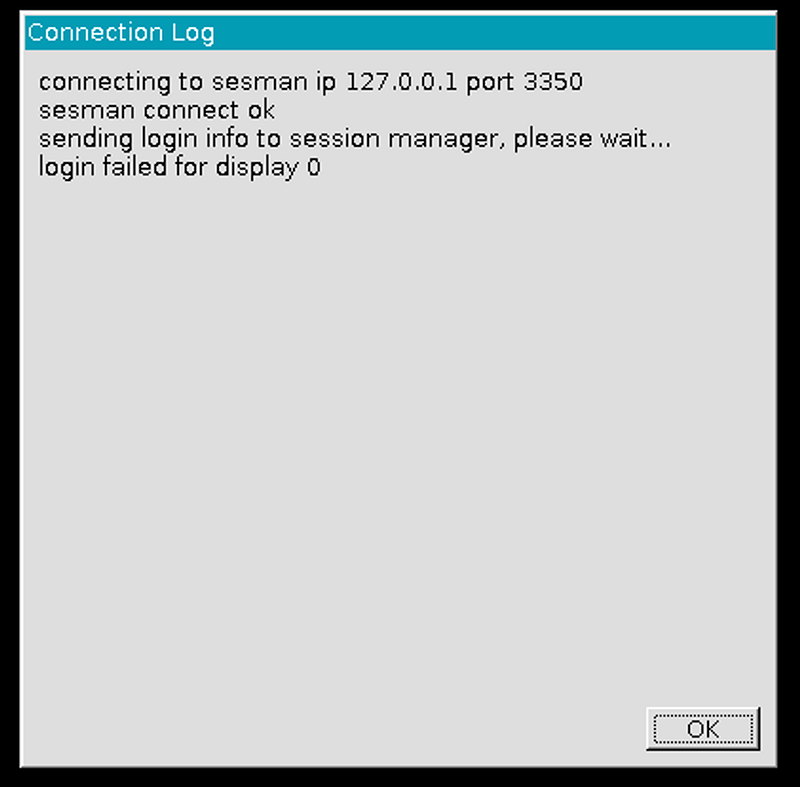
After that happens I try to log back in and get this error:

connecting to sesman ip 127.0.0.1 port 3350 — sending login info to session manager — failed for display 0.
Someone else was exploring this problem here:

https://www.linuxquestions.org/questions/linux-newbie-8/sending-login-info-to-session-manager-login-failed-for-display-0-a-4175675226/

The final conclusion is:

In my case, and with much time dispend, I was found a simple resolution when note broke login in register log file xrdp after 50 connection session display

You need to change in both sesmain.in and sesman.ini the field MaxSessions to a greater number than you already have. It seems that some sessions are not set freed in a proper way. Both files are in /etc/xrdp. You would need sudo privileges to edit them.

I did the above in order to get RDP to work as I wrote in one of the posts linked above. First of all, why is that required? Secondly, why is this happening only when the session disconnects? Interesting.

Where is it getting the password that it’s “sending” somewhere?

Wish I had more time to dig into this.

Follow for updates.

Teri Radichel | © 2nd Sight Lab 2023

About Teri Radichel:
~~~~~~~~~~~~~~~~~~~~
⭐️ Author: Cybersecurity Books
⭐️ Presentations: Presentations by Teri Radichel
⭐️ Recognition: SANS Award, AWS Security Hero, IANS Faculty
⭐️ Certifications: SANS ~ GSE 240
⭐️ Education: BA Business, Master of Software Engineering, Master of Infosec
⭐️ Company: Penetration Tests, Assessments, Phone Consulting ~ 2nd Sight Lab
Need Help With Cybersecurity, Cloud, or Application Security?
~~~~~~~~~~~~~~~~~~~~~~~~~~~~~~~~~~~~~~~~~~~~~~~~~~~~~~~~~~~~~
🔒 Request a penetration test or security assessment
🔒 Schedule a consulting call
🔒 Cybersecurity Speaker for Presentation
Follow for more stories like this:
~~~~~~~~~~~~~~~~~~~~~~~~~~~~~~~~~~~~~~~~~~~~~~~~~~~~~~~~~~~~~ 
❤️ Sign Up my Medium Email List
❤️ Twitter: @teriradichel
❤️ LinkedIn: https://www.linkedin.com/in/teriradichel
❤️ Mastodon: @teriradichel@infosec.exchange
❤️ Facebook: 2nd Sight Lab
❤️ YouTube: @2ndsightlab

Bug
Ubuntu
Password
Login
Desktop
Recommended from ReadMedium