
AWS CloudWatch Anomaly Detection: A Machine Learning Algorithm
A Detailed Approach to Identifying Unusual Data Points and Anomalies

Introduction
Overview of AWS CloudWatch
AWS CloudWatch serves as an extensive tool for monitoring and observation, tailored for professionals like DevOps engineers, developers, SREs, and IT managers. It stands as a dependable and adaptable solution for gathering and analyzing metrics, overseeing log files, setting up alarms, and responding proactively to changes in AWS resources. CloudWatch is integral in providing instant data and insights on the operational status of both applications and AWS services, making it a key player in the management of cloud infrastructure.
Importance of Anomaly Detection in Monitoring
Anomaly detection uses advanced algorithms to learn from historical trends and patterns of the monitored metrics. This method enables the identification of unusual behaviour that deviates from the norm, even if the change is not drastic enough to cross a preset threshold. Effective anomaly detection in monitoring is crucial for the early identification of potential issues, allowing for proactive resolution before they escalate into major problems.
On the other hand, traditional monitoring solutions rely on predefined thresholds to identify issues. For instance, an alarm might be set to trigger when CPU usage exceeds 80%. However, this approach has limitations. It often leads to a high number of false positives, or worse, it may miss subtle anomalies that don’t cross these predetermined thresholds but are indicative of significant issues.
How AWS CloudWatch’s Anomaly Detection Works
CloudWatch’s anomaly detection works by using smart algorithms that are a mix of statistics and machine learning. These algorithms keep an eye on your system and application data, figure out what’s normal, and highlight anything that doesn’t fit that pattern, all with very little need for people to get involved.
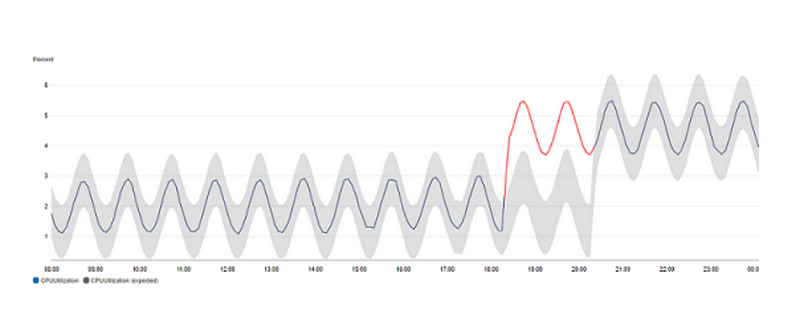
These algorithms get better by learning from two weeks of your data, but they can start working even if there’s not a lot of data available. On the CloudWatch graph, you’ll see a grey band that shows the range of what’s considered normal. If the actual data goes above or below this grey area, it turns red to highlight that something unusual might be happening.
To get this started in CloudWatch, you just have to go to the dashboard, choose anomaly detection from the math expressions options, and then use ‘calculate band’ for the metric you’re interested in.
The machine learning algorithms in CloudWatch continuously analyze metric data, learning and adapting to the normal behaviour of these metrics over time. This process involves extensive data analysis and pattern recognition:
- Learning Phase: The algorithms start with a learning phase, analyzing historical data to understand typical patterns and variations. This phase can range from a few days to weeks, depending on the amount and variability of the data.
- Pattern Recognition: The algorithms identify recurring patterns, such as daily or weekly cycles in metrics like CPU utilization or network traffic. They also recognize trends and long-term changes in the metric behaviour.
- Anomaly Scoring: Each new data point is scored based on how much it deviates from the established patterns. A high anomaly score indicates a significant deviation, potentially signalling an operational issue.
Types of Metrics and Patterns it Can Detect
The anomaly detection model in CloudWatch is capable of handling a wide range of metrics, including but not limited to:
- System Metrics: Such as CPU utilization, disk I/O, and network traffic.
- Application Metrics: Like transaction volumes, response times, and error rates.
- Custom Metrics: Metrics generated by user applications and services.
The model can detect various patterns, including:
- Sudden Spikes or Drops: Abrupt changes in metric values that are not typical for the observed time series.
- Level Changes: When a metric shifts to a new baseline, either higher or lower than the previous norm.
- Trend Changes: Significant alterations in the trend of a metric, such as a gradual increase in error rates.
- Seasonal Deviations: Anomalies that occur when metrics deviate from expected seasonal patterns, like a drop in user activity during a typically busy hour.
Integration with Other AWS Services
1. Linking with AWS Lambda: Integration with AWS Lambda allows for executing custom scripts or functions in response to an anomaly.
2. AWS Auto Scaling: CloudWatch metrics and anomaly detection can be used to trigger AWS Auto Scaling actions.
3. Integration with AWS SNS: When an anomaly is detected and an alarm is triggered, CloudWatch can send an alert via SNS, which can then be routed to email, SMS, or even trigger Lambda functions for automated responses.
4. AWS EC2 and ECS: For EC2 instances and ECS services, CloudWatch provides detailed metrics that can be used for anomaly detection, offering deep insights into the performance and health of these services.
Conclusion
In conclusion, AWS CloudWatch’s anomaly detection feature is a powerful tool in the arsenal of cloud computing, offering advanced monitoring capabilities through sophisticated machine learning and statistical algorithms. Automating the process of identifying unusual patterns and deviations in system and application metrics, minimizes the need for constant human oversight, allowing teams to focus on more strategic tasks.


