
AWS CloudShell integrity and formatting issue
Code written in AWS CloudShell has messed up formatting the next time I login
~~~~~~~~~~~~~~~~~~~~~~~~~~~~~~~~~~~~~~~~~~~~~~~~~~~~~~~
⚙️ Check out my series on Automating Cybersecurity Metrics | Code.
🔒 Related Stories: Bugs | AWS Security | Secure Code | CloudFormation
💻 Free Content on Jobs in Cybersecurity | ✉️ Sign up for the Email List
~~~~~~~~~~~~~~~~~~~~~~~~~~~~~~~~~~~~~~~~~~~~~~~~~~~~~~~
I wrote some code in CloudShell. I only stored that code in CloudShell for the time being while I’m testing things out.
I correctly formatted all the code to align nicely so I could copy it into blog posts, painstakingly because CloudShell copy and paste doesn’t work correctly and code alignment goes haywire. This happens even between files in CloudShell to another file in CloudShell. I don’t know if it is specific to Chrome and Mac or something else but it’s quite time-consuming to fix and I am not planning to use this approach long term.
So anyway, I fix all the formatting and log out. The next day I return and my formatting is all messed up again.
Today my perfectly aligned code (yesterday) looks like this:
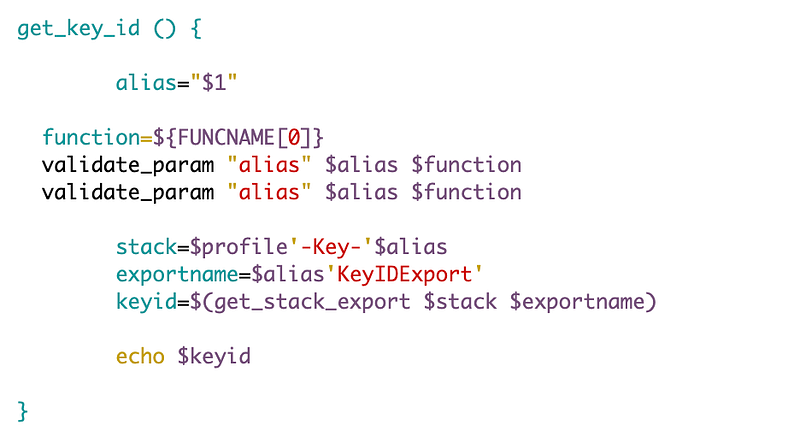
How does this happen?
So I’m looking at my file and actually some of the code is missing. I can see this because I have screen shots of the code.
One thing I noticed is that when I logged in a temporary file existed which I had to delete (starting with [.])
The thing is, I’m 99% sure I saved that file. This same thing has happened two days in a row. So perhaps I caused this. But when I work in non-CloudShell environments, I rarely ever have this issue unless I purposely have to kill my session for some reason, and then I immediately delete the temp file and fix the code. I’ll have to monitor it more closely going forward, but it feels like something is amiss.
If you are getting a warning about a file existing when trying to edit files in vi, run this command to see the hidden files (in Linux/Mac):
ls -alYou will seen files that start with a dot [.] indicating those are hidden files. Temp files related to something you were editing when your terminal session ended will be there as well.
One issue that causes this is when you are looking at a file and your session times out. At that point, your open temp file remains. When you re-open CloudShell you’ll have that hidden file sitting there and your existing file will retain whatever code you had in it prior to your edits. This is why I don’t see CloudShell as a serious tool for editing but a short term work around until I get my AMIs moved over to the new account.
Anyway, even if that is the cause of the problem in some cases, it doesn’t make sense in the case above, because I was working with and repeatedly saving the file in question. If I had this issue while working with the file, I think I would have resolved it before logging out. But I’ll have to monitor and see if it happens again.
Follow for updates.
Teri Radichel | © 2nd Sight Lab 2023
About Teri Radichel:
~~~~~~~~~~~~~~~~~~~~
⭐️ Author: Cybersecurity Books
⭐️ Presentations: Presentations by Teri Radichel
⭐️ Recognition: SANS Award, AWS Security Hero, IANS Faculty
⭐️ Certifications: SANS ~ GSE 240
⭐️ Education: BA Business, Master of Software Engineering, Master of Infosec
⭐️ Company: Penetration Tests, Assessments, Phone Consulting ~ 2nd Sight Lab
Need Help With Cybersecurity, Cloud, or Application Security?
~~~~~~~~~~~~~~~~~~~~~~~~~~~~~~~~~~~~~~~~~~~~~~~~~~~~~~~~~~~~~
🔒 Request a penetration test or security assessment
🔒 Schedule a consulting call
🔒 Cybersecurity Speaker for PresentationFollow for more stories like this:
~~~~~~~~~~~~~~~~~~~~~~~~~~~~~~~~~~~~~~~~~~~~~~~~~~~~~~~~~~~~~
❤️ Sign Up my Medium Email List
❤️ Twitter: @teriradichel
❤️ LinkedIn: https://www.linkedin.com/in/teriradichel
❤️ Mastodon: @teriradichel@infosec.exchange
❤️ Facebook: 2nd Sight Lab
❤️ YouTube: @2ndsightlab


