avatarTeri Radichel

Free AI web copilot to create summaries, insights and extended knowledge, download it at here

4163

Abstract

o add the timestamp to force an update same as above. Good thing I made get_timestamp a common function. :)</p><p id="dd95">OK things are getting weird. My role is definitely re-deploying with the force update. I can see the new parameter and output in the template in CloudFormation. I can see the correct KMS Admin user passed in as a parameter. The stack shows updated. No errors in the deploy script.</p><p id="a2b4"><i>And yet…..the trust policy has not updated.</i> <i>This is a problem.</i></p><p id="3b15">If I try to delete the role in CloudFormation that will fail because all the key policies reference it. And lots of things reference all the keys.</p><p id="e9e3">UGGGHHH.</p><p id="4a71">So now I could manually update the trust policy, but that will be bad. And it is at this point that I realize this is going to be a single blog post because this is very, very problematic.</p><div id="01ba"><pre>I really don’t think Amazon <span class="hljs-keyword">should </span><span class="hljs-keyword">be </span>changing customer policies. </pre></div><p id="6651">So what can we do about this…I can try to force the trust policy some other way since the force update parameter is not working. I can temporarily add another user to the trust policy and then remove them again maybe.</p><p id="5531">What if I rename the group?</p><figure id="9b4b"><img src="https://cdn-images-1.readmedium.com/v2/resize:fit:800/1*_zmoWFadpOul88V2bK55mw.png"><figcaption></figcaption></figure><p id="9831">Well maybe the group alone doesn’t update the trust policy…</p><p id="ba98">What if I change allow to deny?</p><figure id="4b90"><img src="https://cdn-images-1.readmedium.com/v2/resize:fit:800/1*5mCJYTNPObgjevw68vc6JQ.png"><figcaption></figcaption></figure><p id="1ce7">Luckily, my IAM role is in a separate deploy script otherwise I would lock out my IAM admin if I had delete that user and group addition as well. I could also pull out the KMS admin into a separate script since I don’t want this change to apply to every other trust policy while trying to force this update. That seems safer. Let’s do that.</p><p id="afb7">test.sh:</p><figure id="a009"><img src="https://cdn-images-1.readmedium.com/v2/resize:fit:800/1*Ydr17Vwmu-BkkvRvKlFmUg.png"><figcaption></figcaption></figure><p id="cae3">Well, something happened but not what we wanted. The updated failed. Here’s an error:</p><figure id="3983"><img src="https://cdn-images-1.readmedium.com/v2/resize:fit:800/1*fizHQjWAm7bU7a1RO5Fc_A.png"><figcaption></figcaption></figure><p id="8499">Here’s why:</p><figure id="8c61"><img src="https://cdn-images-1.readmedium.com/v2/resize:fit:800/1*fBWHRXUcRvllk7-riMqhPg.png"><figcaption></figcaption></figure><p id="54dd">Let’s change it back to Allow and try to figure something else out.</p><p id="e3f0">And now we have a huge mess:</p><figure id="325a"><img src="https://cdn-images-1.readmedium.com/v2/resize:fit:800/1*oD0MY-tMK4Ex8V8A76BtSQ.png"><figcaption></figcaption></figure><p id="eac1">This is the kind of nightmare you can get into with CloudFormation and the fact that AWS is changing these policies unbeknownst to the customer is a huge problem in my opinion. This does not seem like the correct solution to whatever problem it was intended to solve. Please stop doing this. #awswishlist</p><div id="dfdf"><pre><span class="hljs-keyword">Let</span><span class="hljs-comment">'s think about this for a minute. If a user is deleted and a policy references an ARN for a resource that does not exist, what is the risk? Nothing can use that policy because no related user exists to use the permission. There is no need to delete the user in this policy in that case.</span></pre></div><div id="144a"><pre>But ...<span class="hljs-keyword">if</span> someone <span class="hljs-keyword">does</span> re-add <span class="hljs-keyword">the</span> user <span class="hljs-keyword">back</span> <span class="hljs-keyword">in</span> <span class="hljs-keyword">with</span> <span class="hljs-keyword">the</span> same ARN, <span class="hljs-keyword">that</span> user can now use <span class="hljs-keyword">the</span> permissions <span class="hljs-keyword">in</span> <span c

Options

lass="hljs-keyword">the</span> policy. But <span class="hljs-keyword">is</span> <span class="hljs-keyword">it</span> really <span class="hljs-keyword">the</span> same user? Someone could delete a user <span class="hljs-keyword">and</span> add <span class="hljs-keyword">back</span> <span class="hljs-keyword">in</span> one they have credentials <span class="hljs-keyword">for</span> <span class="hljs-keyword">to</span> gain access <span class="hljs-keyword">to</span> <span class="hljs-keyword">some</span> permissions they shouldn't have. That <span class="hljs-keyword">is</span> <span class="hljs-keyword">the</span> risk AWS <span class="hljs-keyword">is</span> trying <span class="hljs-keyword">to</span> protect you <span class="hljs-keyword">against</span>.</pre></div><div id="731d"><pre>However, I would argue that <span class="hljs-keyword">it</span> would be better <span class="hljs-built_in">to</span> warn <span class="hljs-keyword">the</span> user <span class="hljs-keyword">before</span> making <span class="hljs-keyword">the</span> change <span class="hljs-keyword">and</span> disallow <span class="hljs-keyword">the</span> change, <span class="hljs-keyword">or</span> optionally allow <span class="hljs-keyword">the</span> user <span class="hljs-built_in">to</span> <span class="hljs-built_in">add</span> <span class="hljs-keyword">a</span> deny statement <span class="hljs-keyword">for</span> that ARN <span class="hljs-built_in">to</span> <span class="hljs-keyword">the</span> policy rather than just change <span class="hljs-keyword">the</span> policy <span class="hljs-keyword">and</span> mangle <span class="hljs-keyword">a</span> customer<span class="hljs-string">'s whole stack of resources in the process. I'</span>m sure someone <span class="hljs-keyword">at</span> AWS can think <span class="hljs-keyword">of</span> <span class="hljs-keyword">a</span> better solution based <span class="hljs-keyword">on</span> <span class="hljs-title">how</span> <span class="hljs-title">things</span> <span class="hljs-title">work</span> <span class="hljs-title">behind</span> <span class="hljs-title">the</span> <span class="hljs-title">scenes</span> <span class="hljs-title">than</span> <span class="hljs-title">what</span> <span class="hljs-title">is</span> <span class="hljs-title">happening</span> <span class="hljs-title">above</span>.</pre></div><p id="00aa">Luckily I’m just in a POC environment and I can literally delete everything and start over. I should probably write a script for that…</p><p id="0ca5">Next post.</p><p id="25af">Follow for updates.</p><p id="4a3a">Teri Radichel | <i>© <a href="https://2ndsightlab.com/?source=post_page---------------------------">2nd Sight Lab</a> 2022</i></p><div id="8b5f"><pre><span class="hljs-section">About Teri Radichel:

⭐️ Author: Cybersecurity Books
⭐️ Presentations: Presentations by Teri Radichel
⭐️ Recognition: SANS Award, AWS Security Hero, IANS Faculty
⭐️ Certifications: SANS ~ GSE 240
⭐️ Education: BA Business, Master of Software Engineering, Master of Infosec
⭐️ Company: Penetration Tests, Assessments, Phone Consulting ~ 2nd Sight Lab</pre></div><div id="caae"><pre><span class="hljs-section">Need Help With Cybersecurity, Cloud, or Application Security?
~~~~~~~~~~~~~~~~~~~~~~~~~~~~~~~~~~~~~~~~~~~~~~~~~~~~~~~~~~~~~</span>
🔒 Request a penetration test or security assessment
🔒 Schedule a consulting call
🔒 Cybersecurity Speaker for Presentation</pre></div><div id="5a42"><pre>Follow <span class="hljs-keyword">for</span> more stories like <span class="hljs-keyword">this</span>:

❤️ Sign Up my Medium Email List ❤️ Twitter: <span class="hljs-meta">@teriradichel</span> ❤️ LinkedIn: https:<span class="hljs-comment">//www.linkedin.com/in/teriradichel</span> ❤️ Mastodon: <span class="hljs-meta">@teriradichel</span><span class="hljs-meta">@infosec</span>.exchange ❤️ Facebook: 2nd Sight Lab ❤️ YouTube: @2ndsightlab</pre></div><figure id="faf5"><img src="https://cdn-images-1.readmedium.com/v2/resize:fit:800/0*H9Ew1KCl-29nZiPR.jpeg"><figcaption></figcaption></figure></article></body>

AWS Changing ARNs in Trust Policies — Problems

ACM.94 Trying to restore things after a user gets deleted leaves you in a malformed state for which there is no simple recovery

~~~~~~~~~~~~~~~~~~~~~~~~~~~~~~~~~~~~~~~~~~~~~~~~~~~~~~~~~~~

⚙️ Check out my series on Automating Cybersecurity Metrics. The Code.

🔒 Related Stories: IAM | AWS Security | Application Security

💻 Free Content on Jobs in Cybersecurity | ✉️ Sign up for the Email List

~~~~~~~~~~~~~~~~~~~~~~~~~~~~~~~~~~~~~~~~~~~~~~~~~~~~~~~~~~~

In the last post we worked on giving a user access to a user-specific secret stored in AWS Secrets Manager via the AWS Console.

At some point while writing my code for these posts, the KMSAdmin user got inadvertently deleted so I couldn’t manage KMS keys by assuming the associated KMS role. The user was removed from the KMS Admin group. The Developer user was also removed from the AppDeployment group which hindered deployments by that role.

I tried re-running the CloudFormation templates that add the users to the groups. Since the template hadn’t changed re-running it has no effect. CloudFormation only deploys templates that changed, not things that are out of sync with what should be deployed.

If you have been following along you know that I added an output to force updating every time a KMS key gets deployed to solve this problem when AWS magically mangles ARNs in key policies. I tried that approach again for this problem.

Since I need a timestamp twice now I created a shared function for it (the principle of abstraction I’ve been telling you about repeatedly — don’t repeat yourself or the DRY principle):
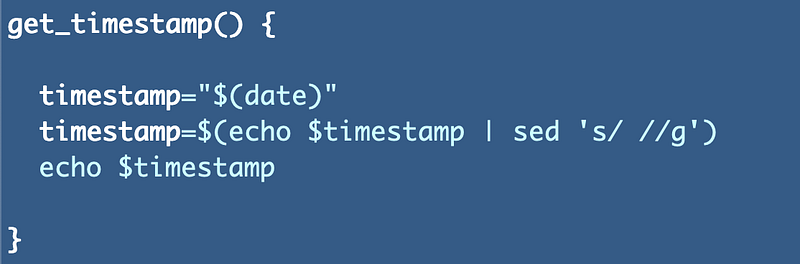
I added the timestamp to my add_user_to_group function:
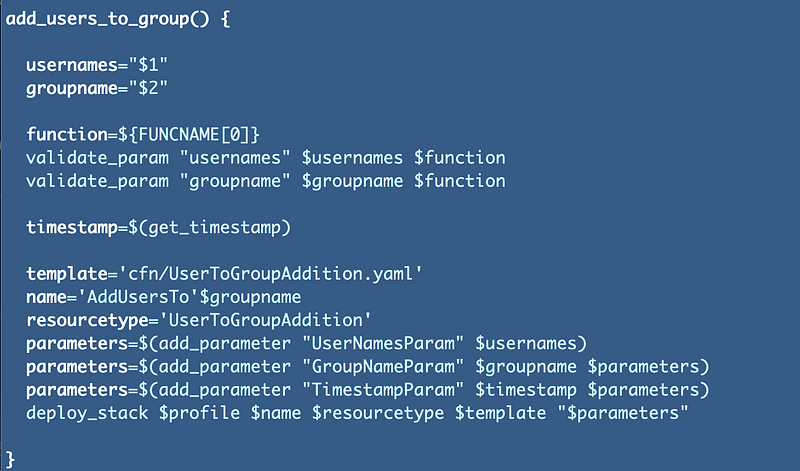
Unfortunately, that did not work for this scenario. I’m still getting an error that the KMS Admin cannot assume the group role.

Head over the trust policy. Aha. AWS does the same thing in trust policies that they do in KMS key policies, and it’s not updating for the same reasons. The deleted user ARN was apparently replaced with some sort of logical ID and the policy is no longer correct, nor does anything related to it work anymore.
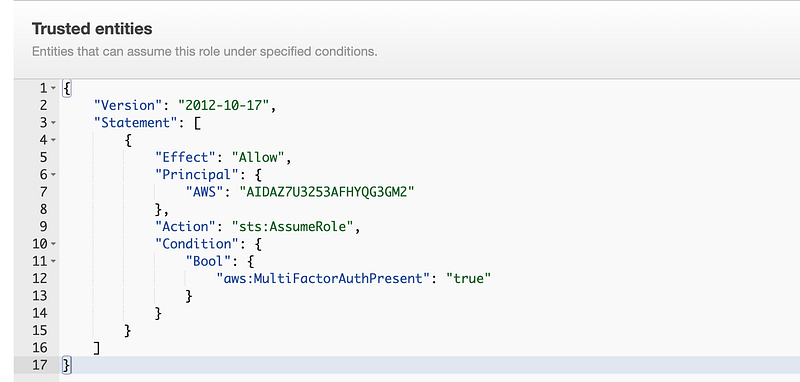
Over to the role to add the timestamp to force an update same as above. Good thing I made get_timestamp a common function. :)

OK things are getting weird. My role is definitely re-deploying with the force update. I can see the new parameter and output in the template in CloudFormation. I can see the correct KMS Admin user passed in as a parameter. The stack shows updated. No errors in the deploy script.

And yet…..the trust policy has not updated. This is a problem.

If I try to delete the role in CloudFormation that will fail because all the key policies reference it. And lots of things reference all the keys.

UGGGHHH.

So now I could manually update the trust policy, but that will be bad. And it is at this point that I realize this is going to be a single blog post because this is very, very problematic.

I really don’t think Amazon should be changing customer policies. 

So what can we do about this…I can try to force the trust policy some other way since the force update parameter is not working. I can temporarily add another user to the trust policy and then remove them again maybe.

What if I rename the group?
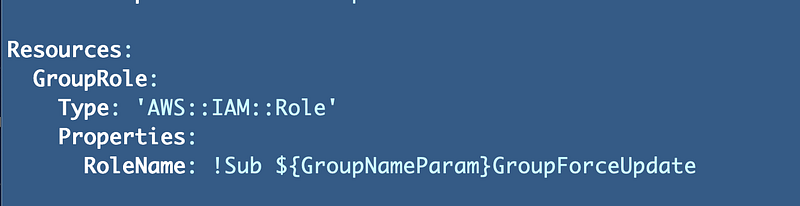
Well maybe the group alone doesn’t update the trust policy…

What if I change allow to deny?
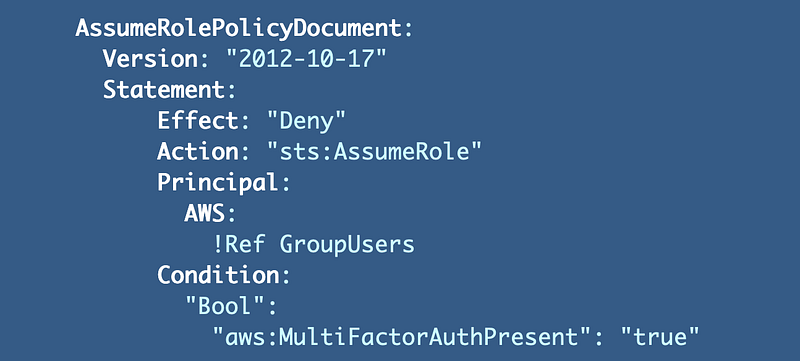
Luckily, my IAM role is in a separate deploy script otherwise I would lock out my IAM admin if I had delete that user and group addition as well. I could also pull out the KMS admin into a separate script since I don’t want this change to apply to every other trust policy while trying to force this update. That seems safer. Let’s do that.

test.sh:
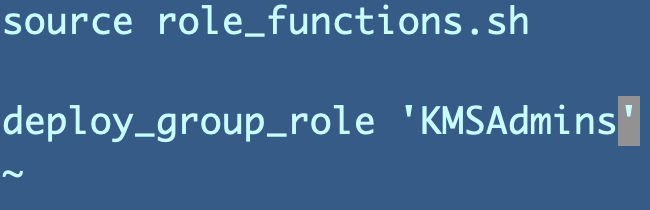
Well, something happened but not what we wanted. The updated failed. Here’s an error:

Here’s why:

Let’s change it back to Allow and try to figure something else out.

And now we have a huge mess:
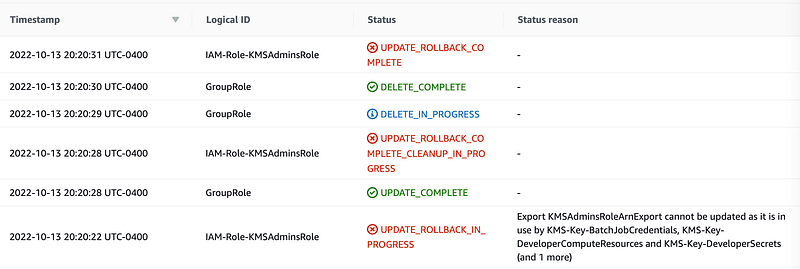
This is the kind of nightmare you can get into with CloudFormation and the fact that AWS is changing these policies unbeknownst to the customer is a huge problem in my opinion. This does not seem like the correct solution to whatever problem it was intended to solve. Please stop doing this. #awswishlist

Let's think about this for a minute. If a user is deleted and a policy references an ARN for a resource that does not exist, what is the risk? Nothing can use that policy because no related user exists to use the permission. There is no need to delete the user in this policy in that case.
But ...if someone does re-add the user back in with the same ARN, that user can now use the permissions in the policy. But is it really the same user? Someone could delete a user and add back in one they have credentials for to gain access to some permissions they shouldn't have. That is the risk AWS is trying to protect you against.
However, I would argue that it would be better to warn the user before making the change and disallow the change, or optionally allow the user to add a deny statement for that ARN to the policy rather than just change the policy and mangle a customer's whole stack of resources in the process. I'm sure someone at AWS can think of a better solution based on how things work behind the scenes than what is happening above.

Luckily I’m just in a POC environment and I can literally delete everything and start over. I should probably write a script for that…

Next post.

Follow for updates.

Teri Radichel | © 2nd Sight Lab 2022

About Teri Radichel:
~~~~~~~~~~~~~~~~~~~~
⭐️ Author: Cybersecurity Books
⭐️ Presentations: Presentations by Teri Radichel
⭐️ Recognition: SANS Award, AWS Security Hero, IANS Faculty
⭐️ Certifications: SANS ~ GSE 240
⭐️ Education: BA Business, Master of Software Engineering, Master of Infosec
⭐️ Company: Penetration Tests, Assessments, Phone Consulting ~ 2nd Sight Lab
Need Help With Cybersecurity, Cloud, or Application Security?
~~~~~~~~~~~~~~~~~~~~~~~~~~~~~~~~~~~~~~~~~~~~~~~~~~~~~~~~~~~~~
🔒 Request a penetration test or security assessment
🔒 Schedule a consulting call
🔒 Cybersecurity Speaker for Presentation
Follow for more stories like this:
~~~~~~~~~~~~~~~~~~~~~~~~~~~~~~~~~~~~~~~~~~~~~~~~~~~~~~~~~~~~~ 
❤️ Sign Up my Medium Email List
❤️ Twitter: @teriradichel
❤️ LinkedIn: https://www.linkedin.com/in/teriradichel
❤️ Mastodon: @teriradichel@infosec.exchange
❤️ Facebook: 2nd Sight Lab
❤️ YouTube: @2ndsightlab

Trust Policy
AWS
Iam
Role
Cloudsecurity
Recommended from ReadMedium