
Awesome Uses for a Raspberry Pi
Projects for Raspberry Pi
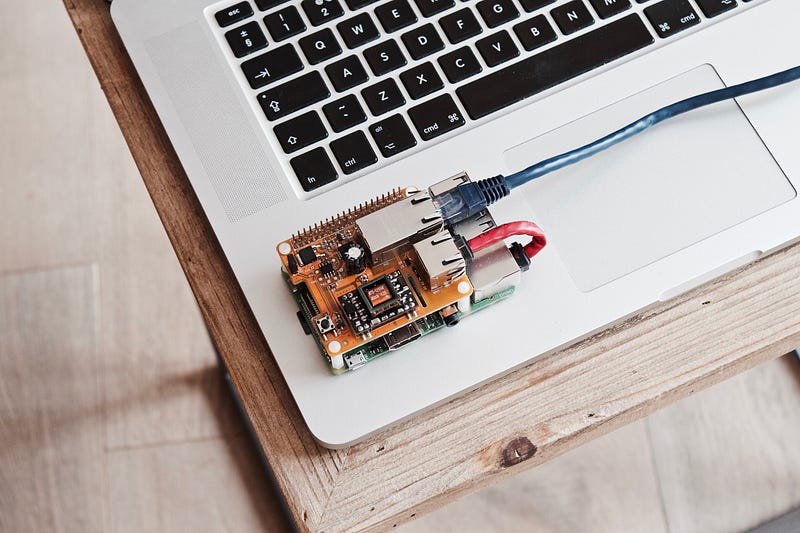
At first glance, the Raspberry Pi doesn’t seem spectacular: it’s an assembly of different computer components, including a circuit board the size of a credit card. But it’s amazing how broad the spectrum of functionality the Raspberry Pi is, given its small size.
It is to the Raspberry Pi Foundation in Great Britain that we owe the development of the product. It is particularly affordable financially, and it is now the best-selling computer in the English market. Initially, Raspberry Pi was designed for experienced techies who wanted to program with hardware that only understood the basics.
In a short time, this nano-computer aroused the interest and aroused the curiosity of ingenious and DIY users, who knew how to use it for many purposes. Thus, many applications and all kinds of projects have emerged with Raspberry Pi. We present a selection of 17 beneficial projects to set up at home.
What is Raspberry Pi?
This credit card-sized computer system is a single card computer. It also contains the basic components of a computer (processor, working memory, etc.) and several ports USB, HDMI, video, speakers, etc. The slot (port) to insert a Micro SD card works with the hard drive and is available on the operating system.
Raspbian operating system is recommended for Raspberry Pi; it is based on Debian’s. Other operating systems can be used, like Linux or Android, but it is better to go for Raspbian. Regarding the power supply, a micro-USB charger is enough that of a smartphone, for example, because Raspberry Pi is very energy efficient.
An Internet connection can be established via a network cable on an Ethernet port. On the USB port, it is possible to connect various peripherals, such as a mouse, a keyboard or an external hard drive. The HDMI port represents the simplest option for connecting a screen to Raspberry Pi. For this, several contact pins are made available to allow the programming of functions.
The components vary by model. The first (Raspberry Pi 1) hit the market in February 2012. Other models followed, and the original price of £35 was very well received. The Raspberry Pi 3 was then released in February 2016 and had a 64-bit processor and Bluetooth and Wifi.
Raspberry Pi was chosen because it is an easy-to-remember pun, which designates a raspberry pie ( raspberry pie ). Also, this name serves as a nod to brands like Apple, Acorn or Blackberry.
“Pi” is also short for “Python interpreter”, as Python is used as Raspberry Pi's main programming language by developers. Those with less development experience can resort to more intuitive, easier programming languages, such as Scratch.
A few useful projects with Raspberry Pi
Raspberry Pi’s areas of intervention are extensive. In addition to the many practical options available to you, it is also possible to set up all kinds of projects that are out of the ordinary.
The level of prior knowledge to carry out these projects varies greatly. With a little patience and curiosity, it is possible to achieve excellent results, experiment with the motherboard, and learn computers.
The Web is full of information on the technical implementation of many applications and projects with Raspberry Pi. The following examples first give an overview of the possibilities offered by this nano-computer. Then, find the most popular projects to set up and short instructions and articles for further reading, among the links provided.
Webserver
Many users use Raspberry Pi as a web server. For this, several web server programs are available: for example Apache, Lighttpd or NGINX. When it comes to hosting large-scale dynamic web content without difficulty, Raspberry Pi’s performance is not always satisfactory. Still, the nano-computer is better suited to serve as a testbed for local websites.
Simple statistics websites, with relatively low traffic, can also be hosted by Raspberry Pi. In the Digital IONOS Guide, you also learn how you can configure a Raspberry Pi web server. As the basis of your web project.
An automatic pumping system for coffee machine
Coffee machines have become essential at home and in the office. Modern devices prepare the right dosage at the click of a button – at least as long as the integrated water tank is not empty and needs to be refilled. Alex Stakhanov and his colleagues have cobbled together an automatic water pump system for their machine (a SAECO Aulika Focus) with a Raspberry Pi at its heart. An HC-SR04 ultrasonic sensor connected to the nano-computer regularly measures the water level, while software programmed in Python provides the system's necessary logic.
Smart home central
The networking of all home technologies and appliances is becoming more and more popular. The smart home approach, which allows central management and control of heating, lamps, shutters, fridge, washing machine etc., improves the quality of life and contributes to energy consumption. More efficient energy.
Thanks to its great price, internet capability, and status as a fully functional system with excellent hardware support, more and more hobby DIYers trust Raspberry Pi to implement projects for their own homes. The required software base is formed by open source tools like openHAB or Home Assistant.
Email server
If you are using Raspberry Pi as an email server, they will all be stored on the nano-computer. Thus, no other provider can have access to your emails. With such an email server, you not only get complete control over your email system, but you can also create multiple email addresses with your own domain name.
As a central platform for your electronic communications, nano-PC offers the highest level of privacy and possible security (since all the data is in your hands) and that flexibility.
Raspberry PI security system
A Raspberry Pi not only offers more comfort but also more security for its home. Thus, Max Williams used the nano-computer Raspberry Pi 3 Model A+ as the basis to create a small but subtle security system that, when turned on, scans the surroundings in real-time and gives immediate feedback with photo via telegraphic message.
When movements are detected, even if the device is deactivated, a message is sent. To carry out the Raspberry Pi project at home, the instructions are described on hackster.io. It includes, in particular, the Python programming code used to control the security camera.
Interactive LED surface
Amateur handyman Vincent Deconinck has impressively proven that Raspberry Pi is not only interesting for practical use projects. For around 130 euros, he fitted a standard IKEA table with an interactive display that reacts to extinct objects with colourful animations and even allows you to play Tetris.
At the heart of the project is a Raspberry Pi which processes all interactions recorded by the Arduino microcontrollers and converts them into desired animations using the Gladiator software. On its homepage, Deconinck has published detailed instructions for restoring the LED display.
LED windows
The combination of LED units and the Raspberry Pi isn’t necessarily limited to playful projects: user dannyk6 has posted on instructables.com a guide to building a practical LED window that simulates sunlight.
Rooms without windows and cellars are literally brought to light and thus convey a whole new atmosphere. The “fake” window can be controlled through a web interface, where the brightness can be adjusted manually or automatically based on time and weather via Yahoo! API.
VPN server
With a VPN (Virtual Private Network), it is possible to encrypt all network data traffic. This is particularly interesting for public connections without encryption, not secure, and it protects your sensitive data (bank details, addresses, etc.)
A VPN server is straightforward to use with a Raspberry Pi. As the central authentication and switching instance for individual VPN clients, the nano-computer performs well, both in the private and professional spheres.
Binary clock
If you’ve always dreamed of owning a binary clock, then Simon Monk’s Raspberry Pi project is for you. The developer and writer have equipped the nano-computer with a Unicorn Hat, an expansion board with 64 RGB LEDs, which presents the current time in binary code using appropriate software.
From top to bottom, this special clock displays the year (last two digits), month, day, hour (24-hour format), minutes, seconds and even hundredths of a second. Detailed instructions were published in issue 42 of The MapPi magazine, but they can also be found in abbreviated form on the official Raspberry-Pi homepage.
ownCloud
With the Raspberry Pi nano-computer, it is also possible to have a private cloud server with the free software download. Raspberry Pi once again serves as a server, with which data is downloaded and made available.
Having your own cloud server is a big advantage compared to commercial services like Dropbox or iCloud. Knowing that the user has full control over a clean server and sensitive data is better protected there.
3D printer
Worth around 11,000 euros, the Pi 3D scanner, which Dutchman Richard Garsthagen has developed and perfected over the past few years, is a costly but at the same time staggering Raspberry Pi project.
Each with their own SD card and camera modules, the hundred Raspberry Pi form the basic structure of its two-meter-high body scanner. With self-programmed 3D scan management software, the recorded values can be optimized and used for printing a 3D model.
Video games console
Raspberry Pi's performance is more than enough to play old video games or arcade games through emulators. Arcade machines have been recreated in both miniature and rough original size, sometimes even with a coin slot for a feeling of maximum authenticity.
Raspbian and the RetroPie emulation application form a trendy software base for such Raspberry Pi projects.
Conclusion:
There are limitless things we can do with Raspberry PI, whatever your needs and imaginations, whatever your experience, it is definitely something to give a try.


