Awaken Review — Best DeFi and NFT Tax Software
In this article, we will review Awaken. Their software generates your crypto tax reports that you plug into your tax software or pass along to your accountant.
Unlike other crypto tax solutions that are 4–6 years old, Awaken was built for today’s Web3 world. That’s why they have the best support for NFTs, staking, bridging, LPing, and many other web3 functions.
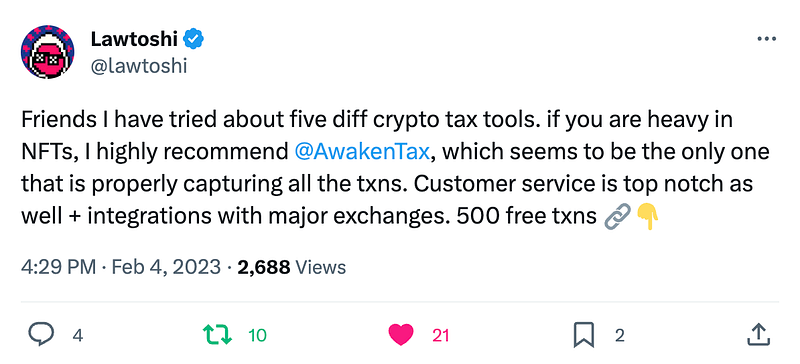
Launched in 2022, Awaken quickly went viral on Twitter for its next-generation support for DeFi and NFTs. They have built-in automation for over 10,000 protocols, meaning you don’t have to do anything for your OpenSea, Tensor, Uniswap, and many other transactions. They also support many crypto exchanges, including Coinbase, Gemini, and Kraken.
Awaken Review: Summary
- Awaken is a crypto tracking and tax reporting software that is especially accurate for blockchain transactions.
- The main reason Awaken is growing fast is its industry-leading DeFi and NFT support. They automatically support over 10,000 protocols.
- They also support centralized exchanges, including Coinbase, Kraken, and Gemini.
- They are mainly geared towards U.S. citizens, but their international customers modify the Awaken tax reports to be compliant with their own countries.
- It is free to upload your wallets and see your tax summary. You only have to pay once you want to download your tax reports.
- They have very strong customer support, which is one of the main things their customers love about them.
Awaken Review: Key Features
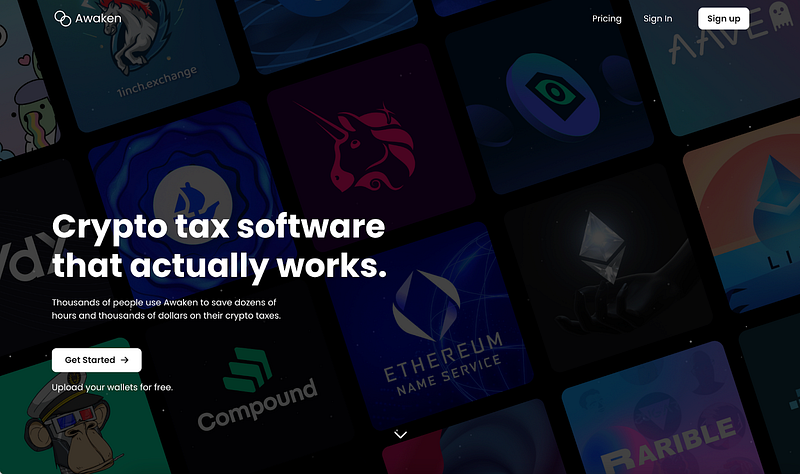
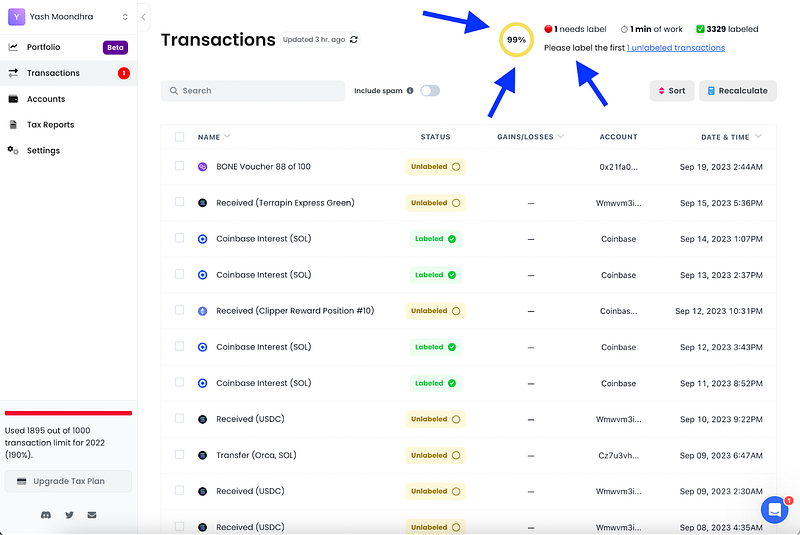
- Automatic support for 10,000 protocols. This is what makes Awaken special. When you upload your wallet, you will see hundreds or even thousands of your transactions automatically labeled for you and not needing review. (See picture below)
- Intelligent AI-like software. When you label one transaction on Awaken, dozens of other transactions can automatically be labeled for you as Awaken finds patterns.
- Best-in-class Solana support. Awaken is renowned for its extremely fast imports and ability to handle many edge cases on the Solana blockchain.
- Missing cost basis on minimal number of transactions. Awaken pulls in almost all of your ERC-20, ERC-721, and ERC-1155 transactions. The software isn’t perfect, but it is far better than many other platforms on the market in this regard.
- Edit cost basis. You can edit the cost basis of an asset with the click of a button.
- Awaken hosts their data in secure databases encrypted using AES 256 in transit and at rest.
- Seamless user interface. Awaken was built to make crypto taxes easy for anyone.
- Sort by capital gains/losses. Awaken allows you to sort your transactions by importance so that you can first review the ones impacting the tax reports the most.
- Versatile search and filter functionality. You can filter by protocol name, asset name, date, transaction type, and many other fields.
- Real-time portfolio. Tax loss harvesting is a breeze with Awaken’s accurate portfolio tracking tool. You can see your current coins & NFTs, their cost basis, and unrealized gains/losses.
- Highlight label suggestions. When you need to label a transaction and aren’t sure what it is, Awaken often suggests what it thinks the transaction is — staking, bridging, etc.
- Multiple accounting methods. Awaken supports FIFO, HIFO, and LIFO.
Awaken Review: Get Started with Awaken
- Create Account
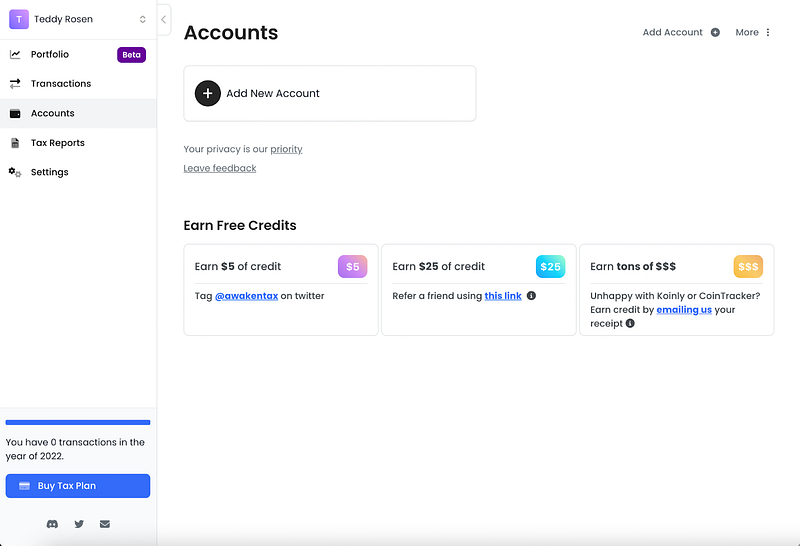
You can sign up on the Awaken website here. You will need to provide your first name, last name, and email, but you can provide fake values for these if you really want. Once you sign up, you will see a dashboard that looks like this:
- Import Your Transactions
Now, you must import your transactions. You can either (1) type in your public key, and Awaken will automatically pull in your data, or (2) upload a CSV. Awaken provides automated imports for select providers, including Ethereum, Arbitrum, Solana, Coinbase, and roughly a dozen others.
For the other exchanges and blockchains, you can upload a CSV. In order to upload the CSV, you may need to re-format it into Awaken’s standard. For other CSVs, you can drop the CSV in directly without needing to modify it. You can find their standard CSV format here. To help you format the CSV properly, you can use their AI tool called “csvGPT”, which you can find here.
- Label Transactions
Then, go to your transactions page and label any transactions that need to be labeled. In the top right, Awaken tells you how many more transactions need to be addressed. In the picture below, only 1 transaction needs to be labeled. However, you are welcome to label more to further optimize your taxes.
- Generate Tax Reports
Make sure to hit “Recalculate” to make sure your tax reports are the most up-to-date with your changes. Once you do that, you are all ready to go!
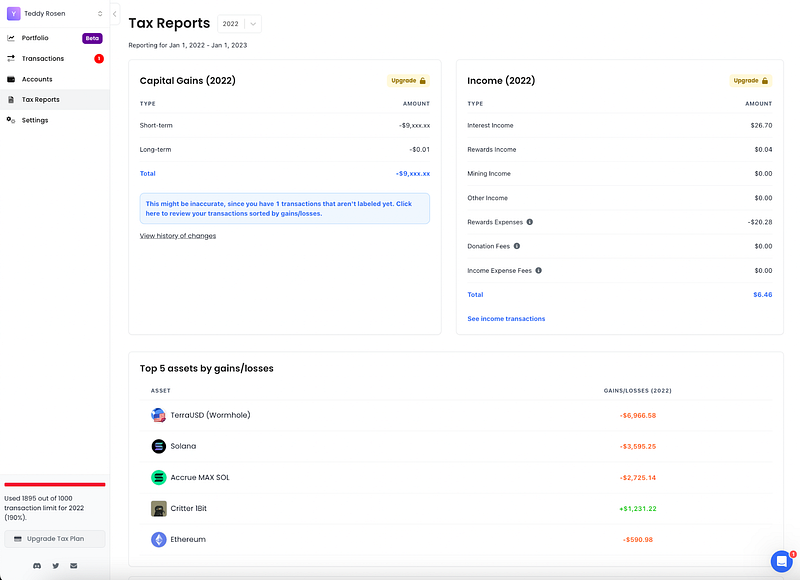
Here is the tax reports page. You can see that Awaken shows me a rough estimate of my gains/losses, my top 5 assets that led to the biggest gains/losses, as well as a breakdown of the income I earned this year.
Awaken Review: Exchanges and Blockchains supported by Awaken
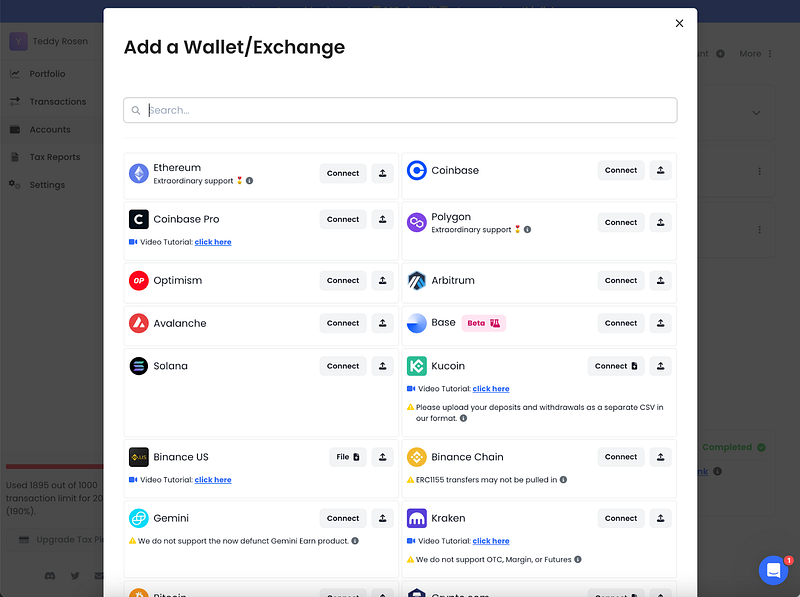
Awaken supports over 100+ exchanges and blockchains. They have extraordinary support for Solana and EVM chains (Ethereum, Polygon, Arbitrum, Optimism, Avalanche, BSC, Fantom). They also have great support for exchanges like Coinbase, Gemini, and Kraken.
They allow you to directly upload CSVs for certain exchanges, including Crypto.com and Cash App. For other exchanges, you should reformat their CSV. To help you do that, you can use their AI tool located here.
Awaken Review: Pricing
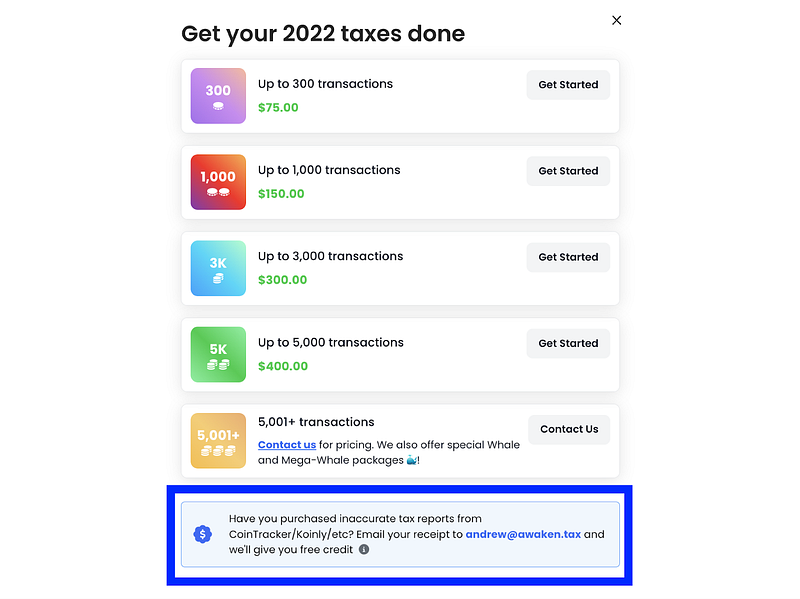
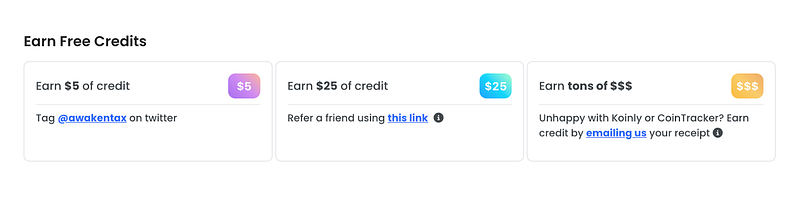
If you already paid for a crypto tax software that you are not satisfied with, you can send the Awaken team a picture of your receipt and they will match your credits on their software. So if you paid $300 on Koinly this year, they will give you $300 of credits on Awaken for this year.
Their pricing is pretty standard compared to other crypto tax softwares on the market. They charge based on the number of transactions you have executed in the given tax year, with custom plans for larger users who have more needs.
Referral Bonus / Affiliates
There are several ways to earn free credits on Awaken. First, you can earn up to $50 by referring two friends ($25 per friend). They also offer $5 of credits if you make a Twitter post about them and have their credit matching program mentioned above.
They also have a separate affiliate program they offer to influencers and companies, which you can learn more about by reaching out to them via their website.
Types of Reports
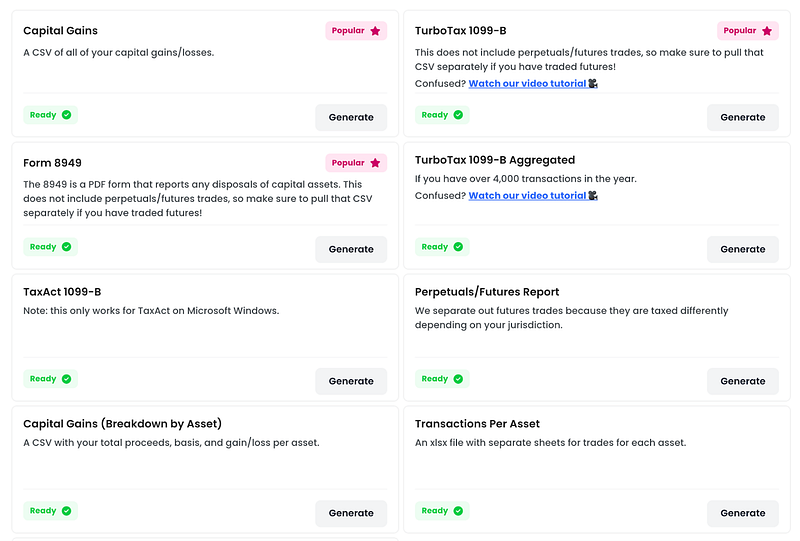
Awaken offers a variety of reports, including everything you need for TurboTax, TaxAct or your CPA.
Is Awaken Safe?
Awaken is a safe product, yes. They never ask for your private keys. All connections to your centralized exchanges are read-only and can be removed at any time.
Awaken hosts their data in secure databases encrypted usijng AES 256 in transit and at rest.
Awaken never shares your data with third parties. If you want, you can even register anonymously by providing a random email, first name, and last name.
Pros & Cons
Pros
- Best support on the market for DeFi, NFTs, and major exchanges
- Support for 10,000+ protocols including Uniswap, Aave, LooksRare, and Blur
- Sleek user interface that is easy-to-use, with powerful search and filtering functionality
- Upload wallets for free and see tax summary for free
- Top-knotch customer support
Cons
- Only has a web platform (no mobile application)
- Targeted towards US citizens, so international users may have to modify reports
Awaken Review: Conclusion
Awaken is an extremely accurate, fast tax software that is growing fast. Their customers seem to love it, often posting praise on Twitter and Discord. They have the best support for NFTs and DeFi, with automatic support for 10,000+ protocols. However, they are targeted towards US users, and users might need to upload CSVs for select exchanges and blockchains.
Frequently Asked Questions
- Is the cryptocurrency data submitted to the government by Awaken?
No, Awaken does not share any report with tax authorities. You need to provide a name and email address to sign up. Only you choose whether or not you would like to report your information to authorities.
- What countries does Awaken support?
Awaken is best for U.S. citizens but can still be used in other countries as well. Some of their users are international and modify the tax report formats to the needs of their particular governments.
Disclaimer — This blog contains product affiliate links. We may receive a commission if you make a purchase after clicking on one of these links. There might be paid endorsements in this article.
Also, Read
- Copy Trading | Crypto Tax Software
- CoinTracking Review | Koinly Review
- Grid Trading | Crypto Hardware Wallet
- Crypto Telegram Signals | Crypto Trading Bot
- Best Crypto Exchange | Best Crypto Exchange in India
- Best Crypto APIs for Developers
- Ngrave Review | Ledger vs. Trezor
- Best Crypto Investing Apps
- Top 10 Smart Contract Audit Companies
- TOP 6 Play to Earn Crypto Games
- Best Cryptocurrency Mining Platforms
- Best Crypto Lending Platform
- Top 8 Crypto Jewelry
- Free Crypto Signals | Crypto Trading Bots
- An ultimate guide to Leveraged Token
- NFT Trading Signals


