
Automating Your Homelab with Proxmox, Cloud-init, Terraform, and Ansible — Part 1- Configuring a base image with Cloud-Init
Overview of Cloud-init
Cloud-init is an open-source package which allows the automation of the initial setup and configuration of virtual machines, making it much easier to manage and deploy them. With Cloud-init, we can define a set of instructions, contained within a user-data file, which tells each virtual machine what to do when it starts up. This user-data file can contain instructions such as configuring the network interfaces, setting up user accounts, or installing software packages. By using Cloud-init, we can streamline the process of setting up virtual machines and ensure consistent configurations across all the instances.
For this process, we will perform these actions from our Proxmox instance.
Creating a base image with Cloud-init
First, we need to download and extract a cloud-init image, in my case, I want to use Debian as my base.
cd /var/lib/vz/template/iso/
wget https://cloud.debian.org/images/cloud/bullseye/latest/debian-11-generic-amd64.tar.xz
tar -xf debian-11-generic-amd64.tar.xz
Let’s go ahead and rename the raw disk, and delete the original archive we downloaded.
mv disk.raw debian-11-generic-amd64.img
rm debian-11-generic-amd64.tar.xz
There are a few dependencies that we’ll need installed in our Proxmox instance.
echo "deb http://download.proxmox.com/debian bullseye pve-no-subscription" >> /etc/apt/sources.list.d/pve-enterprise.list
apt update -y && apt install libguestfs-tools -y
Customizing the base image
We wish to install qemu-guest-agent on the VMs that use our Cloud-init image. virt-customize -a debian-11-generic-amd64.img --install qemu-guest-agent

At this time, you could perform additional actions against the VM. See virt-customize for more options. However, in our case, we will handle additional configurations with Ansible.
Now we can create a template from this Cloud-init disk.
qm create 9001 --name "debian-11-cloudinit-template" --memory 2048 --cores 2 --net0 virtio,bridge=vmbr0
qm importdisk 9001 debian-11-generic-amd64.img local-lvm
qm set 9001 --scsihw virtio-scsi-pci --scsi0 local-lvm:vm-9001-disk-0
qm set 9001 --boot c --bootdisk scsi0
qm set 9001 --ide2 local-lvm:cloudinit
qm set 9001 --serial0 socket --vga serial0
qm set 9001 –-agent 1
qm template 9001
Manually using the base image to create a Virtual Machine
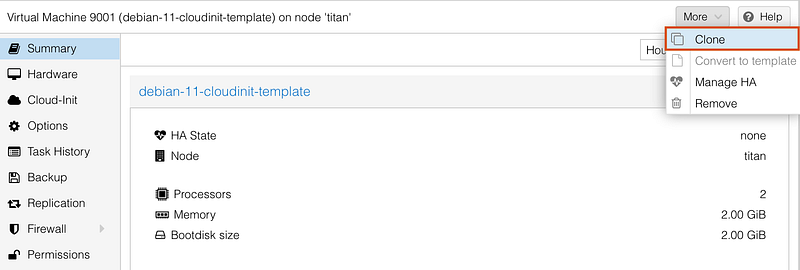
At this point, we can click on More -> Clone under this template in Proxmox
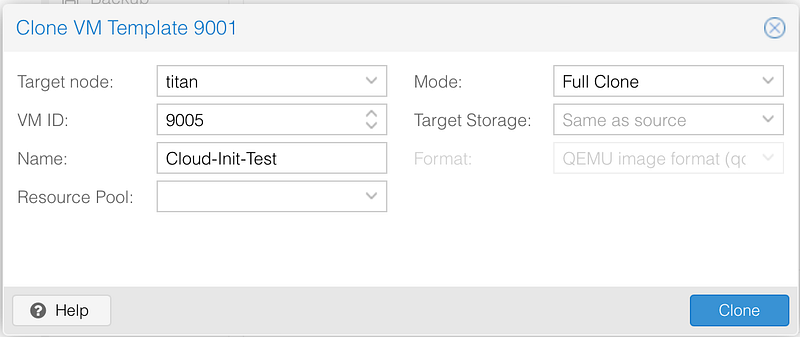
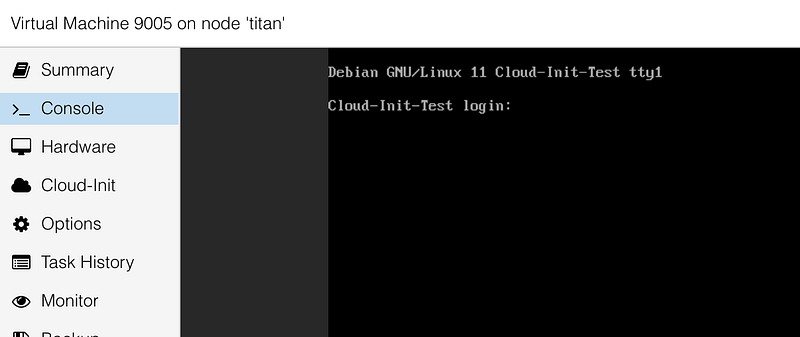
If all is successful, the newly created VM will appear in our Virtual Machine list and it should boot successfully.
Conclusion
In conclusion, configuring a base image with Cloud-init is a crucial step in automating your homelab using Proxmox, Terraform, and Ansible. With Cloud-init, we can automate the initial setup and configuration of virtual machines, ensuring consistent configurations across all instances. By following the steps outlined in this article, you can easily create a Cloud-init base image from a Debian distribution and customize it to suit your needs. Additionally, you can create a template from this Cloud-init disk and use it to create multiple virtual machines. With this base image, you can save time and effort when deploying new virtual machines. In the next article, we will cover how to deploy virtual machines using Terraform.
If you liked this post here are 4 things you can do to support me:
- 👏 Give the article a clap
- 🗯️ Leave me a comment
- 🤝Follow me to learn about upcoming articles
- ☕️ Buy me a coffee


