
Scrape Web Articles With Python
Use common Web Scraping techniques in Python to build a library of articles for you to read offline. Using BeautifulSoup, urllib3, and pdfkit.
Lately, I have been interested in creating a Second Brain as a complement to my current goal to build an automated life. I intend to create a repository of the content that I consume, add my notes to it, and make it searchable. This will allow me to surface content as I need it and create a repository of information that I have previously vetted. As anyone who has looked into building an AI, the first thing to do is that you need data. I don’t have enough time to read all the articles I come across. So, I need to create a repository of articles that I can consume anywhere on my Kindle. I’ll be doing this with python and some common web scraping techniques.
The first step is to web scrape articles as I see them needed. After some liberal usage of HTML Inspect in my Chrome browser, I identified two sites with a predictable article format, CNN.com and Vox.com.
Setting up your Python Environment
First, we need to get the libraries that Python will need to construct the code. I’m using Python 3.7 and the following libraries:
- Beautiful Soup — For Web Scraping
- urllib3 — To Call Webservices
- certifi — To facilitate calling HTTPS sites with urlib3
- pdfkit — To Convert HTML to PDFs
Here are the pip install commands for the libraries.
pip install beautifulsoup4
pip install urllib3
pip install pdfkit
pip install certifi
First, we need to create a PoolManager with urllib3. I’m also using the certifi library here so that I can parse HTTPS websites.
Web Scraping with Beautiful Soup to Isolate the Article Text
After using the function in Chrome, you can look at the underlying HTML for the page. You can highlight the article text and determine where the information you want sits in the DOM. With this information, you can identify the elements that hold the article text (in the Vox.com article, the main class is c-entry-content).
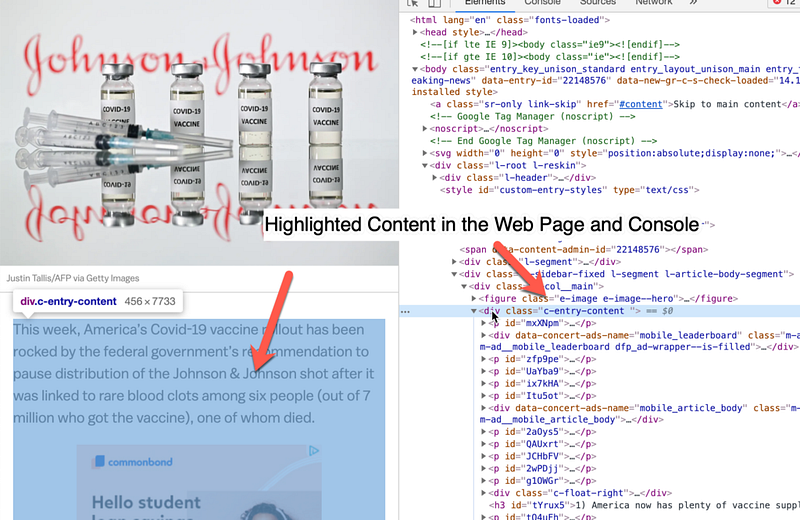
Once we have the main class that we want to identify , we can create an iterable for all of the sub-children, in this case, ‘p’ elements. We will itterate over this content and join it together, this way we only get the text that we want (no ads or javascript functions) so our conversion to PDF is cleaner.
Here is the code to scrape the Vox website:
Converting the Article Text to PDF
Now that we have performed the Web Scraping and isolated the HTML for the article we can use pdfkit to convert the HTML to PDF.
pdfkit is the easiest library that I found to use, but I did have to use a try/except to make sure that it continued upon errors. pdfkit also allows you to pass an actual website or a file if you would like.
Two other libraries that I tried but rejected are xhtml2pdf and WeasyPrint. They are also pretty easy to use, but the results were mixed.
There you have it! Convert the articles that you want to use to PDF for sharing or later consumption.
You can use the PDFs as the beginning of your Knowledge System. Check out this article on how to apply metadata so that you can begin to surface your readings.
Next Steps
I like to use my Kindle to consume this content so that I can take notes but not be distracted by other articles. To find out more you can check out the official Amazon documentation.
There are many things that you can do now that you have the text like:
- Summarizing the content with NLP
- Identifying Keywords so that you can connect your readings by topic
- Importing the content to a notes app like Roam Research, Notion, or Obsidian
In future articles, we will be covering how to use expert.ai to analyze your articles so you can further hone in on articles that you might find interesting.
I’ve written some other methods for other websites, including CNN. Please feel free to download the full code on my GitHub and good luck Web Scraping!
If you would like more information on how to create a Second Brain, a knowledge repository that matches your own interests, please join our mailing list.
Resources
Python Libraries Used
- Beautiful Soup — For Web Scraping
- urllib3 — To Call Webservices
- certifi — To facilitate calling HTTPS sites with urlib3
- pdfkit — To Convert HTML to PDFs
Other Python Libraries


