
Automating Remote Jobs with Airflow’s SSH Operator: A Step-by-Step Guide
Introduction
In the dynamic landscape of data engineering and workflow automation, Apache Airflow stands as a beacon, offering robust capabilities for orchestrating complex tasks. Among its many features, the SSH operator emerges as a versatile tool, empowering users to seamlessly trigger and manage remote jobs. In this guide, we’ll delve into the significance of Apache Airflow, the prerequisites for leveraging the SSH operator, and a step-by-step walkthrough on automating remote tasks.
Section 1: Understanding Apache Airflow
Apache Airflow provides a powerful platform for orchestrating workflows, enabling the automation of intricate data processes with ease. Its open-source nature, extensibility, and rich set of operators make it a preferred choice for data engineers and developers. By adopting Airflow, teams can achieve:
- Workflow Orchestration: Airflow simplifies the scheduling and coordination of complex workflows, ensuring tasks are executed in the right order and with the necessary dependencies.
- Dynamic DAGs: With its Directed Acyclic Graphs (DAGs), Airflow allows users to express complex data dependencies, making it ideal for orchestrating intricate data pipelines.
- Extensibility and Customization: Airflow’s modular design allows the integration of custom operators, making it adaptable to various use cases and technologies.
Section 2: Prerequisites for Using the SSH Operator in Airflow
Before leveraging the SSH operator for remote job execution, ensure the following prerequisites are in place:
- Apache Airflow Installation: Have Apache Airflow installed and configured. Follow the official documentation for installation instructions.
- Access to Airflow Web Interface: Ensure access to the Airflow web interface to run and manage DAGs. This typically involves running the Airflow webserver.
- Remote Server Access: Have SSH access to the remote server where the jobs or scripts will be executed. Before proceeding, it’s essential to verify the remote server’s accessibility from the machine running Airflow. Ensure that you have the correct SSH connection details, including the hostname or IP address, username, and SSH port. Test the connectivity using tools like SSH or Ping to confirm that the machine can establish a connection to the remote server successfully. Address any potential issues, such as firewall restrictions or SSH key authentication problems, that may affect server accessibility. Reliable connectivity is crucial for seamless execution of remote jobs or scripts in Airflow, so it’s important to troubleshoot and resolve any connectivity issues promptly. If SSH access is not feasible, consider alternative methods such as using a VPN connection or configuring Airflow to interact with the server through other protocols.
- SSH Connection Details: Gather the necessary SSH connection details, including the remote host, username, password, or private key, and the SSH port.
Section 3: Setting Up the SSH Operator in Airflow
The SSHOperator in Apache Airflow offers a versatile set of options to facilitate remote job execution and server interaction. Apart from basic connectivity settings like hostname, username, and port, it provides additional parameters to customize and enhance the execution environment. For instance, the ‘environment’ parameter allows users to pass variables from Airflow to the SSH server, enabling seamless integration with Airflow’s XCom feature. This functionality proves invaluable in scenarios where dynamic data exchange between Airflow tasks and the remote server is required. Furthermore, the SSHOperator supports various advanced configurations, including setting up SSH keys, specifying timeout values, defining a working directory, and executing commands in a specific shell environment. These options empower users to tailor the SSH connection according to their specific use cases, whether it involves complex configurations or intricate command executions. By leveraging the flexibility and extensibility of the SSHOperator, Airflow users can streamline their workflow orchestration and effectively manage remote server interactions.
Follow a brief explanation of each option along with code samples demonstrating their usage with the SSHOperator in Apache Airflow:
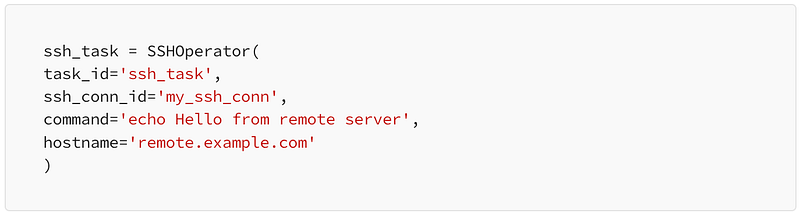
hostname: Specifies the hostname or IP address of the remote server.
ssh_task = SSHOperator(
task_id='ssh_task',
ssh_conn_id='my_ssh_conn',
command='echo Hello from remote server',
hostname='remote.example.com'
)
username: Specifies the username used for authentication on the remote server.
ssh_task = SSHOperator(
task_id='ssh_task',
ssh_conn_id='my_ssh_conn',
command='echo Hello from remote server',
username='my_username'
)
port: Specifies the SSH port on the remote server.
ssh_task = SSHOperator(
task_id='ssh_task',
ssh_conn_id='my_ssh_conn',
command='echo Hello from remote server',
port=2222
)
environment: Passes variables from Airflow to the SSH server.
environment_vars = {
'VAR1': 'value1',
'VAR2': 'value2'
}
ssh_task = SSHOperator(
task_id='ssh_task',
ssh_conn_id='my_ssh_conn',
command='echo $VAR1 $VAR2',
environment=environment_vars
)
key_file: Specifies the path to the SSH private key file for authentication.
ssh_task = SSHOperator(
task_id='ssh_task',
ssh_conn_id='my_ssh_conn',
command='echo Hello from remote server',
key_file='/path/to/private_key'
)
timeout: Specifies the timeout duration for the SSH connection.
ssh_task = SSHOperator(
task_id='ssh_task',
ssh_conn_id='my_ssh_conn',
command='echo Hello from remote server',
timeout=10
)
do_xcom_push: Determines whether the output of the SSH command should be pushed to XCom.
ssh_task = SSHOperator(
task_id='ssh_task',
ssh_conn_id='my_ssh_conn',
command='echo Hello from remote server',
do_xcom_push=True
)
These options provide flexibility and customization for interacting with remote servers using the SSHOperator in Apache Airflow. Incorporating these parameters into your SSH tasks allows for seamless integration and effective management of remote server interactions within your Airflow workflows.
Now, let’s set up the SSH operator within an Airflow DAG. This involves defining the DAG structure, specifying the remote command to be executed
Configuring the SSH connection:
# In your Airflow DAG file
from airflow import DAG
from airflow.operators.ssh_operator import SSHOperator
from datetime import datetime, timedelta
default_args = {
'owner': 'your_name',
'start_date': datetime(2024, 1, 1),
'retries': 1,
'retry_delay': timedelta(minutes=5),
}

dag = DAG(
'remote_job_trigger',
default_args=default_args,
schedule='@daily',
catchup=False,
)

ssh_task = SSHOperator(
task_id='execute_remote_job',
command='your_remote_command',
ssh_conn_id='your_ssh_connection',
dag=dag,
)
Section 4: Running the Airflow DAG
Once your DAG and SSH connection are configured, trigger the DAG to execute the remote command. Use the Airflow web interface or the Airflow CLI to initiate the workflow.
airflow trigger_dag remote_job_trigger
After successfully manually testing the DAG, it will run automatically as determined by the schedule parameter.
Section 5: Monitoring and Troubleshooting
Keep a close eye on the Airflow web interface for DAG execution progress. If issues arise, examine the task logs for detailed information. Verify the remote server’s accessibility and the correctness of provided credentials.
Follow an overview about common issues:
- SSH Connection Failures: Users may experience SSH connection failures due to various reasons such as incorrect SSH credentials, network connectivity issues, firewall restrictions, or misconfigured SSH settings on the remote server. It’s essential to ensure that the SSH connection parameters (hostname, username, port, private key) are correctly configured and that the remote server is accessible from the Airflow environment.
- Authentication Problems: Authentication problems may arise when using SSH keys for authentication. Users must ensure that the SSH key pair (public and private key) is correctly generated, and the public key is added to the authorized_keys file on the remote server. Additionally, permissions on the SSH key files must be set correctly to prevent unauthorized access.
- Timeout Issues: Timeout issues may occur if the SSH connection takes longer than the specified timeout duration to establish or execute commands. Users should adjust the timeout parameter appropriately based on the network latency and the complexity of the commands being executed.
- Environment Setup: Setting up the environment variables for the SSH command execution may pose challenges, especially when passing complex data structures or sensitive information. Users must ensure that the environment variables are properly configured and sanitized to avoid security vulnerabilities or data leakage.
- Command Execution Errors: Errors may occur during command execution on the remote server due to syntax errors, permissions issues, or missing dependencies. Users should thoroughly test their commands and scripts in a standalone environment before integrating them with Airflow tasks. Additionally, capturing and handling command execution errors gracefully within Airflow tasks is essential for error handling and troubleshooting.
- XCom Integration: When using the SSH Operator with XCom to exchange data between tasks, users may encounter issues with data serialization, size limitations, or compatibility between Airflow versions. It’s important to carefully design and test XCom communication to ensure seamless data exchange between tasks.
- Security Considerations: Security considerations such as SSH key management, data encryption, and access control must be taken into account when using the SSH Operator in Airflow. Users should follow best practices for securing SSH connections and handling sensitive data to mitigate potential security risks.
By addressing these common issues and implementing best practices, users can effectively leverage the SSH Operator in Apache Airflow for remote command execution and server interaction within their workflows. Regular testing, thorough error handling, and proactive troubleshooting are essential for maintaining reliable and secure SSH connections in Airflow environments.
Section 6: Best Practices for Using SSH Operator in Airflow
- Security Considerations: Always prioritize security. Avoid storing sensitive information like passwords in plain text within DAG files. Use Airflow’s secure connection handling for credentials.
- Error Handling: Implement robust error handling in your DAG. Consider using the on_failure_callback parameter in your DAG definition to specify a callback function for handling task failures.
- Logging and Monitoring: Leverage Airflow’s logging capabilities to capture and monitor the execution of SSH tasks. This includes logging both within the Airflow web interface and external logging solutions.
- Optimize Commands: Keep remote commands concise and efficient. If possible, batch commands or scripts to minimize the number of SSH connections, optimizing execution time.
- Testing and Validation: Before deploying your DAG to production, thoroughly test it in a controlled environment. Ensure that the SSH operator behaves as expected and that the remote commands are executed accurately.
- Automated retries: One additional best practice to consider when using the SSH Operator in Apache Airflow is to configure automated retries for tasks, as demonstrated in the example code. This practice is particularly crucial when dealing with remote servers that may experience intermittent availability issues, leading to occasional failures in command execution. By setting automated retries with appropriate backoff intervals, Airflow can automatically retry failed SSH tasks, allowing for graceful handling of transient server unavailability and ensuring the successful execution of commands even in less stable network environments. This proactive approach enhances task reliability and minimizes the impact of temporary server disruptions on workflow execution.
Conclusion
Apache Airflow’s SSH operator serves as a valuable tool in automating remote tasks within your workflow. By understanding the importance of Airflow in workflow orchestration and ensuring the prerequisites are met, you can seamlessly integrate the SSH operator to streamline the execution of remote jobs. This not only enhances efficiency but also contributes to a more agile and automated data engineering environment.
Incorporate these practices into your workflow, and witness the power of Apache Airflow in simplifying the orchestration of diverse and distributed tasks.
References and Additional Resources
For further exploration of the SSH operator and related topics in Apache Airflow, refer to the following official documentation:
Additionally, explore the following resources to enhance your understanding of Apache Airflow and workflow automation:
Author Bio
Senior professional with over 21 years in IT area with experience in both private and public sectors. Large experience in database SQL and NoSQL technologies (Oracle, MySQL, SQL Server, Postgres, Mongo, Cassandra, Couchbase, Redis, Teradata, Greenplum) and data engineer — Python, R, Oracle PLSQL, T-SQL, Python, SQL, R, Windows PowerShell and Linux Shell scripts, Ansible, Celonis, StreamSets, MS SQL SSIS, Kafka, Hadoop and Spark.
Certifications:
- PMP — Project Management Professional.
- IBM IT Specialist — Data Management — Level Three (Thought Leader). Fourteen certified in Latin America and Fourth certified at IBM GTS Brazil.
- IBM Demonstrating Leadership and Competences — Level Two (Expert).
- Open Group Distinguish IT Specialist. Sixth certified in Brazil.
- PCAP — Certified Associate in Python Programming.
- Open Group TOGAF 9.2 Certified.
- Open Group: Certified Architect Level One.
- Apache Airflow Fundamentals.
- Gitlab Certified Associate.
Social Media Links:


