
Automating Hyperparameter Tuning with LlamaIndex
Exploring ParamTuner for RAG pipelines

LlamaIndex recently introduced a feature to optimize hyperparameters for RAG. Even though it’s still in beta, it looks quite intriguing as it facilitates the automation of hyperparameter tuning in our RAG pipelines. Let’s unpack and explore this great feature in this article.
Hyperparameters
Hyperparameters are adjustable configuration parameters that influence the behavior of a machine learning model. In the context of Retrieval Augmented Generation (RAG), hyperparameters play a crucial role in tuning the performance of the model across various tasks. These parameters govern the model’s ability to retrieve relevant passages from an external knowledge source and effectively integrate them into the generation process.
In the context of RAG, we focus on tuning the following two parameters in this article:
chunk_sizesimilarity_top_k
Both chunk_size and similarity_top_k are parameters used to manage the efficiency and effectiveness of the data retrieval process in RAG models. Adjusting these parameters can impact the trade-off between computational efficiency and the quality of retrieved information.
Chunk_size determines the size of the retrieved text units. A smaller chunk_size may lead to more frequent retrievals, potentially increasing the retrieval accuracy at the cost of higher computational overhead. Conversely, a larger chunk_size might reduce the number of retrievals but could lead to incomplete or less precise matches.
Similarity_top_k determines how many top-ranked chunks in the retrieval phase are considered for further processing in the generation phase. A higher similarity_top_k increases the diversity of retrieved candidates, potentially providing the model with richer information for generating responses. However, it also increases computational load.
Evaluator Selection
We use LlamaIndex’s Evaluation modules to aid in the parameter tuning. LlamaIndex offers a wide spectrum of evaluation options to assist in evaluating multiple stages of an RAG pipeline. It’s essential to select the right evaluator to tune your particular parameter(s).
In our use case, given that both chunk_size and similarity_top_k primarily impact the retrieval phase, SemanticSimilarityEaluator is chosen to evaluate the retrieval. SemanticSimilarityEaluator calculates the similarity score between embeddings of the generated answer and the reference answer.
During this exercise, I also experimented with another LlamaIndex evaluator, CorrectnessEvaluator, which mainly deals with the generation phase of an RAG pipeline instead of the retrieval phase. The best-scored parameter combination was different from that derived from the SemanticSimilarityEaluator. My lesson learned is that it is important to select the right evaluator for your parameter tuning. Choosing the wrong evaluator(s) leads to incorrect parameter selection.
We are going to follow the approach recommended in the LlamaIndex guide:
- Load a document.
- Generate evaluation question/answer pairs.
- Build index, query engine, and gather parameters for three sets of
chunk_sizewith three sets ofsimilarity_top_k, resulting in 9 parameter combinations, as outlined in the diagram below. - Define EDD (Evaluation Driven Development) to measure the scores for each parameter combination for semantic similarity.
- Run
ParamTunerto tune the parameters.ParamTuneris responsible for tuning hyperparameters by trying different combinations and running a specified function with each combination. The tuner evaluates the results based on a score provided by the function and returns the best combination.
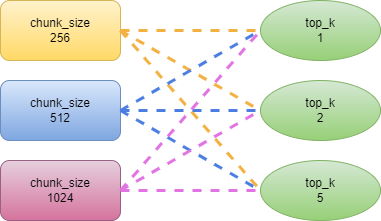
Hyperparameter Tuning
Step 1: Load document
We first load our test document, an 8-page PDF document on DevOps self-service pipeline architecture.
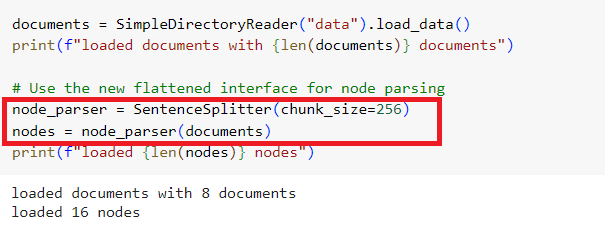
Notice we are using the newly introduced flattened and simplified interface for node parsing/text splitting since LlamaIndex 0.9 release, SentenceSplitter.
Step 2: Generate evaluation question/answer pairs
- We use gpt-4 turbo (
gpt-4–1106-preview) to generate the evaluation dataset. - If the eval dataset JSON file already exists, load it. If not, call
DatasetGeneratorto generate question/answer dataset and save the dataset to a JSON file.
from llama_index.evaluation import (
    DatasetGenerator,
    QueryResponseDataset,
)

eval_service_context = ServiceContext.from_defaults(llm=OpenAI(model="gpt-4-1106-preview"))

# load eval question/answer dataset from JSON file if exists
if os.path.exists("data/eval_qr_dataset.json"):
    eval_dataset = QueryResponseDataset.from_json("data/eval_qr_dataset.json")
else:
    # construct dataset_generator
    dataset_generator = DatasetGenerator(
        nodes[:8],
        service_context=eval_service_context,
        show_progress=True,
        num_questions_per_chunk=2,
    )

    # generate queries and responses
    eval_dataset = dataset_generator.generate_dataset_from_nodes()

    # save the dataset into a file
    eval_dataset.save_json("data/eval_qr_dataset.json")
Let’s load the JSON file and print its content. We get 16 pairs of questions/answers as we defined 2 questions per node for 8 out of 16 nodes (see the logic in the DatasetGenerator constructor above).
import json

# Load dataset from JSON file
with open("data/eval_qr_dataset.json", "r") as file:
    eval_dataset_content = json.load(file)

# Print the content in JSON format
json_str = json.dumps(eval_dataset_content, indent=2)  # indent for pretty printing
print(json_str)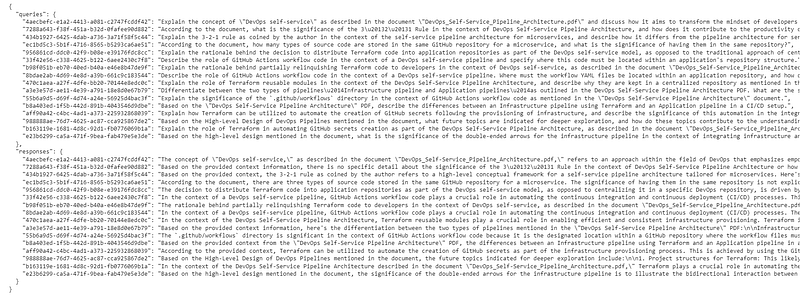
We then split the questions and answers in two different dictionaries, one for queries, the other responses, each having query id as its key:
eval_qs = eval_dataset.questions
ref_response_strs = [r for (_, r) in eval_dataset.qr_pairs]
Step 3: Build index, query engine, and gather parameters
We then define a helper function, _build_index, to build the index for our docs. chunk_size is passed in as one of the parameters.
def _build_index(chunk_size, docs):
    index_out_path = f"./storage_{chunk_size}"
    if not os.path.exists(index_out_path):
        Path(index_out_path).mkdir(parents=True, exist_ok=True)

        # Using the new flattened interface for node parsing
        node_parser = SentenceSplitter(chunk_size=chunk_size)
        nodes = node_parser(docs)

        # build index
        index = VectorStoreIndex(nodes)

        # save index to disk
        index.storage_context.persist(index_out_path)
    else:
        # rebuild storage context
        storage_context = StorageContext.from_defaults(
            persist_dir=index_out_path
        )
        # load index
        index = load_index_from_storage(
            storage_context,
        )
    return index
Let’s now gather our parameters in a param_dict dictionary. We also need a fixed_param_dict dictionary to hold the docs, eval questions, and reference responses. Keep in mind that param_dict contains the parameters that need to be tuned, while parameters in fixed_param_dict remain fixed across all runs of the tuning process.
# contains the parameters that need to be tuned
param_dict = {"chunk_size": [256, 512, 1024], "top_k": [1, 2, 5]}

# contains parameters remaining fixed across all runs of the tuning process
fixed_param_dict = {
    "docs": documents,
    "eval_qs": eval_qs,
    "ref_response_strs": ref_response_strs,
}
Step 4: Define EDD to measure the score for each parameter combination
We define a helper function _get_eval_batch_runner_semantic_similarity to define a BatchEvalRunner for the semantic similarity evaluator.
def _get_eval_batch_runner_semantic_similarity():
    eval_service_context = ServiceContext.from_defaults(
        llm=OpenAI(model="gpt-4-1106-preview")
    )
    evaluator_s = SemanticSimilarityEvaluator(
        service_context=eval_service_context
    )
    eval_batch_runner = BatchEvalRunner(
        {"semantic_similarity": evaluator_s}, workers=2, show_progress=True
    )

    return eval_batch_runner
We define another function, objective_function_semantic_similarity, to build an index and query engine, get responses based on the eval questions, and run the evaluator.
def objective_function_semantic_similarity(params_dict):
    chunk_size = params_dict["chunk_size"]
    docs = params_dict["docs"]
    top_k = params_dict["top_k"]
    eval_qs = params_dict["eval_qs"]
    ref_response_strs = params_dict["ref_response_strs"]

    # build index
    index = _build_index(chunk_size, docs)

    # query engine
    query_engine = index.as_query_engine(similarity_top_k=top_k)

    # get predicted responses
    pred_response_objs = get_responses(
        eval_qs, query_engine, show_progress=True
    )

    # run evaluator
    eval_batch_runner = _get_eval_batch_runner_semantic_similarity()
    eval_results = eval_batch_runner.evaluate_responses(
        eval_qs, responses=pred_response_objs, reference=ref_response_strs
    )

    # get semantic similarity metric
    mean_score = np.array(
        [r.score for r in eval_results["semantic_similarity"]]
    ).mean()

    return RunResult(score=mean_score, params=params_dict)
Step 5: Run ParamTuner
Finally, let’s run ParamTuner to find the best-scored parameter combination for semantic similarity. The ParamTuner class is a simple hyperparameter tuning framework. It tunes hyperparameters by trying different combinations and running a specified function (param_fn) with each combination. The tuner returns the best combination. The main activities of the ParamTuner include:
- Generate the parameter combination by calling the
generate_param_combinationsfunction, which generates all possible combinations of hyperparameter values from the givenparam_dict. - For each generated parameter combination, the specified function (
param_fn) is called with the current parameter combination to get aRunResult, which includes a score, the parameters used, and optional metadata. The results are collected in theall_run_resultslist. - Sort the
RunResultobjects based on their scores in descending order.
The ParamTuner class provides a flexible and extensible framework for hyperparameter tuning, supporting both synchronous and asynchronous tuning. Additionally, the optional integration with Ray Tune allows for distributed hyperparameter tuning.
Examples of asynchronous tuning and integration with Ray Tune can be found in the LlamaIndex guide.
from llama_index.param_tuner import ParamTuner

param_tuner = ParamTuner(
    param_fn=objective_function_semantic_similarity,
    param_dict=param_dict,
    fixed_param_dict=fixed_param_dict,
    show_progress=True,
)

results = param_tuner.tune()

best_result = results.best_run_result
best_top_k = results.best_run_result.params["top_k"]
best_chunk_size = results.best_run_result.params["chunk_size"]

print("")
print(f"Semantic Similarity Score: {best_result.score}")
print(f"Top-k: {best_top_k}")
print(f"Chunk size: {best_chunk_size}")
Interpreting the results into a bar chart:
import matplotlib.pyplot as plt
import numpy as np

# use the following lists to store data
scores = []
top_k_chunk_combos = []

for result in results.run_results:
    p = result.params
    score = result.score
    top_k = p["top_k"]
    chunk_size = p["chunk_size"]

    # Combine top_k and chunk_size for x-axis label
    top_k_chunk_combo = f"{top_k}_{chunk_size}"

    # Append values to the lists
    scores.append(score)
    top_k_chunk_combos.append(top_k_chunk_combo)

    print(f"Score: {score}, Top_k: {top_k}, Chunk_size: {chunk_size}")

# Create a bar chart with log scale for the y-axis
plt.bar(top_k_chunk_combos, scores, align='center', alpha=0.7)
plt.yscale('log')  # Set log scale for the y-axis
plt.xlabel('Top_k and Chunk_size')
plt.ylabel('Score (log scale)')
plt.title('Score vs Top_k and Chunk_size')
plt.xticks(rotation=45, ha="right")  # Rotate x-axis labels for better visibility
plt.show()
The chart looks like the following:
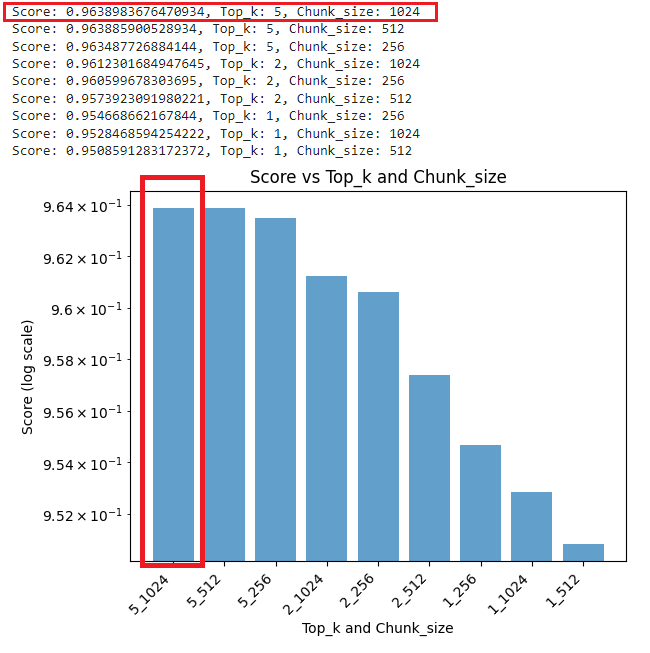
Based on the results and the chart, we conclude that the best score for semantic similarity comes from the combination of chunk_size 1024 and similarity_top_k 5. The combination of chunk_size 512 and similarity_top_k 1 returned the worst score.
A Word on Cost
ParamTuner doesn’t come for free, for obvious reasons:
- We use GPT-4 turbo as the model for dataset generation and parameter evaluation. It costs $0.01 / 1000 input tokens and $0.03 / 1000 output tokens.
- The number of parameter combinations grows exponentially based on the number of parameters and their values for tuning. In our case, we only tuned two parameters,
chunk_sizeandsimilarity_top_k, each having three values, resulting in 9 parameter combinations.
For our sample RAG, tuning for semantic similarity cost around $0.40.
Summary
We explored the hyperparameter tuning feature offered by LlamaIndex in this article. We implemented our use case by following the LlamaIndex guide. We delved into the detailed steps of implementing ParamTuner to automate parameter tuning in an RAG pipeline. We tuned two parameters for the retrieval stage, chunk_size and similarity_top_k. With this similar approach, you can tune other parameters in either the retrieval or the generation stage of an RAG pipeline.
With ParamTuner, which utilizes EDD (Evaluation Driven Development) under the hood, parameter tuning in an RAG pipeline is no longer a guessing game. Be sure to add ParamTuner to your RAG toolkit.
I hope you find this article helpful.
The source code for this article can be found in my Colab notebook.
Happy coding!


