
Automating Athena Queries from S3 With Python and Boto3.
DataSeries highlight:
- Amazon Athena is an interactive query service that makes it easy to analyze data in Amazon S3 using standard SQL. Athena is serverless, so there is no infrastructure to manage, and you pay only for the queries that you run. Athena is easy to use.
Introduction:
Towards the end of 2016, Amazon launched Athena — and it’s pretty awesome.
AWS Athena?
Amazon Athena is an interactive query service that makes it easy to analyze data in Amazon S3 using standard SQL. Athena is serverless, so there is no infrastructure to manage, and you pay only for the queries that you run. Athena is easy to use.

Amazon Athena is an interactive query service that makes it easy to analyze data directly from Amazon S3 using standard SQL. … Athena works directly with data stored in S3. Athena uses Presto, a distributed SQL engine to run queries. It also uses Apache Hive to create, drop, and alter tables and partitions.
The required functions and codes are available in the Github repo.
As the first step, you have to create an AWS account. Which is pretty easy; no need of any agreements, only the details and your credit or debit card.
Getting Started with Athena Queries and S3.

When you are in the AWS console, you can select S3 and create a bucket there. In that bucket, you have to upload a CSV file.
First let us create an S3 bucket and upload a csv file in it. Then we can use Athena to query it from AWS console itself.

I created a sample CSV which looks like this for the steps to follow.
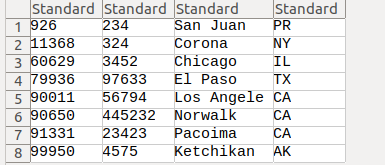
Now you can go to Athena and try querying data from the zip.csv file from S3 bucket. In order to do that you have to create a database and configure the S3 bucket as your location. For configuring and using AWS Athena from the console you can follow this video.

Now you can query the required data from the tables created from the console and save it as CSV.
Now we will move on to automating Athena queries using python and boto3.
Let’s go step by step.
- Installing AWS SDK and Configuring:
$ pip install awscli$ aws configureNow you have to type in the following details to connect.
AWS Access Key ID
Secret access key
Region
After filling this you are ready to go If there is no error.
For further processing you need to install boto3.
pip install boto3What is Boto3?
Boto3 is the Amazon Web Services (AWS) Software Development Kit (SDK) for Python, which allows Python developers to write software that makes use of services like Amazon S3 and Amazon EC2. You can find the latest, most up to date, documentation at our doc site, including a list of services that are supported.
2. Now lets run a sample boto3 to upload and download files from boto so as to check your AWS SDK configuration works correctly.
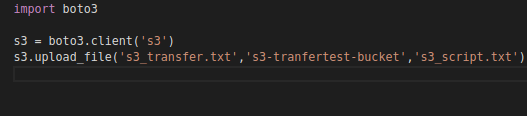
You can create a sample .txt file and use this code to upload and verify your connection is okay. If there is no error and also you are getting result as below you are ready to go.
You can check your s3 bucket in AWS console to

Now yeah. It is all set to go.
let’s import the required functions and configure the parameters.
So with the above code we are importing boto3 and other required functions, parameters for athena and also we intitated a boto3 session. Here we also use a function called query_results from library called athena_from_s3 which you can download from my repo or explained below. And also there is a function called cleanup inorder to clean up every data stored in the location to avoid redundancy.
Now for the easiness, I created a library called athena_from_s3.py which you can download from my repo. Which intakes the parameters and session so as to give the csv file saved and output of the query you entered in return and location in which it saves the csv in S3 bucket.
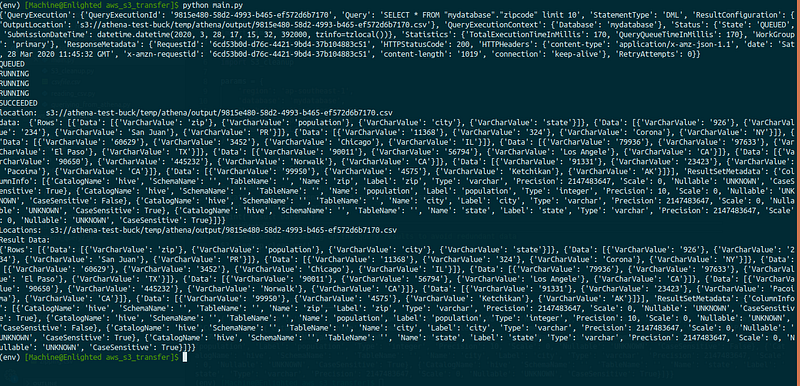
I hope yours will be working by now. If you want to know about the function read through. You can check on this page for more reference.
Let’s explain the helper function below.

Here we use three main functions from boto3. Check the documentation for details.
client = boto3.client('athena')There are mainly three functions associated with this.
first, we have to create an Athena client. Then we have to pass down the parameters and query to start_query_execution function which will return response as such.
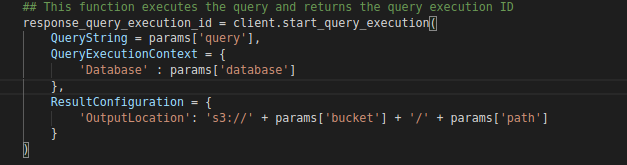
This function executes the query and returns the query execution ID with some other responses.
second, we have to get the status of the query using get_query_execution() function which will give response of status and other parameters.

Last we will get the query results with the function get_query_results().
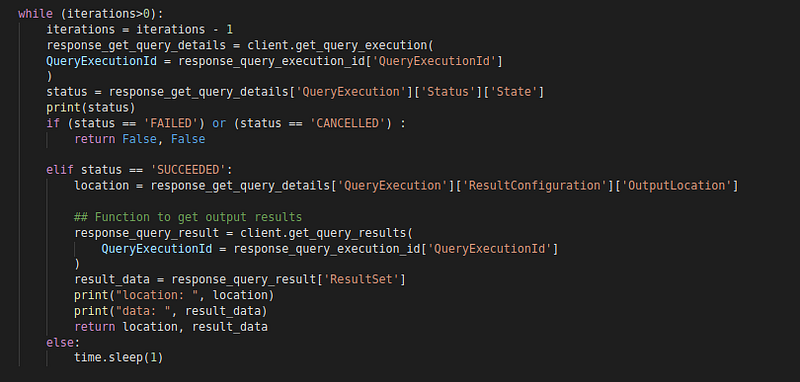
What this module of code does is it check for status of query execution every second for 5 seconds and when the status turned out to be “SUCCESS” it will ask for query results.
All code available here.

Correct me if I made mistakes. Thank you so much for your time. Have a great career and a great life.
Reference:


