
Automated Test Coverage Check in buildSrc
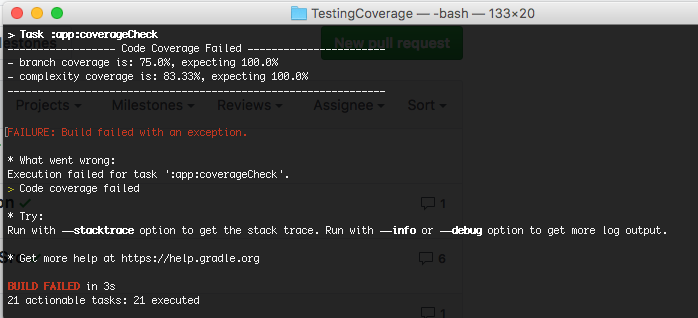
Ever wonder if you could automate your coverage checking in your CI (Continuous Integration), as the image above? And also have the coverage checking on a separate build source (buildSrc of gradle)…
In this Blog the focus is to how use buildSrc in gradle to build a Coverage Check for your build process. The explanation of what is buildSrc is very well defined in
Add Jacoco Coverage
The first step is to use Jacoco Coverage. If you already know how to on this, you could skip this section.
I assume you already have your App code working with some tests. To add Jacoco Code Coverage (for Android), would be a simple process.
- In your root’s
build.gradle, addclasspath ‘com.dicedmelon.gradle:jacoco-android:0.1.2’tobuildscriptdependencies - In your module (in our case app)
build.gradle, addapply plugin: ‘jacoco-android’at the top of the file - Optional: exclude any modules that is not wanted for coverage measurement. In my case is the
Activity, since it is not a presenter logic code that I wanted to test.
jacocoAndroidUnitTestReport {
    excludes += ['**/*Activity*.*']
}
With this in place, if you run your test, you could get your code coverage in
/app/build/reports/jacoco/jacocoTestDebugUnitTestReport/html/index.html

This is good, but it doesn’t automatically check for you if it meets your requirement. I will show you how in next section.
Add Coverage Check process in buildSrc
Actually, there’re some references on how to write gradle script to measure it. To be exact, it is from here. For this blog, I’ll show you how to get the scripts in a more organized fashion in buildSrc, so you don’t need to add extra gradle scripts to the root folder.
1. Create a custom gradle plugin in buildSrc
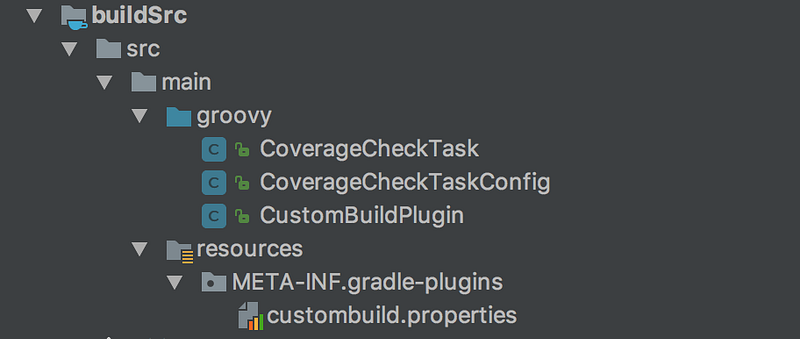
Under your application root folder, create a buildSrc folder. Then make the directory src/main/groovy. In thegroovy folder, you could put your groovy based classes code there, as instructed below
2. Create CoverageCheckTask.groovy class to perform the check
Based on the code here, transform it into Groovy class format and break it down to relevant functions for more clarity.
The code starts as below. Refers to github for the other part of the codes.
class CoverageCheckTask extends DefaultTask {
    String reportPath
    String coverageRequired
@TaskAction
def testCoverageVerification() {
reportPath = project.coverageCheckConfig.reportPath
coverageRequired =
project.coverageCheckConfig.coverageRequired // ... Call the relevant def functions for checking coverage
} // ... more codes. Refer to the git
}Note the above reportPath is to indicate the path of the Jacoco Coverage Report. The coverageRequired is the path of the file to state the expected % required. It looks like below (100% for all… the ideal case :)
instruction=100
branch=100
line=100
complexity=100
method=100
class=100
3. Create CoverageCheckTaskConfig.groovy class to define inputs for the Coverage Check Task class
package custom.build.gradle

class CoverageCheckTaskConfig {
    String reportPath
    String coverageRequired
}
This is defined, so that in your app’s build.gradle, you could set this inputs accordingly per your app’s module specific folder data. I’ll elaborate in the last section beneath.
4. Create CustomBuildPlugin.groovy class to define the plugin entry
class CustomBuildPlugin implements Plugin<Project> {
    void apply(Project project) {
        project.extensions.create('coverageCheckConfig',
                                        CoverageCheckTaskConfig)
        project.tasks.create('coverageCheck', CoverageCheckTask)
    }
}
This is the plugin definition that connects all the CoverageCheckTaskConfig, CoverageCheckTask and also the entry to it, which is
coverageCheckConfig— the task configuration scope that your app’sbuild.gradleto define the path ofreportPathandcoverageRequiredcoverageCheck— the task name that your app’sbuild.gradlecould access.
This could be seen clearer in the section beneath.
4. Define the META-INF.gradle-plugins for your CustomBuildPlugin
Under the main folder, create META-INF.gradle-plugins folder. In that folder, create a file name custombuild.properties
In the file, just define your implementation-class as below
implementation-class=custom.build.gradle.CustomBuildPluginBy now, your buildSrc should look like this.
Call Coverage Check from your app module
Now you have the Coverage Check class defined in buildSrc, you could then use it in your module (app module or other modules you have defined).
To use it, is quite simple. Just need to add the below code to your build.gradle.
apply plugin: custom.build.gradle.CustomBuildPlugin

coverageCheckConfig {
    reportPath = "app/build/reports/jacoco/" +
            "jacocoTestDebugUnitTestReport/" +
            "jacocoTestDebugUnitTestReport.xml"
    coverageRequired = "app/coverage.properties"
}

coverageCheck.dependsOn "jacocoTestDebugUnitTestReport"
In this code, we just
- apply the
custom.build.gradle.CustomBuildPluginplugin - define your
reportPathandconverageRequiredpath throughcoverageCheckConfig - inform that
coverageChecktask depends onjacocoTestDebugUnitTestReporttask, so that jacoco report could be generate first before your run yourconverageChecktask.
With this defined, all done! Ready to check your automated coverage check triggered.

Code references
All the above codes are available in github.
To show the test, it has simple App that enable user to enter 2 numbers and sum it up. The logic is stored in MainPresenter class. And unit test is added to MainPresenter with 100% coverage.
To run the test and it’s code coverage, just run (i.e. clean the build, and run test)
./gradlew clean coverageCheck
It will result as below
> Task :app:coverageCheck
Passed Code Coverage Checks
If you disable one of the test, it will result as something like below
If you inspect the Coverage Check codes, it also will update the coverage.properties when the % coverage improve. So you could actually start with 0% for all, and incrementally improve from there.
Happy Testing and Code Coverage-ing!!
I hope you appreciate this post and it’s helpful for you. Do share with others.
You could check out my other interesting topics here.
Follow me on medium, Twitter or Facebook for little tips and learning on Android, Kotlin etc related topics. ~Elye~


