avatarEric Kleppen

Free AI web copilot to create summaries, insights and extended knowledge, download it at here

8226

Abstract

href="https://www.ally.com/api/invest/documentation/fixml/">FIXML format</a>. The <i>Financial Information eXchange</i> (FIX) Protocol is a free and open standard, supported by thousands of firms.</p><blockquote id="35b4"><p>FIX has become the language of the global financial markets used extensively by buy and sell-side firms, trading platforms and even regulators to communicate trade information.</p></blockquote><blockquote id="4faf"><p><a href="http://www.fixprotocol.org.">http://www.fixprotocol.org</a>:</p></blockquote><p id="e6fb">When making an API call, the FIXML is passed in the body of the request. It is essentially XML. <b>Because the request payload requires FIXML, the URI must use XML format instead of JSON.</b></p><div id="dc7c"><pre><span class="hljs-attribute">URL</span><span class="hljs-operator">=</span>f<span class="hljs-string">"https://devapi.invest.ally.com/v1/accounts/{acct}/orders.xml"</span></pre></div><p id="3422">The following is an example of FIXML for a buy order of stock.</p><div id="052b"><pre><FIXML xmlns<span class="hljs-operator">=</span><span class="hljs-string">"http://www.fixprotocol.org/FIXML-5-0-SP2"</span>> <Order TmInForce<span class="hljs-operator">=</span><span class="hljs-string">"1"</span> Typ<span class="hljs-operator">=</span><span class="hljs-string">"2"</span> Side<span class="hljs-operator">=</span><span class="hljs-string">"1"</span> Px<span class="hljs-operator">=</span><span class="hljs-string">"13.39"</span> Acct<span class="hljs-operator">=</span><span class="hljs-string">"60534810"</span>> <Instrmt SecTyp<span class="hljs-operator">=</span><span class="hljs-string">"CS"</span> Sym<span class="hljs-operator">=</span><span class="hljs-string">"GE"</span>/> <OrdQty Qty<span class="hljs-operator">=</span><span class="hljs-string">"1"</span>/> </Order> </FIXML></pre></div><p id="6e7c">Notice there are several attributes within the order. The attributes correspond to order parameters, like price, quantity, and order type. <a href="https://www.ally.com/api/invest/documentation/fixml/">For a complete list of FIXML attributes used with Ally, check the documentation</a>.</p><h2 id="e077">The Create Stock Order Function</h2><p id="aded">To handle buying stocks, create a function that takes in variables for the FIXML attributes. There are seven attributes that need to be configured in the FXML:</p><div id="e8b7"><pre><span class="hljs-keyword">def</span> <span class="hljs-title function_">create_stock_order</span>(<span class="hljs-params">sym, typ, side, tif, price, acct, qty</span>)<span class="hljs-symbol">:</span></pre></div><p id="b0d8"><b>Sym: </b>The symbol (ticker) of the security.</p><p id="5791"><b>Typ</b>: Price Type. Values include <i>Market</i>: 1, <i>Limit</i>: 2, <i>Stop</i>: 3, <i>Stop Limit</i>: 4</p><p id="3e16"><b>Side: </b>The side of the market.<b> </b>Buy to cover orders are attributed as buy orders with Side = “1”. Values include <i>Buy</i>: 1, <i>Sell</i>: 2, <i>Sell Short</i>: 5</p><p id="27f5"><b>TmInForce: </b>Time in Force controls the order duration. Values include <i>Day Order</i>: 0, <i>GTC Order</i>: 1, <i>Market on Close</i>:7</p><p id="82e8"><b>Px</b>: The price of the security if needed for the selected <b>Typ</b>. For example, <i>Px </i>would be required for limits (Typ = “2”) or stop limits (Typ=”4").</p><p id="4fe2"><b>Acct</b>: Your account number. This is also required in the URL.</p><p id="2a47"><b>Qty</b>: The quantity of shares or contracts desired.</p><p id="da10">Note: Since the function only buys stocks, the<b> SecTyp</b> attribute does not need to be adjusted<b>. SecTyp: </b>The type of<b> </b>Security. This attribute is required. Values include <i>Common Stock</i>: CS, <i>Option</i>: OPT</p><div id="bfc0"><pre>def create_stock_order(sym, typ, side, tif, price, acct, qty): <span class="hljs-comment">'''</span> FIXML <span class="hljs-keyword">KEY</span> Typ: Market: <span class="hljs-string">"1"</span> Limit: <span class="hljs-string">"2"</span> <span class="hljs-keyword">Stop</span>: <span class="hljs-string">"3"</span> <span class="hljs-keyword">Stop</span> Limit: <span class="hljs-string">"4"</span>

Side: Buy: <span class="hljs-string">"1"</span> 
      Sell: <span class="hljs-string">"2"</span> 
      Sell <span class="hljs-type">Short</span>: <span class="hljs-string">"5"</span> 

tif:  Day <span class="hljs-keyword">Order</span>: <span class="hljs-string">"0"</span> 
      GTC <span class="hljs-keyword">Order</span>: <span class="hljs-string">"1"</span> 
      Market <span class="hljs-keyword">on</span> Close: <span class="hljs-string">"7"</span> 
<span class="hljs-comment">'''</span>
    url=f<span class="hljs-string">"https://devapi.invest.ally.com/v1/accounts/{acct}/orders.xml"</span></pre></div><div id="cf4d"><pre>xmlns = '<span class="hljs-attr">xmlns=</span><span class="hljs-string">"http://www.fixprotocol.org/FIXML-5-0-SP2"</span>'

<span class="hljs-keyword">order</span> <span class="hljs-title">= f</span>'<span class="hljs-attr">TmInForce=</span><span class="hljs-string">"{tif}"</span> <span class="hljs-attr">Typ=</span><span class="hljs-string">"{typ}"</span> <span class="hljs-attr">Side=</span><span class="hljs-string">"{side}"</span> <span class="hljs-attr">Px=</span><span class="hljs-string">"{price}"</span> <span class="hljs-attr">Acct=</span><span class="hljs-string">"{acct}"</span>'</pre></div><div id="33d1"><pre><span class="hljs-attr">instrmt</span> = f<span class="hljs-string">'SecTyp="CS" Sym="{sym}"'</span>
<span class="hljs-attr">orderQty</span> = f<span class="hljs-string">'Qty="{qty}"'</span></pre></div><div id="0587"><pre>payload <span class="hljs-operator">=</span> f<span class="hljs-string">"&lt;FIXML {xmlns}&gt;<span class="hljs-subst">\r</span><span class="hljs-subst">\n</span> &lt;Order {order}&gt;<span class="hljs-subst">\r</span><span class="hljs-subst">\n</span> &lt;Instrmt {instrmt}/&gt;<span class="hljs-subst">\r</span><span class="hljs-subst">\n</span> &lt;OrdQty {orderQty}/&gt;<span class="hljs-subst">\r</span><span class="hljs-subst">\n</span>  &lt;/Order&gt; <span class="hljs-subst">\r</span><span class="hljs-subst">\n</span> &lt;/FIXML&gt;"</span></pre></div><div id="3d23"><pre>headers = {
  <span class="hljs-symbol">'TKI_OVERRIDE</span>': <span class="hljs-symbol">'true</span>',
  <span class="hljs-symbol">'Content</span>-<span class="hljs-keyword">Type</span>': <span class="hljs-symbol">'application</span>/xml',
 }</pre></div><div id="3532"><pre>response = requests<span class="hljs-selector-class">.post</span>(url,auth = auth,  headers=headers, data = payload)

f = xmltodict<span class="hljs-selector-class">.parse</span>(response<span class="hljs-selector-class">.text</span><span class="hljs-selector-class">.encode</span>(<span class="hljs-string">'utf8'</span>))<span class="hljs-selector-attr">[<span class="hljs-string">'response'</span>]</span><span class="hljs-selector-attr">[<span class="hljs-string">'clientorderid'</span>]</span>

<span class="hljs-selector-id">#orderids</span><span class="hljs-selector-class">.append</span>(f)</pre></div><div id="1217"><pre><span class="hljs-keyword">return</span> f</pre></div><p id="6708">It is important to understand, this function will place a <b>live order</b>. <b><i>BE CAREFUL!</i></b> For example, if I wanted to buy 1 share of GE for 1 dollar, the function would look like this:</p><div id="87e4"><pre><span class="hljs-attribute">create_stock_order</span>(<span class="hljs-string">"GE"</span>, <span class="hljs-number">2</span>, <span class="hljs-number">1</span>,<span class="hljs-number">1</span>, <span class="hljs-string">"1.00"</span>, <span class="hljs-number">123456789</span>, <span class="hljs-number">1</span>)</pre></div><p id="3866">The function returns the <b><i>Client OrderID. </i></b>Since the request is sent using the XML format, the response is returned in XML. In order to parse the XML response, I use the library <a href="https://pypi.org/project/xmltodict/"><b><i>xmltodict</i></b></a>. It makes working wi

Options

th XML feel more like working with JSON.</p><p id="552e"><a href="https://pypi.org/project/xmltodict/">Use pip to install the library if needed</a>.</p><div id="3d6f"><pre>pip <span class="hljs-keyword">install</span> xmltodict</pre></div><p id="19b3">To keep track of the orderIDs, append them to a list or save them to a database. To verify the order went through, you can check the Orders Status section of the Dashboard on ally. Or, use the API’s <a href="https://www.ally.com/api/invest/documentation/accounts-id-orders-get">accounts/:id/orders</a> endpoint.</p><figure id="4181"><img src="https://cdn-images-1.readmedium.com/v2/resize:fit:800/1*sc13qXj8BpmzDmzqhXxa9A.png"><figcaption>Order Status https://investor.tradeking.com/Modules/Dashboard/dashboard.php</figcaption></figure><h2 id="63c2">Canceling Orders</h2><p id="6e02">Similarly to Creating orders, canceling orders is also done using FIXML.</p><div id="3ee2"><pre><FIXML xmlns<span class="hljs-operator">=</span><span class="hljs-string">"http://www.fixprotocol.org/FIXML-5-0-SP2"</span>> <OrdCxlReq TmInForce<span class="hljs-operator">=</span><span class="hljs-string">"0"</span> Typ<span class="hljs-operator">=</span><span class="hljs-string">"2"</span> Side<span class="hljs-operator">=</span><span class="hljs-string">"1"</span> OrigID<span class="hljs-operator">=</span><span class="hljs-string">"SVI-12345678"</span> Acct<span class="hljs-operator">=</span><span class="hljs-string">"12345678"</span>> <Instrmt SecTyp<span class="hljs-operator">=</span><span class="hljs-string">"CS"</span> Sym<span class="hljs-operator">=</span><span class="hljs-string">"F"</span>/> <OrdQty Qty<span class="hljs-operator">=</span><span class="hljs-string">"1"</span>/> </OrdCxlReq> </FIXML></pre></div><p id="3ba8">Notice the payload says <b>OrdCxlReq </b>instead of <b>Order. </b>Instead of price, pass the orderID to the OrigID attribute.</p><div id="7087"><pre>def can_stock_order(sym, typ, side, tif, acct, qty, orderids): <span class="hljs-comment">'''</span> FIXML <span class="hljs-keyword">KEY</span> Typ: Market: <span class="hljs-string">"1"</span> Limit: <span class="hljs-string">"2"</span> <span class="hljs-keyword">Stop</span>: <span class="hljs-string">"3"</span> <span class="hljs-keyword">Stop</span> Limit: <span class="hljs-string">"4"</span>

Side: Buy: <span class="hljs-string">"1"</span> 
      Sell: <span class="hljs-string">"2"</span> 
      Sell <span class="hljs-type">Short</span>: <span class="hljs-string">"5"</span> ‐ 

tif:  Day <span class="hljs-keyword">Order</span>: <span class="hljs-string">"0"</span> 
      GTC <span class="hljs-keyword">Order</span>: <span class="hljs-string">"1"</span> 
      Market <span class="hljs-keyword">on</span> Close: <span class="hljs-string">"7"</span> 

<span class="hljs-comment">'''</span></pre></div><div id="7601"><pre><span class="hljs-attribute">url</span> <span class="hljs-operator">=</span> f<span class="hljs-string">"https://devapi.invest.ally.com/v1/accounts/{acct}/orders.xml"</span></pre></div><div id="7eef"><pre>xmlns = <span class="hljs-symbol">'xmlns</span>=<span class="hljs-string">"http://www.fixprotocol.org/FIXML-5-0-SP2"</span>'
order = f<span class="hljs-symbol">'TmInForce</span>=<span class="hljs-string">"{tif}"</span> Typ=<span class="hljs-string">"{typ}"</span> <span class="hljs-literal">Side</span>=<span class="hljs-string">"{side}"</span> OrigID=<span class="hljs-string">"{orderids}"</span> Acct=<span class="hljs-string">"{acct}"</span>'
instrmt = f<span class="hljs-symbol">'SecTyp</span>=<span class="hljs-string">"CS"</span> Sym=<span class="hljs-string">"{sym}"</span>'
orderQty = f<span class="hljs-symbol">'Qty</span>=<span class="hljs-string">"{qty}"</span>'</pre></div><div id="bb6d"><pre>payload <span class="hljs-operator">=</span> f<span class="hljs-string">"&lt;FIXML {xmlns}&gt;<span class="hljs-subst">\r</span><span class="hljs-subst">\n</span> &lt;OrdCxlReq {order}&gt;<span class="hljs-subst">\r</span><span class="hljs-subst">\n</span> &lt;Instrmt {instrmt}/&gt;<span class="hljs-subst">\r</span><span class="hljs-subst">\n</span> &lt;OrdQty {orderQty}/&gt;<span class="hljs-subst">\r</span><span class="hljs-subst">\n</span>  &lt;/OrdCxlReq&gt; <span class="hljs-subst">\r</span><span class="hljs-subst">\n</span> &lt;/FIXML&gt;"</span></pre></div><div id="97a2"><pre>headers = {
      <span class="hljs-symbol">'TKI_OVERRIDE</span>': <span class="hljs-symbol">'true</span>',
      <span class="hljs-symbol">'Content</span>-<span class="hljs-keyword">Type</span>': <span class="hljs-symbol">'application</span>/xml',
     }</pre></div><div id="8d95"><pre>response = requests<span class="hljs-selector-class">.post</span>(url,auth = auth,  headers=headers, data = payload)
f = xmltodict<span class="hljs-selector-class">.parse</span>(response<span class="hljs-selector-class">.text</span><span class="hljs-selector-class">.encode</span>(<span class="hljs-string">'utf8'</span>))<span class="hljs-selector-attr">[<span class="hljs-string">'response'</span>]</span>
</pre></div><div id="0cc4"><pre><span class="hljs-keyword">return</span> f</pre></div><p id="571b">The Create order and cancel order functions are nearly identical. The function returns a dictionary containing information about the success of the order cancelation. Using the function is easy:</p><div id="24b8"><pre><span class="hljs-attribute">can_stock_order</span>(<span class="hljs-string">"GE"</span>, <span class="hljs-number">2</span>, <span class="hljs-number">1</span>,<span class="hljs-number">1</span>, <span class="hljs-number">123456789</span>, <span class="hljs-number">1</span>, 'SVI-<span class="hljs-number">123456789</span>')</pre></div><h1 id="9511">The Complete Code</h1><p id="df86">I have added these functions to my original <a href="https://towardsdatascience.com/collect-stock-and-options-data-easily-using-python-and-ally-financial-api-3-example-queries-45d162e4f055">Ally API Cheat sheet</a> available on Github.com. You’re now ready to capture market quotes, execute orders, and search market news all using the Ally API! With a better understanding of how to create and cancel orders, it is easier to move into things like algorithmic trading.</p><div id="e115" class="link-block">
      <a href="https://github.com/bendgame/Ally-API-Cheat-Sheet">
        <div>
          <div>
            <h2>bendgame/Ally-API-Cheat-Sheet</h2>
            <div><h3>Getting Started with Ally Financial API. Contribute to bendgame/Ally-API-Cheat-Sheet development by creating an account…</h3></div>
            <div><p>github.com</p></div>
          </div>
          <div>
            <div style="background-image: url(https://miro.readmedium.com/v2/resize:fit:320/0*TVopPN55lOu1XU31)"></div>
          </div>
        </div>
      </a>
    </div><h1 id="48c6">Thank You!</h1><ul><li><i>If you enjoyed my work, <a href="https://medium.com/@erickleppen">follow me on Medium</a> for more!</i></li><li><a href="https://erickleppen.medium.com/membership"><i>Get FULL ACCESS and help support my content by subscribing</i></a>!</li><li><i>Let’s connect on <a href="https://www.linkedin.com/in/erickleppen01/">LinkedIn</a></i></li><li><i>Analyze Data using Python? Check out my <a href="https://pythondashboards.com/">website</a></i>!</li></ul><p id="0c04"><a href="http://pythondashboards.com/"><b>— Eric Kleppen</b></a></p><div id="cab5" class="link-block">
      <a href="https://erickleppen.medium.com/the-ultimate-guide-to-erics-articles-d32df8241353">
        <div>
          <div>
            <h2>The Ultimate Guide to Eric’s Articles</h2>
            <div><h3>All my content organized by topic…</h3></div>
            <div><p>erickleppen.medium.com</p></div>
          </div>
          <div>
            <div style="background-image: url(https://miro.readmedium.com/v2/resize:fit:320/1*9FzobDafDGGOWIyH4VvU8g.png)"></div>
          </div>
        </div>
      </a>
    </div></article></body>

Automate Your Trading using Ally Financial API — Collect News and Create Stock Orders

How to use Python and Ally API to Trade Stocks

Photo by Windows on Unsplash

Is It Time to Automate?

The stock market is still hot, even after the slight correction in March. According to research done by SentimenTrader.com, retail trader activity has slowed from the peak in January. However, small trader (trades for 10 contracts or fewer) behavior is still more aggressive than it has been in the past 20 years.
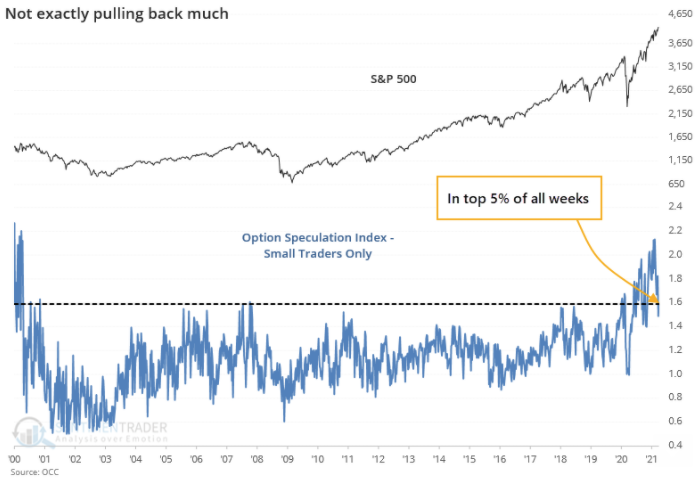
“Did mom and pop really leave?” by Jason Goepfert Premium Note Alerts sentimenTrader.com

Lately, I’ve been exploring how I can automate some of my stock trading strategies. One of the brokers I use, Ally Financial, has an API that is fairly straightforward and could be used for some algorithmic trading. If you’ve never used Ally before, I have a brief cheat-sheet to get you started pulling price data with the API. In this article, I add to that cheat sheet and explain how to collect news, and place and cancel stock orders using Python.

Manage your API keys

API keys are required to interact with the Ally Financial API. To get API keys and develop using the Ally Financial API, follow their Getting Started instructions here:

If you’re new to managing API keys, make sure to save them into a file or database instead of hardcoding them. In this example, I will save my keys in a file named config.py. API keys can be very valuable and must be protected. If you’re worried your key has been leaked, Ally Financial allows you to regenerate a new one. If using a config.py file, add the config file to your gitignore file to prevent it from being pushed to your repo too!

Import Dependencies

Connecting to the API uses OAuth1. It is possible to pass the credentials as part of the URL when making the request, but I prefer to use the library requests_oauthlib.

Use pip install requests-oauthlib as needed.

Notice I use a config file to import api_key, secret, oath_token, oath_secret. That way I don’t need to include those personal tokens in the code.

from requests_oauthlib import OAuth1
import requests
from config import api_key, secret, oath_token, oath_secret
#authentication 
auth = OAuth1(api_key, secret, oath_token, oath_secret)

I pass the imported tokens to OAuth1. This will be used when we make the request to the API.

Collecting Market News

Collecting market news can be useful for activities like sentiment analysis. The Ally Financial API has two API endpoints for news. The Search Endpoint is used to search for article IDs and returns the article’s headline. The News endpoint allows you to enter an article ID and returns the headline and article. Available articles have a max age of 180 days.

Search endpoint documentation News endpoint documentation

#the search endpoint
v1/market/news/search.json?
#the news endpoint. 
v1/market/news/{article ID}.json

I created a simple function that uses the search endpoint to collect article IDs, then uses a for loop to call the news endpoint with each ID returned from the search. The function returns the article’s headline, ID and story.

def get_news(sym, maxhits):
    baseurl = 'https://devapi.invest.ally.com'
    maxhits = str(maxhits)
    stories = []
    url =f'{baseurl}/v1/market/news/search.json?symbols={sym}&maxhits={maxhits}'
    
    response = requests.get(url, auth = auth).json()
    ids = [response['response']['articles']['article'][n]['id'] 
           for n in range(0, len(response['response']['articles']['article']))]
    
    for v in ids:
        url = f'{baseurl}/v1/market/news/{v}.json'
        response = requests.get(url, auth = auth).json()
        stories.append(response['response']['article'])
    return stories
get_news('spy', 5)

Notice the function takes in two parameters: sym and maxhits. Enter the stock’s ticker as the sym. Enter the max number of results you want returned in the maxhits parameter. For example, get_news(‘spy’, 5) will return up to 5 articles about the stock symbol SPY.

get_news(‘spy’, 5) output

Creating and Canceling Orders to Buy or Sell Stocks

Only one function is needed to place buy, sell and short sell orders. That is because all orders are posted using the accounts/:id/orders.xml endpoint.

Ally API Trading Documentation Orders endpoint documentation

When buying and selling stocks through the API, the order information needs to be submitted in FIXML format. The Financial Information eXchange (FIX) Protocol is a free and open standard, supported by thousands of firms.

FIX has become the language of the global financial markets used extensively by buy and sell-side firms, trading platforms and even regulators to communicate trade information.

http://www.fixprotocol.org:

When making an API call, the FIXML is passed in the body of the request. It is essentially XML. Because the request payload requires FIXML, the URI must use XML format instead of JSON.

URL=f"https://devapi.invest.ally.com/v1/accounts/{acct}/orders.xml"

The following is an example of FIXML for a buy order of stock.

<FIXML xmlns="http://www.fixprotocol.org/FIXML-5-0-SP2">
  <Order TmInForce="1" Typ="2" Side="1" Px="13.39" Acct="60534810">
    <Instrmt SecTyp="CS" Sym="GE"/>
    <OrdQty Qty="1"/>
  </Order>
</FIXML>

Notice there are several attributes within the order. The attributes correspond to order parameters, like price, quantity, and order type. For a complete list of FIXML attributes used with Ally, check the documentation.

The Create Stock Order Function

To handle buying stocks, create a function that takes in variables for the FIXML attributes. There are seven attributes that need to be configured in the FXML:

def create_stock_order(sym, typ, side, tif, price, acct, qty):

Sym: The symbol (ticker) of the security.

Typ: Price Type. Values include Market: 1, Limit: 2, Stop: 3, Stop Limit: 4

Side: The side of the market. Buy to cover orders are attributed as buy orders with Side = “1”. Values include Buy: 1, Sell: 2, Sell Short: 5

TmInForce: Time in Force controls the order duration. Values include Day Order: 0, GTC Order: 1, Market on Close:7

Px: The price of the security if needed for the selected Typ. For example, Px would be required for limits (Typ = “2”) or stop limits (Typ=”4").

Acct: Your account number. This is also required in the URL.

Qty: The quantity of shares or contracts desired.

Note: Since the function only buys stocks, the SecTyp attribute does not need to be adjusted. SecTyp: The type of Security. This attribute is required. Values include Common Stock: CS, Option: OPT

def create_stock_order(sym, typ, side, tif, price, acct, qty):
    '''
    FIXML KEY
    Typ:  Market: "1" 
          Limit: "2" 
          Stop: "3" 
          Stop Limit: "4"
    
    Side: Buy: "1" 
          Sell: "2" 
          Sell Short: "5" 
   
    tif:  Day Order: "0" 
          GTC Order: "1" 
          Market on Close: "7" 
    '''
        url=f"https://devapi.invest.ally.com/v1/accounts/{acct}/orders.xml"
xmlns = 'xmlns="http://www.fixprotocol.org/FIXML-5-0-SP2"'
    
    order = f'TmInForce="{tif}" Typ="{typ}" Side="{side}" Px="{price}" Acct="{acct}"'
instrmt = f'SecTyp="CS" Sym="{sym}"'
    orderQty = f'Qty="{qty}"'
payload = f"<FIXML {xmlns}>\r\n <Order {order}>\r\n <Instrmt {instrmt}/>\r\n <OrdQty {orderQty}/>\r\n  </Order> \r\n </FIXML>"
headers = {
      'TKI_OVERRIDE': 'true',
      'Content-Type': 'application/xml',
     }
response = requests.post(url,auth = auth,  headers=headers, data = payload)
 
    f = xmltodict.parse(response.text.encode('utf8'))['response']['clientorderid']
    
    #orderids.append(f)
return f

It is important to understand, this function will place a live order. BE CAREFUL! For example, if I wanted to buy 1 share of GE for 1 dollar, the function would look like this:

create_stock_order("GE", 2, 1,1, "1.00", 123456789, 1)

The function returns the Client OrderID. Since the request is sent using the XML format, the response is returned in XML. In order to parse the XML response, I use the library xmltodict. It makes working with XML feel more like working with JSON.

Use pip to install the library if needed.

pip install xmltodict

To keep track of the orderIDs, append them to a list or save them to a database. To verify the order went through, you can check the Orders Status section of the Dashboard on ally. Or, use the API’s accounts/:id/orders endpoint.

Order Status https://investor.tradeking.com/Modules/Dashboard/dashboard.php

Canceling Orders

Similarly to Creating orders, canceling orders is also done using FIXML.

<FIXML xmlns="http://www.fixprotocol.org/FIXML-5-0-SP2">
  <OrdCxlReq TmInForce="0" Typ="2" Side="1" OrigID="SVI-12345678" Acct="12345678">
    <Instrmt SecTyp="CS" Sym="F"/>
    <OrdQty Qty="1"/>
  </OrdCxlReq>
</FIXML>

Notice the payload says OrdCxlReq instead of Order. Instead of price, pass the orderID to the OrigID attribute.

def can_stock_order(sym, typ, side, tif, acct, qty, orderids):
    '''
    FIXML KEY
    Typ:  Market: "1" 
          Limit: "2" 
          Stop: "3" 
          Stop Limit: "4"
    
    Side: Buy: "1" 
          Sell: "2" 
          Sell Short: "5" ‐ 
   
    tif:  Day Order: "0" 
          GTC Order: "1" 
          Market on Close: "7" 
    
    '''
url = f"https://devapi.invest.ally.com/v1/accounts/{acct}/orders.xml"
xmlns = 'xmlns="http://www.fixprotocol.org/FIXML-5-0-SP2"'
    order = f'TmInForce="{tif}" Typ="{typ}" Side="{side}" OrigID="{orderids}" Acct="{acct}"'
    instrmt = f'SecTyp="CS" Sym="{sym}"'
    orderQty = f'Qty="{qty}"'
payload = f"<FIXML {xmlns}>\r\n <OrdCxlReq {order}>\r\n <Instrmt {instrmt}/>\r\n <OrdQty {orderQty}/>\r\n  </OrdCxlReq> \r\n </FIXML>"
headers = {
          'TKI_OVERRIDE': 'true',
          'Content-Type': 'application/xml',
         }
response = requests.post(url,auth = auth,  headers=headers, data = payload)
    f = xmltodict.parse(response.text.encode('utf8'))['response']
    
return f

The Create order and cancel order functions are nearly identical. The function returns a dictionary containing information about the success of the order cancelation. Using the function is easy:

can_stock_order("GE", 2, 1,1, 123456789, 1, 'SVI-123456789')

The Complete Code

I have added these functions to my original Ally API Cheat sheet available on Github.com. You’re now ready to capture market quotes, execute orders, and search market news all using the Ally API! With a better understanding of how to create and cancel orders, it is easier to move into things like algorithmic trading.

Thank You!

— Eric Kleppen

Finance
Programming
Trading
Stock Market
Coding
Recommended from ReadMedium