avatarAndres Sandoval

Free AI web copilot to create summaries, insights and extended knowledge, download it at here

2177

Abstract

ring">'alpha'</span>,<span class="hljs-string">'beta'</span> or <span class="hljs-string">'production'</span> serviceAccountEmail = <span class="hljs-string">"myapp-release<span class="hljs-variable">@api</span>-75.gserviceaccount.com"</span> serviceAccountCredentials = file(p12_KEY) } ... }</pre></div><p id="f28e">4. Configuration is done, now to publish Bundle or APK to Google Play Store using below commands:</p><p id="4871">Publish App Bundle</p><div id="75ba"><pre>./gradlew publishBundle</pre></div><p id="c174">Publish APK:</p><div id="f7fa"><pre>./gradlew publishApk</pre></div><p id="d53c">Note: remember to update your App Version code or you will get publish error:</p><div id="8760"><pre>* What went wrong: Execution failed for task <span class="hljs-string">':app:publishReleaseBundle'</span>. > Version code <span class="hljs-number">45</span> <span class="hljs-keyword">is</span> too low for variant release.</pre></div><h1 id="5f72">Publish App Bundle and Release notes:</h1><ol><li>The same configuration as above steps, you just need to create a new file “default.txt” → app/src/main/play/release-notes/en-US/default.txt.</li><li>Add your release notes in default.txt.</li><li>To publish Bundle and the release notes we use the same command that we use to upload Bundle.</li></ol><p id="d356">Publish App Bundle and Release notes:</p><div id="6337"><pre>./gradlew publishBundle</pre></div><h1 id="cd04">Production rollout by percentage</h1><p id="692f">Use options track = “production”, “userFraction” and “releaseStatus” to rollout by percentage in Production track.</p><div id="5b9a"><pre>android {

play {
    track <span class="hljs-operator">=</span> <span class="hljs-string">"production"</span> 
    userFraction <span class="hljs-operator">=</span> <span class="hljs-number">0.5</span> //case default is <span class="hljs-number">0.1</span> (<span class="hljs-number">10</span>% of the target)
    releaseStatus <span class="hljs-operator">=</span> <span class="hljs-string">"inProgress"</span>
    
    serviceAccountEmail <span class="hljs-operator">=</span> <span class="hljs-string">"mympp471651.iam.gserviceaccou

Options

nt.com"</span> serviceAccountCredentials <span class="hljs-operator">=</span> file(p12_KEY)

}</pre></div><h1 id="25cf">Check GPP configuration:</h1><p id="17fe">GPP adds Publishing Gradle tasks to your project, run ./gradlew tasks --all</p><figure id="1a8b"><img src="https://cdn-images-1.readmedium.com/v2/resize:fit:800/1*5d8ZgnIR9HtoL0sFr2oBXw.png"><figcaption></figcaption></figure><p id="a417">Ping me if you have any questions. Thanks for reading!</p><p id="8fc2">Resources:</p><div id="820b" class="link-block">
      <a href="https://github.com/Triple-T/gradle-play-publisher">
        <div>
          <div>
            <h2>Triple-T/gradle-play-publisher</h2>
            <div><h3>Gradle plugin to upload your App Bundle or APK and other app details to the Google Play Store …</h3></div>
            <div><p>github.com</p></div>
          </div>
          <div>
            <div style="background-image: url(https://miro.readmedium.com/v2/resize:fit:320/0*MX_aNu73YgjK3a4m)"></div>
          </div>
        </div>
      </a>
    </div><div id="6a86" class="link-block">
      <a href="https://github.com/Triple-T/gradle-play-publisher/issues/496">
        <div>
          <div>
            <h2>Instructions for migrating to v2.0.0 · Issue #496 · Triple-T/gradle-play-publisher</h2>
            <div><h3>Instructions for migrating from v1.2.x to v2.0.0 seems to be a tad scattered, especially for developers not terribly…</h3></div>
            <div><p>github.com</p></div>
          </div>
          <div>
            <div style="background-image: url(https://miro.readmedium.com/v2/resize:fit:320/0*rZG9M3RDVbRZcN_V)"></div>
          </div>
        </div>
      </a>
    </div><p id="1f5d">Notes:</p><ol><li>Create a new <a href="https://developers.google.com/identity/protocols/OAuth2ServiceAccount">Service account</a>.</li><li>Go to developer account -&gt; <a href="https://play.google.com/apps/publish/?account=7285672962128655255#ApiAccessPlace">API access</a> -&gt; enable access “Release Manager” permission.</li></ol></article></body>

Automate publishing App Bundle or APK to Google Play Store

This blog post shows how to automate publishing to Google Play Store with Gradle Play Publisher. The goal is to automate the manual process of uploading Apk andBundle files, and also release notes to the Google Play Store. First time publishing the APK it’s a manual process.

Publish App Bundle:

  1. Create a new Service account. (Microsoft did a nice tutorial for generating a service account). In this step, we will create and download a .p12 or JSON file key. Add the key file to your project inside gradle.properties:
GOOGLE_ACCOUNT_SERVICE_FILE=/home/gradle/TuneIn/Tunein-Android-Play-Publish.json

(don’t check in file key to Github add it to .gitignore, or add the key file at build time).

2. Add below code snippet to build.gradle (app). More details here (note below code needs to go on the top of the file).

plugins {
    id 'com.android.application'
    id 'com.github.triplet.play' version '2.1.0'
}

3. Also, add below code to build.gradle (app). The configuration below uploads APK or Bundle files to the Internal test track.

android {
....
play {
track = 'internal' //'alpha','beta' or 'production'
serviceAccountEmail = "myapp-release@api-75.gserviceaccount.com"
serviceAccountCredentials = file(p12_KEY)
    }
...
}

4. Configuration is done, now to publish Bundle or APK to Google Play Store using below commands:

Publish App Bundle

./gradlew publishBundle

Publish APK:

./gradlew publishApk

Note: remember to update your App Version code or you will get publish error:

* What went wrong:
Execution failed for task ':app:publishReleaseBundle'.
> Version code 45 is too low for variant release.

Publish App Bundle and Release notes:

  1. The same configuration as above steps, you just need to create a new file “default.txt” → app/src/main/play/release-notes/en-US/default.txt.
  2. Add your release notes in default.txt.
  3. To publish Bundle and the release notes we use the same command that we use to upload Bundle.

Publish App Bundle and Release notes:

./gradlew publishBundle

Production rollout by percentage

Use options track = “production”, “userFraction” and “releaseStatus” to rollout by percentage in Production track.

android {

    play {
        track = "production" 
        userFraction = 0.5 //case default is 0.1 (10% of the target)
        releaseStatus = "inProgress"
        
        serviceAccountEmail = "mympp471651.iam.gserviceaccount.com"
        serviceAccountCredentials = file(p12_KEY)
        
    }

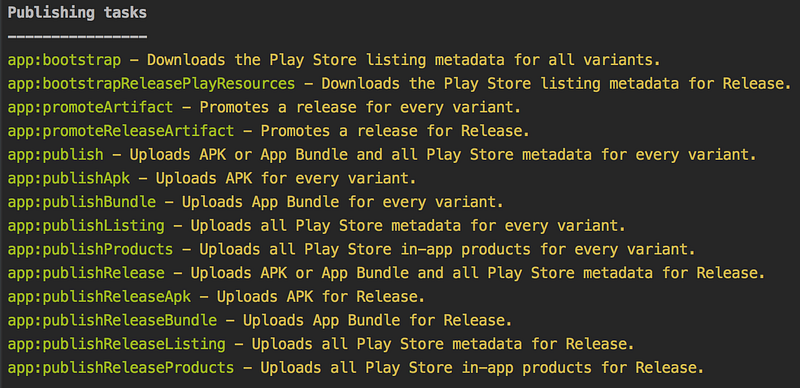
Check GPP configuration:

GPP adds Publishing Gradle tasks to your project, run ./gradlew tasks --all
Ping me if you have any questions. Thanks for reading!

Resources:

Notes:

  1. Create a new Service account.
  2. Go to developer account -> API access -> enable access “Release Manager” permission.
Android
App Bundle
Apk
Publishing
Gradle Play Publisher
Recommended from ReadMedium