
Automate Docker Deployments with Ansible
Deploying Airflow Container with Ansible
Docker solves big problems by providing continuous development and testing environments with rapid deployment cycles. It helps you package your application code with dependencies as an image to provide consistent conditions that never break.
I have covered how a data engineer can leverage dockerizing custom airflow orchestrations with ease in the previous blog post.
However, there is still a missing link. What if you want to avoid doing any manual steps and automate this process of building and deploying your airflow container on a VM on the cloud. We use Ansible, an IT automation tool at Lynx, to achieve this last mile automation.
This article will cover a tutorial on how you can automate the deployment of an Airflow container using Ansible.
Introducing Ansible
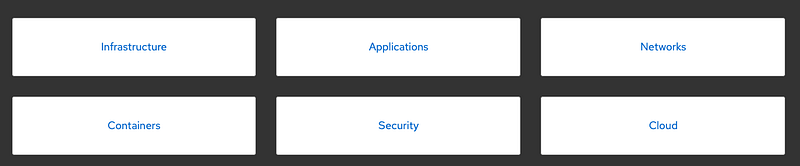
Ansible is an IT automation tool that allows you to automate infrastructure and application deployments. It has 6 key components used for automation in their respective domain.
Automation is quite important these days, to build robust applications organizations prefer infrastructure and applications to be managed and scaled as per need.
Benefits of using Ansible
- Free and open source
- Provides a simple setup that uses YAML configurations, no special coding skills are required
- Cater for complex workflows, including deployment on multiple servers, clusters, and orchestrations
- Ansible is agentless, you don’t need to install separate software on hosts.
- Provides flexibility to deploy on servers, VMs, or cloud with the same YAML scripts
Now that we have looked into the benefits, let’s look into an actual tutorial deploying docker applications using Ansible.
Tutorial on using Ansible for docker deployments
Codebase
If you are interested in directly looking into the source code you can find it here
Project structure
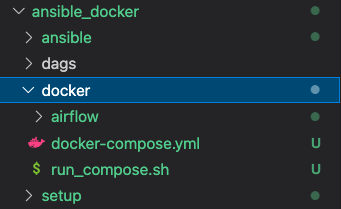
This project has 4 key components in terms of structure:
- ansible: This is where automation code using ansible playbooks live
- dags: Airflow dags
- docker: Docker deployments of airflow copied from a previous blog post
- setup: Setup shell scripts for docker lives here
Docker deployment from the previous blog post
In the previous blog post, I covered a full tutorial on how to deploy airflow using docker. I will be reusing the same component as it is and bringing the whole folder to this new project.
git clone https://github.com/syalanuj/youtube.git
cp youtube/airflow_docker youtube/ansible_docker/docker
Pip install Ansible
Please make sure in your localhost Ansible PIP package is installed, if not you can first create a virtual environment, activate the virtualenv, and then install ansible using pip
virtualenv venv
source venv/bin/activate
pip install ansible
group_vars
This is where you provide variables to be used by the Ansible playbooks:
| — all.yml
ansible_user: <user_name>ansible_ssh_private_key_file: ~/.ssh/id_rsaWe are using this to provide a path to the private key and name of the ansible user
inventory
Using this to provide the IP address of the host under [webservers]. The ansible script picks up this webserver IP address as a host where the automation is run
| — hosts.ini
[webservers]
10.2.3.1
roles
Within roles/ folder, you can see two key components of the Ansible deployments
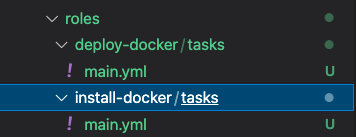
- Setup Docker: This is where the script in the setup folder is used to install docker on the host system. This is one of the ansible-playbook under install-docker → tasks → main.yml.
---
- name: create app dir ~/install-docker/
  file:
    state: directory
    path: "/home/{{ ansible_user }}/install-docker/"
    owner: "{{ ansible_user }}"
  register: deploy_dir
- name: Copy install files
ansible.builtin.copy:
src: "{{ item.src }}"
dest: "{{ item.dest }}"
loop:
- { src: "../../../setup/setup_docker.sh", dest: "{{ deploy_dir.path }}" }- name: Run shell instance-startup.sh
ansible.builtin.shell: /bin/sh "{{ deploy_dir.path }}instance-startup.sh" >> instance_startup_log.txt
register: out- name: shell output
debug: var=out.stdoutThe configuration file has a few steps, which firsts create the directory, copy the shell script (setup_docker.sh), and execute it in the host.
| — setup_docker.sh
#! /bin/bash
# This is script is intended to be provided as startup-script for the Google Cloud VM to install docker
#adding docker repo
sudo apt-get -y config-manager \
--add-repo=https://download.docker.com/linux/centos/docker-ce.repo# install docker
sudo apt-get -y install docker-ce docker-ce-cli containerd.io# start docker service
sudo systemctl start docker#install docker compose
sudo curl -L "https://github.com/docker/compose/releases/download/1.29.2/docker-compose-$(uname -s)-$(uname -m)" -o /usr/local/bin/docker-compose
sudo chmod +x /usr/local/bin/docker-composeSERVICE_USER=syal
sudo su
usermod - aG wheel ${SERVICE_USER}
sed -i 's/%sudo\s\+ALL=(ALL:ALL)\s\+ALL/%sudo ALL=(ALL:ALL) NOPASSWD: ALL/' /etc/sudoers- Deploy Docker: This is where we will build the image, copy the dags and code, and docker-compose up. This ansible-playbook covers the following steps: - Creating directories - Building Docker image on localhost - Copying and load docker image - Copy the Dags folder - Docker Compose up
- name: create app dir ~/deploy_docker/
  file:
    state: directory
    path: "/home/{{ ansible_user }}/deploy_docker/"
    owner: "{{ ansible_user }}"
  register: deploy_dir
  tags: always
- name: Build docker image
command: "cd ../docker/airflow/ && sh build_docker.sh"
delegate_to: localhost- name: Copy docker image
ansible.builtin.copy:
src: "{{ item.src }}"
dest: "{{ item.dest }}"
loop:
- { src: "../docker/airflow/airflow.tar.gz", dest: "{{ deploy_dir.path }}" }- name: Docker Load Image Airflow
ansible.builtin.shell:
cmd: sudo zcat {{ deploy_dir.path }}airflow.tar.gz | sudo docker load- name: create app dir ~/dags/
file:
state: directory
path: "/home/{{ ansible_user }}/dags/"
owner: "{{ ansible_user }}"
register: dags_dir
tags: always- name: Copy Dags
ansible.builtin.copy:
src: "../../../dags/"
dest: "{{ dags_dir.path }}"
directory_mode: yes
owner: "{{ ansible_user }}"- name: Docker Compose UP
ansible.builtin.shell: /bin/sh "{{ deploy_dir.path }}run_compose.sh" >> run_compose.txtConclusion
If you are bounded by the infrastructure and services provided, Ansible can still help you automate your application deployments. Especially when combined with Docker, it provides a generic solution for deployments with ease.


