avatarMaxi Rosson

Free AI web copilot to create summaries, insights and extended knowledge, download it at here

4191

Abstract

n">apply</span> plugin: <span class="hljs-string">"kotlin"</span></pre></div><div id="2da4"><pre><span class="hljs-keyword">buildscript</span> { <span class="hljs-keyword">repositories</span> { mavenCentral() } <span class="hljs-keyword">dependencies</span> { <span class="hljs-keyword">classpath</span>(BuildLibs.KOTLIN_PLUGIN) } }</pre></div><div id="5457"><pre><span class="hljs-variable">repositories</span> { <span class="hljs-function"><span class="hljs-title">mavenCentral</span>()</span> }</pre></div><div id="07a9"><pre><span class="hljs-keyword">dependencies</span> { <span class="hljs-keyword">compile</span>(Libs.KOTLIN) }</pre></div><p id="60ed">This approach gives some useful benefits:</p><figure id="1bc0"><img src="https://cdn-images-1.readmedium.com/v2/resize:fit:800/1*trmjpoadJtt1wCQmJrTrsw.png"><figcaption>Classify and centralize all your dependencies</figcaption></figure><figure id="6751"><img src="https://cdn-images-1.readmedium.com/v2/resize:fit:800/1*qn7vXcsbQjugKox4bNTtVw.png"><figcaption>IDE Autocomplete / Go directly to the definition when clicking.</figcaption></figure><figure id="7a96"><img src="https://cdn-images-1.readmedium.com/v2/resize:fit:800/1*vE_jPXTRw0P-nnxJmH4rqw.png"><figcaption>Possibility to add <code>@Deprecated</code> annotations to any dependency for better code documentation</figcaption></figure><h1 id="ebe5">Apply and configure the plugin</h1><p id="c18f">The next step is to apply and configure the Releases Hub plugin.</p><p id="a8bf">You should add a constant for the plugin on <code>/buildSrc/src/main/kotlin/BuildLibs.kt,</code> replacing <code>X.Y.Z</code> by the latest release version. You see the latest release <a href="https://github.com/dipien/releases-hub-gradle-plugin/releases/latest">here</a>.</p><div id="5c18"><pre><span class="hljs-keyword">object</span> BuildLibs { ...</pre></div><div id="8c2d"><pre> <span class="hljs-keyword">const</span> <span class="hljs-keyword">val</span> RELEASES_HUB_PLUGIN = <span class="hljs-string">"com.dipien:releases-hub-gradle-plugin:X.Y.Z"</span></pre></div><div id="246a"><pre> ... }</pre></div><p id="8080">Then apply the plugin on the root <code>build.gradle</code></p><div id="e5ff"><pre><span class="hljs-keyword">buildscript</span> { <span class="hljs-keyword">repositories</span> { mavenCentral() <span class="hljs-comment">// or gradlePluginPortal()</span> } <span class="hljs-keyword">dependencies</span> { <span class="hljs-keyword">classpath</span>(BuildLibs.RELEASES_HUB_PLUGIN) } }

apply plugin: <span class="hljs-string">"com.dipien.releaseshub.gradle.plugin"</span></pre></div><p id="30b1">If the default configuration is not enough, you can learn how to configure the plugin <a href="https://github.com/releaseshub/releases-hub-gradle-plugin/blob/master/README.md#configure">here</a>.</p><p id="898a">You can try the integration executing the following tasks:</p><ol><li>The<code>listDependencies</code> task to see all your defined dependencies.</li><li>The <code>listDependenciesToUpgrade</code> task to see if you have dependencies to upgrade.</li></ol><h1 id="bd01">Configure your CI tool</h1><p id="b8d4">Finally, if you want automatic dependencies upgrades, you should configure your CI tool. You need to schedule the invocation of the <code>upgradeDependencies</code> task on your CI tool (daily, weekly, monthly, as you wish).</p><p id="d121">Remember to configure the <code>gitHubWriteToken</code> property as an environment variable. Don’t pass the token as a command line parameter, because it is a secret.</p><div id="af3e"><pre>./gradlew upgradeDependencies</pre></div><p id="d6d7">If any of your dependencies is out-of-date, the plugin will create a pull request to update it.</p><p id="fe74">You can read this guide if you want to use GitHub Actions to automate your dependencies upgrades:</p><div id="fc4b" class="link-block"> <a href="https://blog.dipien.com/how-to-automate-your-dependencies-upgrades-with-github-actions-bedf1337ca3f"> <div> <div> <h2>How to automate your dependencies upgrades with GitHub

Options

Actions</h2> <div><h3>Automatically keep your Gradle project dependencies up to date with the Releases Hub Gradle Plugin + GitHub Actions +…</h3></div> <div><p>blog.dipien.com</p></div> </div> <div> <div style="background-image: url(https://miro.readmedium.com/v2/resize:fit:320/1*6t7a6Otz2ZE6HitMA6e3jg.png)"></div> </div> </div> </a> </div><p id="0f02">Once you have the PR, you still need to do some manual tasks:</p><ul><li>read the release notes</li><li>fix any breaking change</li><li>verify that your PR CI checks pass</li><li>perform manual tests</li><li>merge the PR</li></ul><p id="9d69">Our recommendation is to disable by default the Releases Hub plugin on your local environment and enable it on your CI tool. The following article could help you to configure that:</p><div id="7843" class="link-block"> <a href="https://readmedium.com/improve-your-gradle-build-times-by-only-applying-needed-plugins-5cbe78319e17"> <div> <div> <h2>Improve your Gradle build times by only applying needed plugins</h2> <div><h3>A 5 steps guide to reduce your Gradle configuration times by only applying the plugins you need for each environment</h3></div> <div><p>medium.com</p></div> </div> <div> <div style="background-image: url(https://miro.readmedium.com/v2/resize:fit:320/1*Y1E868irNBZgwszeQsk4Lg.png)"></div> </div> </div> </a> </div><figure id="7800"><img src="https://cdn-images-1.readmedium.com/v2/resize:fit:800/1*Gtf6H-0lnnCzD9bCBmoqGw.png"><figcaption>Follow us for more productivity tools & ideas for Android, Kotlin & Gradle projects.</figcaption></figure><h1 id="51bb">Support Us</h1><p id="6429">There are different ways to support our work:</p><ul><li>With Bitcoin Lightning using <a href="https://getalby.com/p/dipien"><b>Alby</b></a>:</li><li>With PayPal or a credit card using <a href="https://ko-fi.com/maxirosson"><b>Ko-fi</b></a>.</li></ul><h1 id="354a">Related Articles</h1><p id="c215">If you enjoyed this article, you might get value out of these as well!</p><div id="f0f6" class="link-block"> <a href="https://blog.dipien.com/how-to-automate-your-dependencies-upgrades-with-github-actions-bedf1337ca3f"> <div> <div> <h2>How to automate your dependencies upgrades with GitHub Actions</h2> <div><h3>Automatically keep your Gradle project dependencies up to date with the Releases Hub Gradle Plugin + GitHub Actions +…</h3></div> <div><p>blog.dipien.com</p></div> </div> <div> <div style="background-image: url(https://miro.readmedium.com/v2/resize:fit:320/1*6t7a6Otz2ZE6HitMA6e3jg.png)"></div> </div> </div> </a> </div><div id="fce1" class="link-block"> <a href="https://readmedium.com/say-bye-bye-to-android-jetifier-a7e0d388f5d6"> <div> <div> <h2>Say bye-bye to Android Jetifier</h2> <div><h3>6 steps to stop using Jetifier and increase your build speed</h3></div> <div><p>medium.com</p></div> </div> <div> <div style="background-image: url(https://miro.readmedium.com/v2/resize:fit:320/1*YIFi_6K9l6Qh7PTvnVHdVg.png)"></div> </div> </div> </a> </div><div id="443e" class="link-block"> <a href="https://readmedium.com/versioning-android-apps-d6ec171cfd82"> <div> <div> <h2>Versioning Android apps</h2> <div><h3>Automatic semantic versioning</h3></div> <div><p>medium.com</p></div> </div> <div> <div style="background-image: url(https://miro.readmedium.com/v2/resize:fit:320/1*HnECvipGoYiq-TlsLEFSPw.png)"></div> </div> </div> </a> </div></article></body>

Automate Dependencies Upgrades With Releases Hub

Automatically keep your Gradle project dependencies up to date

Using more and more dependencies on Gradle projects is a common practice. Keeping your Gradle project dependencies up to date can be a huge manual task if you have a big project. It’s a bit tedious for developers to manually check for dependencies upgrades, causing a lot of waste of time.

Furthermore, developers don’t perform dependencies upgrades as frequently as they should, harming project quality and security.

In particular, Android projects are not an exception. Google offers a lot of official libraries, in some cases with linked versions, like Firebase or Play Services.

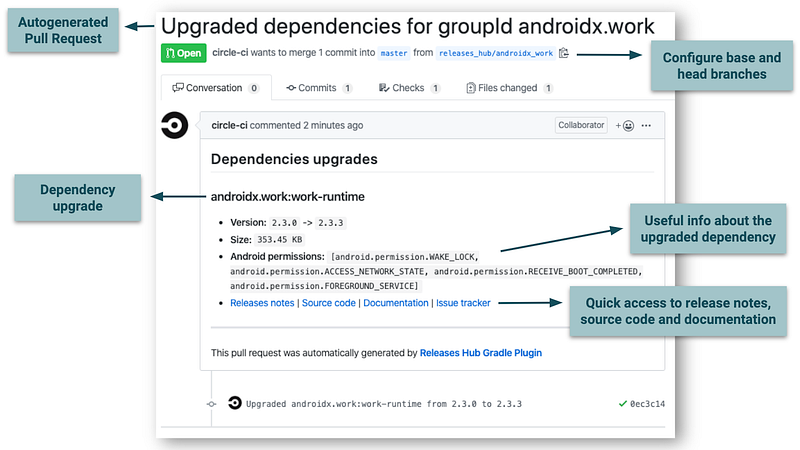
The Releases Hub Gradle Plugin helps developers to keep their dependencies up to date, reducing some tedious manual tasks like remembering to look for dependencies upgrades, upgrading the dependencies on the Gradle configuration and creating a PR with the changes.

The plugin automatically upgrades your Gradle project dependencies and sends GitHub pull requests with the changes.

The Plugin

Features

  • Automatic Github Pull Requests creation with dependencies upgrades
  • Useful information on each pull request whenever available: release notes, documentation, source code, issue tracker, library size, Android permissions, etc
  • Support to configure which dependencies include and exclude, where to find their definitions, how many pull requests create and more.
  • Support any java based project using Gradle.
Migrate your dependencies to buildSrc

The first step is to use the buildSrc Gradle directory to define your dependencies.

“The directory buildSrc is treated as an included build. Upon discovery of the directory, Gradle automatically compiles and tests this code and puts it in the classpath of your build script.”

For more info about buildSrc, click here.

For example:

/buildSrc/build.gradle.kts

plugins { 
    `kotlin-dsl`
}
repositories {
    mavenCentral()
}

/buildSrc/src/main/kotlin/Libs.kt (for your project dependencies)

object Libs {
    const val KOTLIN = "org.jetbrains.kotlin:kotlin-stdlib-jdk7:1.3.40"
}

/buildSrc/src/main/kotlin/BuildLibs.kt (for your plugin dependencies)

object BuildLibs {
    const val KOTLIN_PLUGIN = "org.jetbrains.kotlin:kotlin-gradle-plugin:1.3.41"
}

/build.gradle

apply plugin: "kotlin"
buildscript {
    repositories {
        mavenCentral()
    }
    dependencies {
        classpath(BuildLibs.KOTLIN_PLUGIN)
    }
}
repositories {
    mavenCentral()
}
dependencies {
    compile(Libs.KOTLIN)
}

This approach gives some useful benefits:
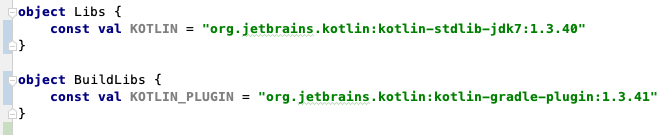
Classify and centralize all your dependencies
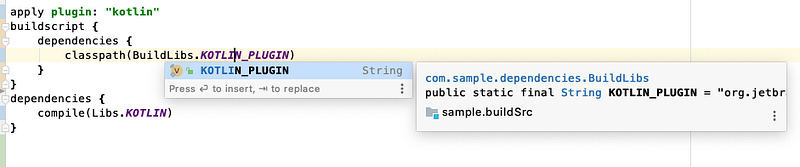
IDE Autocomplete / Go directly to the definition when clicking.
Possibility to add @Deprecated annotations to any dependency for better code documentation

Apply and configure the plugin

The next step is to apply and configure the Releases Hub plugin.

You should add a constant for the plugin on /buildSrc/src/main/kotlin/BuildLibs.kt, replacing X.Y.Z by the latest release version. You see the latest release here.

object BuildLibs {
    ...
    const val RELEASES_HUB_PLUGIN = "com.dipien:releases-hub-gradle-plugin:X.Y.Z"
    ...
}

Then apply the plugin on the root build.gradle

buildscript {
    repositories {
        mavenCentral() // or gradlePluginPortal()
    }
    dependencies {
        classpath(BuildLibs.RELEASES_HUB_PLUGIN)
    }
}
    
apply plugin: "com.dipien.releaseshub.gradle.plugin"

If the default configuration is not enough, you can learn how to configure the plugin here.

You can try the integration executing the following tasks:

  1. ThelistDependencies task to see all your defined dependencies.
  2. The listDependenciesToUpgrade task to see if you have dependencies to upgrade.

Configure your CI tool

Finally, if you want automatic dependencies upgrades, you should configure your CI tool. You need to schedule the invocation of the upgradeDependencies task on your CI tool (daily, weekly, monthly, as you wish).

Remember to configure the gitHubWriteToken property as an environment variable. Don’t pass the token as a command line parameter, because it is a secret.

./gradlew upgradeDependencies

If any of your dependencies is out-of-date, the plugin will create a pull request to update it.

You can read this guide if you want to use GitHub Actions to automate your dependencies upgrades:

Once you have the PR, you still need to do some manual tasks:

  • read the release notes
  • fix any breaking change
  • verify that your PR CI checks pass
  • perform manual tests
  • merge the PR

Our recommendation is to disable by default the Releases Hub plugin on your local environment and enable it on your CI tool. The following article could help you to configure that:

Follow us for more productivity tools & ideas for Android, Kotlin & Gradle projects.

Support Us

There are different ways to support our work:

  • With Bitcoin Lightning using Alby:
  • With PayPal or a credit card using Ko-fi.

Related Articles

If you enjoyed this article, you might get value out of these as well!

Gradle
Gradle Plugin
Dependencies
Android App Development
Github
Recommended from ReadMedium