
AutoGen + LangChain + PlayHT = Super AI Agents that Speak
PlayHT is a company that provides text-to-speech services for generative text.
By integrating these components, we will be able to build a very cool AI agent — a talking AI assistant with expertise in a specific domain.
This is an enhanced version of the AI agent introduced in the previous installment. We will work together to add audio capabilities to it. Before diving into the core content of the sharing today, it’s necessary to have an understanding of the content of the previous tutorial. If you are interested, please follow the link below to read more:
In the previous tutorial, a Python Notebook for the comprehensive sample code has already been provided. In this tutorial, we will introduce the code change for audio capabilities.
Please note that a Python Notebook link with the complete code will also be provided at the end of this tutorial.
Now let’s get started.
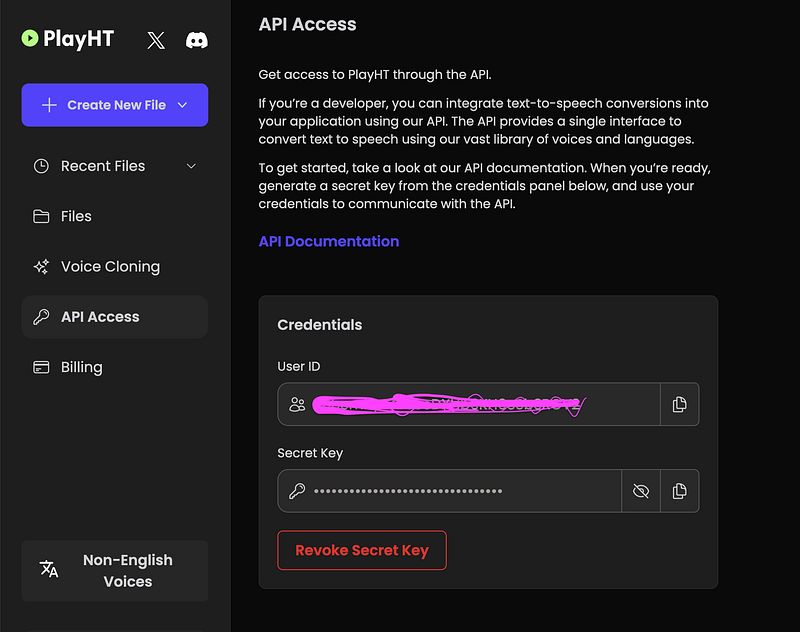
Obtain the API key for PlayHT
Sign up on https://play.ht. Each registered account comes with a certain amount of free characters, with which you can validate the API access and play around for free.
Integrate PlayHT into the AutoGen agent
Integrating AutoGen with external interfaces and data is achieved through Function Calls.
In the previous tutorial, we created a basic AI agent using AutoGen + LangChain + Chromadb, which could automatically execute tasks requiring knowledge of the Uniswap protocol.
To add audio capabilities to the AI agent, we just need to implement a new function convert_text_to_audio, and bind it to the agents of AutoGen. This will help the Assistant Agent decide when to make function calls for text-to-speech conversion in relevant scenarios.
Dependencies Installation
we need to install the following python packages as https://github.com/playht/pyht/ instructed, as we referred to the main.py script in the demo.
pip install pyht numpy simpleaudio
Function convert_text_to_audio implementation
Let’s refer to main.py and implement our own convert_text_to_audio function.
from typing import Generator, Iterable

import time
import threading
import os
import re
import numpy as np
import simpleaudio as sa

from pyht.client import Client, TTSOptions
from pyht.protos import api_pb2

def play_audio(data: Generator[bytes, None, None] | Iterable[bytes]):
    buff_size = 10485760
    ptr = 0
    start_time = time.time()
    buffer = np.empty(buff_size, np.float16)
    audio = None
    for i, chunk in enumerate(data):
        if i == 0:
            start_time = time.time()
            continue  # Drop the first response, we don't want a header.
        elif i == 1:
            print("First audio byte received in:", time.time() - start_time)
        for sample in np.frombuffer(chunk, np.float16):
            buffer[ptr] = sample
            ptr += 1
        if i == 5:
            # Give a 4 sample worth of breathing room before starting
            # playback
            audio = sa.play_buffer(buffer, 1, 2, 24000)
    approx_run_time = ptr / 24_000
    time.sleep(max(approx_run_time - time.time() + start_time, 0))
    if audio is not None:
        audio.stop()


def convert_text_to_audio(
    text: str
):
    text_partitions = re.split(r'[,.]', text)

    # Setup the client
    client = Client(os.environ['PLAY_HT_USER_ID'], os.environ['PLAY_HT_API_KEY'])

    # Set the speech options
    voice = "s3://voice-cloning-zero-shot/d9ff78ba-d016-47f6-b0ef-dd630f59414e/female-cs/manifest.json"
    options = TTSOptions(voice=voice, format=api_pb2.FORMAT_WAV, quality="faster")

    # Get the streams
    in_stream, out_stream = client.get_stream_pair(options)

    # Start a player thread.
    audio_thread = threading.Thread(None, play_audio, args=(out_stream,))
    audio_thread.start()

    # Send some text, play some audio.
    for t in text_partitions:
        in_stream(t)
    in_stream.done()

    # cleanup
    audio_thread.join()
    out_stream.close()

    # Cleanup.
    client.close()
    return 0
The function convert_text_to_audio requires the following to environmental variables:
PLAY_HT_USER_ID=
PLAY_HT_API_KEY=
You should be able to find your USER_ID and API_KEY in the PlayHT Studio.
Update LLM configuration of AutoGen Agents
The last step is to update the AutoGen LLM configuration to enable the text to audio conversion.
llm_config
llm_config={
    "request_timeout": 600,
    "seed": 42,
    "config_list": config_list,
    "temperature": 0,
    "functions": [
        {
            "name": "answer_uniswap_question",
            "description": "Answer any Uniswap related questions",
            "parameters": {
                "type": "object",
                "properties": {
                    "question": {
                        "type": "string",
                        "description": "The question to ask in relation to Uniswap protocol",
                    }
                },
                "required": ["question"],
            },
        },
        {
            "name": "convert_text_to_audio",
            "description": "Convert text to audio and speak it out loud",
            "parameters": {
                "type": "object",
                "properties": {
                    "text": {
                        "type": "string",
                        "description": "The text to be converted and spoken out loud",
                    }
                },
                "required": ["text"],
            },
        }
    ],
}
UserProxyAgent
user_proxy = autogen.UserProxyAgent(
    name="user_proxy",
    human_input_mode="NEVER",
    max_consecutive_auto_reply=10,
    code_execution_config={"work_dir": "."},
    llm_config=llm_config,
    system_message="""Reply TERMINATE if the task has been solved at full satisfaction.
Otherwise, reply CONTINUE, or the reason why the task is not solved yet.""",
    function_map={
        "answer_uniswap_question": answer_uniswap_question,
        "convert_text_to_audio": convert_text_to_audio
    }
)
Notice the convert_text_to_audio function references in the code snippets above and understand how we instruct the agents to use PlayHT API to convert text to audio.
DONE! 🎉🎉🎉
Now we can use UserProxyAgent to execute audio tasks.
Let's request the agent to prepare an introduction to the Uniswap v3 protocol and speak it out loudly:
user_proxy.initiate_chat(
    assistant,
    message="""
I'm writing a blog to introduce the version 3 of Uniswap protocol.
Find the answers to the 2 questions below, write an introduction based on them and speak it out loudly.

1. What is Uniswap?
2. What are the main changes in Uniswap version 3?

Start the work now.
"""
)
You should be able to expect the similar output below:
--------------------------------------------------------------------------------
assistant (to user_proxy):

Based on the answers, here is an introduction for your blog:

"Uniswap is a noncustodial automated market maker implemented for the Ethereum Virtual Machine. It has revolutionized the way we trade cryptocurrencies by providing a decentralized platform for swapping tokens. The latest version, Uniswap v3, brings a host of improvements and changes. It provides increased capital efficiency and fine-tuned control to liquidity providers, making it more beneficial for them to participate. The accuracy and convenience of the price oracle have been improved, providing more reliable price feeds. The fee structure has become more flexible, catering to a wider range of use cases. Uniswap v3 also introduces multiple pools for each pair of tokens, each with a different swap fee, and introduces the concept of concentrated liquidity. This allows liquidity providers to concentrate their capital within specific price ranges, increasing their potential returns."

Now, let's convert this text to audio and speak it out loud.
***** Suggested function Call: convert_text_to_audio *****
Arguments:
{
  "text": "Uniswap is a noncustodial automated market maker implemented for the Ethereum Virtual Machine. It has revolutionized the way we trade cryptocurrencies by providing a decentralized platform for swapping tokens. The latest version, Uniswap v3, brings a host of improvements and changes. It provides increased capital efficiency and fine-tuned control to liquidity providers, making it more beneficial for them to participate. The accuracy and convenience of the price oracle have been improved, providing more reliable price feeds. The fee structure has become more flexible, catering to a wider range of use cases. Uniswap v3 also introduces multiple pools for each pair of tokens, each with a different swap fee, and introduces the concept of concentrated liquidity. This allows liquidity providers to concentrate their capital within specific price ranges, increasing their potential returns."
}
**********************************************************

--------------------------------------------------------------------------------

>>>>>>>> EXECUTING FUNCTION convert_text_to_audio...
First audio byte received in: 0.21162700653076172
user_proxy (to assistant):

***** Response from calling function "convert_text_to_audio" *****
0
******************************************************************

--------------------------------------------------------------------------------
assistant (to user_proxy):

TERMINATE
First audio byte received in: 0.21162700653076172 indicated that the agent started receiving the streaming data. 💥
To watch the real audio effect of the agents, please watch the video below:
This is a video talking about the same content on Youtube. Feel free to watch if you are more comfortable with Video stream. Btw, it’s in Chinese. But I have uploaded the subtitle so that you should be able to use the auto-translate to view in your preferred language.
The complete Python Notebook is published on Github: https://github.com/sugarforever/LangChain-Advanced/blob/main/Integrations/AutoGen/autogen_langchain_uniswap_agent_speak.ipynb
Have a nice day! 🌈 ☀️ 🌤


