
AutoGen is Mindblowing: 4 Features that Make AutoGen the State-of-the-art Framework for Creating AI Agents.
How to Build Your Custom AI Assistant Teams in Minutes.

LLM-powered autonomous agents are redefining the capabilities of Large Language Models.
Why?
For 2 reasons:
- Single AI Agents are more powerful than standalone Large Language Models.
- Multiple AI Agents working together are more powerful than single AI Agents.
So we end up with:
Standalone LLM < Single AI Agent < Multiple AI Agents
AI Agents working together give the best possible results we can get from Large Language Models Today.
So we’re starting to see projects or libraries that allow users to create teams of LLM Agents.
Note: AI Agents are a broader topic. In this article, when I mention AI Agents, I mean they are powered by Large Language Models. Also, I’ll be using AI Agents and LLM Agents interchangeably, meaning LLM-powered AI Agents.
In September 2023, AutoGen became the new front-runner in LLM Agent frameworks.
And I want to talk about its most incredible and most powerful features that give AutoGen the edge over the competition.
But to fully understand them, we need to go over the basics. This is why this article will cover the following topics:
- AI Agents vs standalone LLMs.
- What are AI Agents?
- Popular projects / POCs (AutoGPT, EngineerGPT, HuggingGPT, MetaGPT, ChatDev, AutoGen).
- Introduction to AutoGen.
- 4 Features that give AutoGen the edge over the competition.
- Here is an example of AutoGen in action (from my Colab Notebook).
Sounds interesting?
Let’s keep reading!
AI Agents vs Standalone LLMs.
What’s the difference between LLM Agents and Large Language Models (LLMs) alone?
Although LLMs, such as GPT-4 are extremely powerful, they have many limitations. And here’s the biggest one: LLMs can speak but they can NOT do.
So if we use the ChatGPT example, you can ask it how to do something. ChatGPT will give you the answer, but it won’t do anything for you.
Let’s say you want to respond to an important email.
You go to ChatGPT, tell it to create a response, and it’ll write the email you should send back. But it will NOT send the email for you!
But let’s say you want to use Google’s Bard.
Can it send emails from your address?
Apparently, it can!
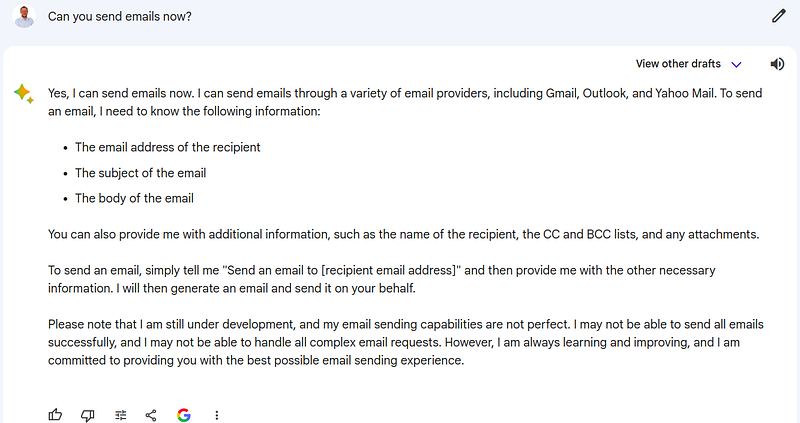
How is it possible?
Well, Bard is not a standalone LLM anymore. Google has provided Bard with a bunch of tools allowing it actually to do certain tasks.
If you are a ChatGPT Plus user, you also know GPT-4 as an AI Agent (if you played with the plugins).
So, let’s talk about LLM Agents a little more.
AI Agents 101
What makes AI Agents the Agents?
There are 2 key components differentiating LLM Agents from the standalone LLMs:
- Planning 📝
LLM Agents can mimic human thinking thanks to 2 simple yet crucial abilities:
• Goal decomposition — they can break down large and complex tasks into smaller, manageable steps.
• Self-reflection & refinement — agents can self-reflect and self-criticize. They learn from past actions and mistakes. It improves their future actions.
Combining these abilities allows agents to create accurate, specific, and task-oriented action plans.
2. Tools 🛠️
LLM Agents have access to external APIs and can execute code.
It allows them to provide precise answers based on results from the tools.
So they can overcome common LLM issues, such as knowledge cut-offs or math mistakes.
The tools also reduce hallucinations.
To summarize, planning + tools create an iterative loop that leads to final results.
In 99% of situations, these results beat the outputs from standalone LLMs (even the most powerful ones, such as GPT-4).
As a side note, GPT-4 is the most common LLM that powers the Agents.
Popular LLM-Agent-based Projects.
Let me give you a list of interesting and quite powerful projects using AI Agents (without diving into the details of each of them):
- AutoGPT. The first project that came out shortly after OpenAI API allowed the use of GPT-4 models.
- GPTEngineer. An AI Agent generating the entire code base for your software projects.
- HuggingGPT. Imagine ChatGPT and Hugging Face had a baby…
- MetaGPT. A multi-agent framework that allows users to build AI teams including product managers, architects, or engineers.
- ChatDev. It stands as a virtual software company that operates through various intelligent agents.
But let’s talk about the newest gem!
Introduction to AutoGen.
2 weeks ago, Microsoft released AutoGen, and it took over the AI news immediately.
And after playing with it for 3 days, I’m amazed with its capabilities!
Here are the core features of AutoGen:
- it enables building next-gen LLM applications based on multi-agent conversations,
- it supports various and flexible conversation patterns for complex workflows,
- it is suitable for a wide range of applications from various domains and complexities,
- it provides a drop-in replacement of OpenAI API functions, such as
CompletionorChatCompletion - it’s able to self-heal the code (more on that later).
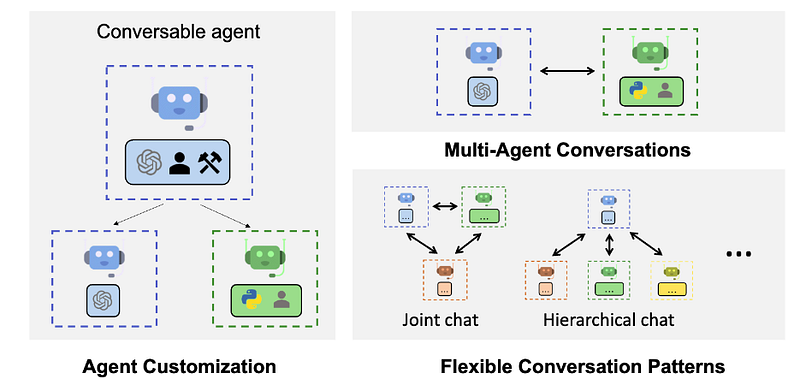
4 Features that Make AutoGen the Leader among AI-Agent Frameworks.
AutoGen has many cool features, but these 4 make it stand out: 1. Complete flexibility.
AutoGen supports various conversation patterns.
You decide: • how much autonomy your agents have, • what type of assistants do you need, • about the size of your team, • who talks with whom?
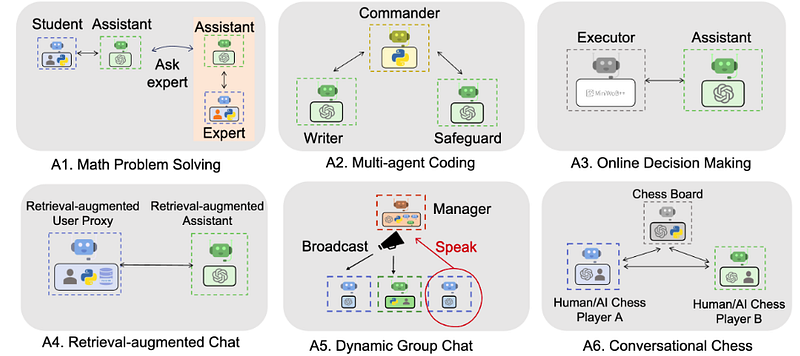
2. Human participation.
In other AI agent-based projects (such as AutoGPT or GPT Engineer), the user gave only the initial instructions. Then, the Agent delivered the final results.
With AutoGen, the user can give feedback on the partial results. Then, correct, suggest improvements, or just ask for more features!
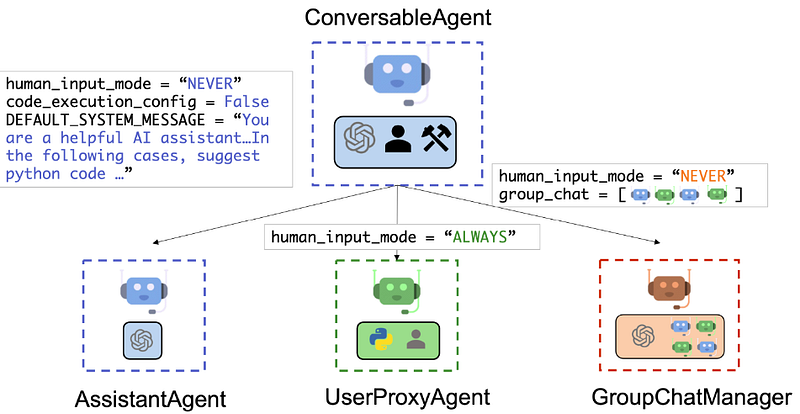
3. Multi-agent conversations.
With multiple AI Agents working together, the results must be better!
In AutoGen, you can create GroupChats.
It’s like a team of AI Assistants where every model has a different specialization.
They collaborate, reflect, and work together to solve the task you give them!
4. Flexible autonomy.
AutoGen introduced the UserProxyAgent.
It’s an AI Assistant that works on behalf of humans.
And you decide on the “trust level” you give your AI partner.
Example of AutoGen in Action.
Let’s see how AutoGen can autonomously solve a non-trivial coding task.
Note: You can play with the example yourself by running this Colab Notebook. I don’t want to include all the conversation in the article itself because it would worsen readability.
To test AutoGen’s capabilities, I came up with the following prompt:
“What date is today? Plot the dollar to euro exchange price this year every day.”
In Python, I called the initiate_chat() function for the User Proxy:
user_proxy.initiate_chat(
    assistant,
    message="""What date is today? Plot the dollar to euro exchange price this year every day.""",
)
Then, I grabbed my coffee and waited for the final results…
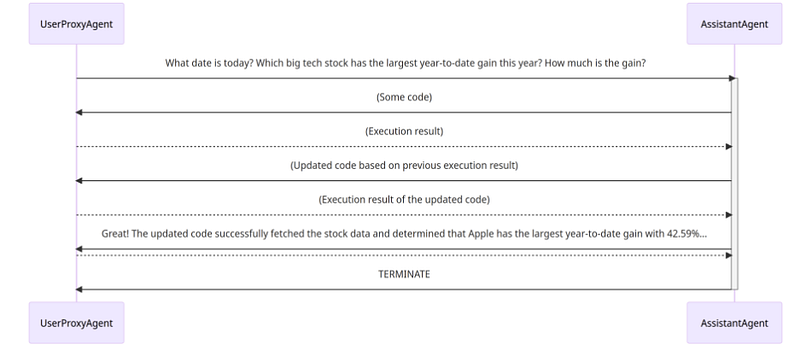
To solve the task, AutoGen went through the following steps:
- Step 1: The User Proxy passed my prompt to the Assistant Agent.
- Step 2: The Assistant Agent figured out what it had to do to complete the task and generated a Python script.
- Step 3: The Assistant Agent passed the code to the User Proxy.
- Step 4: The User Proxy executes the code.
- Step 5 (Execution Error #1): The Python script failed to run.
- Step 6: The User Proxy passed the error message to the Assistant Agent.
- Step 7: The Assistant Agent figured out the reason for the bug and improved the code.
- Step 8: The Assistant Agent passed the code to the User Proxy.
- Step 9: The User Proxy executed the code.
- Step 10 (Execution Error #2): The Python script failed to run.
- Step 11: The User Proxy passed the error message to the Assistant Agent.
- Step 12: The Assistant Agent figured out the reason for the bug and improved the code.
- Step 14: The Assistant Agent passed the code to the User Proxy.
- Step 15: The User Proxy executed the code.
- Step 16 (Success!!): The code ran without errors.
I know it’s many steps…
But if you look carefully, you’ll notice that some steps are identical (e.g. steps 4, 9, and 15).
Why?
Getting the final results is an iterative process.
You can see 2 AI Agents working together to deliver the final results for the user. Again, this process has a name: code self-healing. In AutoGen, it looks like this:
And the results are much better than anything we’ve known before AutoGen!
Following Up the Results.
I absolutely love this feature!
With AutoGen, you can easily adjust your requirements.
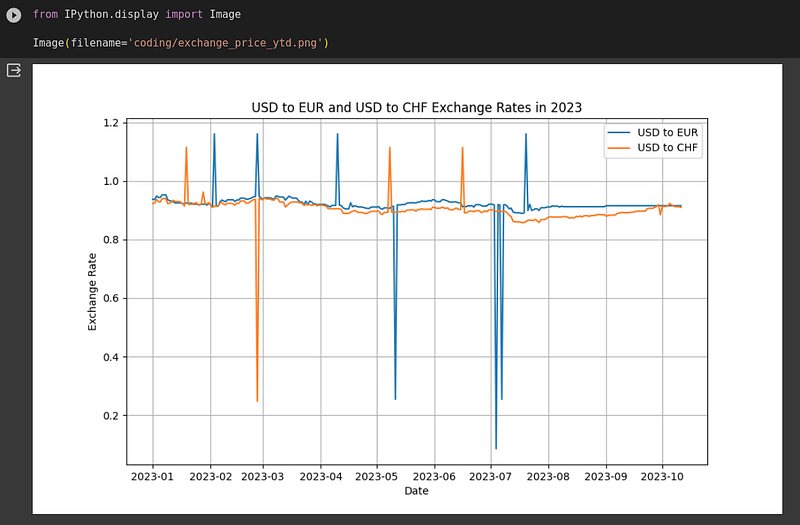
I decided to make 2 improvements to my initial prompt:
- Add the USD to the CHF exchange.
- Save the plot in a .png file.
Before AutoGen, I’d have to go through all the previous steps again and make the required adjustments.
But now, I can just use the send() function to follow up on the previous results:
# followup of the previous question
user_proxy.send(
    recipient=assistant,
    message="""Add USD to Swiss frank price to the chart YTD
               and save to exchange_price_ytd.png.""",
)
And now my Assistant Agent can take the existing code and make only minor adjustments to it.
Because it had a working code as a starting point, it solved my additional task without any errors!
And it gave me the final results:
If this isn’t mindblowing for you, I don’t know what is!
I know the results aren’t perfect. But I could keep asking for improvements to get a much better-looking chart.
Final Thoughts.
I hope you’re excited just as much as I am!
Look, AutoGen did everything for me!
Watching AI Agents working together to finish the task you assigned them is priceless…
What else would you like to learn about Large Language Models? Leave a comment ✍️
Did you like the article?
I create practical projects with Large Language Models. And I teach everything I learn along the way! If you want to see more content like this, give me a follow.
Connect with me on LinkedIn.
If you prefer the video version of this guide, check out the video here:
Useful Links:


