
How can we stream data to Amazon S3 asynchronously?
Asynchronous Realtime Streaming of Data Using Reactive Streams for Amazon S3 using Amazon S3 Transfer Manager

Do you wish to stream your data of unknown size to Amazon S3? Do you find it challenging to stream data of unknown size to Amazon S3?
Then this article will explain how to stream data with an unknown size using reactive streams to an Amazon S3 bucket. We will be utilizing Amazon S3 Transfer Manager to implement this reactive approach.
What is streaming data?
Streaming data is emitted at high volume continuously and incrementally with the goal of low-latency processing.
Some examples of streaming data are as follows:
- A log generator.
- Customer interaction data from a web application or a mobile application.
- Stock market data.
- Data from scientific sensors [IOT device data]
Streaming Data With Amazon S3 Transfer Manager
Amazon S3 Transfer Manager supports uploading an asynchronous request body to an object in S3. TheAsyncRequestBody interface provides the capability to support non-blocking streaming of data, supporting multiple sources.
This approach follows the pattern of the reactive stream, where this interface is the Publisher of data (specifically ByteBuffer chunks) and the HTTP client is the Subscriber of the data (i.e. to write that data on the wire).
subscribe(Subscriber) should be implemented to tie this publisher to a subscriber. Ideally, each call to subscribe should reproduce the content.
If you are producing data from a ByteBufferpublisher, the data is delivered when the publisher publishes the data, and each call to subscribe should read the delivered data. This allows for automatic retries to be performed in the SDK. If the content is not reproducible, an exception may be thrown for any subsequent subscribe(Subscriber) calls.
public interface AsyncRequestBody extends SdkPublisher<ByteBuffer> {

    static AsyncRequestBody fromPublisher(Publisher<ByteBuffer> publisher) {
        return new AsyncRequestBody() {

            @Override
            public Optional<Long> contentLength() {
                return Optional.empty();
            }

            @Override
            public void subscribe(Subscriber<? super ByteBuffer> s) {
                publisher.subscribe(s);
            }
        };
    }

    static AsyncRequestBody fromFile(Path path) {
        return FileAsyncRequestBody.builder().path(path).build();
    }

    static AsyncRequestBody fromString(String string, Charset cs) {
        return ByteBuffersAsyncRequestBody.from(Mimetype.MIMETYPE_TEXT_PLAIN + "; charset=" + cs.name(),
                                                string.getBytes(cs));
    }

    static AsyncRequestBody fromBytes(byte[] bytes) {
        byte[] clonedBytes = bytes.clone();
        return ByteBuffersAsyncRequestBody.from(clonedBytes);
    }

    static AsyncRequestBody fromByteBuffers(ByteBuffer... byteBuffers) {
        ByteBuffer[] immutableCopy = Arrays.stream(byteBuffers)
                                           .map(BinaryUtils::immutableCopyOf)
                                           .peek(ByteBuffer::rewind)
                                           .toArray(ByteBuffer[]::new);
        return ByteBuffersAsyncRequestBody.of(immutableCopy);
    }

    static AsyncRequestBody fromInputStream(InputStream inputStream, Long contentLength, ExecutorService executor) {
        return fromInputStream(b -> b.inputStream(inputStream).contentLength(contentLength).executor(executor));
    }

    static BlockingInputStreamAsyncRequestBody forBlockingInputStream(Long contentLength) {
        return new BlockingInputStreamAsyncRequestBody(contentLength);
    }

    static BlockingOutputStreamAsyncRequestBody forBlockingOutputStream(Long contentLength) {
        return new BlockingOutputStreamAsyncRequestBody(contentLength);
    }
To understand how this works, we should explore how the Amazon S3 Transfer Manager works and what features it provides to achieve reactive streaming. To get a glimpse of Amazon S3 Transfer Manager and understand how it works, go through the below article on Amazon S3 Transfer Manager.
Project Technical Setup
- Spring Boot 3.2.2
- Java 21
Our project will include the following dependencies in the pom.xml file:
<properties>
  <java.version>21</java.version>
  <amazon.awssdk.version>2.23.14</amazon.awssdk.version>
  <amazon.awssdk.crt.version>0.29.9</amazon.awssdk.crt.version>
</properties>

<dependencies>
   <dependency>
      <groupId>software.amazon.awssdk</groupId>
      <artifactId>s3</artifactId>
      <version>${amazon.awssdk.version}</version>
   </dependency>

   <dependency>
      <groupId>software.amazon.awssdk.crt</groupId>
      <artifactId>aws-crt</artifactId>
      <version>${amazon.awssdk.crt.version}</version>
   </dependency>

   <dependency>
      <groupId>software.amazon.awssdk</groupId>
      <artifactId>s3-transfer-manager</artifactId>
       <version>${amazon.awssdk.version}</version>
   </dependency>

   <dependency>
      <groupId>org.springframework.boot</groupId>
      <artifactId>spring-boot-starter-webflux</artifactId>
   </dependency>
</dependencies>
Streaming Data as Flux Of ByetBuffers
We will be utilizing the fromPublisher method of the AsyncRequestBody interface for this implementation.
public interface AsyncRequestBody extends SdkPublisher<ByteBuffer> {

    static AsyncRequestBody fromPublisher(Publisher<ByteBuffer> publisher) {
        return new AsyncRequestBody() {
            @Override
            public Optional<Long> contentLength() {
                return Optional.empty();
            }
            @Override
            public void subscribe(Subscriber<? super ByteBuffer> s) {
                publisher.subscribe(s);
            }
        };
    }
}
Consumer Object of FluxSink<T> used for Publishing
public class FluxSinkImplementation<T> implements Consumer<FluxSink<T>> {
    private FluxSink<T> fluxSink;
    @Getter
    private final CountDownLatch countDownLatch = new CountDownLatch(1);

    @Override
    public void accept(FluxSink<T> integerFluxSink) {
        this.fluxSink = integerFluxSink;
        countDownLatch.countDown();
    }

    public void publishEvent(T event){
        this.fluxSink.next(event);
    }

    public void complete() {
        fluxSink.complete();
    }
}
Upload-Stream Service
The service layer triggers the streaming of the Flux<ByteBuffer> to S3 bucket.
@RequiredArgsConstructor
@Slf4j
@Service
public class UploadStreamService{

    private final AwsProperties s3ConfigProperties;
    private final S3TransferManager transferManager;
    private final String S3_KEY = "stream-directory/Flux.txt";
    private final INPUT_STRING = "This is Test Data that is Published to Amazon S3 in a loop over again and again."


     @Override
    public void uploadStream() throws InterruptedException{

        final FluxSinkImplementation<byte[]> fluxSinkImplementation = new FluxSinkImplementation<>();

        final Flux<ByteBuffer> streamFlux = Flux
                .create(fluxSinkImplementation)
                .map(ByteBuffer::wrap)
                .doOnComplete(() -> log.info("Completed"));

        final PutObjectRequest putObjectRequest = PutObjectRequest.builder()
                .bucket(s3ConfigProperties.getS3BucketName())
                .key(S3_KEY)
                .build();

        final UploadRequest uploadRequest = UploadRequest.builder()
                .putObjectRequest(putObjectRequest)
                .requestBody(AsyncRequestBody.fromPublisher(streamFlux))
                .addTransferListener(new LoggingTransferListener(314_572_800L)) //30MB
                .build();

        final Upload upload = transferManager.upload(uploadRequest);

        fluxSinkImplementation.getCountDownLatch().await();

        for (int i = 0; i < 10_000_00; i++) {
            fluxSinkImplementation.publishEvent(INPUT_STRING.getBytes(StandardCharsets.UTF_8));
        }
        fluxSinkImplementation.complete();

        Mono.fromFuture(upload.completionFuture()).subscribe(completedUpload -> {
            log.info("Data Streamed Successfully");
            log.info("Entity Tag of S3 Object Streamed: {}", completedUpload.response().eTag());
        });
    }
}
Logging Transfer Listener
This listener is responsible for logging event-driven updates on the progress of the transfer initiated by the S3 Transfer Manager. Throughout the lifecycle of the request, S3TransferManager will invoke the provided TransferListeners when important events occur, like additional bytes being transferred, allowing you to monitor the ongoing progress of the transfer.
@Slf4j
@RequiredArgsConstructor
public class LoggingTransferListener implements TransferListener {

    private final long byteSize;
    private long startTime;
    private int iteration=0;

    @Override
    public void transferInitiated (Context.TransferInitiated context) {
        log.info("Transfer initiated: {}", context.progressSnapshot().ratioTransferred());
        startTime = System.currentTimeMillis();
        logTransferStatus(context.progressSnapshot().transferredBytes());
    }

    private void logTransferStatus(long l) {
        if (l > iteration * byteSize) {
            log.info("Bytes transferred: {} ", l);
            iteration++;
        }
    }

    @Override
    public void bytesTransferred (Context.BytesTransferred context) {
        logTransferStatus(context.progressSnapshot().transferredBytes());
    }

    @Override
    public void transferComplete (Context.TransferComplete context) {
        long seconds = (System.currentTimeMillis() - startTime) / 1000;
        double bytes = (double)context.progressSnapshot().transferredBytes();
        double megabytes = bytes / 1_048_576;
        double throughput = megabytes / seconds;
        log.info("Transfer complete: \n\t Bytes Transferred: {}\n\t MBs: {}\n\t Total Time Taken: {} Seconds\n\t Throughput: {} MB/s",
                String.format("%10f", bytes), String.format("%.3f", megabytes),
                seconds,
                String.format("%.2f", throughput));
    }

    @Override
    public void transferFailed (Context.TransferFailed context) {
        log.error("Transfer failed", context.exception());
    }
}
Streaming Data as an OutputStream
We will utilize the forBlockingOutputStream method of the AsyncRequestBody interface for performing blocking writes to the downstream service as if it’s an output stream. Retries are not supported for this request body.
The caller is responsible for calling OutputStream.close() on the BlockingOutputStreamAsyncRequestBody.outputStream() when writing is complete.
public interface AsyncRequestBody extends SdkPublisher<ByteBuffer> {

    static BlockingOutputStreamAsyncRequestBody forBlockingOutputStream(Long contentLength) {
        return new BlockingOutputStreamAsyncRequestBody(contentLength);
    }
}
Upload-Stream Service
@RequiredArgsConstructor
@Slf4j
@Service
public class UploadStreamService{

    private final AwsProperties s3ConfigProperties;
    private final S3TransferManager transferManager;
    private final String S3_KEY = "stream-directory/Flux.tar.gz";
    private final INPUT_STRING = "This is Test Data that is Published to Amazon S3 in a loop over again and again."

    @Override
    public void uploadStream() throws IOException {


        final PutObjectRequest putObjectRequest = PutObjectRequest.builder()
                .bucket(s3ConfigProperties.getS3BucketName())
                .key(S3_KEY)
                .build();

        final BlockingOutputStreamAsyncRequestBody blockingOutputStreamAsyncRequestBody = AsyncRequestBody.forBlockingOutputStream(null);


        UploadRequest uploadRequest = UploadRequest.builder()
                .putObjectRequest(putObjectRequest)
                .requestBody(blockingOutputStreamAsyncRequestBody)
                .addTransferListener(new LoggingTransferListener(200L))
                .build();

        final Upload upload = transferManager.upload(uploadRequest);
        final GZIPOutputStream outputStream = new GZIPOutputStream(blockingOutputStreamAsyncRequestBody.outputStream());

        Mono.fromRunnable(()-> {
            for (int i = 0; i < 10_000_000; i++) {
                try {
                    outputStream.write(INPUT_STRING.getBytes(StandardCharsets.UTF_8));
                } catch (IOException e) {
                    throw new RuntimeException(e);
                }
            }
            try {
                outputStream.flush();
                outputStream.close();
            } catch (IOException e) {
                throw new RuntimeException(e);
            }

            Mono.fromFuture(upload.completionFuture()).subscribe(completedUpload -> {
                log.info("Data Streamed Successfully");
                log.info("Entity Tag of S3 Object Streamed: {}", completedUpload.response().eTag());
            });
        }).subscribeOn(Schedulers.boundedElastic()).subscribe();
    }
}
Visualizing Streaming Data using Transfer Manager
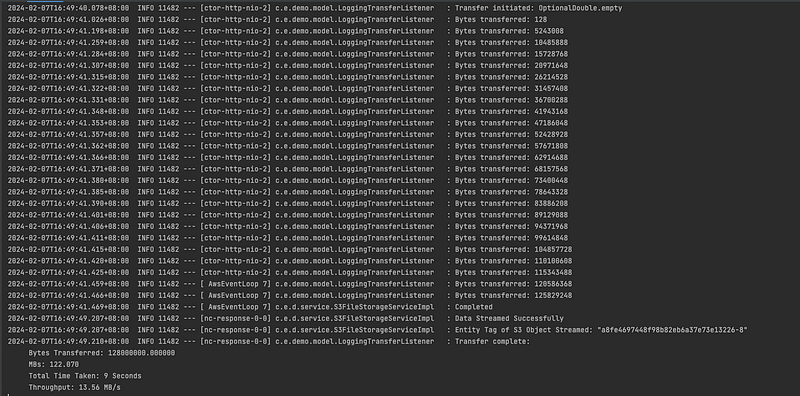
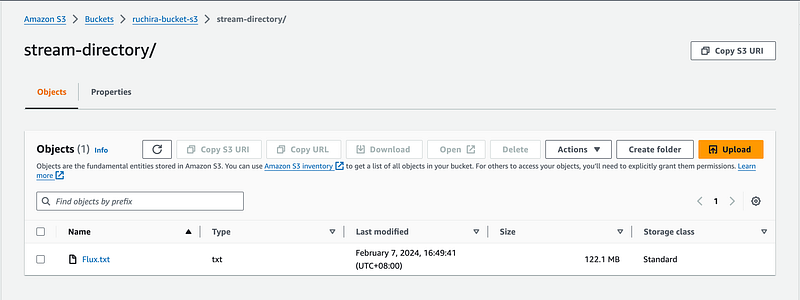
Visualizing Streaming Data as Flux Of ByetBuffers
We will stream as follows:
S3-Directory-Path and Key : stream-directory/Flux.txt
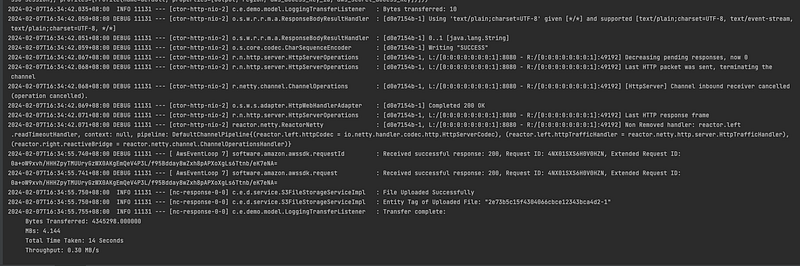
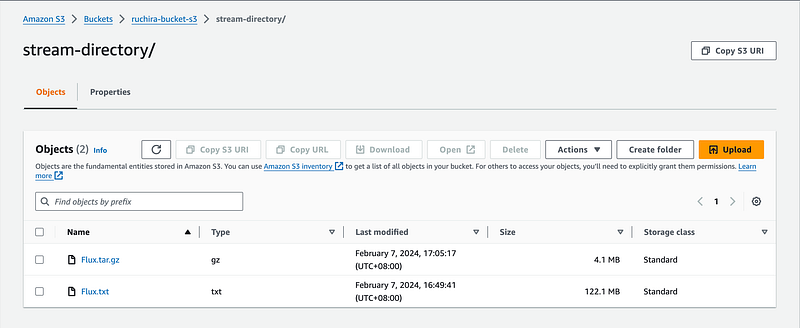
Visualizing Streaming Data as OutputStream
We will stream as follows:
S3-Directory-Path and Key : stream-directory/Flux.tar.gz
Thank You for Reading
- Please feel free to share your feedback.
- Stay connected for more insightful content.


