
Assuming a Role With MFA When An EC2 Instance Starts and Run a Container With the Credentials
ACM.343 Allowing users to start containers with roles that require MFA to assume using their own credentials
~~~~~~~~~~~~~~~~~~~~~~~~~~~~~~~~~~~~~~~~~~~~~~~~~~~~~~~
⚙️ Check out my series on Automating Cybersecurity Metrics | Code.
🔒 Related Stories: Batch Job Security | IAM | Container Security.
💻 Free Content on Jobs in Cybersecurity | ✉️ Sign up for the Email List
~~~~~~~~~~~~~~~~~~~~~~~~~~~~~~~~~~~~~~~~~~~~~~~~~~~~~~~
I explained how to assume short term credentials for a role with MFA and pass those credentials to a container, along with risks, caveats, and why I am doing it.
So now I have a script to assume the credentials and pass them to a container. What I want to do now is run that script when an EC2 instance starts.
The thing is, the EC2 instance needs to be able to assume the role with MFA, so it needs an MFA token. Credentials that work with an MFA token are assigned to a user. We don’t want to hard code those credentials into the MFA Amazon Machine Image (AMI).
We want to limit the access to the credentials and to the token to the shortest window possible. Since we’re talking about MFA here, ideally the credentials and the token come from two different sources. if both are on the same machine they can be accessed by an attacker who gets access to a single device.
For example, if the credentials are on a developer workstation, and the developer enters the token on the developer workstation, the attacker who gets malware onto the machine can get both the credential and the token (via a keylogger as was the case in the LastPass breach.)
How can we limit our risk but still require MFA? I can think of a few options but for now, the simplest approach I’m going to start with works like this:
- The EC2 instance is started with a role that has access to obtain the credentials from AWS Secret Manager.
- The developer starts the EC2 instance from a machine that does not have access to that secret on AWS Secrets Manager and passes in the token on start-up.
Now the above is how I would do it in a production environment. In a development environment it works roughly the same but developers are testing with non-production data. To make it easier for developers to test, I can do the following.
A developer specific secret
We’ll give each developer access to their own secret that they control. I already wrote about user-specific secrets here:
The risk is that with access to the developer machine and if the user is logged into the console or copying and pasting their developer secret around, and the attacker can also get a token from the developer machine, then the attacker might access both factors. But as in prior posts, we can lock this all down to a private network for one thing.
The chances are slim that an attacker would get access to both factors in that case, since you’re using MFA to log into the AWS console, right? And people log out when they are not using the console, right?
😊
But even if they do get access they’re getting non-production data. We could take more precautions in production but accessing the credentials and passing in MFA token from different machines and perhaps have two separate users handling those two MFA factors.
The cool thing about this is that a developer has access to a secret he or she controls and can add his or her own developer credentials to that secret. No one else can access the other developers’ secrets. If the developer needs to rotate their secret, they can do that at whatever interval is required, independent of all the other developer secrets.
A developer specific EC2 Role
A developer can also have their own role that they can pass to an EC2 instance when it starts up. The developer’s EC2 instance can read that developer’s secret via that developer’s role.
What that means is that the EC2 instance can use the developer’s credentials to assume any role that those developer credentials are allowed to assume.
There are ways to further restrict that of course, but for the moment, I’m only going to test with one user, one user role, one MFA role (from the last post), and one secret and set of credentials.
Starting a container with a role that requires MFA on an EC2 instance
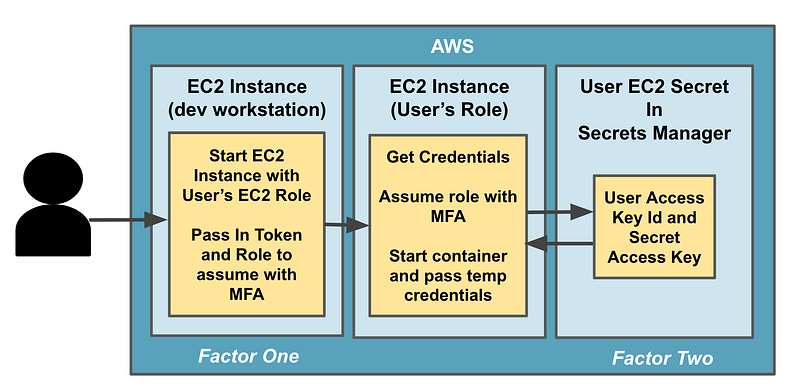
Now that we have the above role and Secret, here’s how it works.
- The user starts the EC2 instance with the User’s EC2 Role.
- The user passes in an MFA token and the role to assume on startup.
- The EC2 instance has permission to go get the credentials from Secrets Manager in an init script.
- The EC2 instance needs to be able to pull down the container from ECR or it has to be baked into the AMI.
- The rest is the script from our last post that assumes the role and passes the temporary credentials to the container.
Here’s a visual of the new functionality we’re adding.
I’ll try this out in the next post.
Next story at bottom.
Follow for updates.
Teri Radichel | © 2nd Sight Lab 2023
About Teri Radichel:
~~~~~~~~~~~~~~~~~~~~
⭐️ Author: Cybersecurity Books
⭐️ Presentations: Presentations by Teri Radichel
⭐️ Recognition: SANS Award, AWS Security Hero, IANS Faculty
⭐️ Certifications: SANS ~ GSE 240
⭐️ Education: BA Business, Master of Software Engineering, Master of Infosec
⭐️ Company: Penetration Tests, Assessments, Phone Consulting ~ 2nd Sight Lab
Need Help With Cybersecurity, Cloud, or Application Security?
~~~~~~~~~~~~~~~~~~~~~~~~~~~~~~~~~~~~~~~~~~~~~~~~~~~~~~~~~~~~~
🔒 Request a penetration test or security assessment
🔒 Schedule a consulting call
🔒 Cybersecurity Speaker for PresentationFollow for more stories like this:
~~~~~~~~~~~~~~~~~~~~~~~~~~~~~~~~~~~~~~~~~~~~~~~~~~~~~~~~~~~~~
❤️ Sign Up my Medium Email List
❤️ Twitter: @teriradichel
❤️ LinkedIn: https://www.linkedin.com/in/teriradichel
❤️ Mastodon: @teriradichel@infosec.exchange
❤️ Facebook: 2nd Sight Lab
❤️ YouTube: @2ndsightlab