
Artificial Inteligence
scikit-learn: python library

This story will walk through an example of artificial intelligence using the scikit_learm python library starting from scratch on a Fedora Linux Operating system. The example explains one of the tutorials put out be scikit_learn.
As I am introducing myself to developing artificial intelligence applications using python3 and the scikit_learn pyton3 machine learning library, I will write stories about significant steps I take.
My first story is about examing cross-validation with a diabetes dataset.
Install python3 and python3-pip using the package manager of the Linux Distribution.
Fedora
The Fedora package is called python3-scikit-learn for the python 3 version, the only one available in Fedora30. It can be installed using dnf:
sudo dnf install python3-scikit-learn[bob@localhost ~]$ Sudo dnf install python3-scikit-learn [sudo] password for bob: Last metadata expiration check: 2:10:35 ago on Mon 23 May 2022 02:09:45 AM CDT. Dependencies resolved. =============================================================================== Package Arch Version Repository Size =============================================================================== Installing: python3-scikit-learn x86_64 0.19.1–7.fc30 fedora 5.1 M Installing dependencies: atlas x86_64 3.10.3–8.fc30 fedora 6.3 M python3-devel x86_64 3.7.7–1.fc30 updates 206 k python3-joblib noarch 0.13.0–2.fc30 fedora 418 k python3-numpy x86_64 1:1.16.4–2.fc30 updates 3.9 M python3-numpy-f2py x86_64 1:1.16.4–2.fc30 updates 216 k python3-rpm-macros noarch 3–47.fc30 updates 9.9 k python3-scipy x86_64 1.2.0–1.fc30 fedora 16 M Installing weak dependencies: python3-lz4 x86_64 3.0.2–1.fc30 updates 781 k python3-psutil x86_64 5.6.7–1.fc30 updates 396 k
Transaction Summary =============================================================================== Install 10 Packages
Total download size: 33 M Installed size: 137 M Is this ok [y/N]: y Downloading Packages: (1/10): python3-devel-3.7.7–1.fc30.x86_64.rpm 470 kB/s | 206 kB 00:00 (2/10): python3-lz4–3.0.2–1.fc30.x86_64.rpm 1.2 MB/s | 781 kB 00:00 (3/10): python3-numpy-f2py-1.16.4–2.fc30.x86_6 960 kB/s | 216 kB 00:00 (4/10): python3-rpm-macros-3–47.fc30.noarch.rp 45 kB/s | 9.9 kB 00:00 (5/10): python3-psutil-5.6.7–1.fc30.x86_64.rpm 1.2 MB/s | 396 kB 00:00 (6/10): python3-numpy-1.16.4–2.fc30.x86_64.rpm 3.9 MB/s | 3.9 MB 00:00 (7/10): python3-joblib-0.13.0–2.fc30.noarch.rp 1.0 MB/s | 418 kB 00:00 (8/10): python3-scikit-learn-0.19.1–7.fc30.x86 4.6 MB/s | 5.1 MB 00:01 (9/10): atlas-3.10.3–8.fc30.x86_64.rpm 3.9 MB/s | 6.3 MB 00:01 (10/10): python3-scipy-1.2.0–1.fc30.x86_64.rpm 4.3 MB/s | 16 MB 00:03 — — — — — — — — — — — — — — — — — — — — — — — — — — — — — — — — — — — — — — — - Total 5.7 MB/s | 33 MB 00:05 Running transaction check Transaction check succeeded. Running transaction test Transaction test succeeded. Running transaction Preparing : 1/1 Installing : python3-numpy-1:1.16.4–2.fc30.x86_64 1/10 Installing : atlas-3.10.3–8.fc30.x86_64 2/10 Running scriptlet: atlas-3.10.3–8.fc30.x86_64 2/10 Installing : python3-rpm-macros-3–47.fc30.noarch 3/10 Installing : python3-devel-3.7.7–1.fc30.x86_64 4/10 Installing : python3-numpy-f2py-1:1.16.4–2.fc30.x86_64 5/10 Installing : python3-scipy-1.2.0–1.fc30.x86_64 6/10 Installing : python3-psutil-5.6.7–1.fc30.x86_64 7/10 Installing : python3-lz4–3.0.2–1.fc30.x86_64 8/10 Installing : python3-joblib-0.13.0–2.fc30.noarch 9/10 Installing : python3-scikit-learn-0.19.1–7.fc30.x86_64 10/10 Running scriptlet: python3-scikit-learn-0.19.1–7.fc30.x86_64 10/10 Verifying : python3-devel-3.7.7–1.fc30.x86_64 1/10 Verifying : python3-lz4–3.0.2–1.fc30.x86_64 2/10 Verifying : python3-numpy-1:1.16.4–2.fc30.x86_64 3/10 Verifying : python3-numpy-f2py-1:1.16.4–2.fc30.x86_64 4/10 Verifying : python3-psutil-5.6.7–1.fc30.x86_64 5/10 Verifying : python3-rpm-macros-3–47.fc30.noarch 6/10 Verifying : atlas-3.10.3–8.fc30.x86_64 7/10 Verifying : python3-joblib-0.13.0–2.fc30.noarch 8/10 Verifying : python3-scikit-learn-0.19.1–7.fc30.x86_64 9/10 Verifying : python3-scipy-1.2.0–1.fc30.x86_64 10/10
Installed: atlas-3.10.3–8.fc30.x86_64 python3-devel-3.7.7–1.fc30.x86_64 python3-joblib-0.13.0–2.fc30.noarch python3-lz4–3.0.2–1.fc30.x86_64 python3-numpy-1:1.16.4–2.fc30.x86_64 python3-numpy-f2py-1:1.16.4–2.fc30.x86_64 python3-psutil-5.6.7–1.fc30.x86_64 python3-rpm-macros-3–47.fc30.noarch python3-scikit-learn-0.19.1–7.fc30.x86_64 python3-scipy-1.2.0–1.fc30.x86_64
Complete! [bob@localhost ~]$
Verifying the install.
$ rpm -qa | grep python3 | grep scikit python3-scikit-learn-0.19.1–7.fc30.x86_64 [bob@localhost examples]$
bob@localhost ~]$ rpm -ql python3-scikit-learn | grep example | more /usr/share/doc/python3-scikit-learn/examples /usr/share/doc/python3-scikit-learn/examples/README.txt /usr/share/doc/python3-scikit-learn/examples/applications /usr/share/doc/python3-scikit-learn/examples/applications/README.txt /usr/share/doc/python3-scikit-learn/examples/applications/plot_face_recognition. py /usr/share/doc/python3-scikit-learn/examples/applications/plot_model_complexity_ influence.py /usr/share/doc/python3-scikit-learn/examples/applications/plot_out_of_core_class ification.py /usr/share/doc/python3-scikit-learn/examples/applications/plot_outlier_detection _housing.py /usr/share/doc/python3-scikit-learn/examples/applications/plot_prediction_latenc y.py /usr/share/doc/python3-scikit-learn/examples/applications/plot_species_distribut ion_modeling.py /usr/share/doc/python3-scikit-learn/examples/applications/plot_stock_market.py /usr/share/doc/python3-scikit-learn/examples/applications/plot_tomography_l1_rec onstruction.py /usr/share/doc/python3-scikit-learn/examples/applications/plot_topics_extraction _with_nmf_lda.py /usr/share/doc/python3-scikit-learn/examples/applications/svm_gui.py /usr/share/doc/python3-scikit-learn/examples/applications/wikipedia_principal_ei — More —
[bob@localhost examples]$ cd /usr/share/doc/python3-scikit-learn/examples
[bob@localhost examples]$ cd exercises [bob@localhost exercises]$ ls plot_cv_diabetes.py plot_digits_classification_exercise.py README.txt plot_cv_digits.py plot_iris_exercise.py [bob@localhost exercises]$
Noticing an exercise sub directory, entering it and doing a listing.
[bob@localhost exercises]$ ls plot_cv_diabetes.py plot_digits_classification_exercise.py README.txt plot_cv_digits.py plot_iris_exercise.py [bob@localhost exercises]$
These exercises are part of tutorials provided by scikit_learn. The directory structure is different then what is documented. implying the documentation is out of date with the latest version of the artificial intelligence python library scikit_learn. I had to get these files from GitHub.
Since. I am a diabetic, I decided to investigate the plot_cv_diabetes,py python program. Looking at the contents of the program.
A standard diabetes dataset that comes with scikit-lean is found here.
This dataset contains data from diabetic patients and contains certain features such as their BMI, age, blood pressure, and glucose levels which are useful in predicting the diabetes disease progression in patients.
In order to import the diabetes data as a numpy array set the return parameter to True.
The following lines in the code: Load the diabetes dataset as a numby array.
from sklearn import datasets diabetes_X,diabetes_y = datasets.load_diabetes(return_X_y = True)
NumPy is a Python library used for working with arrays. It also has functions for working in the domain of linear algebra, Fourier transform, and matrices.
The Lasso is a linear model that estimates sparse coefficients. GridSearchCV tries all the combinations of the values passed in the dictionary and evaluates the model for each combination using the Cross-Validation method. Hence after using this function we get accuracy/loss for every combination of hyperparameters and we can choose the one with the best performance.
The contents of plot_cv_diabetes.py. CV is cross-validation.
[bob@localhost exercises]$ cat plot_cv_diabetes.py “”” =============================================== Cross-validation of diabetes Dataset Exercise ===============================================
A tutorial exercise which uses cross-validation with linear models.
This exercise is used in the :ref:`cv_estimators_tut` part of the :ref:`model_selection_tut` section of the :ref:`stat_learn_tut_index`. “””
from __future__ import print_function print(__doc__)
import numpy as np import matplotlib.pyplot as plt
from sklearn import datasets from sklearn.linear_model import LassoCV from sklearn.linear_model import Lasso from sklearn.model_selection import KFold from sklearn.model_selection import GridSearchCV
diabetes = datasets.load_diabetes() X = diabetes.data[:150] y = diabetes.target[:150]
lasso = Lasso(random_state=0) alphas = np.logspace(-4, -0.5, 30)
tuned_parameters = [{‘alpha’: alphas}] n_folds = 3
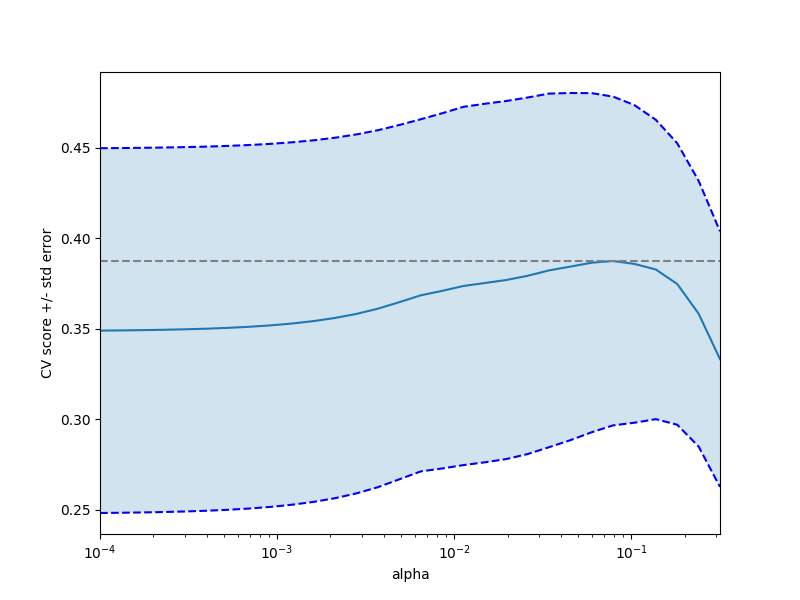
clf = GridSearchCV(lasso, tuned_parameters, cv=n_folds, refit=False) clf.fit(X, y) scores = clf.cv_results_[‘mean_test_score’] scores_std = clf.cv_results_[‘std_test_score’] plt.figure().set_size_inches(8, 6) plt.semilogx(alphas, scores)
# plot error lines showing +/- std. errors of the scores std_error = scores_std / np.sqrt(n_folds)
plt.semilogx(alphas, scores + std_error, ‘b — ‘) plt.semilogx(alphas, scores — std_error, ‘b — ‘)
# alpha=0.2 controls the translucency of the fill color plt.fill_between(alphas, scores + std_error, scores — std_error, alpha=0.2)
plt.ylabel(‘CV score +/- std error’) plt.xlabel(‘alpha’) plt.axhline(np.max(scores), linestyle=’ — ‘, color=’.5') plt.xlim([alphas[0], alphas[-1]])
# ############################################################################# # Bonus: how much can you trust the selection of alpha?
# To answer this question we use the LassoCV object that sets its alpha # parameter automatically from the data by internal cross-validation (i.e. it # performs cross-validation on the training data it receives). # We use external cross-validation to see how much the automatically obtained # alphas differ across different cross-validation folds. lasso_cv = LassoCV(alphas=alphas, random_state=0) k_fold = KFold(3)
print(“Answer to the bonus question:”, “how much can you trust the selection of alpha?”) print() print(“Alpha parameters maximising the generalization score on different”) print(“subsets of the data:”) for k, (train, test) in enumerate(k_fold.split(X, y)): lasso_cv.fit(X[train], y[train]) print(“[fold {0}] alpha: {1:.5f}, score: {2:.5f}”. format(k, lasso_cv.alpha_, lasso_cv.score(X[test], y[test]))) print() print(“Answer: Not very much since we obtained different alphas for different”) print(“subsets of the data and moreover, the scores for these alphas differ”) print(“quite substantially.”)
plt.show() [bob@localhost exercises]$
The output of the program.
[bob@localhost exercises]$ python3 plot_cv_diabetes.py Answer to the bonus question: how much can you trust the selection of alpha?
Alpha parameters maximising the generalization score on different subsets of the data: [fold 0] alpha: 0.05968, score: 0.54209 [fold 1] alpha: 0.04520, score: 0.15521 [fold 2] alpha: 0.07880, score: 0.45192
Answer: Not very much since we obtained different alphas for different subsets of the data and moreover, the scores for these alphas differ quite substantially. /home/bob/scikit-learn/examples/exercises/plot_cv_diabetes.py:90: UserWarning: Matplotlib is currently using agg, which is a non-GUI backend, so cannot show the figure. plt.show() [bob@localhost exercises]$
The correction for the message that Mathplotlib is currently using agg, which is a non-GUI backend, is to install a GUI backend that Mathplotlib could use,
pip3 install pyqt5
Rerunning the program plots the following plots.
That's all for now. My next following story should answer more questions about developing artificial intelligence applications using python3 and the scikit-learn library.