
Art Style Text Prompt Generator for Midjourney, Stable Diffusion, Dall-E built with Python
Welcome fellow AI, Python and Design enthusiasts! Are you tired of constantly searching for the perfect prompt for your image generation projects? Look no further, as we will be diving into the exciting world of building your very own art style prompt generator using Python. This guide will walk you through the process of creating a personalized prompt generator that can be used with popular AI image generators such as Midjourney, Stable Diffusion, and Dall-E.
Whether you’re a beginner or an experienced developer, this tutorial will provide you with the tools and knowledge to take your image generation projects to the next level. So let’s get coding!
As I delved deeper into the world of AI image generators, I became increasingly obsessed with Midjourney. This tool offers endless possibilities for creative expression, limited only by one’s own imagination. But as I continued to experiment with it, I began to realize that the quality of the text prompts I used had a significant impact on the final result. With so many different prompt options available, such as art styles, artist names, and lighting options, I knew I needed to streamline the process. And so, I set out to write a Python script that would make building text prompts for the AI image generator a breeze.
If you’re familiar with Python, then you’re in for a real treat! Because it’s time to dive into the solution and learn how to build your very own art style prompt generator. So strap on your coding gloves, and let’s get started on creating a personalized tool that will take your image generation projects to new heights.
Prerequisites
Before we begin, it’s important to note that in order to follow along with this tutorial, there are a few prerequisites that you’ll need to take care of. As a very first step, you’ll need to make sure you have the following Python modules installed: PySimpleGUI, pyyaml and pyperclip.
PySimpleGUI is a module that allows you to create graphical user interfaces (GUIs) for your Python programs. It’s a great tool for creating user-friendly interfaces that make it easy for users to interact with your program.
pip install PySimpleGUI
pyyaml is a module that allows you to work with YAML files in Python. YAML is a data serialization format that is often used for configuration files and data exchange between languages.
pip install pyyaml
pyperclip is a module that provides a cross-platform Python module for copying and pasting text to the clipboard. It’s a useful tool for quickly copying text to the clipboard and pasting it elsewhere.
pip install pyperclip
Once you have these modules installed, you’ll be ready to start building your art style prompt generator.
Python Solution
The solution we’ll be building is made up of two main components: a Python script and a YAML file. The Python script is where all the magic happens, as it contains the “brains” for generating text prompts. It will use the modules we installed earlier to create a GUI for selecting prompt options and then generate the final prompt text.
The YAML file, on the other hand, is where all the available options for prompt selection will be stored. YAML is a human-readable data serialization format that is often used for configuration files, and it’s the perfect choice for storing the options for our prompt generator. The YAML file will contain all the different art styles, artists names, lighting options and many more that will be used to generate the final prompt.
With these two components, we’ll have all the tools we need to create a powerful and flexible art style prompt generator.
Python script:
import PySimpleGUI as sg
import yaml
import pyperclip

def get_options(file_path):
    with open(file_path, 'r') as file:
        options = yaml.load(file, Loader=yaml.FullLoader)
    return options

options = get_options('options.yaml')

layout = [[sg.Column([[sg.Text(key), sg.Combo(options[key], key=key)] for key in options.keys()])]]
layout.append([sg.Text('Enter image topic:'), sg.InputText(key='topic')])
layout.append([sg.Button('Submit'), sg.Button('Exit')])
layout.append([sg.Text('Output: '), sg.InputText(key='output', size=(40,1))])
layout.append([sg.Button('Copy to clipboard', key='copy', visible=False)])

window = sg.Window('Image Prompt Generator', layout)

while True:
    event, values = window.read()

    if event == 'Submit':
        output = values['topic'] + ', ' + ', '.join([values[key] for key in options.keys()])
        window['output'].update(output)
        window['copy'].update(visible=True)
    if event == 'copy':
        pyperclip.copy(values['output'])
    if event in (None, 'Exit'):
        break

window.close()
One of the great things about using a YAML file to store our prompt options is that it’s incredibly easy to modify and update. If at any point you want to add additional options to the prompt generator, all you have to do is add them to the YAML file. The Python script will automatically read in the options from the YAML file and display them in the GUI, making it easy for you to select the options you want to use for your text prompt.
This also means that if you want to share your prompt generator with others, all they have to do is run the Python script and they will have access to the same options that you do. And if they want to add their own options, they can simply edit the YAML file and their new options will appear in the GUI.
In short, using a YAML file to store our prompt options makes our generator highly customizable and easy to use. And it’s a great way to make sure that you always have access to the exact options you need to create the perfect text prompt.
YAML file:
Style:
  - Abstract
  - Classic
  - Dada movement
  - Modern
  - Psychedelic
  - Orphism
  - Minimalism
  - Naive art
  - Retro
  - Surreal
Artist:
  - Abbott Fuller Graves
  - Abbott Handerson Thayer
  - Anne Truitt
  - Auguste Rodin
  - Afarin Sajedi
  - Brian Jungen
  - Dan Colen
  - Jamie Hewlett
  - Fairy Kei
Option:
  - Color Grading
  - Depth of Field
  - Cinematic
  - Backlight
  - Natural Lighting
  - HDR
  - Incandescent
  - Moody Lighting
  - Glowing
  - Ektachrome
  - Studio Lighting
Detail level:
  - minimalistic details
  - normal details
  - high details
  - very high details
  - extreme level of details
Output style:
  - pen drawing
  - oil painting
  - water colour painting
  - 3d render
  - sculpture
  - cartoon
  - anime
  - line art
  - pixel art
  - graffiti
  - sketch
And here is the final solution up and running!
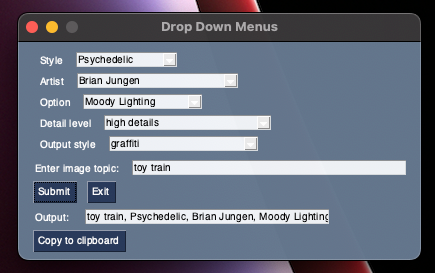
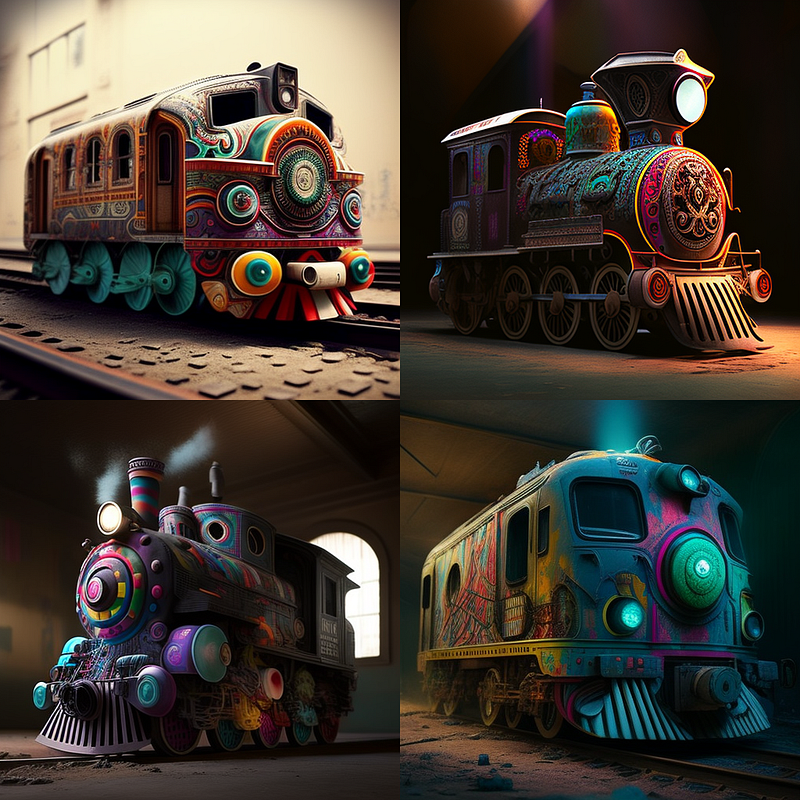
And that is the Image Output from Midjorney for my generated text prompt: toy train, Psychedelic, Brian Jungen, Moody Lighting, high details, graffiti
That concludes our guide on how to build your own art style prompt generator for AI image generators using Python. I hope you found this tutorial informative and helpful in your own image generation projects.
Don’t forget to follow my channel and join the newsletter to stay updated on the latest tips and tricks for AI image generators and Python. There’s always more to learn and new possibilities to explore, and we’re here to help you every step of the way.
As always, happy coding and keep experimenting with AI image generators!
Thanks for reading!
And if you’re feeling particularly generous, you could buy me a coffee at www.buymeacoffee.com/kingmichael. Your support would greatly help in keeping me motivated and writing articles that you love.


