Free AI web copilot to create summaries, insights and extended knowledge, download it at here
2111
Abstract
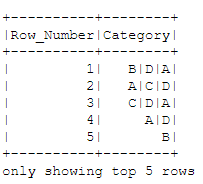
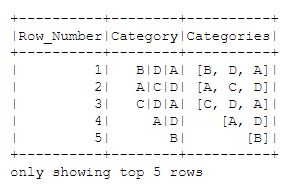
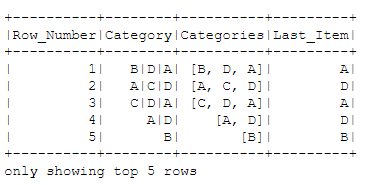
/figcaption></figure><p id="36bb">Assume that we want to create a new column called ‘Categories’ where all the categories will appear in an array. We can easily achieve that by using the split() function from functions.</p><div id="a971"><pre><span class="hljs-keyword">from</span> pyspark.<span class="hljs-keyword">sql</span> <span class="hljs-keyword">import</span> <span class="hljs-keyword">functions</span> <span class="hljs-keyword">as</span> F</pre></div><div id="235c"><pre>df_new = df<span class="hljs-selector-class">.withColumn</span>(<span class="hljs-string">'Categories'</span>, F<span class="hljs-selector-class">.split</span>(df<span class="hljs-selector-class">.Category</span>, <span class="hljs-string">'|'</span>))</pre></div><div id="6a5d"><pre>df_new <span class="hljs-type"></span>= df_new<span class="hljs-type"></span>.select([<span class="hljs-string">'Row_Number'</span>, <span class="hljs-string">'Category'</span>, <span class="hljs-string">'Categories'</span>])</pre></div><div id="4535"><pre><span class="hljs-attribute">df_new</span>.show(<span class="hljs-number">5</span>)</pre></div><figure id="2c21"><img src="https://cdn-images-1.readmedium.com/v2/resize:fit:800/0*YS3VpNQQNSqnBtFR.png"><figcaption></figcaption></figure><p id="a0d0">We can confirm that the “Categories” column is an “array” data type.</p><div id="16b3"><pre>df_new<span class="hljs-type"></span>.printSchema()</pre></div><p id="bf62">We get:</p><div id="e272"><pre>root
|-- Row_Number: <span class="hljs-built_in">string</span> (<span class="hljs-literal">null</span>able = <span class="hljs-literal">true</span>)
|-- Category: <span class="hljs-built_in">string</span> (<span class="hljs-literal">null</span>able = <span class="hljs-literal">true</span>)
|-- Categories: <span class="hljs-built_in">array</span> (<span class="hljs-literal">null</span>able = <span class="hljs-literal">true</span>)
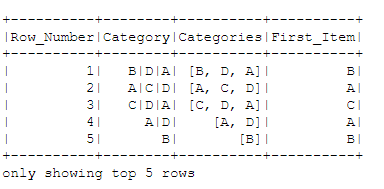
| |-- element: <span class="hljs-built_in">string</span> (containsNull = <span class="hljs-literal">true</span>)</pre></div><p id="6e44">Let’s see some cool things that we can do with the arrays, li
Options
ke getting the first element. We will need to use the getItem() function as follows:</p><div id="4bb0"><pre>df_new<span class="hljs-selector-class">.withColumn</span>(<span class="hljs-string">'First_Item'</span>,df_new<span class="hljs-selector-class">.Categories</span><span class="hljs-selector-class">.getItem</span>(<span class="hljs-number">0</span>))<span class="hljs-selector-class">.show</span>(<span class="hljs-number">5</span>)</pre></div><figure id="84b1"><img src="https://cdn-images-1.readmedium.com/v2/resize:fit:800/0*YlRVPZodg-3OqzKD.png"><figcaption></figcaption></figure><h1 id="3adf">Get the Number of Elements of an Array</h1><p id="4b27">We can get the size of an array using the <b>size()</b> function.</p><div id="3bad"><pre>df_new<span class="hljs-selector-class">.withColumn</span>(<span class="hljs-string">'Elements'</span>, F<span class="hljs-selector-class">.size</span>(<span class="hljs-string">'Categories'</span>))<span class="hljs-selector-class">.show</span>(<span class="hljs-number">5</span>)</pre></div><figure id="f26a"><img src="https://cdn-images-1.readmedium.com/v2/resize:fit:800/0*Sit30kaMLsjJ3Chk.png"><figcaption></figcaption></figure><h1 id="e919">Get the Last Element of an Array</h1><p id="5a65">We can get the last element of the array by using a combination of <b>getItem()</b> and <b>size() </b>function as follows:</p><div id="90a5"><pre>df_new<span class="hljs-selector-class">.withColumn</span>(<span class="hljs-string">'Last_Item'</span>,df_new<span class="hljs-selector-class">.Categories</span><span class="hljs-selector-class">.getItem</span>(F<span class="hljs-selector-class">.size</span>(<span class="hljs-string">'Categories'</span>)-<span class="hljs-number">1</span>))<span class="hljs-selector-class">.show</span>(<span class="hljs-number">5</span>)</pre></div><figure id="bddb"><img src="https://cdn-images-1.readmedium.com/v2/resize:fit:800/0*BJwBf_VhdfNc7J7j.png"><figcaption></figcaption></figure><p id="6248">Originally posted by <a href="https://predictivehacks.com/?all-tips=arrays-in-pyspark">Predictive Hacks</a></p></article></body>