
Are We About To See Decade+ MacOS Support For Macs?
Technically, are there any reasons why macOS in 2030 wouldn’t support M1 chips?
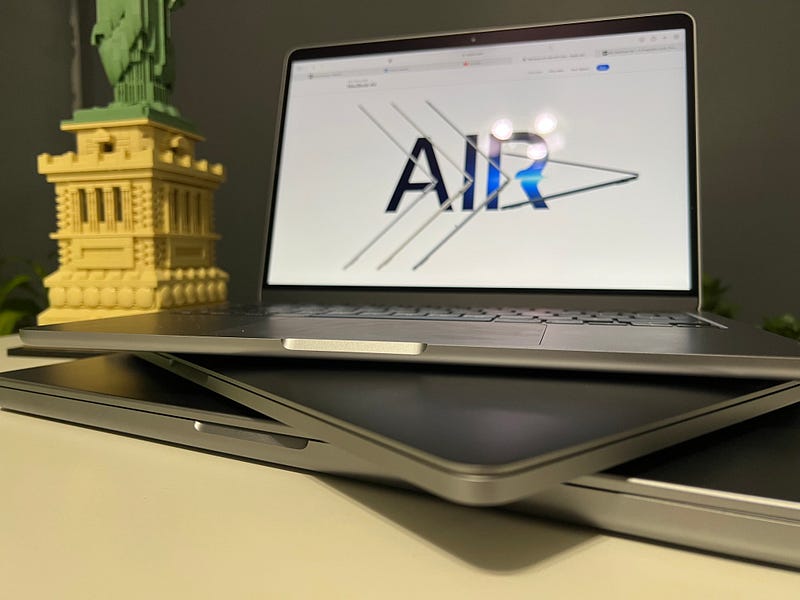
2020 was a great year. I take that back. 2020 was a horrible year in many-many ways. A global disaster that we’d all love to forget, but can’t. There was something though that for some of us made the year a little better, and that was no other than Apple Silicon. It’s old news by now that it radically changed the course of personal computing. It was a big leap in processing hardware, one that the entire industry took note of and concluded yet again that it was worth following in Apple’s footsteps. But this leap in hardware opened the door to something else, something that previously was a lot less tenable — long-term software support.
As it stands, macOS Sonoma supports Macs as old as 2018. That’s not bad. Six years, some might say, is longer than they’d ever keep a machine for. That, however, doesn’t account for the life of the machine once it’s rehomed or refurbished, at which point one can make an educated guess that many Macs will stick around for about a decade or even longer. When I sold my first 15” Retina MacBook Pro, it was eight years old, and it was still capable of running the latest version of macOS, so one could argue that six years of support isn’t good enough.
There is however a reason why that’s currently the case: Intel. Apple doesn’t outright state this, but many of us read between the lines since 2020 — an Intel Mac is basically abandonware, and the macOS support Apple currently offers for Intel machines is the absolute minimum they can get away with while keeping customers — and possibly lawyers — happy. As a software engineer, I know for a fact how problematic and costly it can be to support multiple architectures, browsers, operating systems, etc. No wonder then that some features in macOS Sonoma are already unsupported on Intel machines.
MacOS Sonoma on Intel is not the same OS as it is on Apple Silicon. It’s a cut-down experience.
And I suspect this will only get worse over time. Apple could technically pull the plug on all Intel machine support as early as 2024, claiming that, in conjunction with objectively affordable prices on the lower-end Macs and trade-in programs, anyone wanting the latest macOS should just bite the bullet and move to Apple Silicon if they have a 2019 machine.
But then, of course, there is the Mac Pro, which complicates things quite a bit. Apple only introduced Apple Silicon Mac Pros in 2023, meaning the latest Intel machine is, in fact, a 2022 machine, so dropping support for hardware that cost tens of thousands of dollars would be a very ballsy move — though I wouldn’t rule it out entirely given that on their site they list it as a 2019 machine (still sold in the first half of 2023).
Is decade-long support feasible?
Technically, assuming Apple Silicon is here to stay for at least a decade, of which three years have already passed, one can make an educated guess that we’ll still be rocking Apple designed SOCs in 2030. The question is, will macOS in 2030 still run fine on the M1 and M2 machines?
If history is anything to go by, some might argue we should all give up on the 10-year-long software support dream. MacOS Catalina — the last OS designed for Intel only machines was released in 2019, and the oldest machine it supported was from 2012. That’s 8 years. I will, however, point out that Apple could have gone as far as 10 years given that 2010 machines running Mac OS X 10.7 (Lion) were already Intel-based machines and have been since 2006, so perhaps even 10+ could have been an option. Theoretically. Maybe.
Both the PowerPC and the Intel eras in Apple’s history suffered from the same problem. The Cupertino giant had only partial control over hardware design and development. Moving from the IBM-Motorola partnership to Intel was still just that, though — a partnership. Don’t get me wrong, the move was necessary, and it saved Apple in a big way. We may laugh or belittle Intel these days, but those far too hot processors with barely noticeable year-on-year iterations made Macs more popular than ever. In the grand scheme of things, it helped Apple far more than it did Intel.
Mature operating systems of yesteryear were far more taxing on hardware than these days.
While it would be interesting to test macOS Catalina on a 12-year-old Mac, I suspect Intel’s earlier chips would struggle just running the operating system on its own. Attempts at running it on 2008 machines have already been known to produce unacceptable results, plagued with lag across the entire UX. And that without any 3rd-party apps installed. As incremental the Intel updates were each year, towards the end of the Apple-Intel relationship, we did end up with a hardware-software configuration where the OS didn’t hog all the resources to itself.
When it comes to Apple Silicon, however, things are very different. Starting with the M1 chip, the only potential hardware bottleneck one could run into is RAM. The base machines come with just 8 GB of memory, and that’s non-serviceable memory. While I wouldn’t necessarily assume that by 2030 we’ll all need 8 GB of memory just for the operating system, it also doesn’t sound improbable. As I am writing this article, a little under 4 GB of memory is set aside as “wired” memory, necessary for macOS’ kernel and other core components and functions.
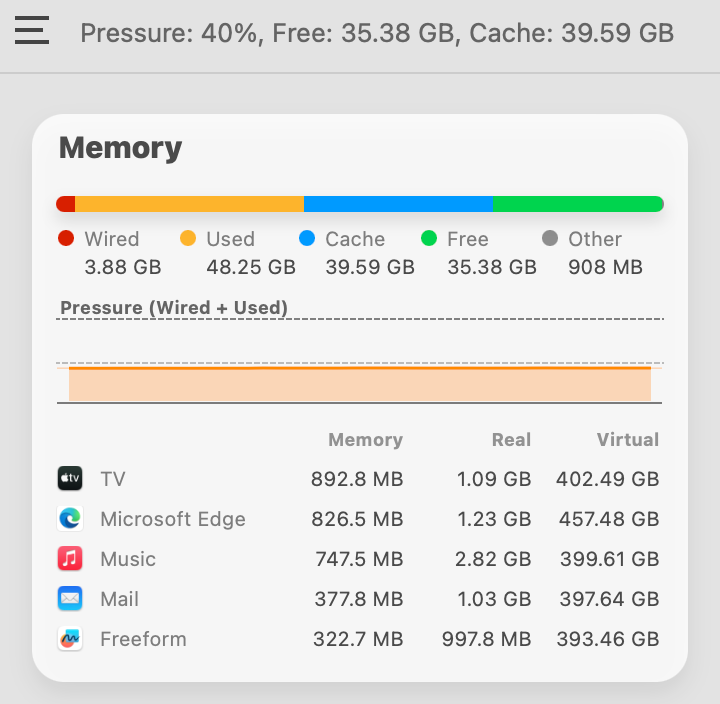
The reason I find this interesting is that I am seeing this number on a 128 GB M3 Max Machine. Apple’s “wired” memory is dynamic based on how much total memory it can work with. Apparently, the most it ever needs is about 4 GB when running with about 10 apps open, a few dozen tabs in browsers. That’s good news, but not good enough to convince me that a 2030 version of macOS would run buttery-smooth on a 2020 M1 MacBook Air with 8 GB of memory.
Apart from 8 GB memory Apple Silicon machines, Apple could technically allow macOS to be installed on 10-year-old Macs.
Of course, as new components are added to the SOC over time, certain capabilities would perhaps be more limited and tasks would likely take longer to process as there would be no dedicated hardware support baked in, but those who need the latest and greatest are never the ones who hold on to their machines for 10 years.
But all that might not even matter. To make matters even less predictable, Apple is known for its notorious list of “obsolete devices”. In 2023 for instance, it added the 2017 TouchBar MacBook Pro to that list. That’s barely a 7-year-old machine, a Mac that, in my view, is still a perfectly fine device for over 50% of Mac users.
It remains to be seen if Apple decides to mark its own M1 obsolete in 2026 or 2027. I certainly hope not.
Those of us who have used the M1 machines, and even those who are just discovering Apple Silicon’s debut SOC’s capabilities now, all agree it’s blazing fast, and while memory is still memory, with enough of it, there is very little reason not to be capable of running a 2030 edition of macOS with standard productivity apps. Currently, Apple seems to apply the 7-year rule as a blanket rule for all of its devices, be that a Mac, iPhone or whatever else.
Products are considered obsolete when Apple stopped distributing them for sale more than 7 years ago. Monster-branded Beats products are considered obsolete regardless of when they were purchased. — Apple
While that may have been the prudent choice for many years, Apple Silicon Macs feel a great deal more capable than to bin them after 7 years simply because there are no OS updates anymore. Sure, one can, of course, use a Mac with an outdated OS, but I also can’t see any valid reason why that would have to be the case. The argument that by its 7th year the machine’s battery will surely be dead, while valid, doesn’t render the machine itself unusable, on which note Apple does state the following:
Mac laptops may be eligible for an extended battery-only repair period for up to 10 years from when the product was last distributed for sale, subject to parts availability. — Apple
Looking at Apple’s historical data, their stance on vintage and obsolete devices and the unprecedented capabilities of Apple Silicon SOCs, I can’t but feel that with just a little good will, Apple could, in fact, offer software support for its Macs for 10 years and perhaps even longer on more powerful machines, which brings me to my next and final point.
A precarious Intel future
Those who spent tens of thousands on a Mac Pro during the last couple of years are already in an odd situation. Five features in macOS Sonoma are already exclusive to Apple Silicon. Regardless of just how powerful the Intel Mac Pro might be, certain Sonoma features are simply not available.
- Presenter Overlay uses Apple’s Neural Engine to lift the subject from the background. I use this feature quite a lot, and while perhaps not essential, it is pretty darn great.
- Abbreviated “Siri”. Turns out, you can’t omit saying “Hey” if you’re on an Intel Mac. Sounds ridiculous, but it is what it is.
- Game Mode is not available on Intel Macs either, and when you think just how powerful a fully specked out Mac Pro can be, it makes you grind your teeth knowing you can’t have the very setting that makes some games run so great on Macs.
- Made-for-iPhone hearing devices cannot pair with Intel Macs (nor M1 base models). Perhaps a niche accessibility use-case, but it’s notable nevertheless.
- Screen Sharing while technically not unavailable for Intel Macs, the performance of it leaves a lot to desire, so if you want a smooth experience, you gotta go with Apple Silicon.
And this is only the beginning. Realistically speaking, all future versions of macOS will keep adding features exclusive to Apple Silicon, and it’s understandable why. As a tech company, you have this incredible new chip to work with, of course you’re going to focus all your new OS features on making the most of it.
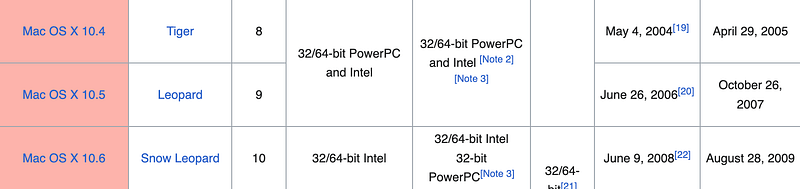
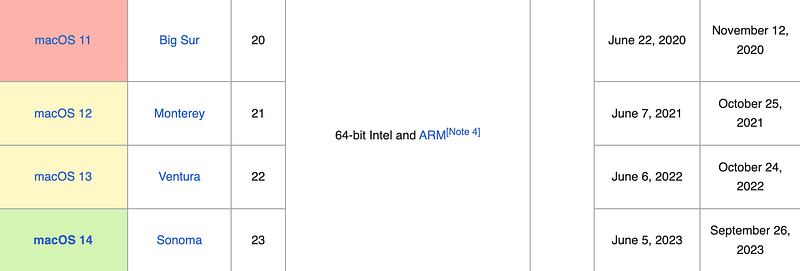
Combined support for PowerPC and Intel lasted but four years over three OS releases — Tiger, Leopard and Snow Leopard. Currently, we are again at the 4-year mark except in this case it’s over four OS releases — Big Sur, Monterey, Ventura, Sonoma. This could mean — though I suspect it won’t — that next year’s macOS will drop support for Intel machines entirely, and that’s not a good prospect to have to think of after spending tends of thousands on an Intel Mac, or frankly, any Mac.
It remains to be seen just how soon Apple drops support for Intel machines, and how long Apple Silicon Macs will be supported by OS updates. I would certainly love for Apple to do the right thing and allow OS updates as long as the hardware is capable of running it smoothly. Perhaps instead of blanket rules, run a benchmark on any system before requesting a major update and if the benchmark results fit the requirements, allow the user to upgrade.
I would hate to see M1 and M2 Macs hit the bin before the turn of the decade.
Attila Vago — Software Engineer improving the world one line of code at a time. Cool nerd since forever, writer of codes and blogs. Web accessibility advocate, LEGO fan, vinyl record collector. Loves craft beer! Read my Hello story here! Subscribe for more stories about LEGO, tech, coding and accessibility! For my less regular readers, I also write about random bits and writing.