
Architecting a GraphQL API Codebase in Node.js
Setup a GraphQL server with modularization and authentication
Most tutorials on GraphQL do not teach you how to split your schemas and resolvers just like you modularize your routes and controllers in a typical REST API or how to define and load type definitions from .grapqhl files instead of template literals. I will try to teach you these important concepts in this tutorial.
I assume that you have a basic understanding of GraphQL and its working principles. Otherwise, this tutorial won’t make much sense. Feel free to explore the code repository yourself and if you want to code along with me that’s great too.
Initial Setup
Let’s start with a basic server and install the following dependencies.
npm i express express-graphql graphql @graphql-tools/schemaexpressis the framework for NodeJSexpress-graphqlis a module that lets you build a GraphQL API with Expressgraphqlis the JavaScript reference implementation for GraphQL@graphql-tools/*is a set of packages that makes working with GraphQL easier
Please note that I am using makeExecutableSchema from @graphql-tools and not buildSchema from graphql because it limits the functionality of your schema. More on this StackOverflow answer.
Data To Work With
We need data to work with an API, I am going to use dummy data for the demonstration (stored in JS file). But the concepts will remain the same whether you’re using dummy data or a database.
Create a directory in the root of your codebase named data and put the following:
const authors = [
  { id: 1, name: 'J. K. Rowling' },
  // ... more authors
];
const books = [
{ id: 6, name: 'Forrest Gump', authorId: 2 },
{ id: 7, name: 'The Way of Shadows', authorId: 3 },
{ id: 8, name: 'Beyond the Shadows', authorId: 3 },
// ... more books
];exports.authors = authors;
exports.books = books;If you are coding along, just copy and paste the data from here. There are two entities, author and book. An author has a set of books and a book has an author.
Define Modular Schema
Let’s create two new directories at the root of our application:
- schemas (for holding type definitions for authors and books)
- resolvers (for holing resolver functions for authors and books)
root
 └─ resolvers
     ├─ authors.js
     ├─ authors.js
     └─ index.js
 └─ schemas
     ├─ authors.graphql
     └─ books.graphql
     └─ index.graphql
 ├─ package.json
 └─ server.js
The index.js file in resolvers and index.graphql file in schemas directory are the meeting points of all resolvers and schemas respectively.
// index.graphqltype Query {
_empty: String
# define any root queries here
}type Mutation {
_empty: String
# define any root queries here
}Currently, we’re only defining an empty query in type Query because we will define queries for books and authors later in their respective schema files.
Note that the current version of GraphQL doesn’t allow you to have an empty type even if you intend to extend it later. That's the reason I added an empty field.
// authors.graphqltype Author {
id: Int!
name: String!
books: [Book]
}# extending root query type we defined in index.grapqhl
extend type Query {
authors: [Author]
author(id: Int!): Author!
}Similarly, the schema for books looks like this:
// books.graphqltype Book {
id: Int!
title: String!
authorId: Int!
author: Author!
}extend type Query {
books: [Book]!
book(id: Int!): Book!
}input NewBook {
title: String!
authorId: Int!
}extend type Mutation {
createBook(newBook: NewBook): Book!
}For defining the schema and types, I am using GraphQL’s SDL. You can also generate schema programmatically. Since GraphQL can be used with any backend programming language so I think that it’s better to use SDL.
If you’re using VSCode and you don’t see the syntax highlighting/auto-completion in your .graphql files, install the official GraphQL Extention.
Define Resolvers
Now we’ve defined our schema for books and authors. It’s time to make resolvers for authors and books.
// resolvers/authors.jsconst { authors, books } = require('../data');const authorsResolvers = {
Query: {
authors: () => authors,
author: (parent, { id }) => {
return authors.find((author) => author.id === id);
}
},
Author: {
books: (author) => {
return books.filter((book) => book.authorId === author.id);
}
}
};module.exports = authorsResolvers;Similarly, books resolver
// resolvers/books.jsconst { authors, books } = require('../data');const booksResolvers = {
Query: {
books: () => books,
book: (parent, { id }) => {
return books.find((book) => book.id === id);
}
},
Book: {
author: (book) => {
return authors.find((author) => author.id === book.authorId);
}
},
Mutation: {
createBook: (parent, { newBook }) => {
const createdBook = { id: books.length + 1, ...newBook };
books.push(createdBook);
return createdBook;
}
}
};module.exports = booksResolvers;And in index.js of resolvers directory, we can combine books and authors resolvers into one object.
// resolvers/index.jsconst authorsResolvers = require('./authors');
const booksResolvers = require('./books');const rootResolver = {};const resolvers = [
rootResolver,
authorsResolvers,
booksResolvers,
];module.exports = resolvers;Here’s what we are doing here
- importing all resolvers (books and authors in this case)
- defining a root resolver
- exporting an array of resolvers (graphql-tools automatically takes care of combining them)
Injecting our schema and resolvers in server
Finally, we can import schemas and resolvers in server.js. Since I am using .graphql files for type definitions, I will use two small graphql-tools that help me read .graphql files
npm i @graphql-tools/load @graphql-tools/graphql-file-loaderAnd in server.js
I am using a glob pattern for loading type definitions, so loadSchemaSync will load all the .graphql files from the schemas directory and will combine them to make a single schema.
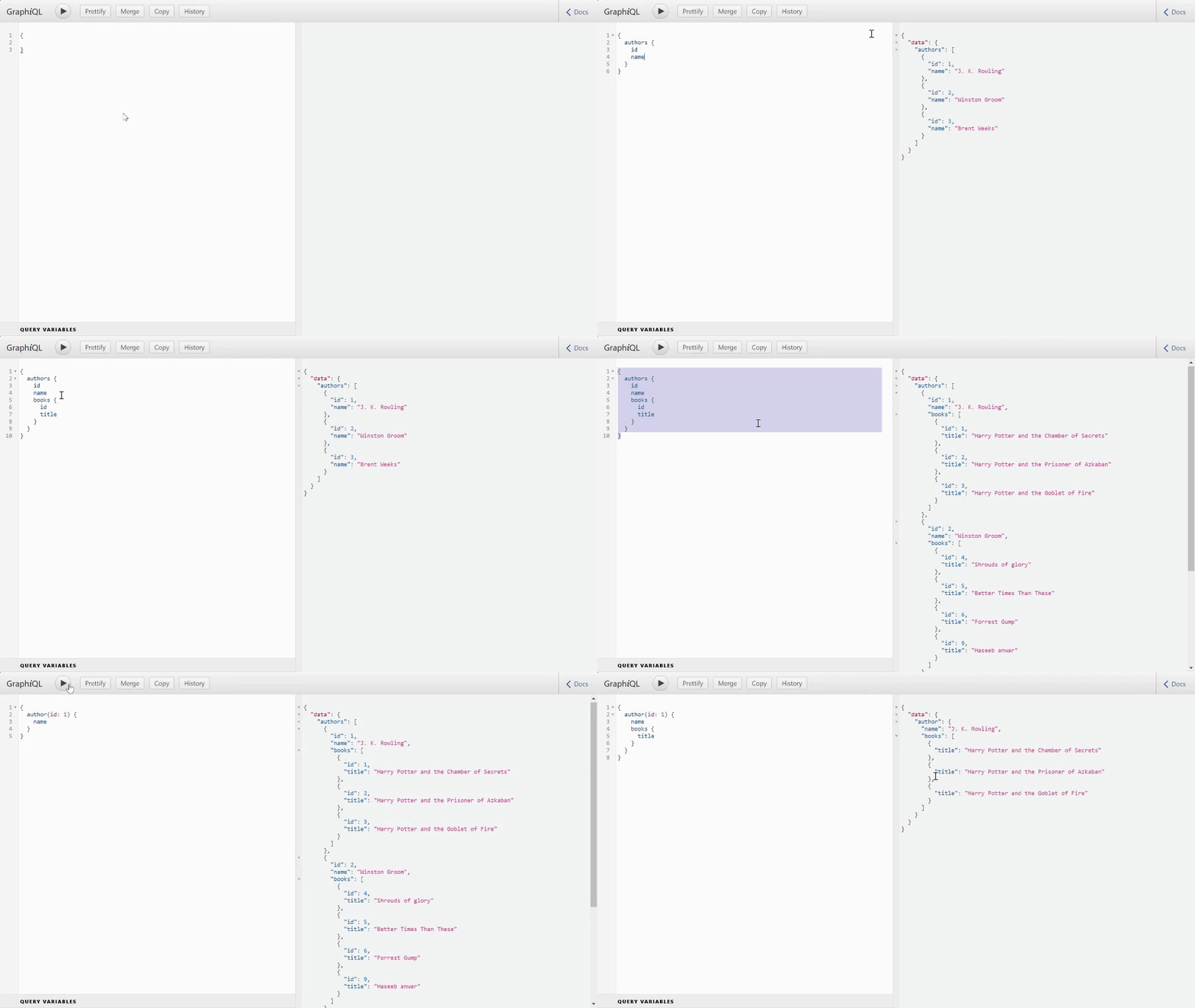
Now we have a functional GraphQL server running at localhost:5000/graphql, and we can perform the following queries:
Authentication
Adding authentication to a GraphQL API is simple. Just add an express middleware before defining the /graphql route in server.js
And then in your resolver function, you can do
// resolvers/authors.jsconst authorsResolvers = {
Query: {
authors: (parent, args, context) => {
if (!context.isAuthenticated) {
throw new Error('You are not authenticated');
} return authors;
},
author: (parent, { id }) => {
return authors.find((author) => author.id === id);
}
},
};Resolvers Composition
Since we need to perform authentication on every resolver, so instead of checking if the user is authenticated in every single resolver we can use a tool from @graphql-tools that lets us define an authentication middleware once for a set of queries or mutations
npm i @graphql-tools/resolvers-compositionAnd
// resolvers/authors.jsconst { composeResolvers } =
require('@graphql-tools/resolvers-composition');
const { authors, books } = require('../data');const authorsResolvers = {
Query: {
authors: (parent, args, context) => {
      return authors;
    },
    author: (parent, { id }) => {
      return authors.find((author) => author.id === id);
    }
  },
};const authenticateReq = (next) => {
return (root, args, context, info) => {
if (!context.isAuthenticated) {
throw new Error('You are not authorized');
}
return next(root, args, context, info);
};
};// run auth middleware for all types and all fields
// on authors resolver
module.exports = composeResolvers(authorsResolvers, {
'*.*': [authenticateReq],
});Now whenever you query for auhtors or author(id: id_here), a middleware authenticateReq runs before the resolver function and it makes sure that only authenticated requests make to the actual resolver function.
You can follow the same approach for the books resource of our API. See supported glob patterns for resolvers composition here.
This is the starting point of any complex GraphQL project but the way it’s structured will help you maintain your code easily as the resources are modularized.
Thanks for reading. Here is the code repository.